
QFX E-B8
QFX E-B8 8" Bluetooth Rechargeable Speaker User Manual
Model: E-B8 | Brand: QFX
Introduction
The QFX E-B8 is an 8-inch Bluetooth rechargeable speaker designed for portable audio entertainment. It features an integrated LED circle and party lights, offering both sound and visual effects. This manual provides detailed instructions for setting up, operating, and maintaining your E-B8 speaker.

Image: Front view of the QFX E-B8 speaker, showcasing its 8-inch woofer with integrated LED circle and party lights.
Package Contents
Ensure all items are present in the package:
- QFX E-B8 Speaker
- AC Adapter (for charging)
- Remote Control
- Instruction Manual (this document)
Product Overview
Control Panel and Ports

Image: Rear view of the QFX E-B8 speaker, detailing the control panel with various knobs and ports.
- Master Volume: Adjusts the overall sound output level.
- Treble: Adjusts the high-frequency sound.
- Bass: Adjusts the low-frequency sound.
- Mic Vol: Adjusts the microphone input volume.
- Mic Echo: Adjusts the echo effect for the microphone.
- USB Port: For USB flash drive playback.
- TF Card Slot: For TF (microSD) card playback.
- AUX Input: 3.5mm input for external audio devices.
- Mic Input: 6.35mm input for a wired microphone.
- LED Switch: Toggles the LED lights on/off.
- Power Switch: Turns the speaker on/off.
- Charging Port: For connecting the AC adapter.
Setup
1. Charging the Speaker
Before first use, fully charge the speaker. Connect the included AC adapter to the speaker's charging port and plug it into a standard wall outlet. The charging indicator light will show the charging status. A full charge ensures maximum playtime.
2. Powering On/Off
Locate the Power Switch on the rear control panel. Flip the switch to the "ON" position to power on the speaker. Flip it to the "OFF" position to power off.
Operating Instructions
1. Bluetooth Connectivity
- Ensure the speaker is powered on.
- The speaker will automatically enter Bluetooth pairing mode. You will hear an audible prompt or see a blinking indicator.
- On your mobile device (smartphone, tablet, laptop), enable Bluetooth and search for available devices.
- Select "QFX E-B8" from the list of devices.
- Once connected, you will hear a confirmation sound. You can now play audio from your device through the speaker.
2. True Wireless Stereo (TWS) Pairing
TWS allows you to connect two QFX E-B8 speakers wirelessly for a stereo audio experience.
- Ensure both E-B8 speakers are powered on and in Bluetooth mode.
- Connect each E-B8 speaker individually to your Bluetooth device first. This step is crucial.
- After both speakers are connected to your device, press and hold the "TWS" button (or equivalent button, refer to speaker's physical controls if not explicitly labeled TWS) on one of the speakers.
- The two speakers will attempt to pair with each other. A confirmation sound will indicate successful TWS pairing.
- Now, audio played from your device will be output in true wireless stereo through both speakers.

Image: Two QFX E-B8 speakers demonstrating True Wireless Stereo (TWS) connectivity with a smartphone.
3. USB/TF Card Playback
Insert a USB flash drive or TF (microSD) card containing MP3 audio files into the respective port on the control panel. The speaker will automatically detect the media and begin playback.

Image: The QFX E-B8 speaker highlighting its versatile input options including AUX, TF card, USB, and Bluetooth.
4. AUX Input
Connect an external audio device (e.g., MP3 player, computer) to the 3.5mm AUX input port using an audio cable (not included). The speaker will switch to AUX mode, and audio from the connected device will play.
5. Microphone Input
Plug a wired microphone into the 6.35mm Mic Input port. Adjust the Mic Vol and Mic Echo knobs on the control panel to achieve desired sound effects.

Image: The QFX E-B8 speaker positioned next to a microphone, illustrating its microphone input capability.
6. LED Lights
Use the LED Switch on the rear control panel to turn the integrated LED circle and party lights on or off.
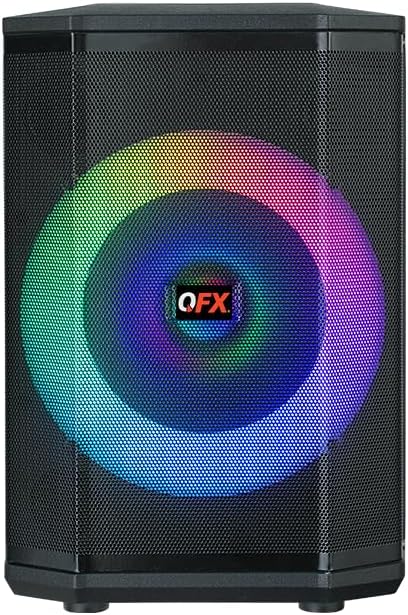

Image: Two views of the QFX E-B8 speaker demonstrating its dynamic LED lighting effects in different colors.
7. Remote Control
The included remote control provides convenient access to various functions, including power, mode selection, volume adjustment, track control (for USB/TF playback), and LED light control.
Maintenance
- Cleaning: Use a soft, dry cloth to clean the speaker's exterior. Do not use abrasive cleaners, waxes, or solvents.
- Storage: Store the speaker in a cool, dry place away from direct sunlight and extreme temperatures.
- Battery Care: To prolong battery life, avoid fully discharging the battery frequently. Recharge the speaker regularly, even if not in use for extended periods.
- Water Exposure: This speaker is NOT waterproof. Avoid exposing it to water or excessive moisture.
Troubleshooting
| Problem | Possible Cause | Solution |
|---|---|---|
| Speaker does not power on. | Battery is depleted; Power switch is off. | Charge the speaker using the AC adapter; Ensure the power switch is in the "ON" position. |
| No sound output. | Volume is too low; Incorrect input mode; Device not connected. | Increase Master Volume; Select the correct input mode (Bluetooth, USB, AUX); Ensure device is properly connected. |
| Bluetooth device cannot find speaker. | Speaker not in pairing mode; Device too far; Interference. | Ensure speaker is in Bluetooth pairing mode; Move device closer to speaker; Avoid sources of interference. |
| TWS pairing fails. | Speakers not individually connected to device first; Incorrect pairing procedure. | Ensure both speakers are individually connected to your Bluetooth device before initiating TWS pairing; Follow TWS pairing steps precisely. |
Specifications

Image: The QFX E-B8 speaker shown with its dimensions: 9.8"D x 11.1"W x 9"H. A basketball is included for size comparison.
| Feature | Detail |
|---|---|
| Model Name | E-B8 |
| Speaker Type | Single Speaker |
| Speaker Size | 8 Inches |
| Woofer Diameter | 8 Inches |
| Connectivity Technology | Bluetooth |
| Bluetooth Range | 10 Meters |
| Power Source | Battery Powered |
| Product Dimensions | 9.8"D x 11.1"W x 9"H |
| Item Weight | 12.03 pounds |
| Control Method | Remote Control |
| Audio Output Mode | Stereo |
| Special Features | Bass Boost, USB Port, TF Card Slot, AUX Input, Microphone Input, LED Circle and Party Lights, True Wireless Stereo (TWS) |
| Is Waterproof | No |
| Recommended Uses | Indoor/Outdoor |
Warranty and Support
Warranty Information
The QFX E-B8 speaker comes with a Limited Warranty. Please refer to the warranty card included with your product for specific terms and conditions.
Customer Support
For any questions, problems, or issues regarding your QFX E-B8 speaker, please contact QFX customer support directly:
- Email: support@qfxusa.com
Related documentsE-B8


Ask a question about this manual
Ask about setup, troubleshooting, compatibility, parts, safety, or missing instructions. Manuals+ will review the question and use this page’s manual context to help answer it.