
Introduction
Thank you for purchasing the RASTAR R/C 1:18 McLaren F1 MCL36 remote control car. This manual provides essential information for the safe operation, setup, and maintenance of your new R/C vehicle. Please read this manual thoroughly before use to ensure proper function and to maximize your enjoyment.
Important Safety Information
For detailed safety guidelines and warnings, please refer to the official safety document provided by RASTAR. It is crucial to read and understand all safety instructions before operating the product.
You can access the safety information PDF here.
Package Contents
Please check the package contents to ensure all items are present:
- 1 x RASTAR R/C 1:18 McLaren F1 MCL36 Vehicle
- 1 x Remote Control
- 1 x AA Battery (for remote control)
- 1 x Instruction Manual (this document)
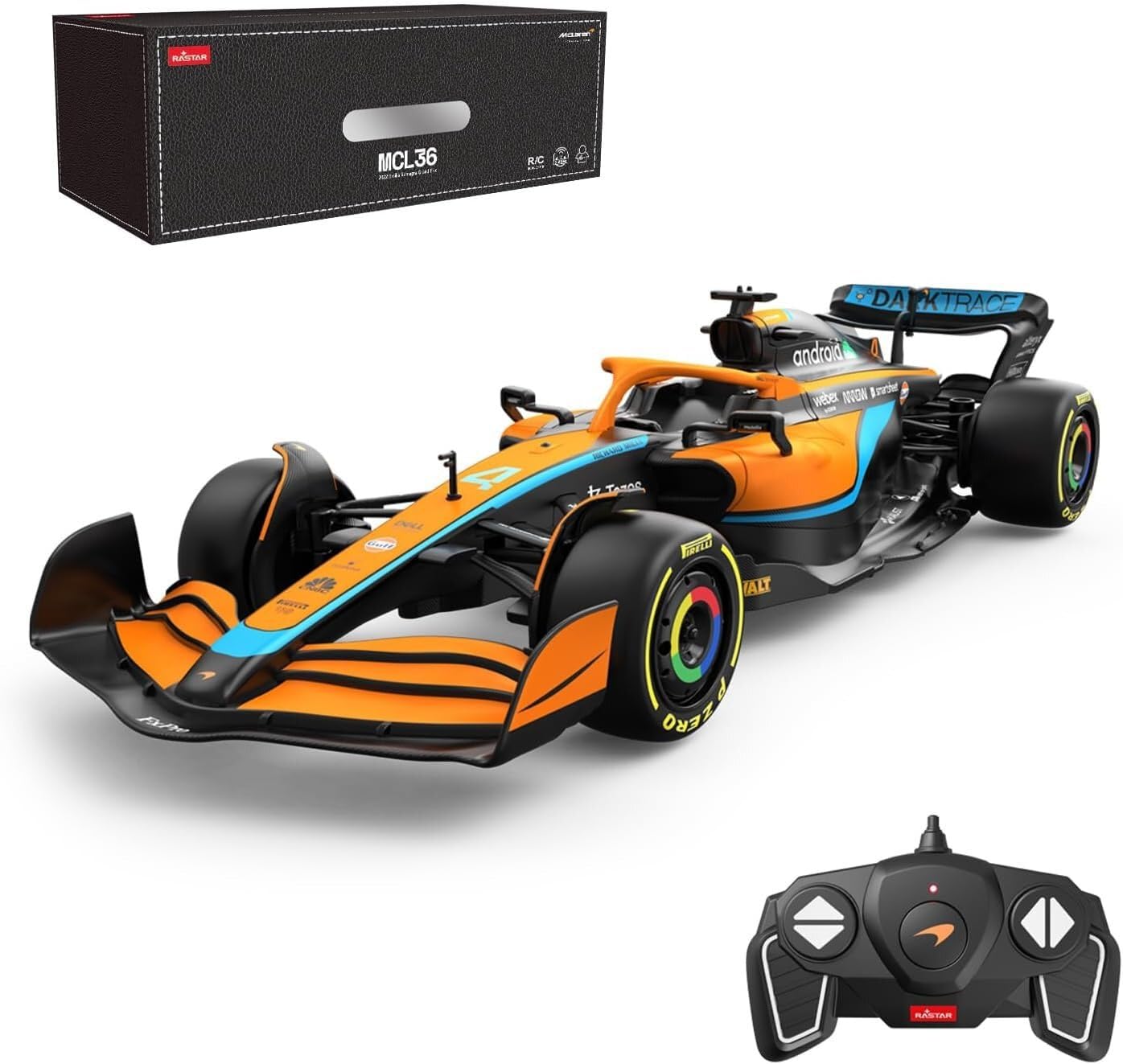
Image showing the RASTAR R/C 1:18 McLaren F1 MCL36 vehicle, its remote control, and the product packaging box. The car is orange and black with sponsor decals, and the remote is black with orange accents.
Setup
1. Battery Installation (Vehicle)
The RASTAR R/C McLaren F1 MCL36 vehicle requires multiple AA batteries (not included) for operation. Follow these steps to install them:
- Locate the battery compartment on the underside of the vehicle.
- Use a screwdriver to open the battery compartment cover.
- Insert the required AA batteries, ensuring correct polarity (+/-).
- Replace the battery compartment cover and secure it with the screw.
2. Battery Installation (Remote Control)
The remote control requires one AA battery (included). Follow these steps to install it:
- Locate the battery compartment on the back of the remote control.
- Open the battery compartment cover.
- Insert the AA battery, ensuring correct polarity (+/-).
- Replace the battery compartment cover.
3. Pairing the Vehicle and Remote Control
The vehicle and remote control are typically pre-paired. If they do not connect automatically, follow these steps:
- Ensure both the vehicle and remote control have fresh batteries installed.
- Turn on the vehicle using its power switch.
- Turn on the remote control using its power switch.
- The indicator light on the remote control should stop flashing and remain solid, indicating a successful connection. If not, turn both off and on again, or try moving them closer together.
Operating Instructions
Basic Controls
Familiarize yourself with the remote control functions:
- Forward/Backward Lever: Push forward to move the car forward, pull back to move backward.
- Left/Right Steering Buttons: Press the left button to steer left, press the right button to steer right.

The remote control features a forward/backward lever and left/right steering buttons for precise vehicle control.
Driving Tips
- Operate the vehicle on smooth, flat surfaces for optimal performance.
- Avoid driving in wet conditions, sand, or on rough terrain to prevent damage.
- Keep the vehicle within the effective range of the remote control to maintain connection.
- When not in use, turn off both the vehicle and the remote control to conserve battery life.
Maintenance
Cleaning
- Wipe the vehicle and remote control with a soft, dry cloth after each use.
- Do not use water or chemical cleaners, as they may damage the electronic components.
- Remove any debris from the wheels and chassis to ensure smooth operation.
Storage
- Store the vehicle and remote control in a cool, dry place away from direct sunlight.
- Remove all batteries from both the vehicle and remote control if storing for extended periods to prevent leakage.
Battery Care
- Always use fresh, high-quality batteries.
- Do not mix old and new batteries, or different types of batteries.
- Dispose of used batteries responsibly according to local regulations.
Troubleshooting
If you encounter issues with your RASTAR R/C McLaren F1 MCL36, please refer to the table below for common problems and solutions:
| Problem | Possible Cause | Solution |
|---|---|---|
| Vehicle does not move or responds intermittently. | Low batteries in vehicle or remote control; poor connection; interference. | Replace batteries in both vehicle and remote. Ensure vehicle and remote are turned on and within range. Avoid operating near other R/C devices or strong electrical interference. |
| Vehicle moves slowly or has weak power. | Low batteries in vehicle. | Replace vehicle batteries with fresh ones. |
| Steering is not straight. | Wheel alignment issue. | Check for a steering trim adjustment on the underside of the vehicle or on the remote control (if available) and adjust as needed. |
Specifications
| Feature | Detail |
|---|---|
| Brand | RASTAR |
| Model Name | RAS-CAR-93300 McLaren F1 MCL36 |
| Scale | 1:18 |
| Power Source | Battery Powered |
| Vehicle Batteries Required | Multiple AA batteries (not included) |
| Remote Control Battery | 1 x AA battery (included) |
| Special Feature | Remote Control |
| Item Weight | 450 Grams |
| Color | Black / Orange |
| Recommended Age | Up to 12 years (manufacturer recommended maximum) |
Warranty and Support
RASTAR products are manufactured to high-quality standards. For information regarding warranty coverage, please refer to the documentation included with your purchase or contact the retailer.
If you require further assistance or have questions not covered in this manual, please contact RASTAR customer support or your local distributor for technical support.


