
Introduction
Thank you for choosing the OKELI OK009 Retro Industrial Outdoor Wall Light. This fixture combines classic design with modern functionality, including a built-in GFCI outlet, dusk-to-dawn sensor, and adjustable motion detection. This manual provides essential information for safe installation, operation, and maintenance of your new outdoor light.
Safety Information
Please read and understand all instructions before beginning installation. Failure to do so may result in electric shock, fire, or other injuries that could be fatal or cause property damage.
- WARNING: Risk of electric shock. Disconnect power at the fuse or circuit breaker before installing or servicing.
- All electrical connections must be in accordance with local codes, ordinances, or the National Electric Code (NEC). Contact a qualified electrician if you are unfamiliar with proper electrical wiring connections.
- Ensure the fixture is properly grounded.
- Do not exceed the maximum wattage for the bulb (Max 60W).
- The GFCI outlet is for wet locations ONLY when the cover is closed.
Package Contents
- 1 x OKELI OK009 Outdoor Wall Light
- Mounting Hardware (screws, wire nuts, mounting plate)
Product Features
- Built-in 2 GFCI Outlets: Provides convenient outdoor power with protection against electrical faults. Max power 14.5AWG and Max Load 1080W.
- Heat-Resistant E26 Socket: Compatible with standard E26 DIMMABLE LED/incandescent bulbs (Max 60W, bulb not included).
- Durable Construction: Made of die-cast aluminum and high-strength clear glass, ensuring waterproof and anti-rust performance (IP 44 rated).
- Dusk to Dawn Sensor: Automatically turns the light on at night and off during the day for energy efficiency.
- Adjustable PIR Motion Sensor: Detects movement with adjustable sensing distance (0-40ft) and illumination time (20s-180s).
- 3 Lighting Modes: PC Mode, Auto Mode, and Auto+ Mode for customizable lighting experiences.
Setup and Installation
Professional installation is recommended. Ensure power is disconnected before proceeding.
- Prepare for Installation: Turn off power at the circuit breaker or fuse box.
- Mounting Plate Installation: Attach the mounting plate to the junction box using the provided screws.
- Wiring Connections: Connect the fixture's wires to your household wiring (black to black, white to white, ground to ground) using wire nuts.
- Secure the Fixture: Carefully align the fixture with the mounting plate and secure it with the provided screws.
- Install Bulb: Screw an E26 base bulb (Max 60W, not included) into the socket.
- Restore Power & Test: Turn power back on. Press the "RESET" button between the GFCI outlets to activate them for use.

Figure 1: Product Dimensions and Internal Wiring
Operating Instructions
Your OKELI outdoor wall light offers versatile lighting options:
Dusk to Dawn Function
The integrated photocell sensor automatically detects ambient light. The light will turn on at full brightness when it gets dark and turn off automatically when daylight is detected, ensuring efficient energy usage.
Adjustable PIR Motion Sensor
The motion sensor can be adjusted using a small flat-head screwdriver:
- Sensing Distance (Sens): Adjust from 0-40ft.
- Illumination Time (Time): Adjust the duration the light stays on after motion detection from 20s-180s.
- Dim Light Brightness (Low Level): In Auto+ mode only, adjust dim brightness from 20%-50%.

Figure 2: Adjustable PIR Motion Sensor Settings
3 Lighting Modes
Select your desired lighting mode using the switch on the fixture:
- PC Mode: Light remains off during the daytime and stays on continuously at night.
- Auto Mode: The light stays off (0% brightness) at night without movement. When motion is detected, it illuminates at 100% brightness and turns off after 20-120 seconds of no movement.
- Auto+ Mode: The light maintains a dim brightness (30%, adjustable to 20%-50%) all night. Upon motion detection, it brightens to 100% and returns to the dim state after the set illumination time.
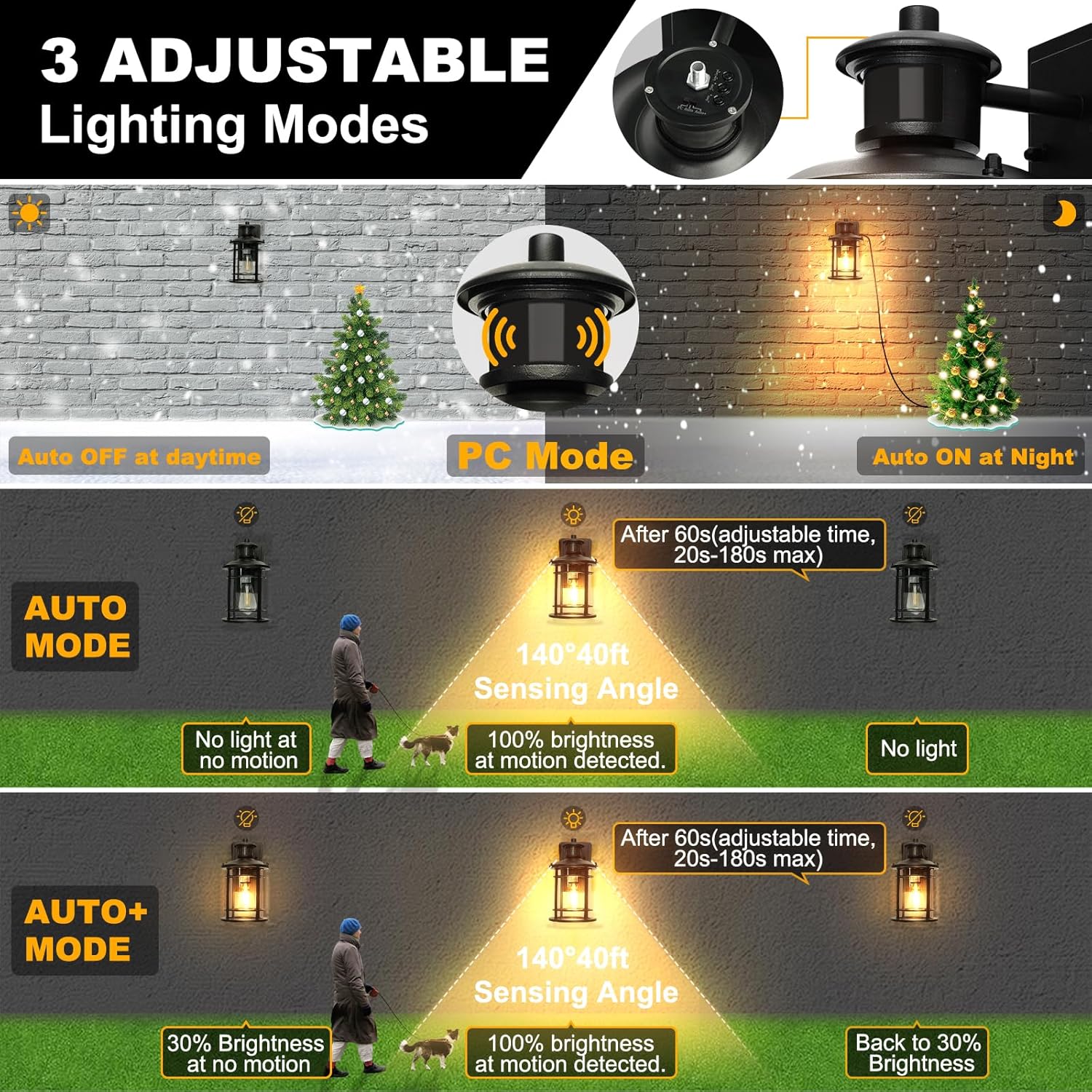
Figure 3: Explanation of 3 Lighting Modes
GFCI Outlets
The built-in GFCI outlets provide convenient power for outdoor devices. To use, simply flip open the protective cover and plug in your device. Remember to press the "RESET" button if the outlets are not providing power. Close the cover when not in use to maintain wet location rating.

Figure 4: Built-in GFCI Outlets
Maintenance
Regular maintenance ensures optimal performance and longevity of your outdoor wall light.
- Cleaning: Clean the fixture with a soft, damp cloth. Do not use abrasive cleaners or solvents as they may damage the finish or glass.
- Bulb Replacement: Ensure power is off before replacing the bulb. Use only E26 base bulbs with a maximum wattage of 60W.
- Inspection: Periodically check for any loose wiring or damage to the fixture.
Troubleshooting
If you encounter issues with your outdoor wall light, refer to the following common problems and solutions:
| Problem | Possible Cause | Solution |
|---|---|---|
| Light does not turn on at night. | No power; faulty bulb; sensor obstructed; incorrect mode. | Check circuit breaker; replace bulb; clear sensor; ensure PC or Auto mode is selected. |
| Light stays on during the day. | Sensor obstructed by light; incorrect mode. | Relocate fixture or clear obstruction; ensure PC, Auto, or Auto+ mode is selected. |
| Motion sensor not detecting movement. | Incorrect sensitivity setting; obstruction. | Adjust "Sens" setting to a higher sensitivity; ensure clear line of sight for the sensor. |
| GFCI outlets not working. | Tripped GFCI; no power. | Press the "RESET" button on the GFCI outlet; check power supply. |
Specifications
| Feature | Detail |
|---|---|
| Brand | OKELI |
| Model Number | OK009 |
| Color | Black |
| Material | Glass, Metal (Die Cast Aluminum) |
| Style | Vintage Industrial/Retro/Rustic/Farmhouse |
| Light Fixture Form | Wall |
| Indoor/Outdoor Usage | Outdoor |
| Power Source | AC |
| Voltage | 120 Volts |
| Bulb Base | E26 (Max 60W, Bulb NOT Included) |
| Water Resistance Level | Waterproof (IP 44) |
| Dimensions (L x W x H) | 11.8"L x 5.9"W x 7.16"H |
| Max GFCI Load | 1080W (14.5 Amps) |
| Special Features | Built-In GFCI Outlet, Dimmable, Dusk to Dawn Sensor, Energy Efficient, Motion Sensor with 3 Lighting Modes, Anti-Rust |
Warranty
This OKELI product is covered by a 24-month limited warranty from the date of purchase. This warranty covers defects in materials and workmanship under normal use. It does not cover damage resulting from improper installation, accident, misuse, abuse, or unauthorized modifications.
Support
For technical assistance, warranty claims, or any questions regarding your OKELI OK009 Outdoor Wall Light, please contact OKELI customer service. Refer to your purchase documentation for contact details or visit the official OKELI website.
