
1. Introduction
This manual provides detailed instructions for the assembly, operation, and maintenance of your Gurexl RGB Vanity Desk. Please read this manual thoroughly before use to ensure proper functionality and safety. Keep this manual for future reference.
2. Safety Information
- Ensure all components are securely fastened during assembly.
- Do not overload drawers or shelves to prevent tipping or damage.
- Keep the vanity set dry and avoid exposure to liquids or moisture.
- Use only the provided power adapter for the LED lights and charging features.
- Keep small parts away from children during assembly.
- Avoid placing hot items directly on the surface without protective mats.
3. Package Contents
Verify that all parts are present before beginning assembly. If any parts are missing or damaged, contact customer support.
- Vanity Desk Components
- LED Mirror with RGB Lighting
- Cushioned Stool
- Assembly Hardware (screws, connectors, etc.)
- Power Adapter
- Remote Control for RGB Lights
- Hair Dryer Holder
- Acrylic Lipstick Grid Organizer
4. Assembly Instructions
Assembly is required. The product comes unassembled. It is recommended to have two people for assembly. Follow the numbered steps carefully.
4.1. Overview of Components

4.2. Step-by-Step Assembly
- Assemble the Main Desk Frame: Connect the desk legs to the main tabletop using the provided screws. Ensure all connections are tight and stable.
- Attach the Side Cabinet: Secure the 3-drawer side cabinet to the main desk structure.
- Install Drawers: Insert the six drawers into their respective slots. The drawers feature smooth rails for easy operation.
- Mount the Mirror Unit: Carefully attach the LED mirror unit to the back of the main desk. Ensure it is securely fastened.
- Connect Electrical Components: Plug in the power adapter to the vanity desk and then to a power outlet.
- Assemble the Stool: Attach the legs to the cushioned stool seat.
- Attach Accessories: Install the hair dryer holder and place the acrylic lipstick grid organizer as desired.

5. Operating Instructions
5.1. LED Mirror and RGB Lighting
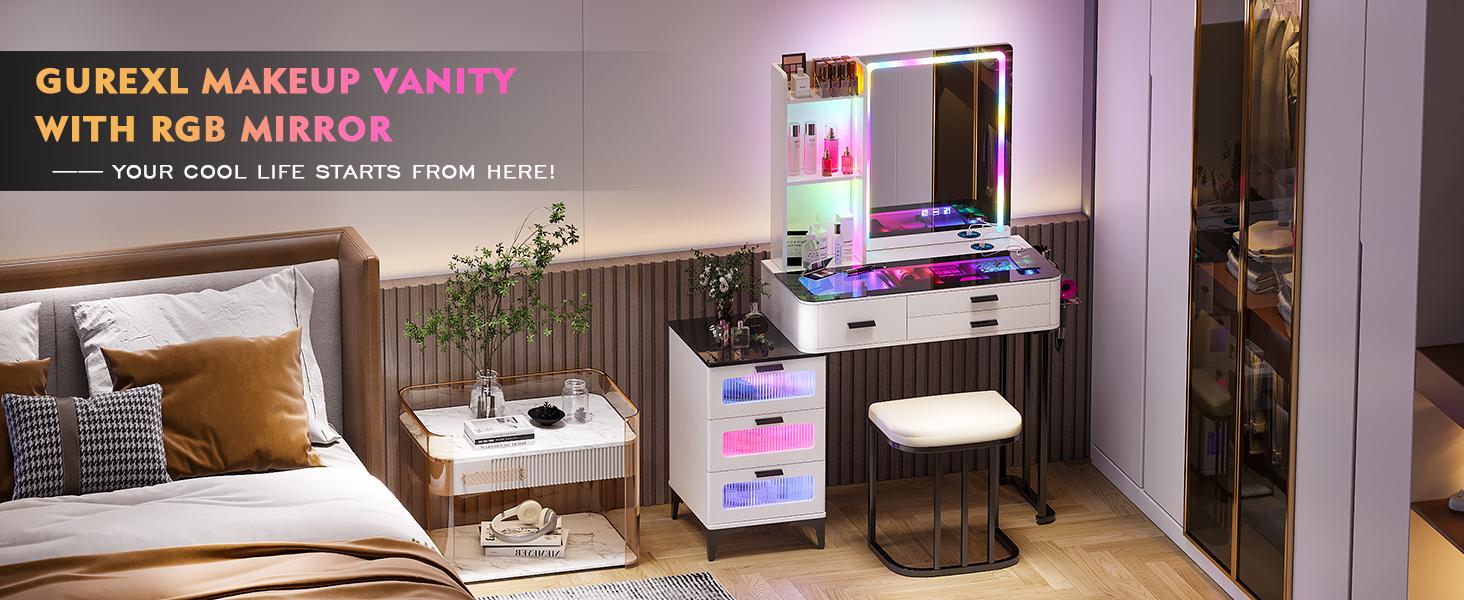
The vanity desk features an LED mirror with RGB lighting and additional RGB lights in the drawers. These can be controlled via touch buttons on the mirror or with the included remote control.
- Power On/Off: Touch the power button on the mirror to turn the lights on or off.
- Color Modes: The mirror and drawer lights offer 7 dynamic and 7 static dimmable RGB modes. Use the RGB button on the mirror or the remote control to cycle through these modes.
- Brightness Adjustment: Press and hold the brightness button on the mirror or use the remote control to adjust the light intensity (10%, 50%, 100%).


5.2. Wireless and Wired Charging
The vanity desk is equipped with a wireless charging station and USB-C ports for convenient device charging.
- Wireless Charging: Place your compatible device on the designated wireless charging pad on the tabletop. Ensure the device is centered for optimal charging.
- USB-C Charging: Connect your device to the integrated USB-C port for wired charging.

5.3. Storage Features
The vanity desk includes multiple storage options to keep your items organized.
- 6 Drawers: Utilize the six drawers for storing cosmetics, accessories, and other personal items. The top drawers feature a visible glass tabletop.
- Open Shelves: The mirror unit includes three open shelves for displaying frequently used items or decorative pieces.
- Hair Dryer Rack: A dedicated rack is provided for convenient storage of your hair dryer and other hot tools.


6. Maintenance
- Cleaning: Wipe the surfaces with a dry cloth. Avoid abrasive cleaners or harsh chemicals that may damage the finish.
- Dusting: Regularly dust the desk and mirror with a soft, dry cloth.
- Spills: In case of spills, wipe immediately with a damp cloth and dry thoroughly.
- Electrical Components: Ensure all electrical connections are secure and free from damage. Do not attempt to repair electrical components yourself.
7. Troubleshooting
| Problem | Possible Cause | Solution |
|---|---|---|
| LED lights not turning on | Power adapter not connected; power outlet not working; faulty connection. | Check power adapter connection; try a different outlet; ensure all internal connections are secure. |
| Wireless charging not working | Device not compatible; device not properly aligned; foreign objects on charging pad. | Ensure device supports wireless charging; reposition device on the pad; remove any obstructions. |
| Drawers are stiff or difficult to open/close | Overloaded drawer; debris in rails; misaligned rails. | Reduce load in drawer; clean rails; check rail alignment and adjust if necessary. |
| Remote control not responding | Battery depleted; obstruction between remote and receiver. | Replace remote battery; ensure clear line of sight to the vanity desk. |
8. Specifications
- Model Number: JZL-5078
- Brand: Gurexl
- Color: RGB White
- Material: Engineered Wood, Metal (stool seat)
- Product Dimensions: 16"D x 40"W x 40"H (Desk), 15.8 x 45 x 50 inches (Overall)
- Item Weight: 36 Kilograms
- Number of Drawers: 6
- Lighting: 7 Dynamic and 7 Static Dimmable RGB LED Modes
- Charging: Wireless Charging Station, USB-C Port
- Assembly: Required
9. Product Videos
9.1. Gurexl Lighted Makeup Vanity Desk with Mirror and Stool
This video provides a comprehensive overview of the Gurexl Lighted Makeup Vanity Desk, highlighting its features and design, including the mirror and accompanying stool.
9.2. Gurexl Vanity Desk with Mirror and RGB Lights
Watch this video to see the Gurexl Vanity Desk's mirror and RGB lighting in action, demonstrating the various color and dynamic modes.
10. Warranty & Support
For warranty information or customer support, please refer to the contact details provided with your purchase or visit the official Gurexl website. The product is sold by Gurexl-US.
Protection plans are available for purchase separately:
- 2-Year Protection Plan
- 3-Year Protection Plan
- Complete Protect (monthly renewal)
Standard return policy: 30 days for refund/replacement.