
1. Important Safety Instructions
When using electrical appliances, basic safety precautions should always be followed to reduce the risk of fire, electric shock, burns, or injury to persons. Read all instructions carefully before using the appliance.
- Do not attempt to operate this oven with the door open as this can result in harmful exposure to microwave energy.
- Do not place any object between the oven front face and the door or allow soil or cleaner residue to accumulate on sealing surfaces.
- Do not operate the oven if it is damaged. It is particularly important that the oven door closes properly and that there is no damage to the: (1) door (bent), (2) hinges and latches (broken or loosened), (3) door seals and sealing surfaces.
- The oven should not be adjusted or repaired by anyone except properly qualified service personnel.
- Ensure adequate ventilation around the appliance. Do not block any ventilation openings.
- Always use oven mitts when handling hot dishes or components.
- This appliance is designed for countertop use only.
- Keep children away from the appliance during operation. The oven features a Child Safety Lock.
2. Product Overview
The BLACK+DECKER MZAF2910-B5 is a versatile 4-in-1 appliance combining a microwave, air fryer, grill, and convection oven. It offers a 29-liter capacity and multiple cooking functions to meet various culinary needs.

Figure 2.1: Front view of the BLACK+DECKER MZAF2910-B5 Digital 4-in-1 Microwave Oven. This image shows the sleek black exterior, digital display, and control panel on the right side, with the oven door on the left.

Figure 2.2: Interior components of the BLACK+DECKER MZAF2910-B5 Microwave Oven. This image highlights the stainless steel interior, 315mm glass turntable, grill rack, and air fry tray, along with labels for key features like the LED display and child safety lock.
Key Features:
- 4-in-1 Functionality: Microwave, Air Fryer, Grill, and Convection Oven.
- Capacity: 29 Liters with LED cavity light.
- Pre-programmed Menus: 10 international cooking menus and 9 air fryer menu options.
- Power Levels: 5 power levels for microwave, grill, and combination cooking.
- Defrost Function: By weight and time.
- Timer: 95-minute preset timer.
- Convenience: Quick start function, clock, and child safety lock.
- Interior: Stainless steel easy-clean interior.
3. Setup
3.1 Unpacking
- Carefully remove the oven and all packing materials from the carton.
- Check the oven for any damage, such as dents or a misaligned door. Do not operate the oven if it is damaged. Contact customer support.
- Remove all protective film from the surface of the cabinet and door.
- Remove the glass turntable, ring assembly, and air fry tray from the oven cavity. Wash them in mild soapy water, rinse, and dry thoroughly.
3.2 Placement
- Place the oven on a flat, stable surface that can support its weight and the heaviest food likely to be cooked in it.
- Ensure there is at least 20 cm (8 inches) of space above the oven, 10 cm (4 inches) at the rear, and 5 cm (2 inches) on both sides for proper ventilation.
- Do not place the oven near heat sources or in a damp environment.
- Keep the oven away from radio and TV sets to avoid interference.
3.3 Electrical Connection
- Plug the power cord into a properly grounded electrical outlet.
- Ensure the voltage and frequency match the specifications on the rating label of the oven.
4. Operating Instructions
This section details how to use the various functions of your 4-in-1 microwave oven.
4.1 Control Panel Overview

Figure 4.1: Close-up of the BLACK+DECKER MZAF2910-B5 control panel. This image shows the digital display, function buttons (Microwave, Convection, Grill/Combi, Air Fryer Menu), and the central rotary dial with a '+30S' quick start button.
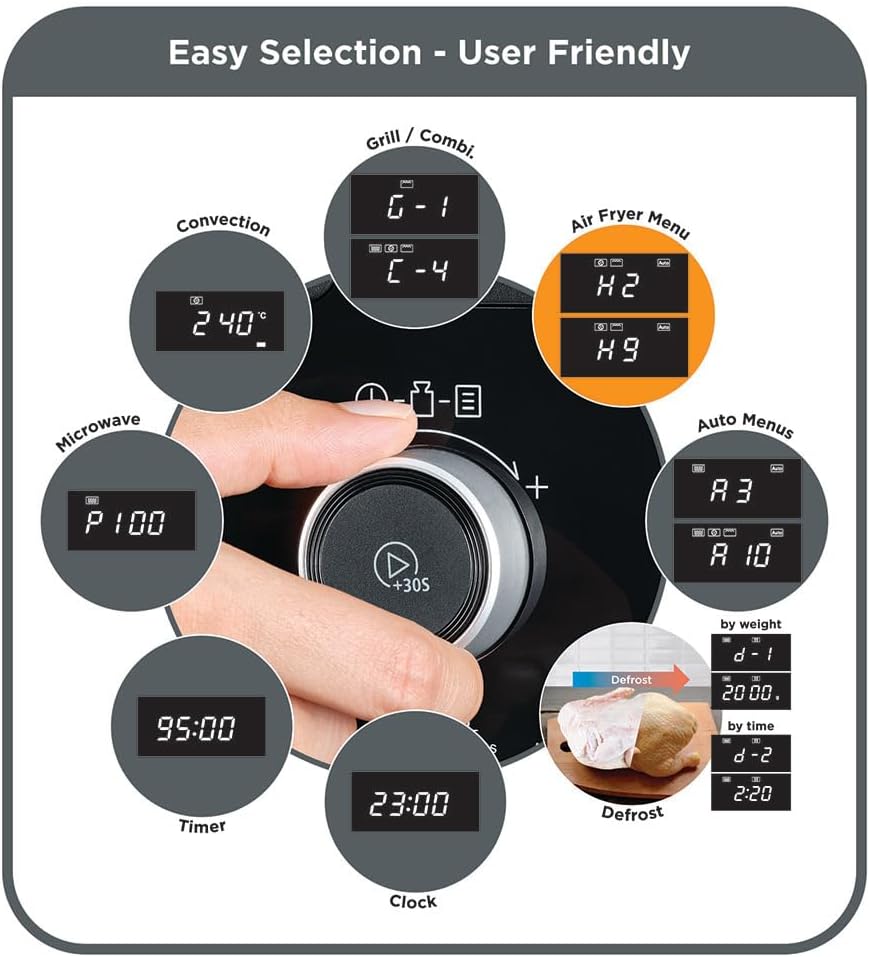
Figure 4.2: Hand operating the control panel of the BLACK+DECKER MZAF2910-B5. This image demonstrates the user-friendly rotary dial for easy selection of cooking modes, time, and power levels, including options for Grill/Combi, Convection, Air Fryer Menu, Microwave, Timer, Clock, and Defrost.
4.2 Setting the Clock
- In standby mode, press the Clock button once.
- Turn the rotary dial to set the hour. Press Clock again.
- Turn the rotary dial to set the minutes. Press Clock to confirm.
4.3 Microwave Cooking
- Place food in a microwave-safe container on the glass turntable.
- Press the Microwave button.
- Turn the rotary dial to select the desired power level (P100, P80, P50, P30, P10).
- Press Microwave again to confirm power.
- Turn the rotary dial to set the cooking time.
- Press Start/+30S to begin cooking.
4.4 Grill Function
- Place food on the grill rack.
- Press the Grill/Combi button repeatedly until 'G' appears on the display.
- Turn the rotary dial to set the grilling time.
- Press Start/+30S to begin grilling.
4.5 Convection Function
- Place food in an oven-safe dish.
- Press the Convection button.
- Turn the rotary dial to select the desired temperature.
- Press Convection again to confirm temperature.
- Turn the rotary dial to set the cooking time.
- Press Start/+30S to begin convection cooking.
4.6 Air Fry Function
Use the dedicated air fry tray for best results.

Figure 4.3: Air fry tray with food inside the microwave oven. This image shows the specialized air fry tray positioned on the glass turntable, ready for air frying, demonstrating the appliance's multi-functionality.
- Place food on the air fry tray.
- Press the Air Fryer Menu button.
- Turn the rotary dial to select one of the 9 preset air fryer options (e.g., H1 for fries, H2 for chicken wings).
- Press Start/+30S to begin air frying.
4.7 Auto Menus
The oven features 10 pre-programmed international cooking menus for convenience.
- Press the Auto Menu button.
- Turn the rotary dial to select the desired menu number (e.g., A-1 for Auto Reheat, A-10 for Chicken).
- Press Start/+30S to begin.
4.8 Defrost Function
Defrost food by weight or time.
- Defrost by Weight: Press Defrost once, turn dial to select weight, press Start/+30S.
- Defrost by Time: Press Defrost twice, turn dial to select time, press Start/+30S.
4.9 Quick Start
Press the Start/+30S button to immediately start cooking at 100% microwave power for 30 seconds. Each subsequent press adds 30 seconds to the cooking time.
5. Maintenance and Cleaning
Regular cleaning helps maintain the performance and longevity of your oven.
- Interior: Wipe the oven cavity with a damp cloth after each use. For stubborn stains, use a mild detergent. Do not use abrasive cleaners or scouring pads.
- Exterior: Clean the exterior with a soft, damp cloth. Avoid getting water into the ventilation openings.
- Door and Seals: Clean the door, door seals, and adjacent parts carefully with a damp cloth to remove any spills or splatters.
- Glass Turntable and Ring Assembly: These can be washed in warm soapy water or in the dishwasher. Ensure they are completely dry before placing them back in the oven.
- Air Fry Tray and Grill Rack: Wash with warm soapy water. These are typically not dishwasher safe; refer to specific care instructions if provided with accessories.
- Power Cord: Regularly inspect the power cord for any damage. If damaged, it must be replaced by qualified service personnel.
6. Troubleshooting
If you encounter issues with your oven, refer to the following table for common problems and solutions.
| Problem | Possible Cause | Solution |
|---|---|---|
| Oven does not start | Power cord not plugged in; Door not closed properly; Fuse blown or circuit breaker tripped. | Plug in power cord; Close door securely; Check household fuse or reset circuit breaker. |
| Food not heating | Incorrect cooking time/power level; Food not suitable for microwave/air fry. | Adjust time/power; Ensure food is suitable for selected function. |
| Turntable not rotating | Turntable not properly placed; Obstruction under turntable. | Reposition turntable and ring assembly; Remove any obstructions. |
| Unusual noise during operation | Loose components; Food container touching oven walls. | Check if turntable and accessories are correctly placed; Ensure containers do not touch oven walls. |
If the problem persists after trying these solutions, please contact customer support.
7. Specifications
| Feature | Specification |
|---|---|
| Brand | BLACK+DECKER |
| Model | MZAF2910-B5 |
| Type | Digital 4-in-1 Microwave Oven (Microwave, Air Fryer, Grill, Convection) |
| Capacity | 29 Liters |
| Microwave Power | 1000 Watts |
| Grill Power | 1000 Watts |
| Convection Power | 2100 Watts |
| Dimensions (D x W x H) | 40 cm x 40 cm x 45 cm |
| Color | Black |
| Material | Metal (Stainless Steel Interior) |
| Installation Type | Countertop |
| Special Features | Automatic Cooking, LED Cavity Light, Child Safety Lock, 315mm Glass Turntable |
| Included Components | Grill Rack, Air Fry Tray, Glass Turntable |
8. Warranty and Support
This BLACK+DECKER appliance comes with a standard manufacturer's warranty. Please refer to the warranty card included in your product packaging for specific terms and conditions, including warranty period and coverage details.
For technical support, service, or to inquire about replacement parts, please contact BLACK+DECKER customer service through their official website or the contact information provided in your product documentation. Always have your model number (MZAF2910-B5) and purchase date ready when contacting support.


