Introduction
Thank you for choosing the Trade Shop Sp-5722 Universal Remote Control. This remote is designed to be a direct replacement for your original Sharp TV remote, offering full functionality without the need for complex setup. It is compatible with a wide range of Sharp LCD, Plasma, LED, and 4K televisions. This manual provides detailed instructions on how to set up, operate, and maintain your new remote control.
Product Overview
The Sp-5722 remote control features a standard layout with all essential buttons for managing your Sharp television. Its ergonomic design ensures comfortable handling.

Figure 1: Front view of the Trade Shop Sp-5722 Universal Remote Control. It is black with clearly labeled white buttons, including a directional pad, number keys, volume and channel controls, and dedicated function buttons for TV, Menu, Home, Source, and more.
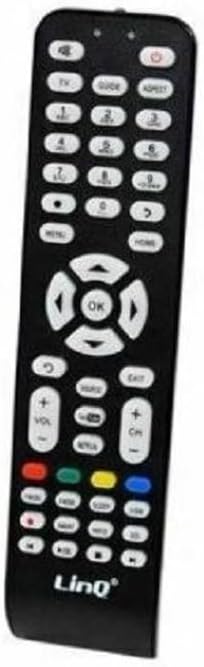
Figure 2: The Trade Shop Sp-5722 Universal Remote Control shown inside its retail blister packaging. The packaging displays the "LinQ" brand and "Telecomando TV Per TV" (TV Remote Control for TV) text.
Setup
Battery Installation
The Sp-5722 remote control requires two (2) AAA batteries (not included) for operation.
- Locate the battery compartment on the back of the remote control.
- Slide the battery compartment cover downwards to open it.
- Insert two (2) AAA batteries, ensuring the positive (+) and negative (-) terminals align correctly with the markings inside the compartment.
- Slide the battery compartment cover back into place until it clicks securely.
Note: This remote control is designed for immediate use after battery installation. No complex programming or configuration is required for most Sharp TV models.
Operating Instructions
The Sp-5722 remote control provides access to all primary functions of your Sharp TV. Below is a list of common functions and their corresponding buttons:
- Power (Red Button): Turns the TV on or off.
- Volume (+/-): Increases or decreases the volume level.
- Mute: Mutes or unmutes the TV audio.
- CH (+/-): Changes the TV channel up or down.
- Number Buttons (0-9): Directly select channels.
- Menu: Accesses the TV's main menu.
- OK / Directional Pad: Navigates through menus and confirms selections.
- Exit: Exits the current menu or function.
- Source / Input: Selects the input source (HDMI, AV, etc.).
- HDMI: Direct access to HDMI input.
- Smart Hub (if applicable): Accesses smart TV features.
- P.Mode / S.Mode: Picture Mode / Sound Mode selection.
- P.Size: Adjusts picture size/aspect ratio.
- Ch List: Displays the channel list.
- Info: Displays information about the current program.
- Return: Goes back to the previous screen or channel.
- Videotext / AV Input: Accesses teletext or AV input.
- Transport Controls (Play, Pause, Stop, Rewind, Fast Forward): For media playback.
Learning Function (if applicable)
The remote control may feature a learning function, allowing you to program specific buttons to mimic functions from another remote. Refer to the specific instructions provided with your remote or contact support for detailed steps on utilizing this feature, as it can vary by model.
Maintenance
Battery Replacement
Replace batteries when the remote's response becomes sluggish or stops working. Always replace both batteries at the same time with new AAA batteries. Do not mix old and new batteries, or different types of batteries.
Cleaning
To clean the remote control, gently wipe it with a soft, dry cloth. For stubborn dirt, slightly dampen the cloth with water or a mild, non-abrasive cleaner. Avoid using harsh chemicals or excessive moisture, as this can damage the remote's electronics.
Troubleshooting
| Problem | Possible Cause | Solution |
|---|---|---|
| Remote not responding. | Dead or incorrectly inserted batteries. Obstruction between remote and TV. | Check battery polarity and replace batteries if necessary. Ensure a clear line of sight to the TV's IR receiver. |
| Some buttons not working. | Button stuck or dirty. Remote not fully compatible with specific TV function. | Clean around the button. While this remote is broadly compatible, some very specific or advanced functions might require the original remote or a learning function setup. |
| Short operating range. | Low batteries. Interference. | Replace batteries. Remove any objects that might be blocking the signal. |
If you continue to experience issues after trying these troubleshooting steps, please contact the seller or manufacturer for further assistance.
Specifications
- Model: Sp-5722
- Material: ABS Plastic
- Power Supply: 2 x 1.5V AAA Batteries (not included)
- IR Range: Approximately 15 meters
- IR Frequency: 0-455 KHz
- Compatibility: Sharp LCD, Plasma, LED, and 4K HDTVs (including 3DTVs)
Warranty and Support
Specific warranty information for the Trade Shop Sp-5722 remote control may vary depending on your region and the retailer from whom you purchased the product. Please refer to your purchase documentation or contact the seller directly for details regarding warranty coverage and support.
For technical assistance or inquiries, please reach out to the OISE ART STORE customer support through the platform where you made your purchase.


