
Product Overview
The GTRS M800 is an innovative smart electric guitar designed to integrate traditional guitar playing with modern digital effects and practice tools. It features a powerful intelligent system with built-in effects, a versatile H-H pickup configuration, and a long-lasting battery for extended use. This manual provides essential information for setting up, operating, maintaining, and troubleshooting your GTRS M800 guitar.
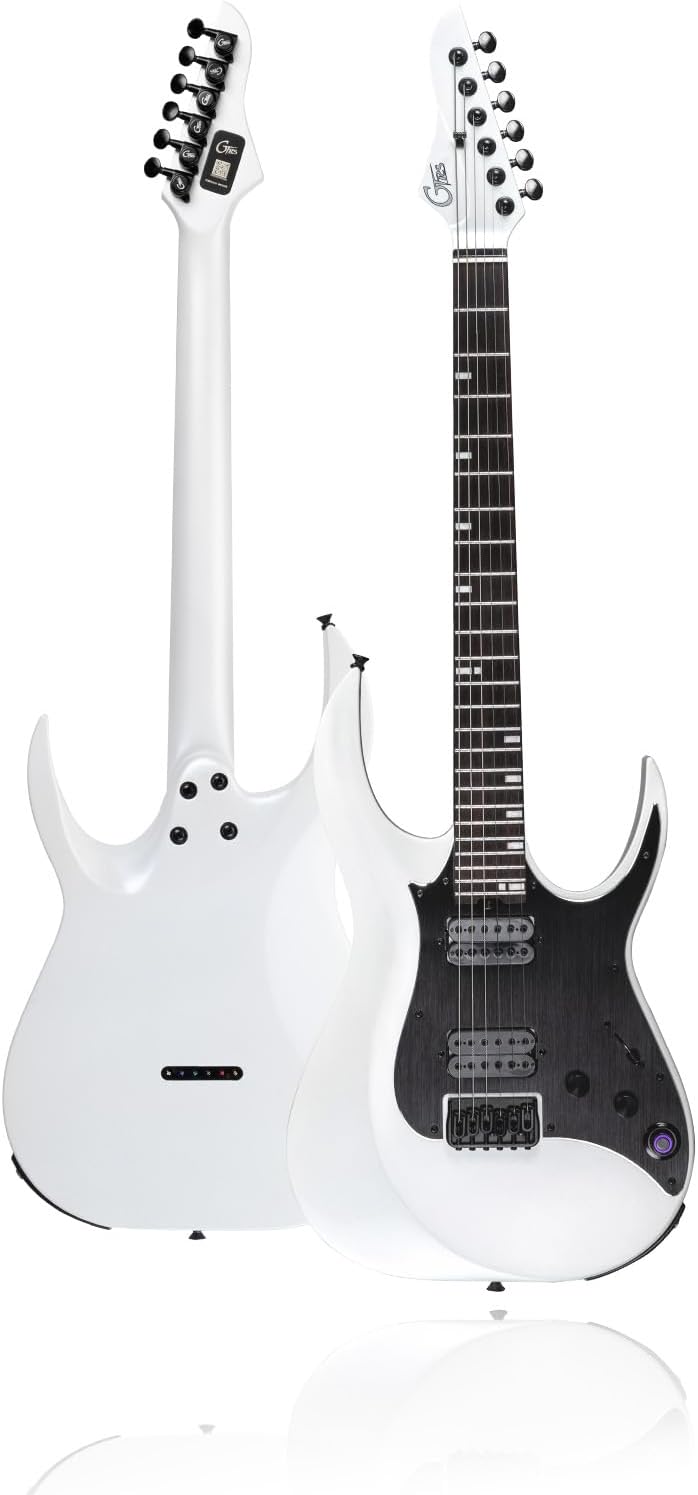
Image: The GTRS M800 Smart Electric Guitar in white, showcasing its sleek design.
Setup
1. Initial Charging
Before first use, fully charge your GTRS M800 guitar. Connect the provided USB-C cable to the guitar's charging port and a compatible USB power adapter. A full charge provides approximately 10 hours of continuous use.

Image: Close-up of the GTRS M800 guitar's headstock, showing the tuning pegs.
2. App Installation and Connection
- Download the official GTRS app from your device's app store (compatible with Android and iOS).
- Ensure Bluetooth is enabled on your smartphone or tablet.
- Turn on your GTRS M800 guitar.
- Open the GTRS app and follow the on-screen instructions to pair your guitar via Bluetooth.

Image: The GTRS Smart App interface displayed on a smartphone, showing various effect settings.
3. Audio Connections
The GTRS M800 can connect to various audio devices:
- Headphones: Connect headphones directly to the guitar's output jack for silent practice.
- Amplifier: Connect the guitar to a standard guitar amplifier using a 1/4-inch instrument cable.

Image: A person playing a GTRS M800 guitar, highlighting the 10-hour battery life and the guitar's Type-C charging port and output jack.
Operating Instructions
1. Using the Smart App
The GTRS app is the central control for your guitar's intelligent system. It allows you to:
- Access and customize 128 effect types.
- Edit and modify tones to your preference.
- Save custom presets for quick recall.

Image: The GTRS app interface displaying various effect module settings, with a person playing a guitar in the background.
2. Integrated Practice Tools
The GTRS M800 includes several instant tools for practice:
- Looper: Record and loop phrases for practice or performance.
- Drum Machine: Access 40 drum patterns for rhythm practice.
- Tuner: Built-in tuner for accurate pitch adjustments.
- Bluetooth: Stream audio from your device to the guitar for play-along practice.

Image: The GTRS app interface showcasing useful practice tools such as a drum machine, looper, and metronome, with two GTRS guitars in the background.
3. Pickup System and Tone Simulation
The guitar features an H-H (Humbucker-Humbucker) pickup configuration, providing a wide range of tonal flexibility. The GTRS HMT-1N neck pickup and GTRS HMT-1B bridge pickup are designed for professional sound quality. The intelligent system also allows for simulation of 16 classic guitar tones, including acoustic and rock electric guitars, using MNRS technology for high reproduction accuracy.

Image: A close-up view of the GTRS M800 guitar's H-H pickup system, highlighting the neck and bridge pickups.

Image: An illustration depicting the GTRS guitar's capability to simulate 16 classic guitar sounds, showing a white guitar with multiple transparent overlays.
Maintenance
1. Cleaning
- Wipe the guitar body and neck with a soft, dry cloth after each use to remove sweat and oils.
- For deeper cleaning, use a guitar-specific cleaning solution and polish. Avoid harsh chemicals.
- Clean the fretboard periodically with a lemon oil or fretboard conditioner to prevent drying and cracking.
2. String Replacement
Replace strings regularly to maintain optimal tone and playability. Refer to standard guitar string replacement procedures. The GTRS M800 uses 6 brass strings.
3. Battery Care
- Avoid completely draining the battery frequently.
- If storing the guitar for an extended period, charge the battery to approximately 50-70% to prolong its lifespan.
- Use only the provided USB-C cable or a certified equivalent for charging.
4. Software Updates
Periodically check the GTRS app for available firmware updates for your guitar. Updates can improve performance, add new features, and fix bugs. Follow the app's instructions for safe updating.
Troubleshooting
- No Sound Output:
- Check if the guitar is powered on.
- Ensure volume knobs on the guitar and connected amplifier/headphones are turned up.
- Verify all cables are securely connected.
- Check the GTRS app for muted effects or output settings.
- App Connection Issues:
- Ensure Bluetooth is active on both the guitar and your mobile device.
- Restart both the guitar and the app.
- Try unpairing and re-pairing the guitar in the app's settings.
- Battery Not Charging:
- Confirm the USB-C cable is fully inserted into both the guitar and the power source.
- Try a different USB-C cable or power adapter.
- Ensure the power source is functional.
- Unwanted Noise/Hum:
- Check for faulty cables or connections.
- Ensure proper grounding of your amplifier and power outlets.
- Move away from sources of electromagnetic interference (e.g., computers, fluorescent lights).
Specifications
| Feature | Detail |
|---|---|
| Brand | GTRS |
| Model | M800 |
| Color | White |
| Body Material | Alder |
| Neck Material | Maple |
| Fretboard Material | Rosewood |
| Pickup Configuration | H-H (GTRS HMT-1N Neck, GTRS HMT-1B Bridge) |
| Number of Strings | 6 |
| String Material | Brass |
| Bridge System | Fixed (GTRS M1 Fixed Bridge) |
| Connector Type | USB-C |
| Battery Life | Approx. 10 hours |
| Dimensions (L x W x H) | 115.1 x 43.2 x 16 cm |
Warranty and Support
Warranty Information
For specific warranty details, please refer to the documentation included with your purchase or contact the manufacturer directly. Third-party protection plans, such as those offered by Assurant, are separate from the manufacturer's warranty and cover accidental damages for specified durations.
Customer Support
If you encounter issues not covered in this manual or require further assistance, please contact GTRS customer support or your authorized dealer. Keep your purchase receipt and product serial number handy for faster service.