
Introduction
The Medical Guardian MGMini is a compact and reliable medical alert device designed to provide 24/7 protection and peace of mind for seniors and their caregivers. This water-resistant device features an emergency call button, step counter, and GPS tracking, ensuring assistance is always within reach, whether at home or on the go. It is the smallest and lightest mobile device offered by Medical Guardian, designed for discreet and comfortable wear.
What's in the Box
Upon unboxing your Medical Guardian MGMini, you will find the following components:
- MGMini Device
- User Guide
- Charging Cradle
- USB Cable
- Charging Block
- Magnetic Lanyard (non-adjustable, pull-apart)
- Adjustable Lanyard (pull-apart)
- Belt Clip
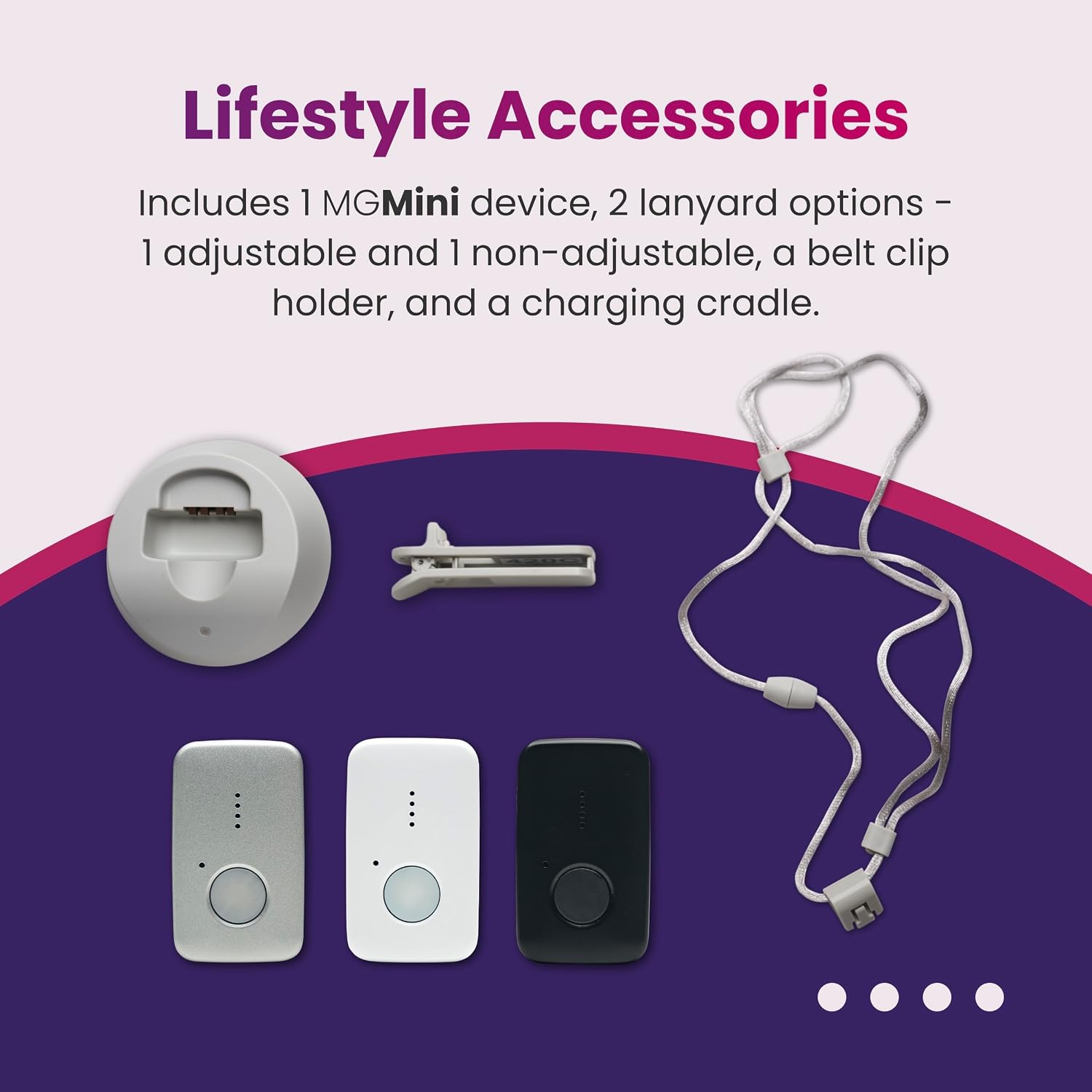
Figure 1: All components included with the Medical Guardian MGMini device.

Figure 2: The Medical Guardian MGMini device.
Video 1: This video provides a detailed overview of the contents of the MGMini box and highlights key features of the device. It demonstrates the unboxing process and shows each included accessory, such as the charging cradle, USB cable, and various lanyards. The video also explains the device's connectivity and button functionalities.
Setup and Activation
Before first use, ensure your MGMini device is fully charged and activated.
- Charge the Device: Connect the USB cable to the charging block, then plug the charging block into a power outlet. Ensure the outlet is not connected to a light switch to prevent accidental power interruption. Place your MGMini device into the charging cradle. A full charge typically takes about 4 hours and provides up to 5 days of battery life.
- Activate Service: The MGMini includes one free month of 24/7 monitoring. To activate your service, you must do so online or by phone. During the activation process, you will be guided through:
- Connecting your device to your location.
- Selecting your monitoring service plan.
- Setting up your emergency contact lists.
- Signing your service agreement.
- Optional Fall Detection: During activation, you have the option to add fall detection for enhanced protection.

Figure 3: The activation process can be completed online or by phone, guiding you through essential setup steps.
Operating Instructions
The MGMini is designed for simple and intuitive operation.
Emergency Call Button
The large, prominent button on the front of the device is your emergency call button. In an emergency, simply press this button to connect instantly with a U.S.-based operator. They can dispatch EMTs, police, firefighters, or contact a loved one based on your needs. The device features two-way audio for clear communication with the operator.

Figure 4: One button press connects you to a live U.S.-based operator for 24/7 assistance.
Info Button Functionality
The MGMini features a unique info button, which is a raised button that is easy to find and push. It serves multiple functions:
- 1-Click: Check battery level and signal strength.
- 2-Clicks: Test the device to ensure it is functioning correctly.
- 3-Clicks: Pair the device with other compatible accessories (if applicable).
- 4-Clicks: Turn off the device.
Step Counter
The MGMini is equipped with an integrated step counter. You can view your daily and weekly step counts by visiting your MyGuardian customer portal or app, helping you monitor your activity levels.
Key Features
The Medical Guardian MGMini offers a range of features designed for safety, convenience, and peace of mind:
- 24/7 Professional Monitoring: Provides continuous protection with direct connection to U.S.-based emergency operators.
- Advanced Connectivity: Utilizes AT&T or Verizon 4G LTE networks for nationwide coverage, ensuring reliable connection.
- Continuous True GPS Tracking: Offers real-time and continuous on-demand GPS location updates for optimal location services, allowing caregivers to know the user's whereabouts.
- Water-Resistant Design: The device is water-resistant, making it safe to wear in the shower, but it should not be submerged in water.
- Long Battery Life: Enjoy up to 5 days of battery life on a single 4-hour charge.
- Alarm Cancellation Feature: Allows for accidental alarm cancellation directly on the device or via add-on buttons.
- MyGuardian Portal and App Integration: Provides hourly updates on signal strength, battery status, and location through the dedicated customer portal and mobile application.
- Optional Fall Detection: Available as an add-on service, automatically detecting falls and alerting monitoring centers.
- Small and Discreet: Measuring approximately 2.15 inches by 1.3 inches, the MGMini is designed to be unobtrusive and can be worn in multiple ways, including with a lanyard or belt clip.

Figure 5: Overview of MGMini's key features.

Figure 6: The MGMini's small and discreet design.

Figure 7: Adaptable care features of the MGMini.
Maintenance
Charging
To maintain optimal performance, regularly charge your MGMini device. Place the device in its charging cradle when not in use or when the battery indicator suggests a low charge. A full charge takes approximately 4 hours and provides up to 5 days of battery life.
Cleaning
To clean your MGMini, gently wipe it with a soft, damp cloth. Do not use harsh chemicals, abrasive cleaners, or immerse the device in water.
Water Resistance
The MGMini is water-resistant and can be worn in the shower. However, it is not designed for submersion. Avoid prolonged exposure to water or high-pressure water streams.
Troubleshooting
If you encounter any issues with your Medical Guardian MGMini, consider the following:
- Device Not Responding: Ensure the device is fully charged. Place it in the charging cradle for at least 4 hours. Check that the charging cradle is securely plugged into a live power outlet, not one controlled by a light switch.
- No Signal/Poor Connectivity: The MGMini relies on 4G cellular networks. Ensure you are in an area with adequate AT&T or Verizon 4G LTE coverage. You can check signal strength using the Info Button (1-click).
- Accidental Alarm: If an alarm is triggered accidentally, you can cancel it using the alarm cancellation feature on the device or via add-on buttons.
- GPS Location Issues: Ensure the device has a clear view of the sky for optimal GPS performance. Location updates are available hourly via the MyGuardian Portal/App.
- Battery Life Shorter Than Expected: Ensure the device is fully charged each time. Frequent use of the emergency button or GPS tracking may consume battery faster.
For persistent issues or problems not covered here, please contact Medical Guardian customer support.
Specifications
| Model | MGMini |
| Brand | Medical Guardian |
| Color | Black (other colors may be available) |
| Material | Plastic |
| Item Weight | 9.6 ounces |
| Package Dimensions | 6.02 x 5 x 2.6 inches |
| Batteries | 1 Lithium Ion battery (included) |
| Connectivity Technology | Cellular (4G LTE) |
| Special Features | Lightweight, Water-Resistant, GPS Tracking, Step Counter |
| Supported Application | Alarm (Medical Alert) |
Support and Warranty
For further assistance, detailed FAQs, or to access your MyGuardian customer portal, please visit the official Medical Guardian support website:
You may also contact Medical Guardian customer service directly for personalized support.
Warranty Information
For specific warranty terms and conditions related to your Medical Guardian MGMini device, please refer to the documentation included with your product or visit the official Medical Guardian website. Warranty details typically cover manufacturing defects and operational issues under normal use.