
1. Introduction
Thank you for choosing the DS18 SXE-2000.4D 4-Channel Class D Full Range Car Amplifier. This amplifier is designed to enhance your vehicle's audio system with powerful and clear sound reproduction. Its compact design allows for versatile installation in various car audio setups. Please read this manual thoroughly before installation and operation to ensure proper use and maximum performance.

Figure 1: DS18 SXE-2000.4D 4-Channel Amplifier Overview
2. Safety Information
- Always disconnect the vehicle's battery negative terminal before starting any electrical work.
- Ensure all wiring is properly routed and secured to prevent damage or short circuits.
- Use appropriate gauge wiring for power, ground, and speaker connections as specified.
- Install the amplifier in a location that allows for adequate ventilation to prevent overheating.
- Avoid mounting the amplifier in areas exposed to moisture or excessive vibration.
- If you are unsure about any installation steps, consult a professional car audio installer.
3. Package Contents
Verify that your package contains the following items:
- DS18 SXE-2000.4D 4-Channel Amplifier
- User Manual (this document)
4. Features
The DS18 SXE-2000.4D amplifier offers a range of features designed for optimal audio performance:
- Class D Circuit Design: Provides high efficiency and powerful performance in a compact size.
- 4-Channel Configuration: Supports multiple speaker setups, including bridging for higher power output.
- Fully Variable Crossover: Adjustable High-Pass Filter (HPF), Low-Pass Filter (LPF), and Full Range settings for precise sound tuning.
- Adjustable Gain Input Sensitivity: Allows matching the amplifier's input to your head unit's output level.
- Comprehensive Electronic Protection: Includes thermal protection against overheating, overload protection, and short-circuit output protection for reliability.
- Compact Size: Facilitates easy installation in various vehicle types.
5. Installation
Proper installation is crucial for the performance and longevity of your amplifier. Follow these guidelines carefully.
5.1 Mounting Location
Choose a mounting location that is dry, well-ventilated, and protected from direct sunlight or excessive heat. Ensure there is sufficient space around the amplifier for air circulation. Avoid mounting on subwoofer enclosures or areas prone to vibration.
5.2 Wiring Connections
Refer to the diagram below for proper wiring connections. Use high-quality wiring and connectors for optimal performance and safety.
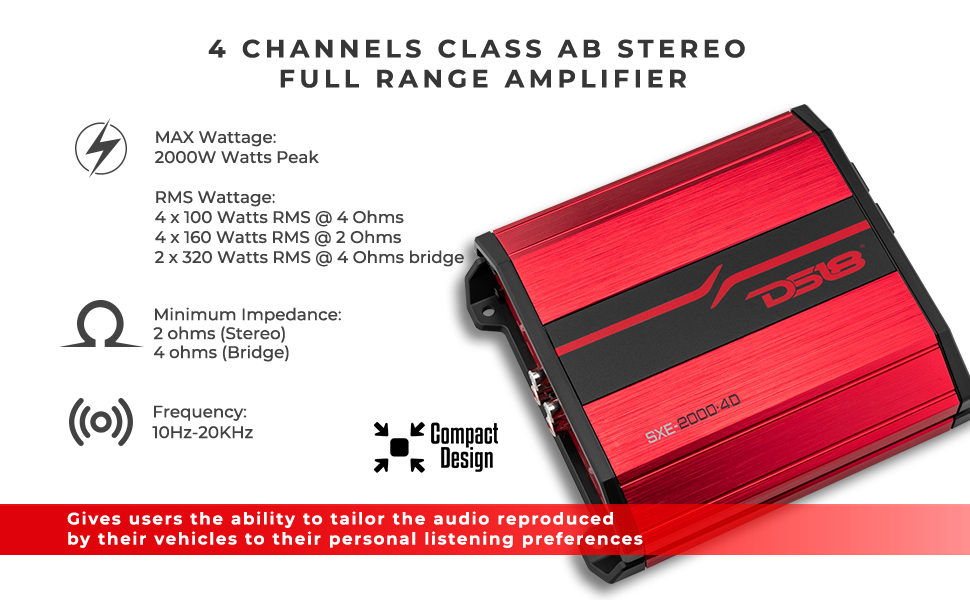
Figure 2: Amplifier Control Panel and Terminal Layout
Power Connections
- +12V (Power): Connect directly to the positive terminal of the vehicle's battery using a fuse holder within 18 inches of the battery. Use a 4-gauge power wire.
- GND (Ground): Connect to a clean, unpainted metal surface of the vehicle chassis. Ensure a solid connection for proper grounding. Use a 4-gauge ground wire, as short as possible.
- REM (Remote): Connect to the remote turn-on output of your head unit. This wire turns the amplifier on and off with your stereo.

Figure 3: Power and Speaker Terminal Connections
Audio Input (RCA)
Connect the RCA output cables from your head unit to the RCA input jacks on the amplifier. Ensure correct channel matching (Front L/R, Rear L/R).
Speaker Outputs
Connect your speakers to the amplifier's speaker output terminals. Observe correct polarity (+ to + and - to -). For bridged operation, refer to the specific bridging instructions for your speaker configuration.
6. Operating Instructions
Once installed, adjust the amplifier settings for optimal sound quality.

Figure 4: RCA Inputs and Control Knobs
6.1 Gain Adjustment
The GAIN control matches the amplifier's input sensitivity to the output level of your head unit. Start with the gain set to minimum. Play a familiar track at about 75% of your head unit's maximum volume. Slowly increase the amplifier's gain until you hear distortion, then back off slightly. This ensures maximum clean signal without clipping.
6.2 Crossover Settings (X-OVER)
The SXE-2000.4D features a fully variable crossover for each channel pair (Front/Rear). Use the X-OVER switch to select between:
- HPF (High-Pass Filter): Allows frequencies above the set point to pass through. Ideal for full-range speakers to prevent low bass distortion.
- LPF (Low-Pass Filter): Allows frequencies below the set point to pass through. Typically used for subwoofers (though this is a full-range amp, LPF can be used for specific speaker types).
- FULL: Allows all frequencies to pass through.
Adjust the FREQ knob to set the desired crossover frequency. Typical settings for full-range speakers are HPF between 80Hz and 120Hz.
7. Maintenance
To ensure long-term performance of your DS18 SXE-2000.4D amplifier:
- Regularly check all wiring connections for tightness and corrosion.
- Keep the amplifier clean and free of dust and debris. Use a soft, dry cloth for cleaning.
- Ensure the amplifier's cooling fins are not obstructed to maintain proper heat dissipation.
- Avoid spilling liquids on the amplifier.
8. Troubleshooting
If you experience problems with your amplifier, refer to the following troubleshooting guide:
| Problem | Possible Cause | Solution |
|---|---|---|
| No Power (PWR LED Off) | Blown fuse, poor power/ground connection, no remote signal. | Check inline fuse, verify +12V, GND, and REM connections. Ensure remote wire is receiving +12V from head unit. |
| No Sound | RCA cables disconnected, speaker wires disconnected/shorted, gain too low, head unit issue. | Check RCA connections, inspect speaker wiring for shorts or disconnections, adjust gain, test head unit with another amplifier if possible. |
| Distorted Sound | Gain set too high, improper crossover settings, damaged speakers, poor ground. | Reduce gain, adjust crossover settings, check speaker condition, verify ground connection. |
| Amplifier Overheating (Thermal Protection) | Insufficient ventilation, impedance too low, prolonged high output. | Ensure proper airflow around the amplifier, verify speaker impedance matches amplifier specifications, reduce volume or allow amplifier to cool. |
| Protection LED On | Short circuit in speaker wiring, amplifier overheating, DC offset. | Disconnect all speakers and RCA inputs. If LED turns off, reconnect one by one to identify fault. Check for overheating. Consult professional if issue persists. |
9. Specifications
Detailed technical specifications for the DS18 SXE-2000.4D amplifier:
| Specification | Value |
|---|---|
| Model | SXE-2000.4D |
| Number of Channels | 4 |
| Output Power (RMS @ 4 Ohms) | 4 x 100 Watts |
| Output Power (RMS @ 2 Ohms) | 4 x 160 Watts |
| Output Power (Bridged RMS @ 4 Ohms) | 2 x 320 Watts |
| Maximum Output Power | 2000 Watts (Peak) |
| Minimum Impedance (Stereo) | 2 Ohms |
| Minimum Impedance (Bridged) | 4 Ohms |
| Frequency Response | 10Hz - 20kHz |
| Efficiency at 4-Ohms | 90% |
| Signal to Noise Ratio | >90dB |
| Total Harmonic Distortion (THD) | 0.10% |
| Input Range | 200mV - 5V |
| Maximum Supply Voltage | 16.5 Volts (DC) |
| Item Dimensions (L x W x H) | 6.4 x 5.5 x 1.8 inches |
| Mounting Type | Freestanding |

Figure 5: Internal Components and Quality Construction
10. Warranty Information
The DS18 SXE-2000.4D amplifier comes with a 1-Year Manufacturer's Warranty from the date of purchase. This warranty covers defects in materials and workmanship under normal use. It does not cover damage caused by improper installation, accident, misuse, abuse, neglect, unauthorized modification, or normal wear and tear. Please retain your proof of purchase for warranty claims.
11. Customer Support
For technical assistance, warranty inquiries, or further information regarding your DS18 SXE-2000.4D amplifier, please contact DS18 customer support through their official website or the retailer where the product was purchased. Have your model number and purchase date ready when contacting support.