
GUY-TECH 3905E01035
GUY-TECH AC Power Cord Instruction Manual
Model: 3905E01035
1. Introduction
Thank you for choosing the GUY-TECH AC Power Cord. This product is designed to provide reliable power connectivity for a wide range of electronic devices. It serves as an ideal replacement for old or missing power cords and as a convenient backup. This manual contains important information regarding the proper use, installation, and maintenance of your power cord to ensure safe and efficient operation.
2. Safety Information
WARNING: To reduce the risk of fire or electric shock, carefully read and follow all instructions.
- Ensure the power cord's voltage and current ratings match the requirements of your device. This cord is rated for 125 Volts and 10 Amps.
- Do not use the power cord if it is damaged, frayed, or has exposed wires.
- Avoid placing heavy objects on the cord or kinking it sharply.
- Do not attempt to modify or repair the power cord. Refer to qualified personnel for service.
- Keep the power cord away from water, excessive heat, and direct sunlight.
- Always grasp the plug, not the cord, when disconnecting from an outlet or device.
- This product contains chemicals known to the State of California to cause cancer and birth defects or other reproductive harm (Proposition 65 warning).
3. Product Overview
The GUY-TECH AC Power Cord is an 18 AWG, 3-prong cable featuring a NEMA 5-15P plug on one end and a C13 connector on the other. It is designed for universal compatibility with various electronic devices requiring a standard AC power connection.

Figure 3.1: Overview of the GUY-TECH AC Power Cord, showing both the NEMA 5-15P (wall plug) and C13 (device connector) ends.

Figure 3.2: Illustration of the NEMA 5-15P wall plug (USA Standard 110/120 Volt) and the C13 connector, along with examples of compatible devices such as medical equipment, computers, monitors, printers, and other commercial C13 devices.

Figure 3.3: Detailed cross-section view of the power cord, highlighting its construction with premium copper wire, PVC cable jacket, and aluminum foil shield for durability and performance.
4. Setup
Setting up the GUY-TECH AC Power Cord is straightforward. Follow these steps to connect your device:
- Identify the Device's Power Inlet: Locate the C14 power inlet on your electronic device (e.g., computer, monitor, printer, amplifier). This is the receptacle designed to accept the C13 connector of the power cord.
- Connect the C13 End: Firmly insert the C13 connector of the GUY-TECH AC Power Cord into the C14 power inlet of your device. Ensure it is fully seated to establish a secure connection.
- Connect the NEMA 5-15P End: Plug the NEMA 5-15P end of the power cord into a standard 3-prong wall outlet (110/120 Volt, 10 Amp rated). Ensure the outlet is properly grounded.
- Verify Connection: Once both ends are connected, ensure all connections are snug and secure. Your device should now be ready to receive power.
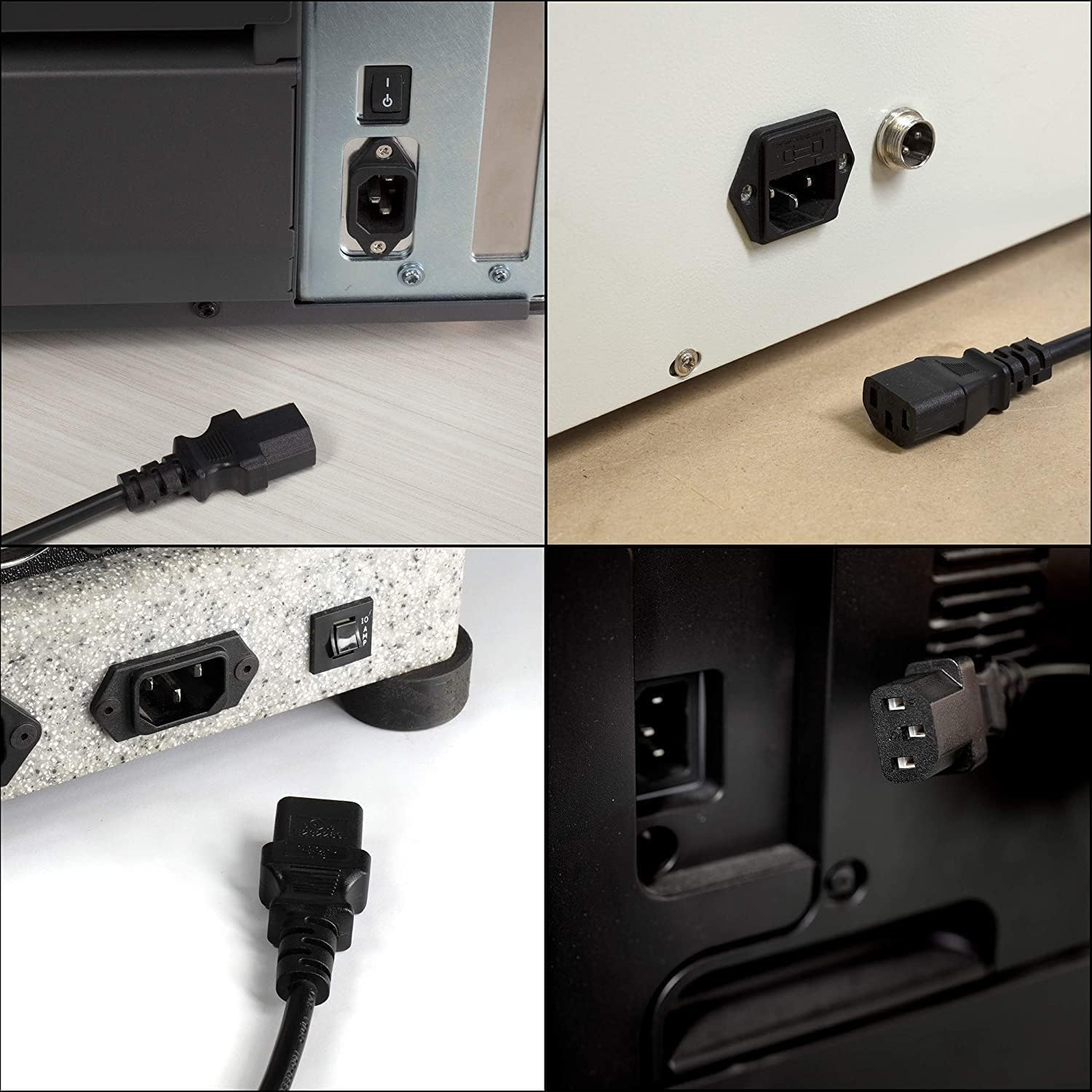
Figure 4.1: Examples of the GUY-TECH AC Power Cord connected to different electronic devices, demonstrating its versatility and proper insertion into various C14 inlets.
5. Operating
The GUY-TECH AC Power Cord functions as a passive power conduit. Once properly connected, it facilitates the flow of electrical power from the wall outlet to your compatible electronic device. There are no operational controls on the cord itself.
- Ensure the power cord is not strained or bent at sharp angles during operation.
- Avoid running the cord under carpets or in high-traffic areas where it could be damaged or cause a tripping hazard.
- The cord is designed for high efficiency and low energy consumption, operating with low heat and no noise at full wattage.
6. Maintenance
Proper maintenance ensures the longevity and safe operation of your power cord.
- Cleaning: Disconnect the power cord from both the wall outlet and the device before cleaning. Wipe the cord and plugs with a dry, soft cloth. Do not use liquid cleaners or solvents.
- Inspection: Periodically inspect the entire length of the cord, including the plugs, for any signs of damage such as cuts, abrasions, kinks, or discoloration. If any damage is observed, discontinue use immediately and replace the cord.
- Storage: When not in use, coil the power cord loosely. Avoid tight coiling or wrapping around sharp objects, which can damage the internal wires. Store in a cool, dry place away from direct sunlight and extreme temperatures.
7. Troubleshooting
If you experience issues with your GUY-TECH AC Power Cord, consider the following troubleshooting steps:
- No Power to Device:
- Ensure both ends of the power cord are fully and securely plugged into the device and the wall outlet.
- Check if the wall outlet is functional by plugging in another known working device.
- Verify that the device itself is powered on and functioning correctly.
- Loose Connection:
- If the connection feels loose, gently re-seat the plugs. If the problem persists, the outlet or device inlet may be worn, or the cord may be damaged.
- Cord Overheating:
- If the cord feels excessively warm, immediately disconnect it. This could indicate an overload or internal damage. Ensure the device's power requirements do not exceed the cord's 10 Amp rating.
- Physical Damage:
- Inspect the cord for any visible damage. If damaged, replace the cord immediately. Do not attempt to repair it.
The power cord is designed with Over Voltage Output Protection, Over Current Output Protection, and Short Circuit Output Protection to safeguard your device.
8. Specifications
| Attribute | Value |
|---|---|
| Brand | GUY-TECH |
| Model Number | 3905E01035 |
| ASIN | B0CHG1PHPS |
| Color | Black |
| Connector Gender | Male-to-Male (NEMA 5-15P to C13) |
| Voltage Rating | 125 Volts (AC) |
| Current Rating | 10 Amps |
| Wire Gauge | 18 AWG |
| Country of Origin | China |
| First Available Date | September 6, 2023 |
9. Warranty and Support
For information regarding warranty coverage and customer support, please refer to the product packaging or contact the seller directly. Ensure you retain your proof of purchase for any warranty claims.
For general inquiries or technical assistance, please visit the official GUY-TECH website or contact their customer service department.
Ask a question about this manual
Ask about setup, troubleshooting, compatibility, parts, safety, or missing instructions. Manuals+ will review the question and use this page’s manual context to help answer it.