
Introduction
The Sennheiser ACCENTUM Wireless Bluetooth Headphones are designed to provide an immersive audio experience with exceptional comfort and advanced features. These headphones offer a remarkable 50-hour battery life, ensuring extended listening pleasure. With hybrid Active Noise Cancellation (ANC) and Transparency Mode, you can control your audio environment, whether you need to focus or stay aware of your surroundings. The ACCENTUM headphones also feature crystal-clear communication capabilities and customizable sound modes for a personalized listening experience.

Image: Sennheiser ACCENTUM Wireless Headphones in white, showcasing their sleek design and comfortable earcups.
Setup
1. Unboxing and Initial Charge
Upon unboxing your Sennheiser ACCENTUM headphones, you will find the headphones and a user manual. Before first use, it is recommended to fully charge the headphones.
- Connect the provided USB-C charging cable to the charging port on the headphones.
- Connect the other end of the cable to a compatible USB power source (e.g., computer USB port, USB wall adapter).
- A full charge takes approximately 3 hours. The LED indicator on the headphones will show the charging status.
- A full charge provides up to 50 hours of battery life.
2. Bluetooth Pairing
To connect your ACCENTUM headphones to a Bluetooth-enabled device:
- Ensure the headphones are charged and powered off.
- Press and hold the power button for approximately 4 seconds until the LED flashes blue and red, indicating pairing mode.
- On your device (smartphone, tablet, computer), go to Bluetooth settings and enable Bluetooth.
- Select "Sennheiser ACCENTUM" from the list of available devices.
- Once connected, the LED on the headphones will glow solid blue.
3. Sennheiser Smart Control App
For enhanced control and customization, download the Sennheiser Smart Control app from your device's app store. The app allows you to:
- Adjust the 5-band equalizer for personalized sound.
- Switch between Hybrid ANC and Transparency Mode.
- Access firmware updates.
- Manage connected devices.

Image: A user wearing the Sennheiser ACCENTUM headphones, illustrating the customizable sound experience via the app's equalizer and sound modes.
Operating Instructions
Basic Controls
The Sennheiser ACCENTUM headphones feature intuitive controls located on the earcups.
- Power On/Off: Press and hold the power button for 2 seconds.
- Volume Control: Use the volume up (+) and volume down (-) buttons.
- Play/Pause: Single press the multi-function button.
- Next Track: Double press the multi-function button.
- Previous Track: Triple press the multi-function button.
- Answer/End Call: Single press the multi-function button during an incoming call or active call.
- Reject Call: Press and hold the multi-function button for 2 seconds during an incoming call.
- Voice Assistant: Single press the voice assistant button to activate your device's voice assistant (e.g., Siri, Google Assistant).
Active Noise Cancellation (ANC) and Transparency Mode
The ACCENTUM headphones offer Hybrid ANC to reduce ambient noise and Transparency Mode to allow you to hear your surroundings without removing the headphones.
- Toggle Modes: Press the ANC/Transparency button to switch between Hybrid ANC, Transparency Mode, and ANC off.
- Hybrid ANC: Ideal for minimizing distractions in noisy environments like commutes or offices.
- Transparency Mode: Useful for hearing announcements, conversations, or traffic sounds while still enjoying your audio.

Image: A user enjoying the Sennheiser ACCENTUM headphones in an outdoor setting, highlighting the versatility of ANC and Transparency modes for different environments.
Maintenance
Proper care and maintenance will extend the lifespan of your Sennheiser ACCENTUM headphones.
- Cleaning: Use a soft, dry, lint-free cloth to clean the plastic surfaces and earcups. Do not use liquid cleaners or solvents.
- Storage: When not in use, store the headphones in a cool, dry place. The headphones feature a fold-flat design for compact storage. If a carrying case is included, utilize it for protection.
- Battery Care: To preserve battery health, avoid fully discharging the battery frequently. Charge the headphones regularly, even if not used for extended periods.
- Avoid Moisture: Do not expose the headphones to water or excessive moisture. They are not designed for use in wet conditions.
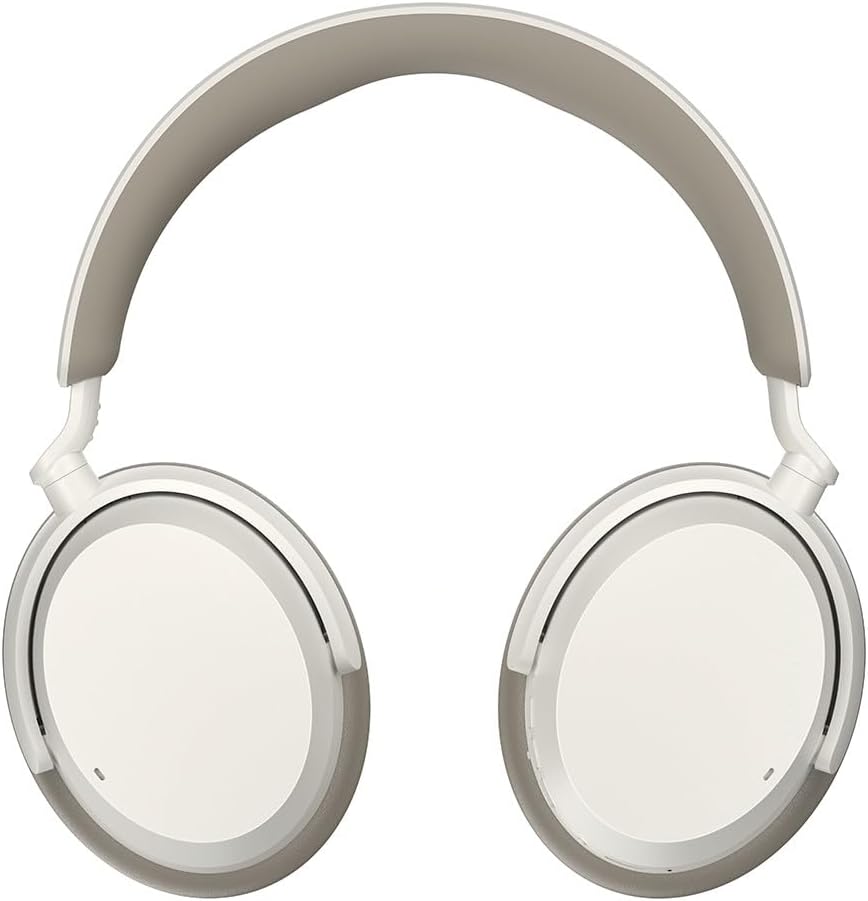
Image: Top-down view of the Sennheiser ACCENTUM headphones, demonstrating their sleek profile and suitability for compact storage.
Troubleshooting
If you encounter issues with your Sennheiser ACCENTUM headphones, refer to the following common solutions:
| Problem | Possible Cause | Solution |
|---|---|---|
| Headphones do not power on. | Low battery. | Charge the headphones fully. |
| Cannot pair with device. | Headphones not in pairing mode; device Bluetooth off; interference. | Ensure headphones are in pairing mode (flashing blue/red LED). Turn device Bluetooth off and on. Move closer to the device. |
| No sound or poor sound quality. | Volume too low; incorrect audio source; connection issues. | Increase volume on headphones and device. Check audio output settings on your device. Re-pair the headphones. |
| ANC not working effectively. | ANC mode not active; improper fit. | Ensure ANC mode is enabled via the button or app. Adjust headphone fit for a proper seal around your ears. |
| Microphone issues during calls. | Microphone blocked; device settings. | Ensure the microphone area is clear. Check microphone input settings on your connected device. |
For more detailed troubleshooting or persistent issues, refer to the Sennheiser Smart Control app or visit the official Sennheiser support website.
Specifications
| Feature | Detail |
|---|---|
| Model Name | ACAEBT White |
| Model Number | 700175 |
| Brand | Sennheiser |
| Color | White |
| Connectivity Technology | Wireless (Bluetooth 5.2) |
| Ear Placement | Over Ear |
| Form Factor | Over Ear |
| Noise Control | Hybrid Noise Cancellation |
| Battery Life | Up to 50 Hours |
| Charging Time | Approx. 3 Hours |
| Audio Driver Type | Dynamic Driver |
| Frequency Range | 20 Hz - 20,000 Hz |
| Control Type | Voice Control, App Control (Sennheiser Smart Control) |
| Special Features | 4 Buttons, Fold Flat, Microphone Included, Noise Cancellation, Voice Assistant Access |
| Material | Plastic |
| Item Weight | 7.7 ounces (218 grams) |
| Product Dimensions | 6.49 x 1.88 x 7.67 inches (16.5 x 4.8 x 19.5 cm) |
| Included Components | User Manual |
| Recommended Uses | Running, Exercising, Cycling, Calling, Gaming, Recording, Music, Travel, Swimming, Snowboarding |
Warranty and Support
Sennheiser products are built with quality and durability in mind. For detailed warranty information specific to your region and product, please refer to the warranty card included with your purchase or visit the official Sennheiser website.
For technical support, frequently asked questions, and additional resources, please visit the Sennheiser support page:Sennheiser Support
You can also find more information and register your product on the official Sennheiser Consumer Audio store page on Amazon:Sennheiser Consumer Audio Store


