
1. Introduction
Thank you for choosing the UTRAI T1 12V Jump Starter. This device is designed to provide emergency jump-starting for vehicles, act as a portable power bank, and offer illumination with its integrated LED light. Its compact and lightweight design makes it an essential tool for any driver.
The UTRAI T1 features a 2000A peak current, suitable for 12V vehicles with up to 6.5L gasoline engines or 5.5L diesel engines. It is also compatible with motorcycles, motorboats, and light trucks.
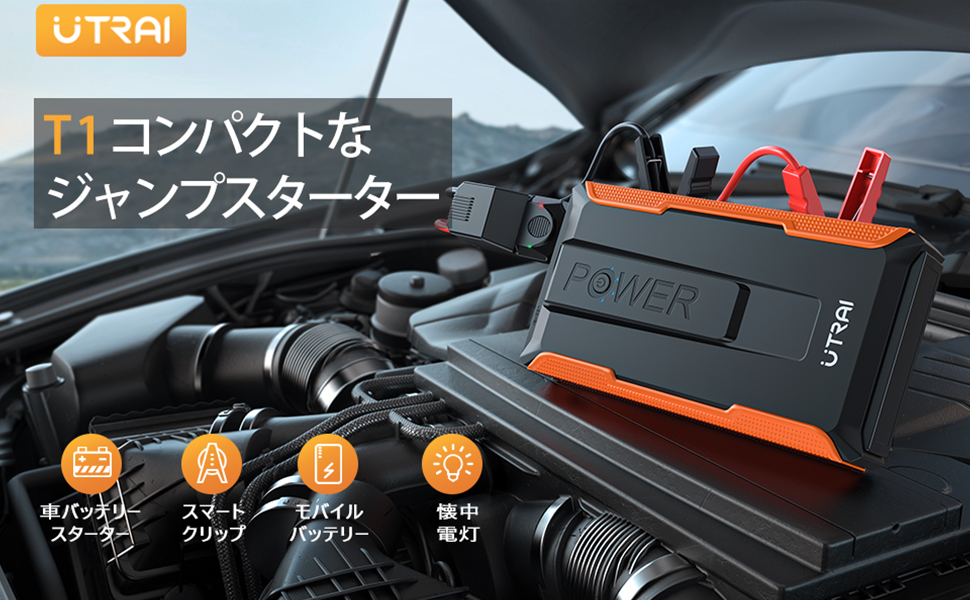
Image: The UTRAI T1 Jump Starter connected to a car battery in an engine bay.
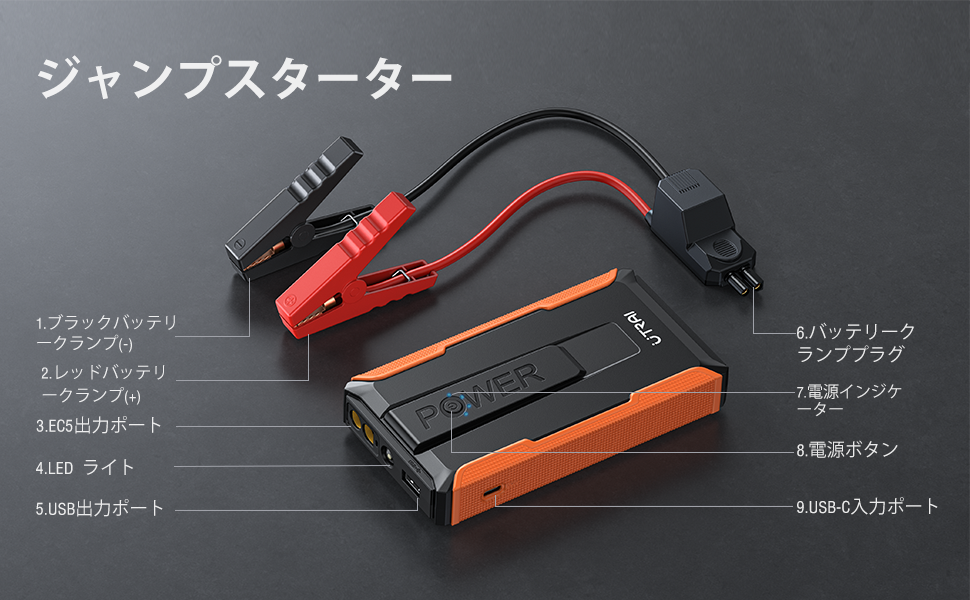
Image: The compact UTRAI T1 Jump Starter held in a user's hand.
2. Safety Information
Please read all safety instructions carefully before using the device. Failure to follow these instructions may result in electric shock, fire, or serious injury.
General Safety Precautions:
- Keep out of reach of children.
- Do not expose the device to rain or extreme moisture.
- Do not disassemble the device. Contact qualified service personnel for repairs.
- Ensure proper ventilation during use and charging.
- Avoid dropping or subjecting the device to strong impacts.
Integrated Safety Protection:
The UTRAI T1 is equipped with an 8-layer smart protection system to ensure safe operation, even for beginners. These protections include:
- Reverse Charge Protection: Prevents current flow back to the jump starter from the vehicle battery.
- Short Circuit Protection: Automatically shuts off power in case of a short circuit.
- Overheat Protection: Monitors internal temperature and prevents overheating.
- Overcharge Protection: Prevents the internal battery from being overcharged.
- Overcurrent Protection: Safeguards against excessive current draw.
- Overdischarge Protection: Protects the internal battery from being fully depleted.
- Reverse Connection Protection: Alerts or prevents operation if clamps are connected incorrectly.
- Reverse Polarity Protection: Ensures correct polarity connection to the vehicle battery.
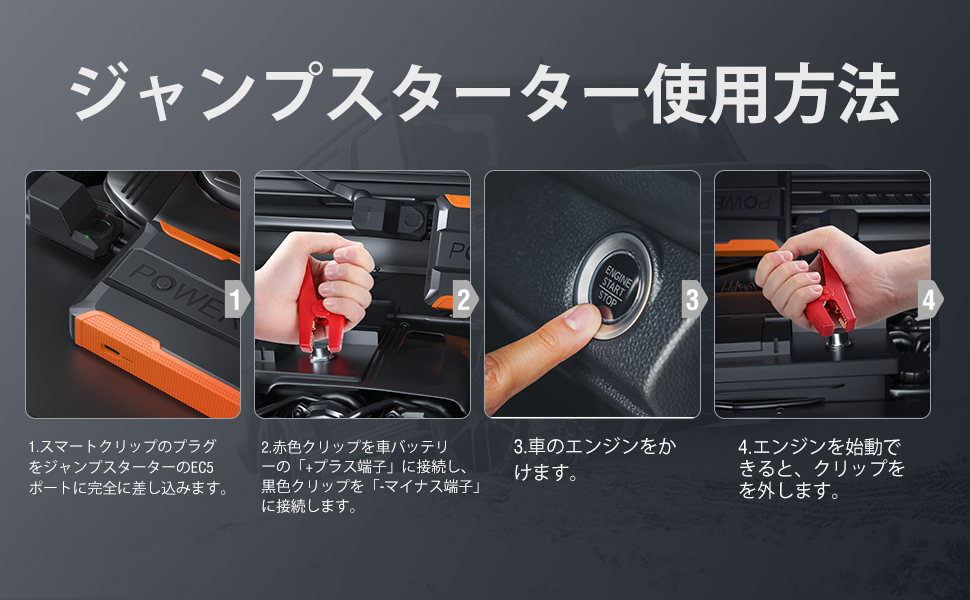
Image: Visual representation of the 8-layer smart protection system.
3. Package Contents
Verify that all items are present in your package:
- UTRAI T1 Jump Starter Unit
- Smart Battery Clamps (Red and Black)
- USB-C Charging Cable
- User Manual

Image: All included accessories: jump starter, smart clamps, USB-C cable, and manual.
4. Product Overview
Familiarize yourself with the components of your UTRAI T1 Jump Starter:
- Black Battery Clamp (-)
- Red Battery Clamp (+)
- EC5 Output Port (for smart clamps)
- LED Light
- USB Output Port
- Battery Clamp Plug
- Power Indicator
- Power Button
- USB-C Input Port (for charging the jump starter)

Image: Labeled diagram of the UTRAI T1 Jump Starter components.
5. Setup
Charging the Jump Starter:
Before first use, fully charge the UTRAI T1 Jump Starter. Use the provided USB-C cable and connect it to the USB-C Input Port (9) on the device and a suitable USB power adapter (not included).
- The power indicator (7) will show the charging status.
- Ensure the device is fully charged for optimal performance, especially before storing it or using it for jump-starting.
6. Operating Instructions
6.1. Jump Starting a Vehicle
Follow these steps to safely jump-start your vehicle:
- Connect Smart Clamps: Fully insert the smart clamp plug into the EC5 output port (3) on the jump starter. Ensure a secure connection.
- Connect to Car Battery: Attach the red (+) clamp to the positive terminal of your car battery. Attach the black (-) clamp to the negative terminal of your car battery.
- Start Engine: Once the clamps are correctly connected, start your car's engine.
- Remove Clamps: After the engine starts, immediately remove the smart clamps from the car battery, then disconnect the smart clamp plug from the jump starter.

Image: Step-by-step visual guide for jump-starting a vehicle.
6.2. Using the LED Light
The integrated LED light (4) offers three modes for various situations:
- Illumination Mode: Provides bright light for working in dark environments, such as under the car hood or inside the car.
- SOS Mode: Emits a Morse code SOS signal for emergency situations.
- Strobe Mode: Flashes rapidly to attract attention during roadside emergencies.
To cycle through the modes, press the power button (8) repeatedly. The high brightness of the LED light is useful for outdoor activities, emergency signaling, and general night lighting.

Image: The three LED light modes demonstrated in an outdoor setting.
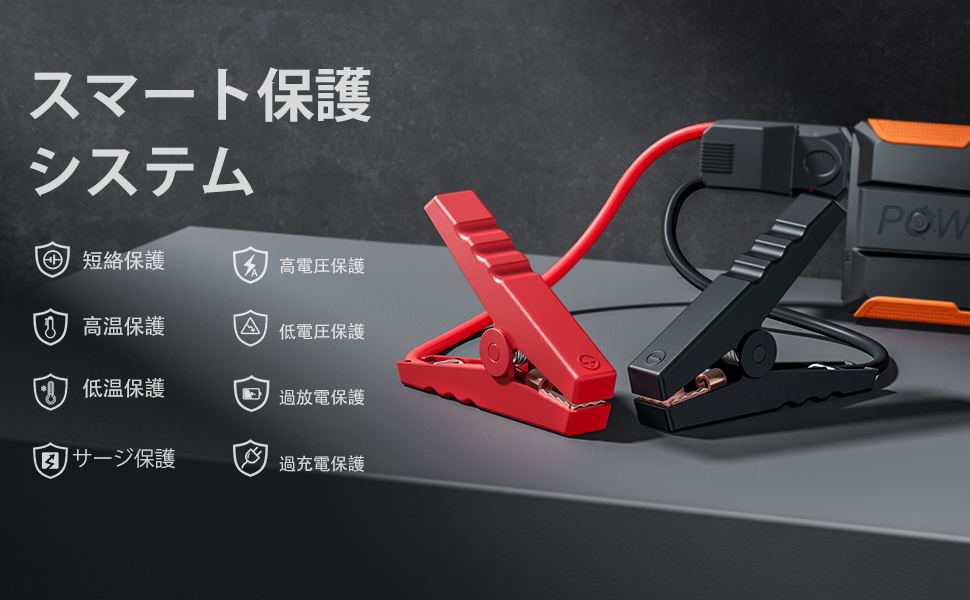
Image: User utilizing the high-brightness LED light for engine inspection at night.
6.3. Using as a Power Bank
The UTRAI T1 features a 13200mAh battery capacity and a USB output port (5), allowing it to charge various electronic devices such as smartphones, tablets, and other USB-powered gadgets.
- Connect your device's charging cable to the USB output port (5) on the jump starter.
- The jump starter will automatically begin charging your device.

Image: The jump starter charging multiple electronic devices.
7. Maintenance
Proper maintenance ensures the longevity and reliability of your UTRAI T1 Jump Starter:
- Regular Charging: To maintain battery health, charge the jump starter at least once every three months, even if not in use.
- Storage: Store the device in a cool, dry place away from direct sunlight and extreme temperatures.
- Cleaning: Wipe the device with a soft, dry cloth. Do not use harsh chemicals or abrasive cleaners.
- Temperature Range: The device is designed to operate in temperatures from -20℃ to 60℃ (-4°F to 140°F). Avoid using or storing outside this range.
- Water Resistance: The device offers excellent water resistance, but it is not fully waterproof. Avoid submerging it in water.

Image: The jump starter's durability features, including temperature and water resistance.
8. Troubleshooting
If you encounter issues with your UTRAI T1 Jump Starter, refer to the following common problems and solutions:
- Device does not turn on:
- Ensure the device is charged. Connect it to a power source using the USB-C cable and check the power indicator. - Vehicle does not start after jump-starting:
- Check that the smart clamps are securely connected to the jump starter and the car battery terminals. Ensure correct polarity (red to positive, black to negative).
- The car battery might be severely discharged or damaged. Consult a professional mechanic.
- The jump starter might not have sufficient charge. Recharge it fully. - LED light not working:
- Press the power button to activate the light. Cycle through modes to ensure it's not in an off state.
- Ensure the device has sufficient battery charge. - External devices not charging from USB port:
- Ensure the jump starter has sufficient battery charge.
- Check the USB cable connection to both the jump starter and the external device. Try a different cable if necessary. - Smart clamps show an error indicator:
- Refer to the smart clamp's specific error codes (if available on the clamp itself or in a separate guide) or check for reverse polarity, short circuit, or overheating conditions. Disconnect and reconnect carefully.
If the problem persists after trying these solutions, please contact customer support.
9. Specifications
| Feature | Specification |
|---|---|
| Brand | UTRAI |
| Model Name | T1 |
| Peak Current | 2000A |
| Starting Voltage | 12V |
| Battery Capacity | 13200mAh (Lithium-Ion) |
| Compatible Gasoline Engines | Up to 6.5L |
| Compatible Diesel Engines | Up to 5.5L |
| Operating Temperature | -20℃ to 60℃ (-4°F to 140°F) |
| USB Output | 5V/2.1A |
| USB-C Input | 5V/2A |
| Dimensions (L x W x H) | 150 x 81 x 26 mm (5.9 x 3.2 x 1.0 inches) |
| Weight | Approx. 300g (0.66 lbs) |
| Certifications | PSE Certified |
10. Warranty and Support
UTRAI products are designed for reliability and performance. For warranty information, product support, or technical assistance, please refer to the contact information provided on the product packaging or visit the official UTRAI website. Please retain your proof of purchase for warranty claims.


