Introduction
The Lian-Li UNI FAN AL120 is a 120mm Addressable RGB (ARGB) fan designed to provide efficient cooling and customizable lighting for your PC. This fan features an innovative daisy-chain design, significantly simplifying installation and cable management by allowing multiple fans to connect with fewer cables. It integrates aesthetic elements such as an aluminum medallion and LEDs on both sides, with customized lighting effects on the fan blades and inner frame, all controllable via the L-Connect software.

Image: The Lian-Li UNI FAN AL120 ARGB Fan showcasing its vibrant, customizable lighting.
Setup
Follow these steps for proper installation of your UNI FAN AL120:
- Unpack Components: Carefully remove the fan and all accessories (such as mounting screws and cables) from the packaging.
- Daisy-Chain Connection: The UNI FAN AL120 features an interlocking mechanism. Align and slide the fans together to create a cluster. This design allows multiple fans to share a single power and ARGB cable connection, simplifying cable management.
- Mounting: Secure the fan(s) to your PC case or radiator using the provided screws. Ensure the airflow direction is appropriate for your cooling configuration (intake or exhaust).
- Cable Connection: Connect the daisy-chained fan cluster to the UNI HUB controller (if included with a multi-pack, or purchased separately) or directly to your motherboard's ARGB and fan headers if compatible. Only two cables are typically required for a cluster of fans.
- Software Installation: Download and install the latest L-Connect software from the official Lian-Li website. This software is essential for controlling ARGB lighting effects and fan speeds.
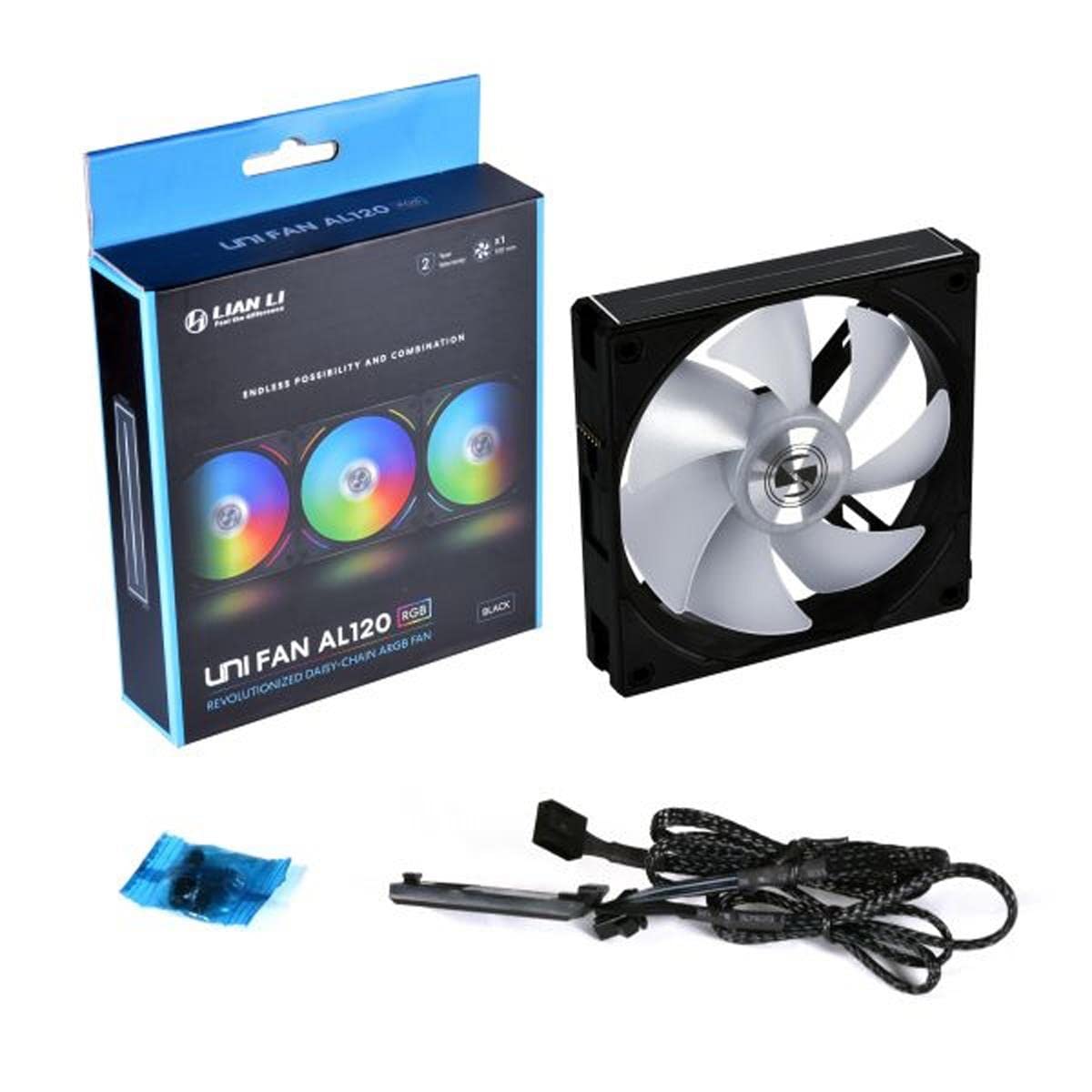
Image: Contents of the Lian-Li UNI FAN AL120 package, showing the fan, cables, and accessories for installation.
Operating
Once installed, the UNI FAN AL120 is ready for operation. Control its features using the L-Connect software:
- Power On: Start your computer. The fans should begin spinning and illuminate with default ARGB effects.
- L-Connect Software: Launch the L-Connect application. Through this interface, you can:
- Adjust fan speed (RPM) to balance cooling performance and noise levels. The fan operates at a maximum rotational speed of 1900 RPM, with a noise level of approximately 30 Decibels.
- Select from multiple pre-set lighting effects or customize individual LED colors and patterns on the fan blades and inner edge.
- Synchronize lighting with other compatible ARGB components in your system.
- Airflow: The fan provides an airflow capacity of 64.5 Cubic Feet Per Minute (CFM), ensuring effective air movement within your PC case.

Image: The Lian-Li UNI FAN AL120 in operation, displaying its dynamic ARGB lighting effects.
Maintenance
Regular maintenance helps ensure optimal performance and longevity of your UNI FAN AL120:
- Dust Removal: Periodically clean dust from the fan blades and frame using compressed air or a soft brush. Accumulation of dust can impede airflow and increase noise levels.
- Inspection: Occasionally inspect the fan for any signs of wear, loose connections, or obstructions. Ensure cables are securely connected and not interfering with fan rotation.
- Software Updates: Keep the L-Connect software updated to the latest version to benefit from performance improvements, new features, and bug fixes.
Troubleshooting
If you encounter issues with your UNI FAN AL120, consider the following troubleshooting steps:
- Fan Not Spinning:
- Check all power connections to the fan and controller.
- Ensure the fan header on the motherboard or controller is properly connected.
- Verify that the L-Connect software is running and fan speeds are not set to 0 RPM.
- ARGB Lighting Not Working/Incorrect:
- Confirm the ARGB cable is securely connected to the controller or motherboard's 3-pin 5V ARGB header. (Note: Do not connect to a 4-pin 12V RGB header, as this can damage the LEDs.)
- Check L-Connect software settings for lighting effects and brightness.
- If using motherboard software for ARGB control, ensure L-Connect is not conflicting or that control has been handed over correctly.
- L-Connect Software Issues:
- Restart the L-Connect software or your computer.
- Ensure you have the latest version of the software installed.
- Temporarily disable any conflicting RGB software from other manufacturers.
- Excessive Noise:
- Check for any cables or obstructions hitting the fan blades.
- Clean any dust buildup on the fan blades.
- Reduce fan speed through the L-Connect software.
Specifications
| Model Number | AL120-1B |
| Brand | Lian Li |
| Product Dimensions | 34.2"L x 34.2"W x 16.6"H |
| Power Connector Type | 3-Pin |
| Voltage | 12 Volts (DC) |
| Wattage | 3.84 watts |
| Cooling Method | Air |
| Compatible Devices | Desktop |
| Noise Level | 30 Decibels |
| Material | Aluminum |
| Maximum Rotational Speed | 1900 RPM |
| Air Flow Capacity | 64.5 Cubic Feet Per Minute |
| Item Weight | 0.8 ounces |
| UPC | 840353041028 |
Note: The listed product dimensions (34.2"L x 34.2"W x 16.6"H) appear unusually large for a 120mm fan and may refer to packaging or an incorrect entry. Standard 120mm fan dimensions are typically 120mm x 120mm x 25mm.
Warranty Information
Specific warranty details for the Lian-Li UNI FAN AL120 are not provided in this manual. For comprehensive warranty terms, conditions, and registration information, please refer to the official Lian-Li website or contact their customer support directly. It is recommended to retain your proof of purchase for warranty claims.
Support
For further assistance, technical support, or to download the latest L-Connect software and drivers, please visit the official Lian-Li website:
You may also find helpful resources and FAQs on the Lian Li Amazon Store Page.