
SUPERJARE 66 inch
SUPERJARE L Shaped Gaming Desk User Manual
Model: 66 inch
Brand: SUPERJARE
1. Product Overview
The SUPERJARE L Shaped Gaming Desk is a versatile and robust workstation designed for home offices, gaming setups, and study areas. It features built-in LED lighting with multiple color and mode options, integrated power outlets and USB ports for convenient device charging, and ample storage solutions including a monitor stand, shelves, and hooks. The desk can be configured in an L-shape or as a long straight desk to suit various space requirements.

Figure 1: Overview of the SUPERJARE L Shaped Gaming Desk in Rustic Brown. This image displays the desk's L-shaped configuration with its elevated monitor stand and integrated power cord.
2. Setup and Assembly
Assembly of the SUPERJARE L Shaped Gaming Desk is designed to be straightforward, though having a helper can simplify certain steps. All necessary tools are typically included, but a power drill may expedite the process for attaching platforms.
2.1 Unpacking and Part Identification
- Carefully unpack all components from the box.
- Identify all parts against the provided parts list in the instruction manual.
- Ensure all screws, bolts, and tools are present before beginning assembly.
2.2 Frame Assembly
- Assemble the metal frame components according to the diagrams in the manual.
- Securely fasten all connections, but do not overtighten until the desk is fully assembled.
2.3 Attaching Desk Surfaces
- Attach the main desktop platforms to the assembled frame using the provided screws.
- Ensure the surfaces are aligned correctly for either the L-shaped or straight configuration.
2.4 Installing Accessories
- Install the elevated monitor stand onto the main desktop.
- Attach the headphone hooks to the side of the desk as desired.
- Place the CPU stand on the designated mesh shelf.
- Connect the power strip and LED lights as per the instructions.

Figure 2: Exploded view of desk components during assembly. This image illustrates the various parts of the desk laid out before construction, including the metal frame, wooden panels, and accessories.

Figure 3: Detailed dimensions and alternative straight installation method. This image provides measurements for both the L-shaped and straight configurations, highlighting the desk's adaptability.
Video 1: Assembly and feature overview of the SUPERJARE L Shaped Gaming Desk. This video demonstrates the assembly process and highlights key features like the LED lights and power outlets.
3. Operating Instructions
3.1 LED Lights
The desk features built-in LED lighting to enhance your workspace ambiance. Use the included RF wireless remote control to manage the lighting.
- Colors: Choose from 20 static colors.
- Modes: Select from 22 dynamic modes (e.g., flash, strobe, fade, smooth).
- Brightness & Speed: Adjust the brightness (5 grades) and speed (10 grades) of the light effects.

Figure 4: RGB LED Light Strip features. This image showcases the various lighting options, including 60,000 colors, mic mode, music mode, and timing mode, controlled via an app (note: remote control is included, app control may vary by model/version).

Figure 5: L-shaped desk with LED lights in a gaming setup. This image demonstrates the desk's appearance with the LED lights activated, creating an immersive gaming environment.
3.2 Power Outlets and USB Ports
The integrated power strip provides convenient access to power for your devices.
- AC Outlets: 4 Standard Plug Outlets (125V/12A) for laptops, monitors, and other electronics.
- USB Ports: 2 USB Ports (5V/2A) for charging phones, tablets, and other USB-powered devices.
- Power Cord: Features a 6.6-foot power cord for flexible placement.
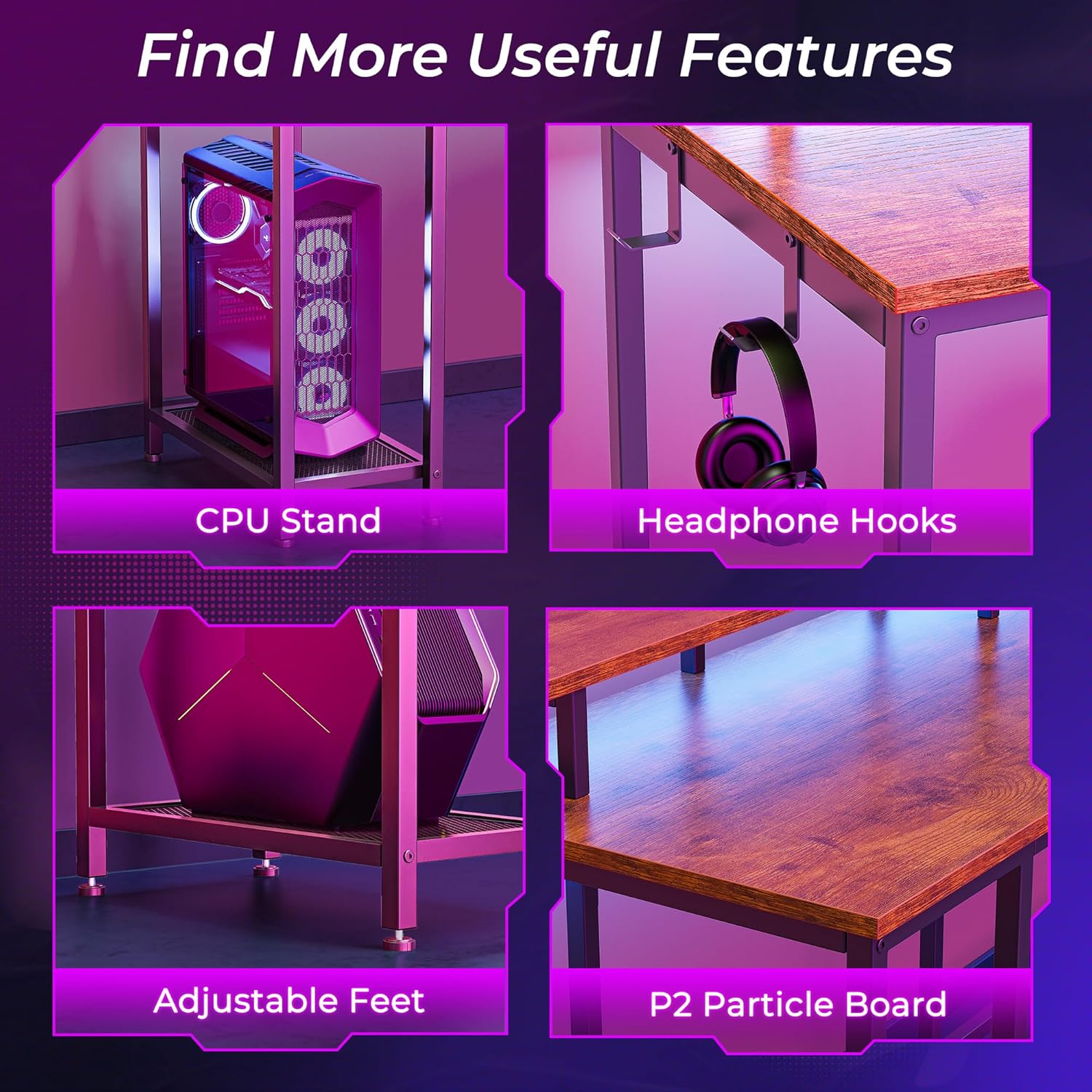
Figure 6: Close-up of the built-in power strip. This image highlights the 4 AC outlets and 2 USB ports available directly on the desk surface for easy access.
3.3 Monitor Stand
The elevated monitor stand helps maintain proper sitting posture and protects your cervical and spinal health by raising your line of sight.

Figure 7: Elevated monitor stand. This image demonstrates the raised platform designed to position monitors at an ergonomic height, maximizing workspace underneath.
3.4 Storage Features
The desk offers various storage options to keep your workspace organized.
- Spacious Desktops: Two spacious desktops provide ample room for office supplies and documents.
- CPU Stand: A dedicated grid shelf is available for placing your computer tower.
- Headphone Hooks: Two hooks on the side of the corner desk allow for convenient headphone storage.

Figure 8: Additional useful features including CPU stand, headphone hooks, and adjustable feet. This image highlights the practical storage solutions and stability features of the desk.
4. Maintenance
To maintain the desk's appearance and longevity, wipe it with a damp cloth as needed. Avoid harsh chemicals or abrasive cleaners that may damage the finish.
5. Troubleshooting
5.1 Assembly Difficulties
- If you encounter difficulty during assembly, re-check the instruction manual diagrams carefully.
- Ensure all screws are aligned with the correct holes before tightening.
- Having a second person to assist can greatly simplify the process.
5.2 Desk Stability
- Ensure all screws and bolts are fully tightened after complete assembly.
- Utilize the adjustable feet to level the desk on uneven ground, preventing wobbling.
5.3 Power Outlet Issues
- Verify the desk's main power cord is securely plugged into a functional wall outlet.
- Note that the built-in power outlets are standard for USA regions. If outside the USA, a compatible power converter may be required.
5.4 LED Light Operation
- Ensure the LED light strip is properly connected to the power source via the USB port.
- The remote control is an RF (Radio Frequency) remote; it does not require an app for operation.
6. Product Specifications
| Feature | Detail |
|---|---|
| Brand | SUPERJARE |
| Product Dimensions | 18.9"D x 66"W x 29.2"H |
| Color | Rustic Brown |
| Style | Modern |
| Base Material | Alloy Steel |
| Top Material Type | Engineered Wood (P2 Particle Board) |
| Finish Type | Power Coated |
| Special Features | Built-In Monitor Stand, Built-In USB Outlet, LED Lights, Headphone Hooks, CPU Stand, Adjustable Feet |
| Room Type | Office, Living Room, Bedroom, Study Room |
| Recommended Uses | Working, Writing, Gaming |
| Number of Shelves | 2 (including CPU stand shelf) |
| Required Assembly | Yes |
7. Important Safety Information
WARNING: This desk requires proper assembly. Always use the appropriate tools and follow the instructions carefully. Once assembled, this desk may be top-heavy. Ensure it is properly anchored to the floor to prevent tipping. Always be aware of the desk's weight when moving or adjusting it to avoid injury.
8. Warranty and Support
Specific warranty details were not provided in the product information. For warranty claims, technical support, or any inquiries regarding your SUPERJARE L Shaped Gaming Desk, please contact the manufacturer directly through their official website or the seller from whom you purchased the product.
Related documents66 inch

Ask a question about this manual
Ask about setup, troubleshooting, compatibility, parts, safety, or missing instructions. Manuals+ will review the question and use this page’s manual context to help answer it.