
1. Introduction
This manual provides essential information for the safe and efficient operation of your Modern Flames Orion Traditional 26-inch Electric Firebox (Model OR26-TRAD). This electric firebox is designed to provide a realistic flame display and supplemental heat, enhancing the ambiance of any room. It features HELIOVISION Flame Technology, customizable flame patterns and colors, and can be controlled via remote or a smartphone application.

Figure 1: Modern Flames Orion Traditional 26-inch Electric Firebox.
2. Setup and Installation
The Modern Flames Orion Traditional Electric Firebox is designed for built-in installation. Proper installation is crucial for safety and optimal performance.
2.1 Unpacking
- Carefully remove all components from the packaging.
- Verify that all included components are present: electric firebox unit, driftwood log set, and black reflective crushed glass media.
- Inspect the unit for any damage that may have occurred during shipping. Contact your retailer immediately if any damage is found.
2.2 Location and Clearance
- Ensure the installation location is suitable for a built-in electric firebox.
- Maintain adequate clearance from combustible materials as specified in the full installation guide (not provided here, but implied by "Built In").
- The unit requires a 120 or 240 Volt circuit for direct-wired installation.
2.3 Media Installation
- Place the driftwood log set and/or black reflective crushed glass media into the ember bed area as desired.
- Ensure media does not obstruct any vents or sensors.

Figure 2: Ember bed with driftwood log set and crushed glass media.

Figure 3: Example of built-in installation.
3. Operating Instructions
Your Modern Flames Orion Traditional Electric Firebox offers various customization options for flame display and heating.
3.1 Powering On/Off
- The unit can be powered on or off using the included remote control or the Modern Flames smartphone application.
- A toggle switch may also be present on the unit for manual power control.
3.2 Flame Technology (HELIOVISION)
The HELIOVISION Flame Technology provides a multi-dimensional and realistic flame display.
- Flame Patterns: Select from three distinct flame patterns: wood-burning with sparks, gas-burning, or a hybrid mixed flame.
- Flame Colors: Choose from six high-definition flame color options to match your preference.
- Flame Speed: Adjust the speed of the flame effect (Slow, Medium, Fast).
- Ember Bed Lighting: Customize the ember bed with multicolor lighting options.
- Cracking Sound: Activate the soothing cracking sound feature for an enhanced realistic experience.
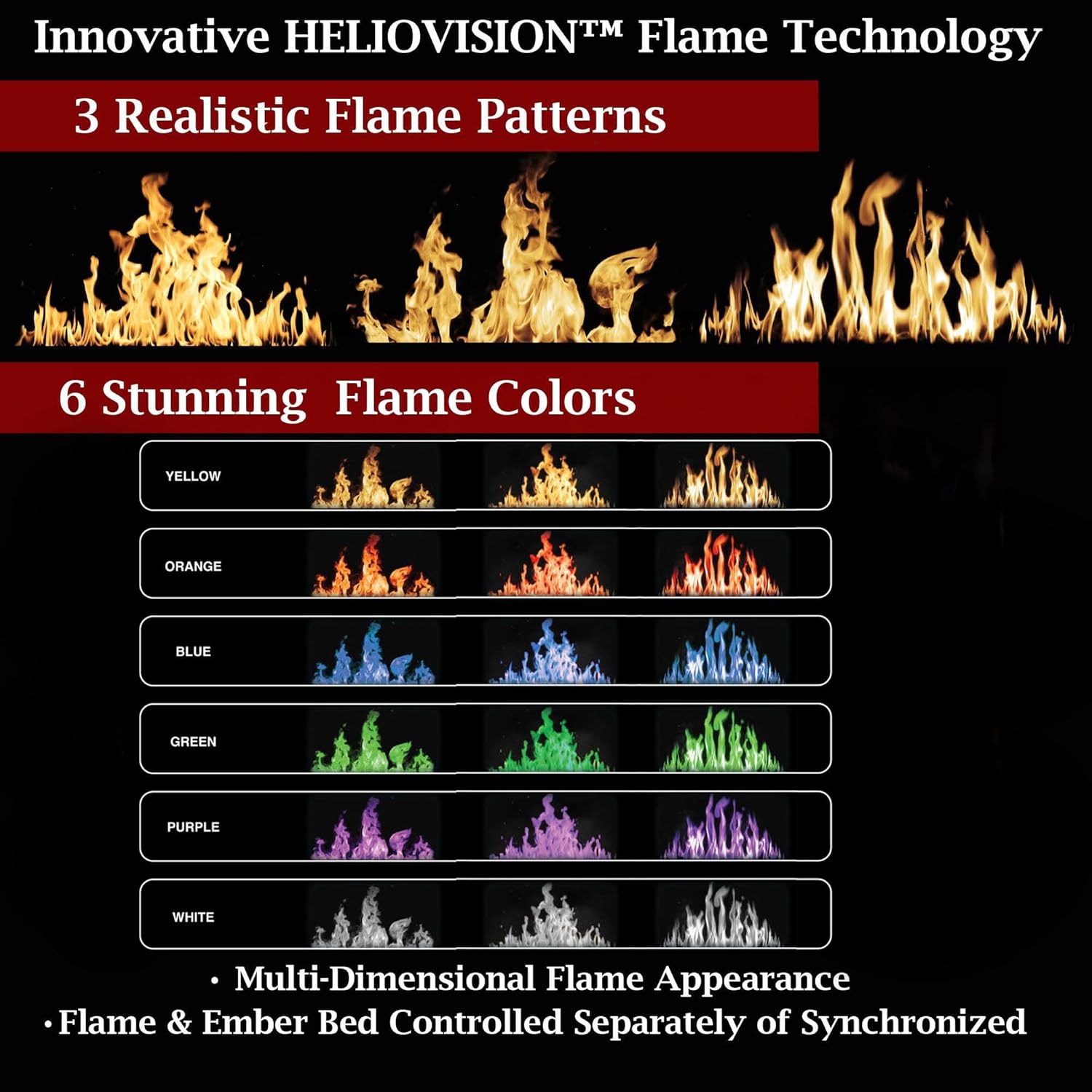
Figure 4: HELIOVISION Flame Technology options.

Figure 5: Overview of customizable features.
3.3 Heating Function
- The unit provides up to 5,000 BTU/hour of heat.
- The variable heat function can operate independently from the flame display.
- Adjust heat settings via the remote or smartphone app.

Figure 6: Heating capabilities.
3.4 Smart Control (App & Remote)
- Download the Modern Flames App to control all features from your smartphone.
- The included remote control provides convenient access to settings.
- Both flame and heat functions can be controlled independently.

Figure 7: Smartphone app and remote control for the firebox.
4. Maintenance
Regular maintenance ensures the longevity and optimal performance of your electric firebox.
4.1 Cleaning
- Exterior: Wipe the exterior surfaces with a soft, damp cloth. Do not use abrasive cleaners or sprays.
- Glass Panel: Clean the glass panel with a soft cloth and a non-abrasive glass cleaner.
- Air Vents: Periodically vacuum or wipe the air vents to prevent dust buildup, which can affect heating efficiency.
4.2 General Care
- Ensure the unit is unplugged or disconnected from power before performing any cleaning or maintenance.
- Do not attempt to service any electrical components yourself. Refer to qualified service personnel.
5. Troubleshooting
If you encounter issues with your electric firebox, refer to the following common troubleshooting steps.
5.1 No Power / Unit Not Turning On
- Check Power Connection: Ensure the unit is properly connected to a functioning power outlet or circuit.
- Circuit Breaker: Verify that the circuit breaker for the firebox is not tripped.
- Reset Procedure: In case of a power outage or unexpected behavior, locate the toggle switch on the unit (typically in the top right corner) and cycle the power off and then on again to reset the firebox.
5.2 Flame Effect Issues
- Dim Flames: Adjust the brightness settings via the remote or app. Ensure the room lighting is not too bright, as this can affect the perceived vibrancy of the flames.
- No Flame Movement: Check the flame speed setting in the app or remote.
5.3 Heating Issues
- No Heat Output: Ensure the heating function is activated and the temperature setting is appropriate.
- Obstructed Vents: Check that the air intake and exhaust vents are not blocked by furniture or debris.
For issues not covered here, please refer to the full product manual or contact customer support.
6. Specifications
| Feature | Detail |
|---|---|
| Brand | Modern Flames |
| Model Name | Orion Traditional |
| Model Number | OR26-TRAD |
| Product Dimensions (D x W x H) | 9"D x 26"W x 9"H |
| Installation Type | Built In |
| Power Source | AC/DC |
| Heat Output | 5118 British Thermal Units (BTU) |
| Material | Ceramic, Glass |
| Color | Black |
| Flame Technology | HELIOVISION (3 patterns, 6 colors) |
| Control Options | Remote, Smartphone App |
| Included Components | Driftwood Log Set, Black Reflective Crushed Glass Media |
7. Warranty & Support
7.1 Warranty Information
The Modern Flames Orion Traditional Electric Firebox comes with a Limited Lifetime Warranty. Please refer to the official Modern Flames warranty documentation for full terms and conditions, including coverage details and limitations.
7.2 Customer Support
For technical assistance, replacement parts, or further inquiries, please contact Modern Flames customer support.
- Website: Visit the Modern Flames Store for product information and support resources.
- Contact: Refer to the contact section on the official Modern Flames website for phone numbers or email support.


