
1. Important Safety Instructions
Please read these instructions carefully before using your Russell Hobbs RHCTH1 Ceramic Tower Heater. Failure to follow these instructions may result in electric shock, fire, or serious injury.
- Always ensure the heater is placed on a firm, level surface.
- Do not operate the heater near water or in damp locations.
- Keep flammable materials such as furniture, curtains, and bedding at least 1 meter (3 feet) away from the heater.
- Do not cover the heater or block its air inlets/outlets.
- Unplug the heater when not in use or before cleaning.
- Do not use the heater with a damaged cord or plug.
- This appliance is not intended for use by persons (including children) with reduced physical, sensory or mental capabilities, or lack of experience and knowledge, unless they have been given supervision or instruction concerning use of the appliance by a person responsible for their safety.
- Children should be supervised to ensure that they do not play with the appliance.
- Do not insert any objects into the heater's openings.
- The heater is equipped with an overheat protection system. If it overheats, it will automatically shut off. Unplug the unit and allow it to cool before restarting.
2. Product Overview
The Russell Hobbs RHCTH1 Ceramic Tower Heater is designed to provide efficient heating for indoor spaces. It features a sleek design, two heat settings (1200W/2400W), a cool fan function, adjustable temperature control, an 8-hour timer, and an LED display. It also includes a remote control for convenient operation and overheat protection for safety.

Figure 1: Front view of the Russell Hobbs RHCTH1 Ceramic Tower Heater.
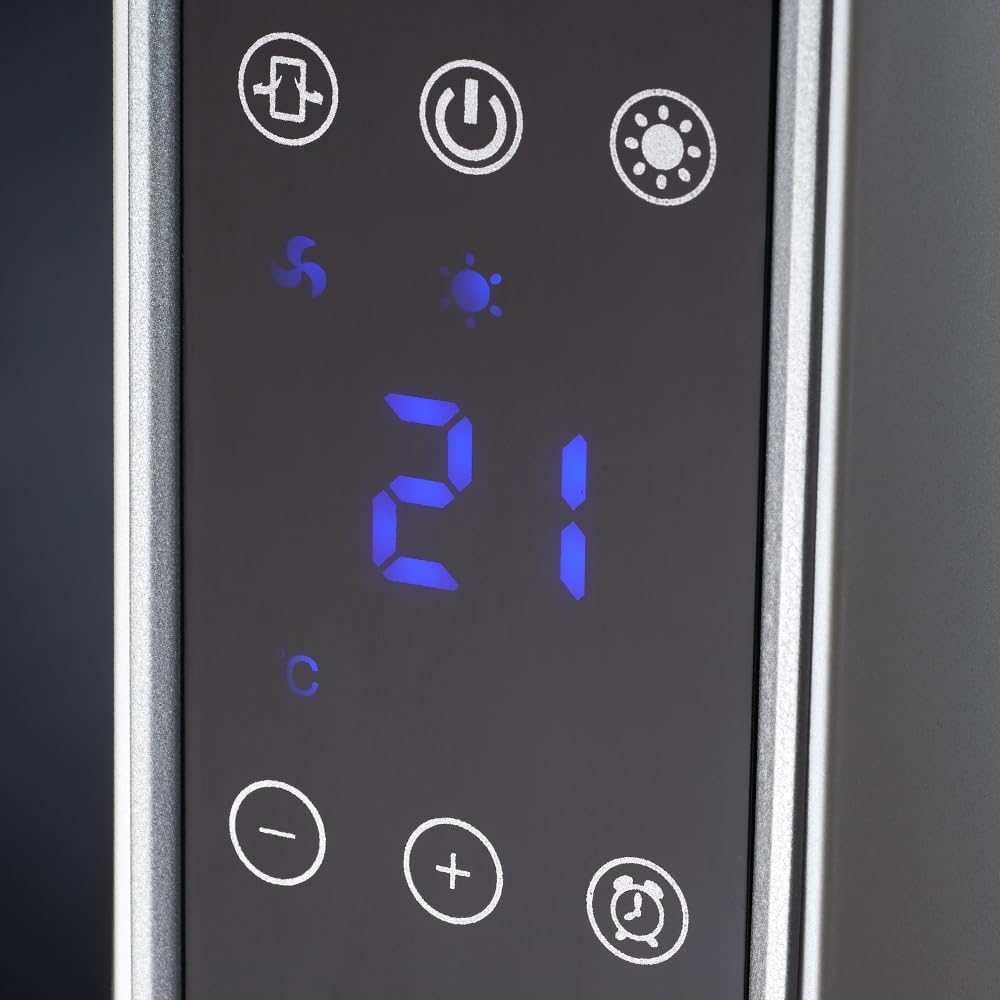
Figure 2: Detailed view of the soft-touch control panel and LED display.

Figure 3: Base of the ceramic tower heater.

Figure 4: Remote control for operating the heater.
Key Features:
- Power: 2400W
- Heat Settings: 2 (1200W / 2400W)
- Functions: Cool fan, adjustable temperature, oscillation
- Temperature Range: 10°C to 49°C
- Control: Soft-touch screen and remote control
- Display: LED display
- Timer: 8-hour programmable timer
- Safety: Overheat protection
3. Setup
- Unpacking: Carefully remove the heater from its packaging. Retain all packaging materials for future storage or transport.
- Placement: Place the heater on a stable, flat, and heat-resistant surface. Ensure there is at least 1 meter (3 feet) of clear space around the heater from walls, furniture, and other objects to allow for proper airflow and prevent fire hazards. Do not place it directly under a power outlet.
- Power Connection: Ensure the heater is switched off before plugging it into a suitable 240V AC power outlet. The power cord should be fully extended and not run under carpets or in areas where it could be tripped over.
4. Operating Instructions
The RHCTH1 heater can be operated using the soft-touch control panel on the unit or the included remote control.
Control Panel / Remote Control Functions:
- Power Button (Ⓘ): Press to turn the heater ON or OFF. The LED display will illuminate when the unit is on.
- Mode Button (☀): Cycle through heat settings (Low Heat 1200W, High Heat 2400W) and the Cool Fan function.
- Temperature Adjustment (+ / -): Use these buttons to increase or decrease the desired room temperature. The temperature can be set between 10°C and 49°C. The unit will maintain the set temperature.
- Oscillation Button (↻): Press to activate or deactivate the oscillation function, which allows the heater to rotate from side to side, distributing heat more widely.
- Timer Button (⏲): Press to set the operating timer. Each press will increase the timer by 1 hour, up to a maximum of 8 hours. The heater will automatically turn off once the set time has elapsed.
Initial Operation:
- Plug the heater into a grounded 240V AC outlet.
- Press the Power button (Ⓘ) to turn the unit on. The LED display will show the current room temperature.
- Press the Mode button (☀) to select your desired heat setting (Low or High) or the Cool Fan function.
- Use the Temperature Adjustment buttons (+ / -) to set your desired temperature. The heater will cycle on and off to maintain this temperature.
- Optionally, press the Oscillation button (↻) for wider heat distribution or the Timer button (⏲) to set an automatic shut-off time.
5. Maintenance and Cleaning
Regular cleaning and maintenance will help ensure the efficient operation and longevity of your heater.
- Before Cleaning: Always unplug the heater from the power outlet and allow it to cool completely before cleaning.
- Exterior Cleaning: Wipe the exterior surfaces of the heater with a soft, damp cloth. Do not use abrasive cleaners, solvents, or harsh chemicals, as these can damage the finish.
- Air Inlets/Outlets: Use a vacuum cleaner with a brush attachment to gently remove dust and debris from the air inlet and outlet grilles. Ensure these openings remain clear for optimal performance.
- Storage: If storing the heater for an extended period, clean it thoroughly and store it in its original packaging in a cool, dry place.
- Do Not Disassemble: Do not attempt to disassemble or repair the heater yourself. Refer all servicing to qualified personnel.
6. Troubleshooting
| Problem | Possible Cause | Solution |
|---|---|---|
| Heater does not turn on. | No power supply; Power button not pressed; Overheat protection activated. | Check if the plug is securely in the outlet. Ensure the power outlet is functional. Press the Power button. Unplug the heater, wait 30 minutes for it to cool down, then plug it back in. |
| Heater produces no heat. | Cool fan function selected; Temperature setting too low. | Ensure a heat mode (Low or High) is selected. Increase the desired temperature setting above the current room temperature. |
| Heater suddenly stops working. | Overheat protection activated; Tip-over switch activated. | Unplug the heater and let it cool for 30 minutes. Ensure the heater is on a stable, flat surface. If it was knocked over, place it upright. |
| Poor heat distribution. | Oscillation not activated; Obstruction of air outlets. | Activate the oscillation function. Ensure air outlets are not blocked by furniture or other objects. |
If the problem persists after attempting these solutions, please contact customer support.
7. Specifications
| Feature | Detail |
|---|---|
| Brand | Russell Hobbs |
| Model Number | RHCTH1 |
| Type | Ceramic Tower Heater |
| Color | White |
| Power | 2400W |
| Heat Settings | 1200W / 2400W |
| Voltage | 240 Volts |
| Temperature Range | 10°C to 49°C |
| Timer | Up to 8 hours |
| Heating Method | Convection |
| Special Features | Portable, Cool fan function, Overheat protection, Adjustable temperature, Remote control, Soft touch screen, LED display |
| Product Dimensions (D x W x H) | 19D x 19W x 73H centimetres |
| Indoor/Outdoor Usage | Indoor |
| Mounting Type | Floor Mount |
8. Warranty and Support
This Russell Hobbs RHCTH1 Ceramic Tower Heater comes with a 1 Year Warranty from the date of purchase. Please retain your proof of purchase for warranty claims.
The warranty covers manufacturing defects under normal household use. It does not cover damage resulting from misuse, neglect, accidental damage, or unauthorized repairs.
For technical support, warranty claims, or service inquiries, please contact Russell Hobbs customer service. Contact details can typically be found on the official Russell Hobbs website or on your product packaging.
You can also visit the official Russell Hobbs store on Amazon for more product information: Russell Hobbs Amazon Store