
1. Introduction
This manual provides detailed instructions for the assembly, operation, maintenance, and troubleshooting of your ANCTOR King Bed Frame with 3 Drawers, Upholstered Platform Bed with Storage Headboard and Charging Station. Please read this manual thoroughly before assembly and retain it for future reference.
The ANCTOR bed frame features a beige linen fabric and maple wood frame design. It includes a storage headboard with a built-in UL certified charging station, three under-bed storage drawers, and a sturdy construction designed for durability and ease of use.
2. Safety Information
- Ensure all parts are present and undamaged before beginning assembly.
- Do not use power tools for assembly as this may overtighten screws and damage the frame.
- Assemble the bed frame on a soft, clean surface to prevent scratches.
- Keep children and pets away from the assembly area.
- Periodically check all connections and tighten as necessary to ensure stability.
- Do not exceed the maximum weight capacity of 1300 lbs.
- The charging station is UL certified. Do not attempt to modify or disassemble it.
3. Package Contents
Your ANCTOR King Bed Frame package includes all necessary components for assembly, shipped in a single box. Please verify all parts against the included parts list (not provided in this manual, refer to your physical instruction sheet).
Key components include:
- Upholstered Headboard with Charging Station
- Bed Frame Rails (Side, Front, Back)
- Wooden Slats with Velcro attachment
- Steel Support Bar
- Three Under-bed Storage Drawers with wheels
- Assembly Hardware (screws, bolts, Allen wrench, etc.)
4. Setup and Assembly
Assembly is designed to be straightforward and can typically be completed by one person. Follow the steps below for proper installation.
4.1 Preparation
- Clear an adequate space for assembly.
- Lay out all components on a soft, clean surface to prevent damage.
- Identify all parts and hardware using the provided parts list.
4.2 Frame Assembly
- Attach the side rails to the headboard and footboard using the provided hardware. Ensure all connections are secure but do not overtighten.
- Install the central support bar and any additional support legs as indicated in your physical instructions.
- Unroll the wooden slats. The Velcro design allows for quick and easy attachment to the frame. Ensure the EVA silent strip is properly positioned between the slats and the iron frame to reduce noise.

Image 1: Illustration of the heavy frame structure, highlighting noise-free design, easy installation, strong wood slats, and iron support legs.
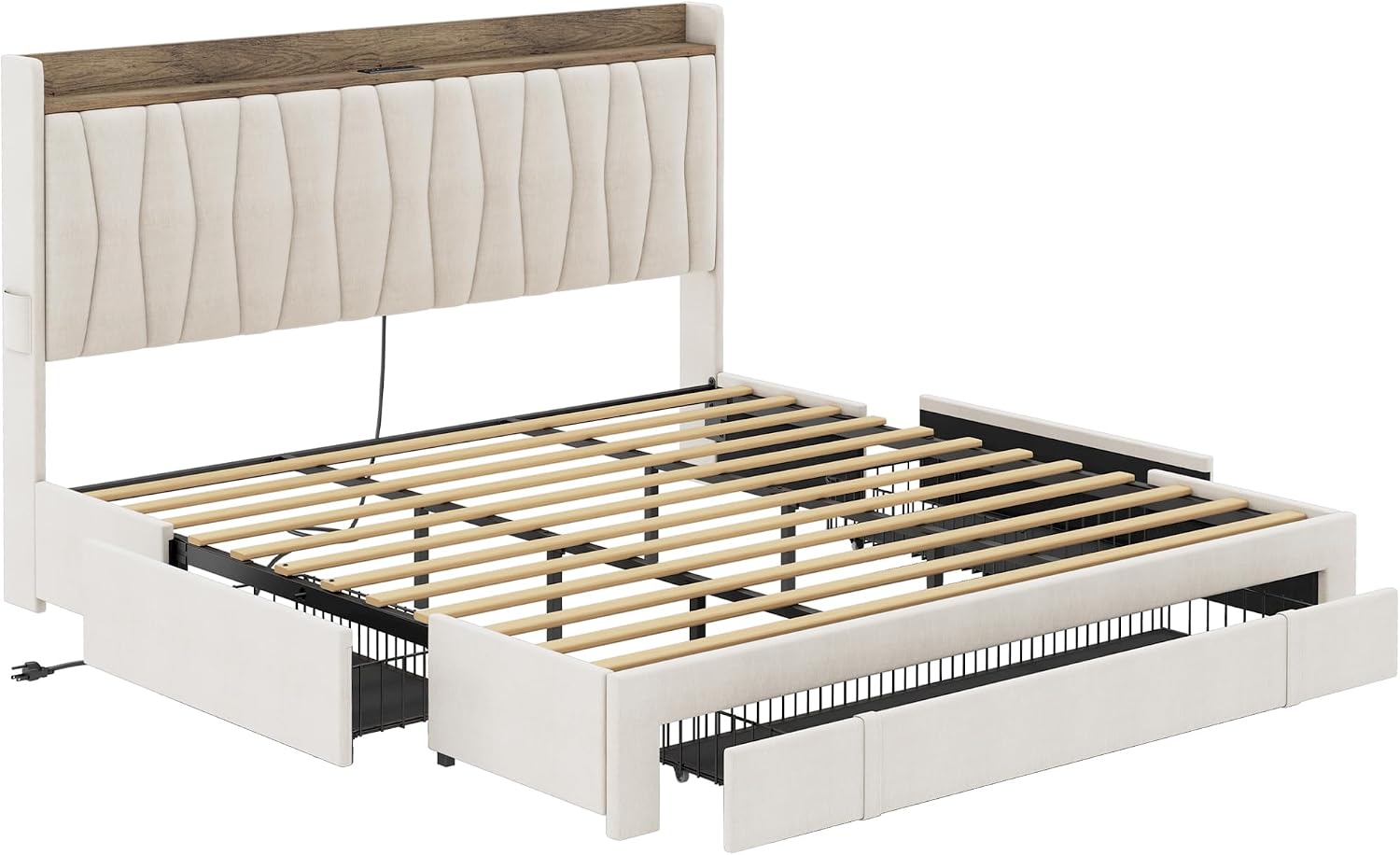
Image 2: Perspective view of the bed frame's internal components, including the slat system and the framework for the storage drawers.
4.3 Drawer Installation
- Assemble the three storage drawers according to the separate drawer assembly instructions.
- Once assembled, slide the drawers into the designated slots under the bed frame. The rolling wheels allow for easy movement.
- Utilize the special lock design to keep the drawers securely in place when not in use.

Image 3: Detailed view of the under-bed storage drawers, illustrating the smooth-gliding wheels and the snap-in feature for secure placement.
4.4 Charging Station Setup
- Locate the power cord for the integrated charging station in the headboard.
- Plug the power cord into a standard wall outlet.
- The charging station is now ready for use, providing 2 AC outlets (110V/12A) and 2 USB ports (5V/2A).

Image 4: Detailed view of the integrated charging station within the headboard, illustrating its power outlets and USB ports.
5. Operating Instructions
5.1 Using the Storage Drawers
- To access items, gently pull the drawer handle to slide the drawer out from under the bed.
- To close, push the drawer back until it is fully seated and the locking mechanism engages, keeping it securely in place.
- The drawers are ideal for storing clothes, linens, or other bedroom essentials.

Image 5: The ANCTOR King Bed Frame with its three storage drawers extended, demonstrating their practical use for organizing items. The headboard's charging station is also visible.
5.2 Using the Charging Station
- Plug your electronic devices into the AC outlets or USB ports located on the headboard.
- The charging station provides convenient power access for phones, tablets, laptops, and other small electronics.
- Always ensure devices are properly connected and the bed frame's power cord is plugged into a functional wall outlet.

Image 6: A lifestyle view of the bed frame, illustrating the use of the headboard's charging station for electronic devices and the under-bed drawers for storage.
5.3 Mattress Compatibility
- This bed frame is designed for mattresses between 8 and 12 inches in thickness.
- No box spring is needed.
- The headboard design ensures no gap between the mattress and the headboard for optimal comfort.

Image 7: A detailed view of the headboard and mattress area, showing the recommended mattress thickness range and the design that eliminates gaps.
6. Maintenance
6.1 Cleaning
- Upholstered Parts: For general cleaning, vacuum the fabric regularly using an upholstery attachment. For spills, blot immediately with a clean, dry cloth. For stubborn stains, consult a professional upholstery cleaner or use a mild fabric cleaner according to its instructions, testing on an inconspicuous area first.
- Wood Parts: Wipe with a soft, damp cloth. Avoid harsh chemicals or abrasive cleaners.
- Metal Parts: Wipe with a soft, dry cloth.
6.2 General Care
- Periodically check all bolts and screws to ensure they are tight. Retighten as needed to maintain the bed frame's stability and prevent noise.
- Avoid exposing the bed frame to direct sunlight or extreme temperature changes, which can affect the fabric and wood finish.
- Do not drag the bed frame when moving it; lift it to prevent damage to the legs and frame structure.
7. Troubleshooting
7.1 Bed Frame is Squeaking or Noisy
- Solution: Check all bolts and screws. Tighten any loose connections. Ensure the EVA silent strip is correctly positioned between the slats and the metal frame.
7.2 Drawers Do Not Slide Smoothly or Stay Closed
- Solution: Verify that the drawer wheels are clean and free of debris. Ensure the drawers are assembled correctly and the locking mechanism is engaging properly. Check for any obstructions under the bed.
7.3 Charging Station Not Working
- Solution: Ensure the bed frame's power cord is securely plugged into a functional wall outlet. Test the outlet with another device. Check if the device you are trying to charge is working correctly. If issues persist, contact customer support.
7.4 Missing Parts or Damaged Components
- Solution: Do not proceed with assembly. Contact ANCTOR customer service immediately with your purchase details and a description of the issue.
8. Specifications
| Feature | Detail |
|---|---|
| Model Number | HK-KBF-25 |
| Size | King |
| Product Dimensions (L x W x H) | 87"L x 77.9"W x 46.1"H |
| Color | Beige |
| Material | Upholstered Linen Fabric, Maple Wood, Steel |
| Weight Capacity | 1300 lbs |
| Compatible Mattress Size | 8-12 inches (thickness) |
| Charging Station | 2 AC Outlets (110V/12A), 2 USB Ports (5V/2A), UL Certified |
| Number of Drawers | 3 |
| Assembly Required | Yes |
| Item Weight | 119 pounds |

Image 8: Comprehensive dimensional drawing of the King size bed frame, including overall measurements and specific dimensions for the headboard, frame, and drawers.
9. Warranty and Support
ANCTOR is committed to providing high-quality products and customer satisfaction. If you encounter any questions regarding the quality of the product, assembly, or require assistance, please do not hesitate to contact our customer service team.
Our customer service will provide a solution within twenty-four hours. Please have your purchase details and model number (HK-KBF-25) ready when contacting support.
For support, please refer to the contact information provided with your purchase documentation or visit the official ANCTOR store on Amazon: ANCTOR Store.