
PHIWOS B0CHBBDKGS
PHIWOS Under Desk Treadmill User Manual
Model: B0CHBBDKGS
1. Product Overview
The PHIWOS Under Desk Treadmill is a versatile and compact fitness machine designed for both walking and light jogging in home or office environments. Its 2-in-1 design allows for use with or without the armrest, making it suitable for under-desk use or as a standalone running machine. Featuring an LED display, remote control, and a quiet motor, it provides a convenient way to stay active.

Figure 1.1: The PHIWOS Under Desk Treadmill in both running and under-desk configurations, highlighting its versatility.
Key Features:
- 2-in-1 Design: Functions as a walking pad for under-desk use and a running treadmill with an armrest.
- Compact & Portable: Equipped with wheels for easy movement and a foldable design for space-saving storage.
- Quiet Motor: Features an upgraded motor with low noise operation (below 60dB).
- LED Display & Remote Control: Monitor time, speed, distance, calories, and steps via the integrated LED display, controlled by a convenient remote.
- Shock Absorption: Provides optimal cushioning for joints during exercise.
- Adjustable Speed: Speed range from 1 to 8 km/h.

Figure 1.2: The treadmill's foldable design allows for easy storage under furniture, and integrated wheels facilitate effortless relocation.
2. Safety Instructions
Please read all safety instructions carefully before operating the treadmill to ensure safe and effective use. Failure to follow these instructions may result in injury or damage to the product.
General Safety Precautions:
- Always place the treadmill on a flat, stable surface.
- Ensure there is adequate clear space (at least 2 meters behind and 1 meter on each side) around the treadmill during operation.
- Keep children and pets away from the treadmill while it is in use.
- Do not operate the treadmill if it is damaged or malfunctioning.
- Wear appropriate athletic footwear when using the treadmill.
- The maximum user weight capacity for this treadmill is 110 KG. Do not exceed this limit.
- Always hold onto the armrest (if installed) when starting or stopping the treadmill, especially at higher speeds.
- Unplug the treadmill from the power outlet when not in use or before cleaning and maintenance.
- Consult a physician before starting any new exercise program.

Figure 2.1: The treadmill supports a maximum user weight of 110 KG.
3. Components List
Before assembly and operation, please ensure all components are present and undamaged. Refer to the diagram below for identification.

Figure 3.1: Included components with your PHIWOS Under Desk Treadmill.
Package Contents:
- PHIWOS Under Desk Treadmill Unit
- Remote Control (1)
- L-shaped Wrench (1)
- Silicone Lubricant (1 bottle)
- Knobs (2)
- Screws (2)
- AAA Batteries (2)
- User Manual (this document)
4. Setup
The PHIWOS Under Desk Treadmill comes largely pre-assembled for your convenience. Only minimal setup is required to begin your workout.
Unboxing and Placement:
- Carefully remove the treadmill from its packaging.
- Place the treadmill on a firm, level surface. Ensure there is sufficient space around the unit for safe operation and movement.
- Unfold the armrest (if applicable) by lifting it into the upright position.
Armrest Installation (if detached):
If the armrest is not already attached or needs re-securing:
- Align the armrest base with the designated slots on the treadmill frame.
- Insert the two provided screws into the holes and tighten them securely with the L-shaped wrench.
- Attach the two knobs to further secure the armrest in place.

Figure 4.1: Detail of the armrest securing mechanism.
5. Operating Instructions
Familiarize yourself with the controls and display before beginning your workout.
Powering On/Off:
- Plug the power cord into a grounded electrical outlet.
- Locate the main power switch (usually at the front or rear of the treadmill) and turn it to the 'ON' position.
- To power off, turn the main power switch to 'OFF' and unplug the unit.
Using the Remote Control:
The treadmill is operated primarily via the included remote control. Ensure the AAA batteries are correctly installed.

Figure 5.1: The Smart LED Loop Display and Remote Control.
- Start/Stop Button: Press to start or pause the treadmill belt.
- Speed Up (+): Increases the treadmill speed.
- Speed Down (-): Decreases the treadmill speed.
- Mode Button (if present): Cycles through display modes or exercise programs.
Understanding the LED Display:
The integrated LED display provides real-time workout data:
- TIME: Displays the duration of your workout.
- SPEED: Shows the current speed of the treadmill belt (in km/h).
- DIST: Indicates the distance covered during your workout.
- CAL: Estimates the calories burned.
- STEP: Counts the number of steps taken.
Starting a Workout:
- Step onto the treadmill belt.
- Press the 'Start' button on the remote control. The treadmill will typically start at a low speed.
- Use the '+' and '-' buttons to adjust the speed to your desired level (1-8 km/h).
2-in-1 Mode Operation:
The treadmill can be used in two primary modes:
- Walking Pad Mode (Armrest Folded Down): Ideal for under-desk use. The maximum speed in this mode may be limited for safety.
- Running Treadmill Mode (Armrest Upright): For walking or jogging at higher speeds. The armrest provides support and stability.

Figure 5.2: The treadmill's multifunctional design for both running and under-desk jogging.
6. Maintenance
Regular maintenance ensures the longevity and optimal performance of your treadmill.
Cleaning:
- Always unplug the treadmill before cleaning.
- Wipe down the frame and display with a soft, damp cloth. Avoid using abrasive cleaners or solvents.
- Periodically vacuum under the treadmill to remove dust and debris.
Belt Lubrication:
The running belt requires periodic lubrication to reduce friction and extend its lifespan. Use the provided silicone lubricant.
- Unplug the treadmill.
- Carefully lift the edge of the running belt on one side.
- Apply a small amount of silicone lubricant in a thin line along the center of the deck, underneath the belt.
- Repeat on the other side.
- Plug in the treadmill and run it at a low speed (e.g., 1-2 km/h) for a few minutes to distribute the lubricant evenly.
- Lubricate every 3-6 months, or after approximately 100 hours of use, depending on usage frequency.
7. Troubleshooting
If you encounter issues with your treadmill, refer to the following common problems and solutions. If the problem persists, contact customer support.
| Problem | Possible Cause | Solution |
|---|---|---|
| Treadmill does not power on. | Power cord not plugged in; Main power switch off; Circuit breaker tripped. | Ensure power cord is securely plugged in. Turn main power switch to 'ON'. Check household circuit breaker. |
| Belt stops or slips during use. | Belt too loose; Insufficient lubrication; Overload (exceeding weight capacity). | Adjust belt tension (refer to specific instructions if available, or contact support). Apply silicone lubricant. Ensure user weight is within limits. |
| Remote control not working. | Batteries dead or incorrectly inserted; Remote out of range. | Replace batteries with new AAA batteries, ensuring correct polarity. Ensure you are within effective range of the treadmill's receiver. |
| Unusual noise from treadmill. | Loose components; Lack of lubrication; Motor issue. | Check for any loose screws or parts and tighten them. Lubricate the running belt. If noise persists, discontinue use and contact customer support. |
8. Specifications
Detailed technical specifications for the PHIWOS Under Desk Treadmill.
| Feature | Specification |
|---|---|
| Brand | PHIWOS |
| Model | B0CHBBDKGS |
| Color | Grey |
| Product Dimensions (L x W x H) | 141 x 66 x 16 cm (folded) / 141 x 66 x 101 cm (unfolded with armrest) |
| Product Weight | 27 kg |
| Maximum User Weight | 110 kg |
| Speed Range | 1 - 8 km/h |
| Display Type | LCD |
| Frame Material | Alloy Steel |
| Power Source | Corded Electric |
| Special Features | Shock Absorbent, Foldable, Remote Control, LED Display |
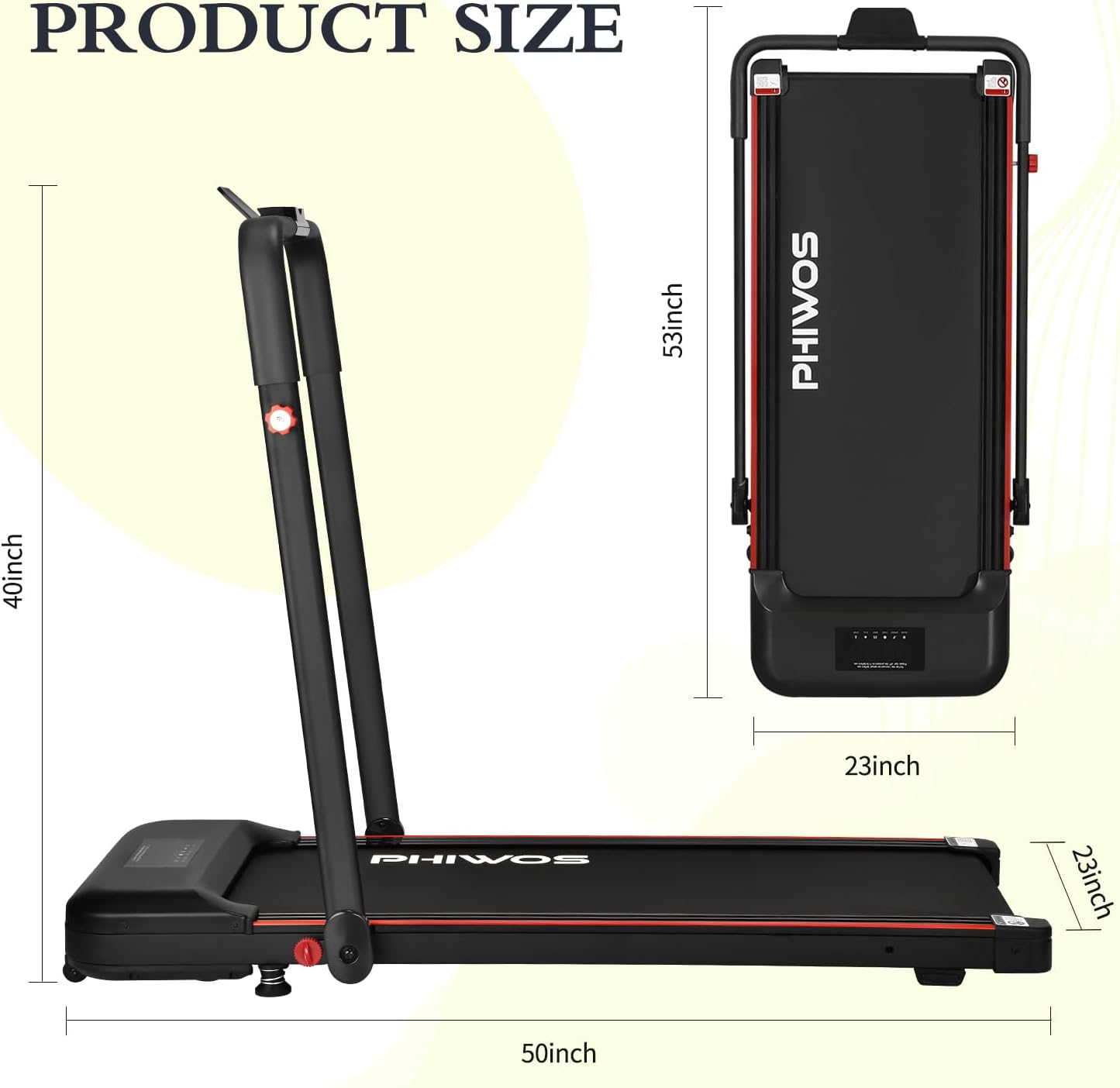
Figure 8.1: Product dimensions for both unfolded and folded states.

Figure 8.2: Details of the upgraded powerful and quiet motor.
9. Warranty and Support
PHIWOS products are manufactured to high-quality standards. For warranty information, technical support, or service inquiries, please refer to the warranty card included with your product or contact the seller directly through your purchase platform.
Customer Support:
For any questions or assistance, please contact the seller or manufacturer via the contact details provided at the point of purchase or on the official PHIWOS website. Please have your product model number (B0CHBBDKGS) and purchase date ready when contacting support.
Ask a question about this manual
Ask about setup, troubleshooting, compatibility, parts, safety, or missing instructions. Manuals+ will review the question and use this page’s manual context to help answer it.