
1. Product Overview
The Flrrtenv L Shape Desk is designed to provide a spacious and functional workspace for home offices, gaming setups, or general use. Its L-shaped design optimizes corner spaces, offering ample room for multiple monitors, computers, and accessories. Constructed with a sturdy metal frame, this desk ensures stability and durability.
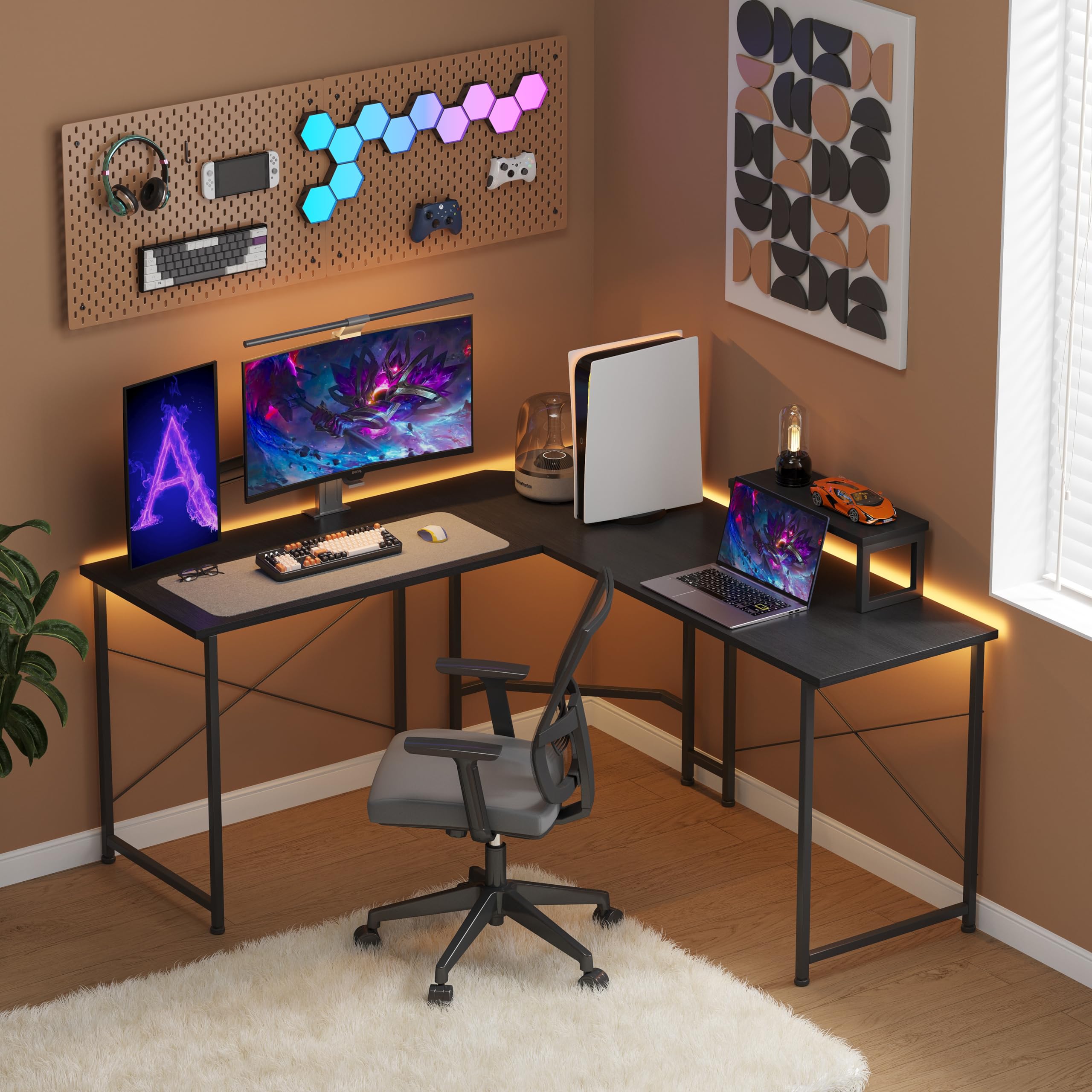
Image: The Flrrtenv L Shape Desk, showcasing its design and functionality in a typical setup.
Key Features:
- Spacious L-shaped desktop: Accommodates multiple monitors, laptops, and peripherals.
- Sturdy metal frame: Eight metal legs provide excellent support and stability.
- Removable monitor stand: Adjustable for optimal viewing height and posture correction.
- Adjustable foot pads: Ensures stability on uneven surfaces.
- Space-saving design: Ideal for corners and smaller rooms.
2. Package Contents
Before beginning assembly, please verify that all components listed in the included parts diagram are present and undamaged. If any parts are missing or damaged, please contact customer support.

Image: A detailed diagram illustrating the dimensions of the L-shaped desk, including the monitor stand.
3. Assembly Instructions
Assembly of the Flrrtenv L Shape Desk requires two people and approximately 1 hour. Please follow these steps carefully. Tools required: Allen Key (included), Screwdriver (not included).
- Unpack Components: Carefully remove all parts from the packaging and lay them out on a clean, soft surface to prevent scratches. Identify each part using the provided parts list.
- Assemble Leg Frames: Attach the horizontal support bars to the vertical leg frames using the designated screws. Ensure all connections are secure but do not fully tighten screws until all parts are aligned.
- Connect Desk Panels: Place the L-shaped desktop panels onto the assembled leg frames. Align the pre-drilled holes on the desktop with the holes on the frame.
- Secure Desktop: Insert and tighten all screws to secure the desktop panels to the leg frames. Ensure the desk is stable and level.
- Install Adjustable Foot Pads: Screw the adjustable foot pads into the bottom of each leg. Adjust them as needed to ensure the desk is stable and does not wobble.
- Attach Monitor Stand: Position the removable monitor stand on the desktop as desired. It is designed to be movable and does not require permanent attachment.

Image: A close-up view of the U-shaped leg design, highlighting the sturdy construction and adjustable feet.
Important Note: Some users have reported mislabeled parts. If you encounter difficulty identifying components, refer to the shape and size of the parts in the diagram rather than relying solely on labels.
4. Usage and Operation
The Flrrtenv L Shape Desk is designed for versatile use in various environments. Its ergonomic features promote comfort during extended periods of use.
Movable Monitor Stand:
The included monitor stand can be freely positioned anywhere on the desktop. This allows you to raise your monitor to an ergonomic viewing height, which can help improve posture and reduce strain on your neck and shoulders.

Image: Illustration demonstrating the flexibility of the movable monitor stand, which can be shifted left or right.

Image: A visual guide comparing proper sitting posture with the use of a monitor stand versus poor posture without one.
Cable Management:
The desk design allows for cables to pass through the corner gap, helping to keep your workspace tidy and organized. This feature prevents cables from being pinched or damaged.

Image: A close-up view demonstrating how cables can be routed through the desk's corner for improved organization.
5. Maintenance
Proper care and maintenance will extend the life and appearance of your Flrrtenv L Shape Desk.
- Cleaning: Wipe surfaces with a soft, damp cloth. Avoid abrasive cleaners or harsh chemicals that may damage the finish.
- Spills: Immediately wipe up any spills to prevent staining or damage to the desktop material.
- Inspection: Periodically check all screws and connections to ensure they remain tight. Retighten if necessary.
- Weight Distribution: Avoid placing excessively heavy items on one section of the desk to ensure even weight distribution and prevent structural stress.
6. Troubleshooting
If you encounter any issues with your desk, refer to the following common problems and solutions:
| Problem | Possible Cause | Solution |
|---|---|---|
| Desk wobbles or is unstable. | Uneven floor; loose screws; improperly adjusted foot pads. | Adjust the foot pads on each leg until the desk is level. Ensure all assembly screws are fully tightened. |
| Parts do not fit together. | Incorrect orientation of parts; misidentified parts (e.g., mislabeled). | Review the assembly diagram carefully. Ensure parts are oriented correctly. If labels are unclear, match parts by shape and size to the diagram. |
| Missing or damaged parts. | Packaging error or transit damage. | Do not proceed with assembly. Contact Flrrtenv customer support immediately for replacement parts. |
7. Specifications
| Feature | Detail |
|---|---|
| Brand | Flrrtenv |
| Model Number | SC504-50-BK |
| Shape | L-Shape |
| Desk Design | Computer Desk |
| Product Dimensions (D x W x H) | 128D x 128W x 76.5H Centimetres |
| Colour | Black |
| Style | Modern |
| Base Material | Alloy Steel |
| Top Material Type | Metal |
| Special Feature | Ergonomic, Removable Monitor Stand |
| Assembly Required | Yes |
| Recommended Tools for Assembly | Allen Key, Screwdriver |
8. Warranty and Support
Flrrtenv is committed to providing quality products and customer satisfaction. While specific warranty details are not provided, we offer support for any issues you may encounter.
If you have any problems during assembly, require replacement parts, or have questions regarding the use or maintenance of your Flrrtenv L Shape Desk, please do not hesitate to contact us through the Amazon platform. Our customer service team will assist you promptly.
For direct support, please refer to the seller information on your purchase receipt or visit the Flrrtenv store on Amazon.