
1. Introduction
Thank you for choosing the E Gate Atom 4X Air Projector. This manual provides essential information for setting up, operating, and maintaining your projector to ensure optimal performance and longevity. Please read this manual thoroughly before using the product and retain it for future reference.
Safety Information
- Do not block ventilation openings. Ensure adequate airflow around the projector.
- Avoid direct eye exposure to the projector lens when the device is operating.
- Keep the projector away from water or other liquids to prevent electric shock.
- Use only the power adapter supplied with the projector.
- Do not attempt to repair the projector yourself. Refer all servicing to qualified personnel.
- Clean the lens only with a soft, lint-free cloth designed for optical surfaces.
2. Product Overview
The E Gate Atom 4X Air is a portable smart projector designed for home cinema, offering advanced features for an immersive viewing experience. It supports 1080p and 4K decoding with a native 720p resolution, delivering clear visuals with 400 ISO lumens brightness.
Key Features
- Display: Native 720p resolution, supports 1080p and 4K decoding.
- Brightness: True 400 ISO Lumens for vibrant images.
- Smart Adjustments: Automatic focus, keystone correction, obstacle avoidance, and screen fit for effortless setup.
- Operating System: Android 12 with access to over 9000 apps including Netflix, Prime Video, and YouTube.
- Connectivity: Dual-band Wi-Fi 6 (2.4 + 5 GHz), Bi-directional Bluetooth 5.4, HDMI ARC + CEC, USB, 3.5mm Audio Out.
- Projection Size: Up to 210-inch (533cm) mega screen with short throw capability.
- Lamp Life: Ultra-durable lamp with a lifespan of 60,000 hours.
- Audio: Integrated 5 Watt speakers.
- Design: Portable with 360-degree rotational design for flexible projection.
Package Contents
The package includes:
- E Gate Atom 4X Air Projector
- Remote Control
- Power Adapter
- User Manual

Image: The E Gate Atom 4X Air Projector highlighting its key features such as Live TV, 720p native resolution, 60000 hours lamp life, 360-degree flexible rotation, HDR10+, HLG, built-in speaker, HDMI ARC+CEC, 400 ISO lumens, Dual Wi-Fi 6, Bi-directional Bluetooth 5.4, Auto Focus, Auto 4D+4P Keystone, Obstacle Avoidance, and Auto Screen Fit.
3. Setup
3.1 Initial Placement
Place the projector on a stable, flat surface. The 360-degree rotational design allows for flexible projection angles, including ceiling projection. Ensure there are no obstructions in front of the lens.

Image: The E Gate Atom 4X Air Projector demonstrating its 360-degree freedom of projection, allowing it to project onto walls or ceilings from various positions.
3.2 Power Connection
- Connect the power adapter to the projector's power input port.
- Plug the power adapter into a suitable electrical outlet.
- Press the power button on the projector or remote control to turn on the device.
3.3 Focus and Keystone Adjustment
The Atom 4X Air features fully automatic adjustments for optimal image quality:
- Auto Focus: The projector will automatically adjust the focus for a clear image. No manual tuning is required.
- Auto Keystone: The projector automatically corrects trapezoidal distortion, ensuring a rectangular image even when projected at an angle. This includes 4D+4P keystone correction.
- Obstacle Avoidance: The projector can detect and avoid obstacles on the projection surface, adjusting the image to fit the available space.
- Auto Screen Fit: The projector automatically adjusts the image size and position to fit the screen or wall perfectly.

Image: A visual representation of the projector's Auto Focus capability, ensuring a consistently clear image without manual adjustments.

Image: The projector demonstrating Auto 4D+4P Keystone correction, which maintains instant clarity even when the projector is moved or bumped.

Image: Smart Screen Alignment features, including Obstacle Avoidance and Tilt Correction, which automatically adjust the projection to fit the screen and avoid obstructions.
4. Operating Instructions
4.1 Smart Android 12 Interface
The projector runs on Android 12, providing a user-friendly interface. Navigate using the included remote control. Access pre-installed apps like Netflix, Prime Video, YouTube, and a wide range of other applications from the app store.

Image: The E Gate Atom 4X Air Projector showcasing its Built-in Android 12 operating system, providing access to numerous OTT apps for endless entertainment.
4.2 Connectivity Options
The projector offers various ways to connect your devices:
- HDMI ARC + CEC: Connect external devices like gaming consoles, Blu-ray players, or laptops using an HDMI cable. HDMI ARC (Audio Return Channel) allows audio to be sent back to a compatible sound system, while CEC (Consumer Electronics Control) enables control of multiple devices with a single remote.
- USB: Plug in USB drives to play media files directly.
- Audio Out (3.5mm): Connect external speakers or headphones for enhanced audio.
- Wi-Fi 6 (Dual Band 2.4 + 5 GHz): Connect to your home network for online streaming and updates.
- Bi-directional Bluetooth 5.4: Connect Bluetooth speakers or headphones to the projector, or use the projector as a Bluetooth speaker for your phone.
- Screen Mirroring: Wirelessly cast content from Windows, iOS, or Android devices using Chromecast or AirScreen.

Image: The E Gate Atom 4X Air Projector highlighting its versatile connectivity options including HDMI (ARC/CEC), USB port, and Audio Out (AUX) for seamless integration with various devices.

Image: The Bluetooth + IR Smart Remote for the E Gate Atom 4X Air Projector, designed for instant response and seamless control.
4.3 Remote Control Functions
The included remote control allows you to navigate the Android interface, adjust volume, select input sources, and access various settings. Refer to the remote control diagram in the quick start guide for specific button functions.
5. Maintenance
5.1 Cleaning the Projector
- Lens: Gently wipe the projector lens with a soft, lint-free cloth specifically designed for optical surfaces. Do not use abrasive cleaners or solvents.
- Casing: Wipe the exterior casing with a soft, dry cloth. For stubborn dirt, slightly dampen the cloth with water and then wipe dry.
- Ventilation: Ensure ventilation openings are clear of dust and debris to prevent overheating. Use a soft brush or compressed air to clean them periodically.
5.2 Lamp Life
The E Gate Atom 4X Air Projector features an ultra-durable lamp with an estimated lifespan of 60,000 hours. Under normal usage, the lamp should not require replacement during the product's lifetime.

Image: The E Gate Atom 4X Air Projector highlighting its impressive 60,000 hours lamp life, ensuring long-term use with minimal energy consumption.
6. Troubleshooting
| Problem | Possible Cause | Solution |
|---|---|---|
| No image displayed | Power not connected; Input source incorrect; Lens cap on. | Check power connection; Select correct input source (HDMI, USB, etc.); Remove lens cap. |
| Image is blurry | Out of focus; Projector moved. | Allow auto-focus to adjust. If manual adjustment is needed (rare), check settings. Ensure projector is stable. |
| Image is distorted (trapezoid) | Projector not perpendicular to screen. | Allow auto-keystone correction to adjust. If issues persist, reposition the projector. |
| No sound | Volume too low; Muted; External audio device not connected or selected. | Increase volume; Unmute; Check external audio connections (Bluetooth, 3.5mm) and ensure they are selected as output. |
| Remote control not working | Batteries low/dead; Obstruction between remote and projector. | Replace batteries; Ensure clear line of sight to the projector's IR receiver. |
| Wi-Fi connection issues | Incorrect password; Router too far; Network interference. | Verify Wi-Fi password; Move projector closer to router; Check for other devices causing interference. |
7. Specifications
| Feature | Detail |
|---|---|
| Brand | E GATE |
| Model Name | Atom 4X Air |
| Model Number | EK9028 |
| Display Resolution | Native 1280 x 720 (HD), Supports 1080p & 4K |
| Brightness | 400 ISO Lumens |
| Contrast Ratio | 6000:1 |
| Light Source Operating Life | 60,000 Hours |
| Operating System | Android 12 |
| Connectivity Technology | Wi-Fi 6 (Dual Band 2.4 + 5 GHz), Bluetooth 5.4 (Bi-directional) |
| Hardware Connectivity | HDMI ARC + CEC, USB, 3.5mm Audio Out |
| Maximum Image Size | 210 inches (533 cm) |
| Minimum Throw Distance | 3 Feet |
| Maximum Throw Distance | 12 Feet |
| Built-in Speakers | 5 Watt |
| Item Weight | 1100 Grams |
| Item Dimensions (L x W x H) | 65.2L x 20W x 19.2H Centimeters |
| Power Consumption | 50 Watts |
| Voltage | 240 Volts |
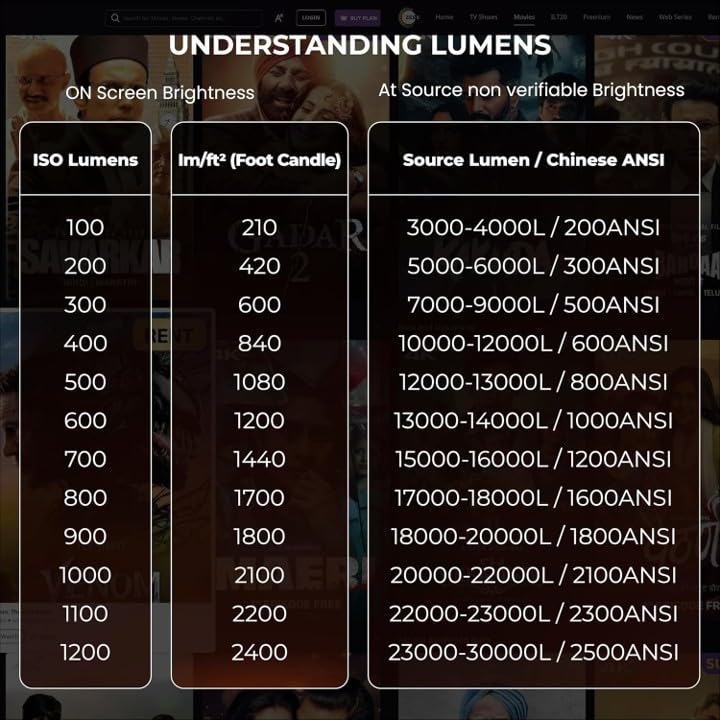
Image: A comparison table illustrating the difference between ISO Lumens and non-verifiable Source Lumens (often referred to as Chinese ANSI), emphasizing the importance of standardized brightness measurements.
8. Warranty & Support
8.1 Warranty Information
The E Gate Atom 4X Air Projector comes with a 1-year warranty from the date of purchase. To avail warranty benefits, it is mandatory to register your product. E Gate provides free home pickup and drop service during the warranty period. For more details, please visit the company's official website.
8.2 Customer Support
If you encounter any issues or have questions regarding your projector, please contact E Gate customer support. Contact information can typically be found on the official E Gate website or in the product packaging.
Manufacturer: Optroniq India (Importer)
Importer Contact Information: Optroniq India, 504, SG Alpha Tower-II, Sector-9, Vasundhara, Ghaziabad Uttar Pradesh 201012
Packer Contact Information: Egate Infotel Pvt Ltd. 503, SG Alpha Tower-II, Sector-9, Vasundhara, Ghaziabad, Uttar Pradesh -201012