
Anwick M1 Black
Anwick M1 Black Folding Mobility Scooter User Manual
Model: M1 Black
1. Introduction
Thank you for choosing the Anwick M1 Black Folding Mobility Scooter. This manual provides essential information for the safe and efficient operation, maintenance, and care of your new mobility device. Please read this manual thoroughly before operating the scooter to ensure proper use and to maximize its lifespan.
The Anwick M1 Black is a versatile 4-wheel electric mobility scooter designed for adults and seniors, offering compact portability for travel. It is engineered to provide reliable mobility with a robust design capable of supporting up to 265 pounds. With a maximum forward speed of 8 KM/H and a travel distance of 15-25 kilometers per charge, it is an ideal companion for both indoor and outdoor navigation.
2. Safety Information
Your safety is paramount. Always adhere to the following safety guidelines:
- Always operate the scooter on stable, level surfaces. Avoid steep inclines or uneven terrain that may compromise stability.
- Ensure the battery is fully charged before extended use to prevent unexpected power loss.
- Use headlights and rear brake lights, especially during low-light conditions or at night, to enhance visibility and alert others.
- Do not exceed the maximum weight capacity of 265 pounds.
- Avoid operating the scooter in heavy rain or through standing water to prevent damage to electrical components.
- Always engage the automatic braking mechanism when stopping, especially on inclines, to ensure the scooter remains stationary.
- Keep hands and clothing clear of moving parts, such as wheels and folding mechanisms.
Legal Disclaimer: Statements regarding dietary supplements have not been evaluated by the FDA and are not intended to diagnose, treat, cure, or prevent any disease or health condition. (Note: This disclaimer is provided as per the source data and is included for completeness.)
3. Product Overview
The Anwick M1 Black Folding Mobility Scooter is designed for ease of use and portability. Below are the key components of the scooter:
- Tiller/Handlebar: Controls steering, speed, and includes the control panel.
- Control Panel: Features speed dial, battery indicator, power switch, headlight switch, and horn button.
- Seat: Padded for comfort, with adjustable height and armrests.
- Footboard: Provides a stable platform for the user's feet.
- Wheels: Four wheels for stability, with 9-inch wheel size.
- Motor/Transaxle: Powers the scooter.
- Battery Pack: Provides power to the scooter.
- Front Basket: Convenient storage for personal items.
- Rear Seat Bag: Additional storage attached to the seat.

Figure 3.1: Anwick M1 Black Folding Mobility Scooter, showcasing its compact design with a front basket and rear seat bag.
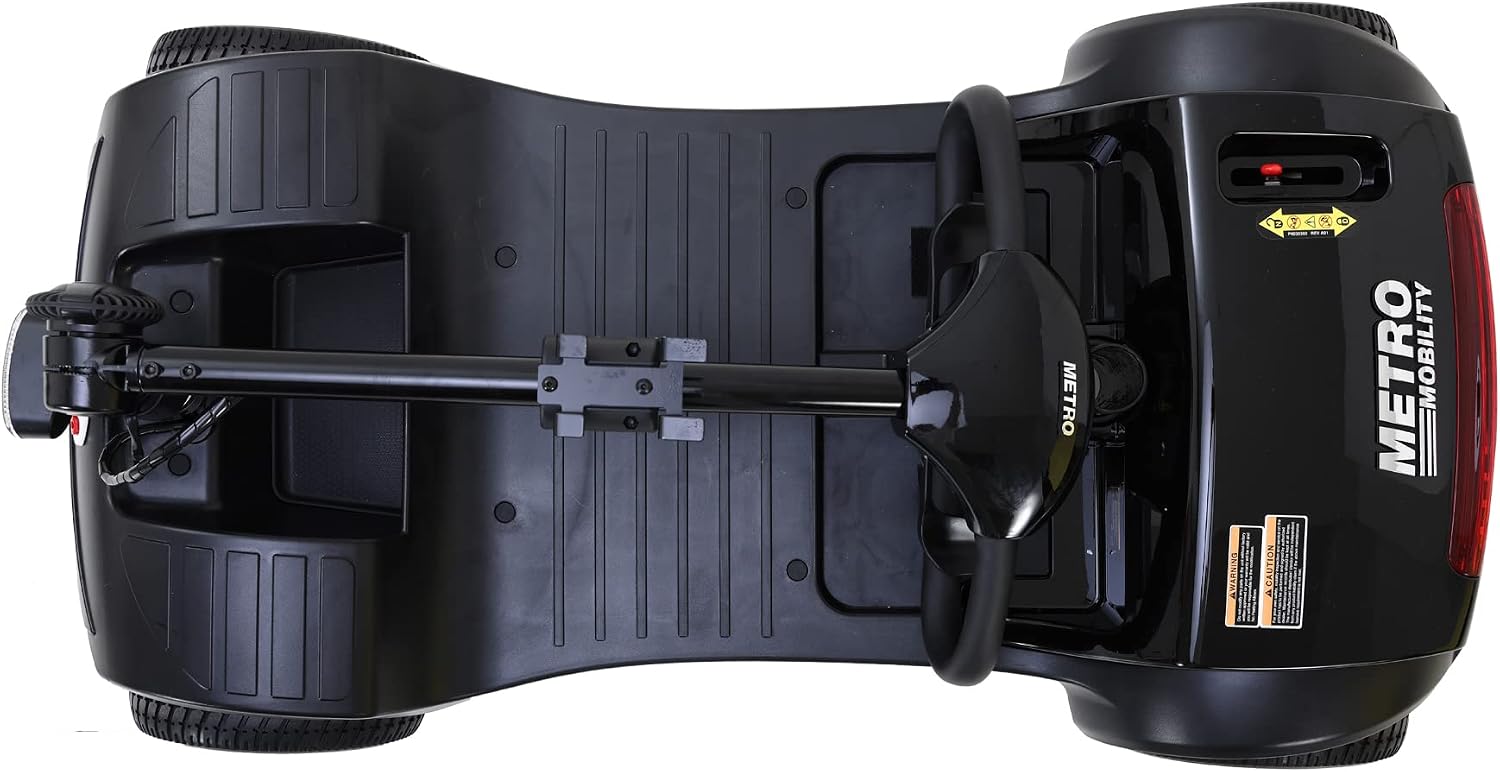
Figure 3.2: Detachable front wire basket for convenient storage.

Figure 3.3: Rear seat bag providing additional storage capacity.
4. Setup and Assembly
The Anwick M1 Black scooter is designed for quick and efficient assembly and disassembly, making it highly portable for travel and storage.
4.1 Initial Assembly
- Carefully remove all components from the packaging.
- Place the main base unit on a flat, stable surface.
- Insert the seat post into the receptacle on the base unit until it clicks securely into place.
- Attach the seat to the seat post. Ensure it is firmly seated and locked.
- Raise the tiller (handlebar column) and secure it in the upright position using the locking mechanism.
- Attach the front basket to the designated mounting points on the tiller.
4.2 Adjustments for Comfort
The scooter offers several adjustable features to enhance user comfort and control:
- Seat Height: Adjust the seat height to ensure your feet can comfortably reach the footboard and the ground.
- Armrest Width: The armrests can be adjusted for width to provide optimal support.
- Armrest Expandability: Armrests can also be expanded for additional space.
- Tiller Angle: Adjust the angle of the tiller for comfortable steering.
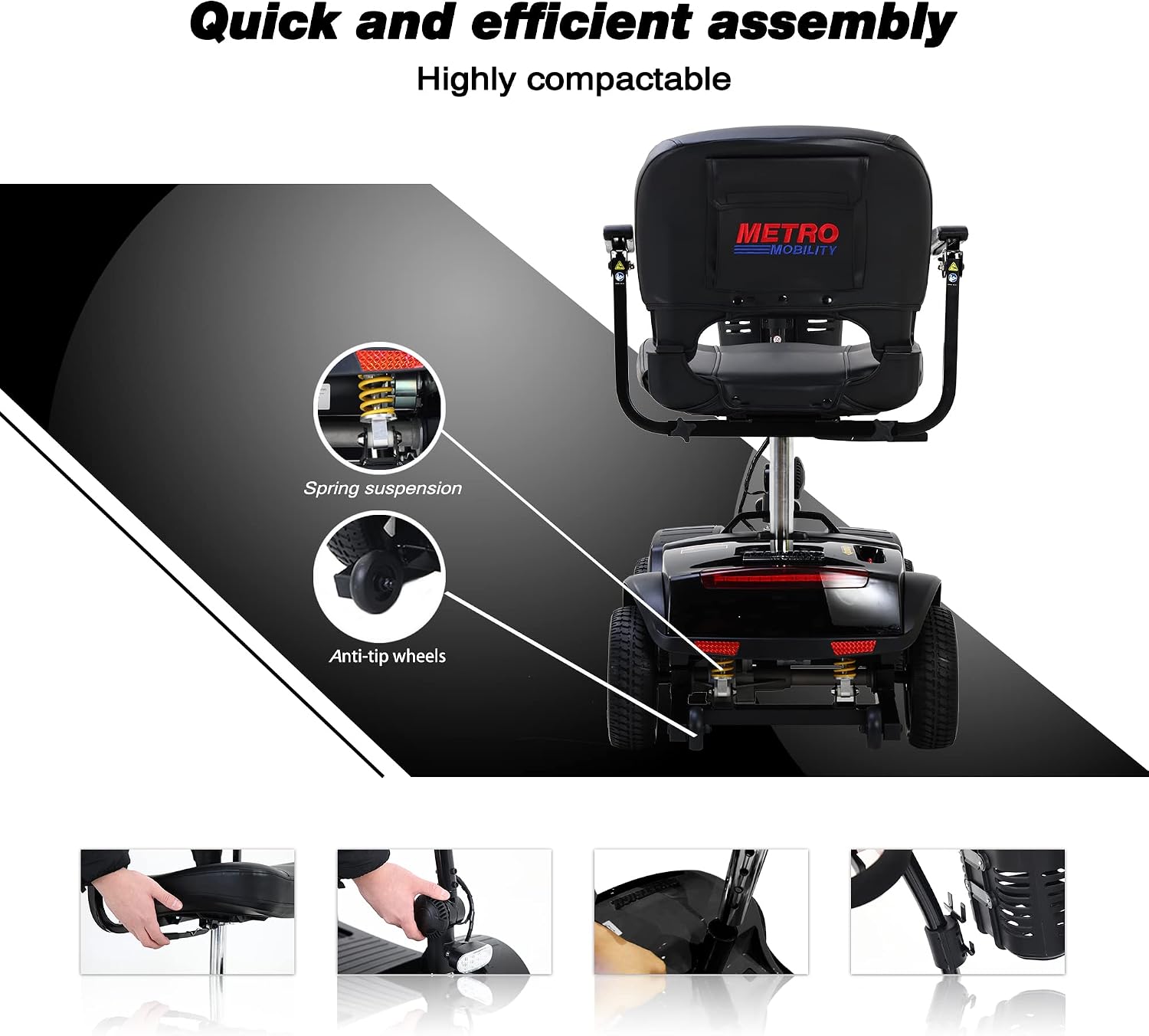
Figure 4.1: Visual guide for quick and efficient assembly and disassembly, highlighting key connection points.

Figure 4.2: Illustrations of adjustable features including armrest width and expandability.
5. Operating Instructions
Familiarize yourself with the control panel and operating procedures before your first ride.
5.1 Control Panel Overview
The control panel is conveniently located on the scooter's console:
- Power Switch: Turns the scooter on and off.
- Variable Speed Dial: Adjusts the maximum speed of the scooter. Turn towards 'Min' for slower speeds and 'Max' for faster speeds.
- Battery Life Indicator: Displays the current battery charge level. Monitor this regularly to avoid running out of power.
- Headlight Switch: Activates the front headlight for improved visibility.
- Forward/Reverse Lever: Push forward to move forward, pull back to move in reverse.
- Horn Button: Activates the horn for alerting others.
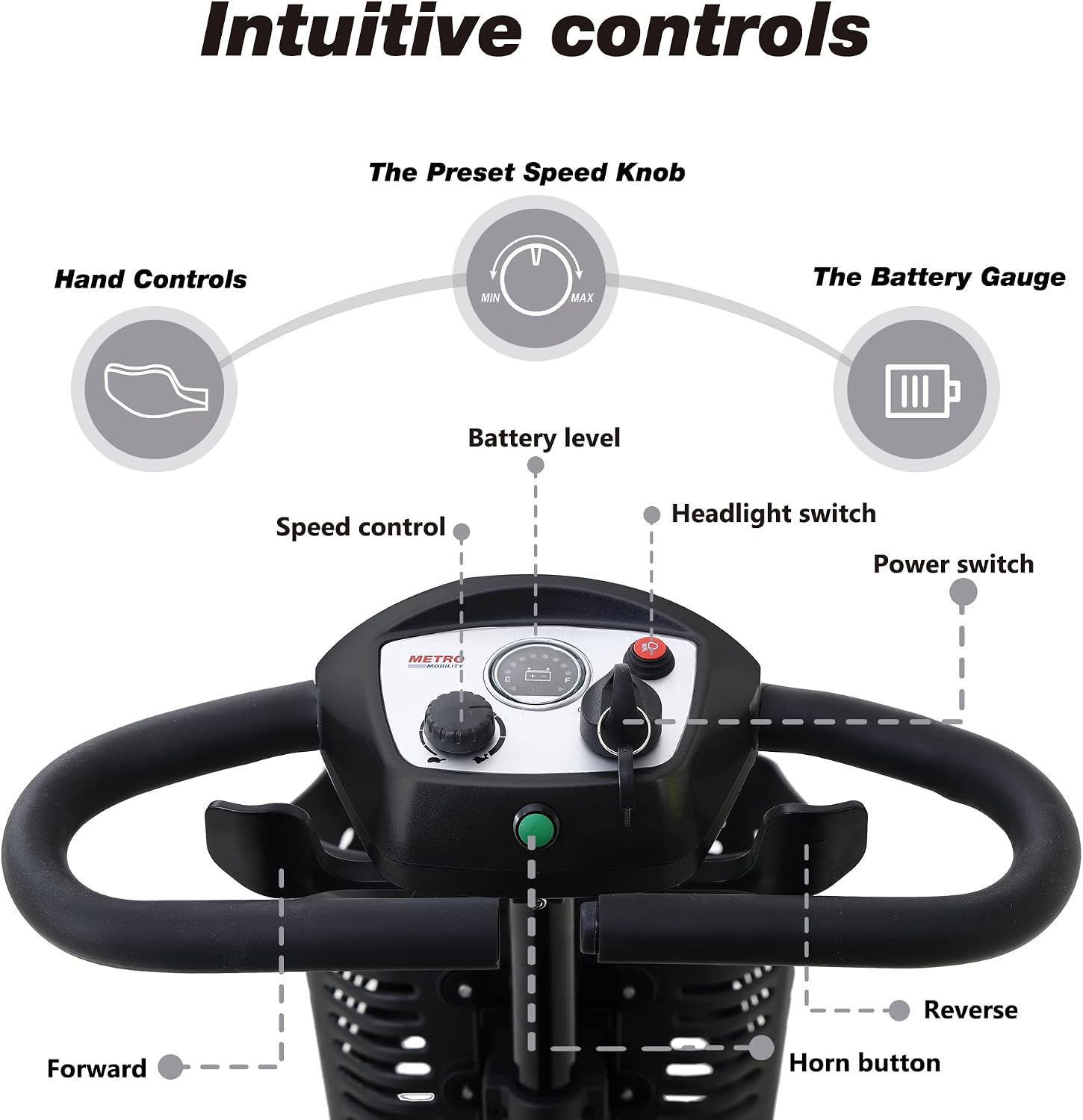
Figure 5.1: Detailed view of the intuitive control panel, showing the speed knob, battery gauge, and various switches.
5.2 Driving the Scooter
- Ensure the scooter is on a flat surface and you are seated comfortably.
- Turn the power switch to the 'ON' position.
- Set your desired maximum speed using the variable speed dial.
- To move forward, gently push the forward lever. To move in reverse, gently pull the reverse lever. The scooter will accelerate smoothly.
- To stop, release the lever. The scooter features an automatic braking mechanism that will engage when the lever is released, bringing the scooter to a controlled stop.
- For night driving or low-light conditions, activate the headlight using the headlight switch. The rear brake lights will illuminate automatically when braking.

Figure 5.2: Illustration of the automatic braking mechanism, demonstrating its effectiveness on inclines and friction-induced wheels preventing slipping.
6. Maintenance
Regular maintenance ensures the longevity and optimal performance of your Anwick M1 Black scooter.
6.1 Battery Care
- Charge the battery fully after each use, even if only used for a short period.
- Avoid completely draining the battery, as this can reduce its lifespan.
- If storing the scooter for an extended period, ensure the battery is fully charged and recharge it at least once a month.
- Use only the charger provided by the manufacturer.
6.2 Cleaning and Storage
- Clean the scooter regularly with a damp cloth. Avoid using abrasive cleaners or direct water spray.
- Keep all electrical connections dry and free from debris.
- Store the scooter in a dry, cool place, away from direct sunlight and extreme temperatures.
- When transporting, disassemble the scooter into its main components as shown in the setup section to protect it from damage.
6.3 General Inspection
- Periodically check all nuts and bolts for tightness.
- Inspect tires for wear and tear. The scooter is equipped with flat-free tires.
- Ensure all lights (headlight, brake lights) are functioning correctly.
7. Troubleshooting
This section addresses common issues you might encounter with your scooter.
| Problem | Possible Cause | Solution |
|---|---|---|
| Scooter does not power on. | Battery is not charged or connected; Power switch is off. | Ensure battery is fully charged and properly connected. Turn the power switch to 'ON'. |
| Scooter moves slowly or lacks power. | Low battery charge; Speed dial set too low; Overload. | Recharge battery; Adjust speed dial to a higher setting; Reduce load on scooter. |
| Scooter stops unexpectedly. | Battery critically low; Safety mechanism triggered (e.g., steep incline, obstacle). | Check battery indicator and recharge if necessary. Move to a flat surface. Remove any obstacles. |
| Lights are not working. | Headlight switch is off; Loose connection; Bulb failure. | Turn on headlight switch. Check connections. Contact customer support if bulb needs replacement. |
8. Specifications
Key technical specifications for the Anwick M1 Black Folding Mobility Scooter:
- Model Name: M1 Black
- Brand: Anwick
- Maximum Forward Speed: Up to 8 KM/H (approx. 4.97 MPH)
- Travel Distance Per Charge: 15-25 kilometers (approx. 10-16 miles)
- Weight Capacity: 265 pounds (approx. 120 kg)
- Wheel Size: 9 Inches
- Battery Type: Lead-acid 12V12AH*2pcs
- Climbing Angle: Up to 8 degrees
- Package Dimensions: 45.28 x 21.26 x 19.69 inches
- Product Weight: 105.82 Pounds (approx. 48 kg)

Figure 8.1: Visual representation of scooter dimensions and travel range.
Figure 8.2: Key performance metrics including speed, weight capacity, range, and climbing ability.
9. Warranty and Support
Anwick is committed to providing quality products and customer satisfaction.
9.1 Return Policy
This product is eligible for a 30-day easy return policy. Please refer to your purchase documentation or the retailer's website for specific terms and conditions regarding returns and refunds.
9.2 Customer Support
For any questions, technical assistance, or support needs, please contact Anwick customer service. Contact information can typically be found on the product packaging, the retailer's website, or by visiting the official Anwick store online.
We recommend keeping your purchase receipt and product serial number readily available when contacting support.
Ask a question about this manual
Ask about setup, troubleshooting, compatibility, parts, safety, or missing instructions. Manuals+ will review the question and use this page’s manual context to help answer it.