
LAUNCH CRP919XBT
LAUNCH CRP919XBT OBD2 Diagnostic Tool User Manual
Model: CRP919XBT
1. Introduction
The LAUNCH CRP919XBT is an advanced OBD2 diagnostic tool designed for comprehensive vehicle analysis and maintenance. It offers a wide range of functions including ECU Coding, Active Test, and over 35 special reset services. This device supports CANFD and DOIP protocols, provides VAG guided functions, and performs full system diagnostics across more than 100 vehicle brands. This manual provides essential information for setting up, operating, maintaining, and troubleshooting your CRP919XBT device.

Image 1.1: The LAUNCH CRP919XBT diagnostic tool, showcasing its robust design and user interface.
2. Setup
The CRP919XBT utilizes Bluetooth connectivity for wireless communication between the tablet and the Vehicle Communication Interface (VCI). This allows for flexible movement around the vehicle during diagnostics.
2.1 Connecting the VCI
- Locate the OBD2 port in your vehicle.
- Plug the VCI module into the vehicle's OBD2 port.
- Power on the CRP919XBT tablet.
- The VCI will automatically attempt to connect to the tablet via Bluetooth.
2.2 Indicator Lights
- Power Indicator Light: Illuminates when the VCI is powered on.
- Green Light: Flashes when the VCI is communicating with the vehicle.
- Blue Light: Indicates the VCI is wirelessly connected to the tablet.
- Red Light: Indicates the VCI is connected to the tablet via cable (if applicable).

Image 2.1: Illustration of the wireless VCI connection, allowing flexible diagnostics.
3. Operating Instructions
3.1 Full System Diagnostics
The CRP919XBT can perform a comprehensive scan of all available vehicle systems, including but not limited to PCM (Powertrain Control Module), ECM (Engine Control Module), EPS (Electric Power Steering), PDM (Powertrain Diagnostic Module), BCM (Body Control Module), and TPMS (Tire Pressure Monitoring System). Use the One-Click AutoVIN and AutoScan functions for quick identification and diagnosis of hidden issues.
- Data Stream Display: View live data in graphical format.
- Freeze Frame: Capture a snapshot of sensor data when a DTC is set.
- ECU Information: Retrieve detailed information about the vehicle's ECUs.

Image 3.1: The CRP919XBT performing OE-level full system diagnostics, identifying fault codes across various modules.
3.2 ECU Coding
The ECU Coding function allows for vehicle customization and programming tasks. This includes copying data to new modules for over 100 popular brands, disabling annoying features, unlocking hidden functions, and customizing OE settings. This feature streamlines vehicle programming and saves time.

Image 3.2: The ECU Coding interface, demonstrating the ability to customize vehicle settings and functions.
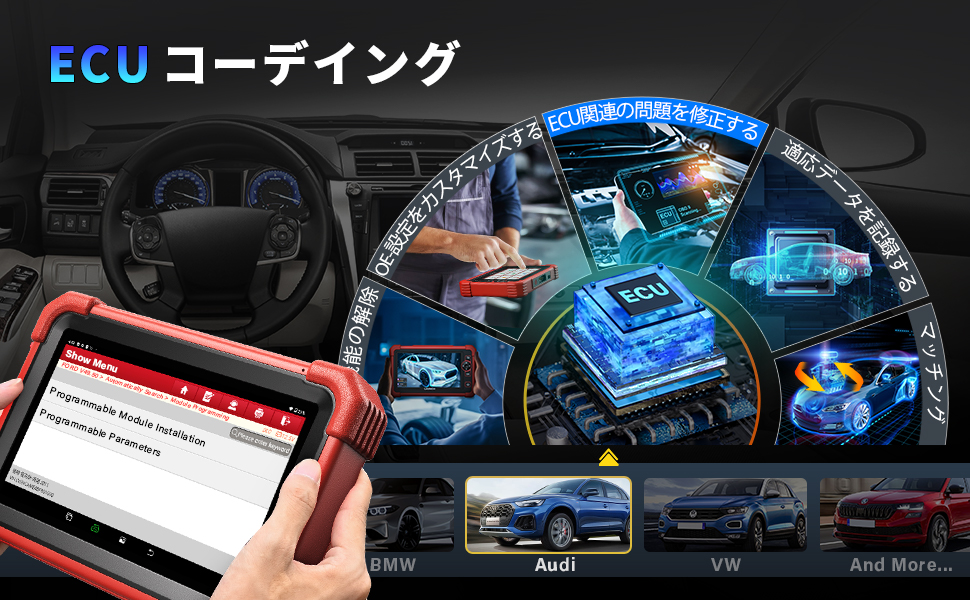
Image 3.3: Visual representation of ECU coding capabilities, including fixing ECU-related problems and recording adaptive data.
3.3 Bi-directional Control (Active Test)
The bi-directional control feature allows the CRP919XBT to send commands to vehicle systems and components to perform active tests. This helps technicians quickly identify and repair issues by verifying the operational status and functionality of actuators directly from the device. Examples include:
- Solenoid activation/deactivation
- Injector power cycling
- Cooling fan on/off tests
- EGR valve tests
- Window/door/sunroof operation tests

Image 3.4: Demonstrating bi-directional control, where the tool sends commands to test specific vehicle components.

Image 3.5: Active test interface showing command sending and receiving for component verification.
3.4 Special Reset Functions (35+)
The CRP919XBT is equipped with over 35 maintenance service functions to address various vehicle needs. These functions simplify complex repairs and routine maintenance tasks. The specific range of supported functions may vary by vehicle model.
- Oil Reset
- SAS (Steering Angle Sensor) Reset
- ABS Bleeding
- IMMO (Immobilizer) Service (for some Asian vehicles with low-grade anti-theft systems)
- EGR (Exhaust Gas Recirculation) Reset
- Throttle Reset
- EPB (Electronic Parking Brake) Reset
- Injector Coding
- TPMS (Tire Pressure Monitoring System) Reset
- DPF (Diesel Particulate Filter) Regeneration
- Gear Learning
- BMS (Battery Management System) Reset
- Coolant Air Bleeding
- Window Adjustment
- Headlamp Adjustment
- A/F (Air/Fuel) Reset
- Tire Reset
- Seat Adjustment

Image 3.6: Overview of various special reset functions available on the CRP919XBT.

Image 3.7: A more detailed visual representation of the 35+ maintenance functions, noting that functions vary by car model.
3.5 Supported Protocols
The CRP919XBT supports advanced communication protocols including DoIP (Diagnostics over Internet Protocol) and CAN FD (Controller Area Network Flexible Data-rate), ensuring seamless diagnostic experiences with newer vehicle models.
4. Maintenance
Regular maintenance of your CRP919XBT device ensures optimal performance and longevity. Keep the screen clean with a soft, dry cloth. Store the device in a cool, dry place away from direct sunlight and extreme temperatures. Ensure the VCI module and cables are free from damage before each use.
Software updates are crucial for maintaining compatibility with new vehicle models and accessing the latest features. The CRP919XBT offers 2 years of free updates. Connect the device to Wi-Fi and check for updates regularly through the system settings.
5. Troubleshooting
- Device Not Powering On: Ensure the device is fully charged or connected to a power source. Check the power adapter and cable for damage.
- VCI Not Connecting: Verify the VCI is securely plugged into the vehicle's OBD2 port. Ensure Bluetooth is enabled on the tablet and the VCI's blue indicator light is on. If issues persist, try restarting both the tablet and the vehicle.
- Diagnostic Communication Errors: Check that the vehicle's ignition is on. Ensure the VCI is properly connected and its green light is flashing during communication attempts. Confirm that the vehicle model and year are correctly selected in the diagnostic software.
- Specific Function Not Working: Some advanced functions, like IMMO, may have limited vehicle compatibility (e.g., specific Asian low-grade anti-theft systems). Refer to the vehicle coverage list or contact support for specific compatibility questions. If a reset function fails, ensure all prerequisites for that function are met as per the vehicle's service manual.
- Software Freezing/Lagging: Ensure the device has sufficient storage space. Close unnecessary applications. Perform a system update if available. If the issue persists, a factory reset might be necessary (back up important data first).
6. Specifications
| Feature | Description |
|---|---|
| Model | CRP919XBT |
| Connectivity | Bluetooth (Wireless VCI), Cable |
| Operating System | Android 10.0 |
| RAM & ROM | 4GB RAM + 64GB ROM |
| Screen Size | 7 inches |
| Battery Capacity | 6300mAh |
| Special Functions | 35+ Maintenance Services |
| Supported Protocols | CANFD, DoIP |
| Vehicle Coverage | 100+ Vehicle Manufacturers |
| Updates | 2 Years Free Updates |

Image 6.1: Comparison of CRP919XBT specifications against CRP919X and CRP909X.
7. Warranty and Support
7.1 Warranty Information
The LAUNCH CRP919XBT comes with a one-year manufacturer's warranty. Please retain your proof of purchase for warranty claims. For detailed warranty terms and conditions, refer to the official LAUNCH website or contact customer service.
7.2 Customer Support
For technical assistance, product inquiries, or warranty support, please contact LAUNCH customer service. You may also find additional resources, FAQs, and software updates on the official LAUNCH website.
Related documentsCRP919XBT


Ask a question about this manual
Ask about setup, troubleshooting, compatibility, parts, safety, or missing instructions. Manuals+ will review the question and use this page’s manual context to help answer it.