
1. Introduction
The BAOFENG GT-5R is a versatile dual-band UHF/VHF two-way radio designed for reliable communication. It offers a wide range of features, including 128 channels, an 1800mAh battery, and compatibility with CHIRP software for easy programming. This manual provides essential information for the proper setup, operation, and maintenance of your GT-5R radio.

The BAOFENG GT-5R is designed for ease of use, making it suitable for various communication needs.
2. Package Contents
Please verify that all items listed below are included in your package:
- BAOFENG GT-5R Two-Way Radio Unit
- 1800mAh Li-ion Battery
- Antenna
- Desktop Charger Base
- Power Adapter for Charger
- Belt Clip
- Hand Strap
- Earpiece with Microphone
- User Manual

Ensure all listed components are present in your product packaging.
3. Product Overview
Familiarize yourself with the main components and controls of your GT-5R radio.

The BAOFENG GT-5R features a clear display and a full keypad for easy operation.
Key Components:
- Antenna: For transmitting and receiving signals.
- PTT (Push-to-Talk) Button: Press to transmit, release to receive.
- Speaker/Microphone: For audio output and input.
- LCD Display: Shows frequency, channel, battery status, and other indicators.
- Keypad: For entering frequencies, channel numbers, and accessing menu functions.
- VFO/MR Button: Toggles between Frequency Mode (VFO) and Channel Mode (MR).
- A/B Button: Switches between upper and lower frequency bands on the display.
- BAND Button: Switches between VHF and UHF bands.
- MENU Button: Accesses the radio's menu settings.
- EXIT Button: Exits menu or cancels current operation.
- Battery Pack: Provides power to the radio.

Physical dimensions and key feature icons of the GT-5R.
4. Setup
4.1. Battery Installation and Charging
- Align the battery pack with the grooves on the back of the radio.
- Slide the battery upwards until it clicks into place.
- To remove, press the battery release latch (if present) and slide the battery downwards.
- Place the radio with the battery installed into the desktop charger.
- Connect the power adapter to the charger and plug it into a standard AC outlet.
- The charger indicator light will show charging status (typically red for charging, green for fully charged).
4.2. Antenna Attachment
Screw the antenna clockwise onto the connector at the top of the radio until it is finger-tight. Do not overtighten.
5. Operating Instructions
5.1. Power On/Off and Volume
- To power on, rotate the power/volume knob clockwise until you hear a click.
- Continue rotating the knob to adjust the volume.
- To power off, rotate the knob counter-clockwise until you hear a click.
5.2. Channel Selection
- In Channel Mode (MR), use the UP/DOWN arrow keys to scroll through programmed channels.
- In Frequency Mode (VFO), directly enter the desired frequency using the keypad.
5.3. Transmitting and Receiving
- To transmit, press and hold the PTT (Push-to-Talk) button on the side of the radio. Speak clearly into the microphone.
- Release the PTT button to switch to receive mode.
5.4. VOX Function (Voice Operated Exchange)
The VOX function allows for hands-free operation. When enabled, the radio will automatically transmit when it detects your voice, eliminating the need to press the PTT button.
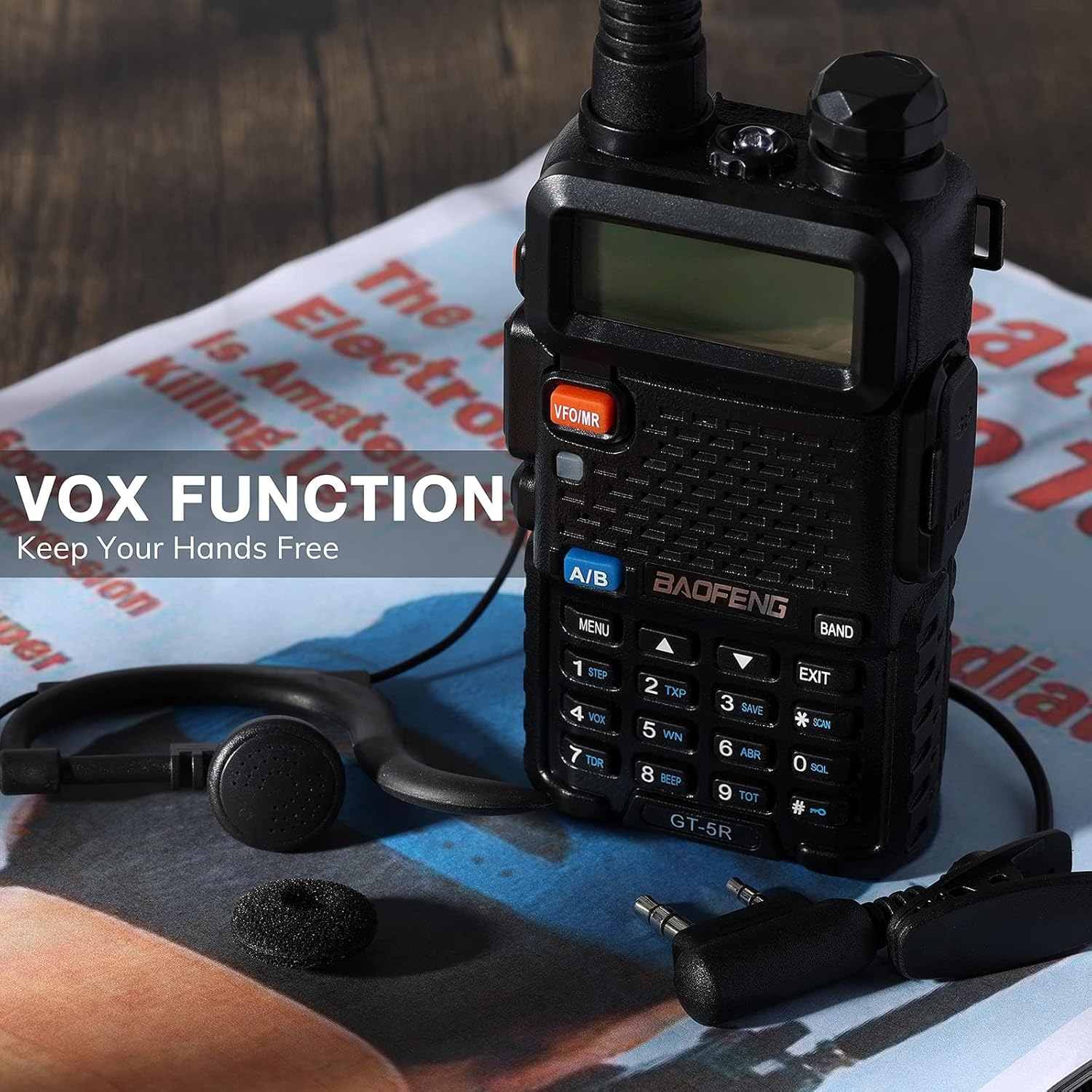
The VOX function enables hands-free communication, ideal for situations where manual PTT operation is inconvenient.
6. Features
6.1. Dual Band Operation
The GT-5R supports both UHF (Ultra High Frequency) and VHF (Very High Frequency) bands, allowing for flexible communication across different frequency ranges (144-146MHz / 430-440MHz).
6.2. CHIRP Software Support
The radio is compatible with CHIRP programming software, which simplifies the process of managing channels, frequencies, and other settings via a computer. This allows for easy customization and backup of your radio's configuration.

CHIRP software compatibility streamlines the programming and management of your radio's settings.
6.3. 128 Channel Capacity
The GT-5R can store up to 128 memory channels, allowing you to pre-program frequently used frequencies and settings for quick access.
6.4. FM Radio Function
In addition to two-way communication, the GT-5R includes an FM radio receiver, allowing you to listen to broadcast FM stations.
6.5. SOS Function
The SOS function can be activated to emit an emergency alarm signal.
6.6. Keypad Lock
Prevents accidental key presses by locking the keypad.
6.7. Channel Scan
Automatically scans through programmed channels or frequencies to detect active transmissions.
6.8. Built-in Flashlight
A small LED flashlight is integrated into the radio for convenience in low-light conditions.
7. Maintenance
- Cleaning: Use a soft, damp cloth to clean the radio's exterior. Do not use harsh chemicals or solvents.
- Battery Care: To prolong battery life, avoid overcharging or completely draining the battery. Store the battery in a cool, dry place when not in use.
- Storage: If storing the radio for an extended period, remove the battery.

While robust, proper care and cleaning will ensure the longevity of your radio.
8. Troubleshooting
| Problem | Possible Cause | Solution |
|---|---|---|
| Radio does not power on | Battery is low or not installed correctly. | Charge the battery or re-install it properly. |
| Cannot transmit or receive | Incorrect frequency/channel, antenna not attached, or out of range. | Verify frequency/channel, ensure antenna is secure, move closer to other radios. |
| Poor audio quality | Low battery, interference, or volume too low/high. | Charge battery, move away from interference sources, adjust volume. |
| Keypad unresponsive | Keypad lock is enabled. | Disable keypad lock (refer to operating instructions for specific key combination). |
9. Specifications
| Feature | Specification |
|---|---|
| Brand | BAOFENG |
| Model | GT-5R |
| Frequency Range | VHF: 144-146MHz, UHF: 430-440MHz |
| Number of Channels | 128 |
| Battery Type | 1800mAh Li-ion Battery |
| Operating Voltage | 7.4 Volts (DC) |
| Maximum Talk Range | 5 Kilometers (approximate, depends on terrain and conditions) |
| Dimensions (Radio Unit) | Approx. 106mm (Height) x 55mm (Width) x 28mm (Depth) |
| Weight (with battery and antenna) | Approx. 500 grams |
| Water Resistance Level | Not water resistant |
10. Warranty and Support
For warranty information and technical support, please refer to the documentation provided with your purchase or visit the official BAOFENG brand store. Keep your proof of purchase for any warranty claims.