
Introduction
This manual provides essential instructions for the safe and effective use of your SLuB Heated Blanket, Model 1211X. Please read this manual thoroughly before first use and retain it for future reference. This wearable flannel heated blanket features USB fast heating, three temperature levels, and an automatic shut-off function for your comfort and safety.

Image: The SLuB Heated Blanket shown folded and worn as a cape, highlighting its wearable design and heating elements.
Important Safety Instructions
WARNING: To reduce the risk of burns, electric shock, fire, or injury to persons, this product must be used in accordance with the following instructions:
- Do not use with an infant, a child, an incapacitated person, a paraplegic, a quadriplegic, a diabetic, anyone insensitive to heat, or anyone who cannot clearly understand the instructions and/or operate the controls.
- Do not use if the blanket is wet.
- Do not use this blanket in conjunction with another heating pad or blanket.
- Never use the blanket if the USB cable or controller is damaged.
- Do not fold, crease, or bunch the blanket tightly during use. This can cause overheating.
- Always disconnect the power source (USB power bank or adapter) before cleaning or storing the blanket.
- Do not insert pins or other metallic objects into the blanket.
- Do not use for pets.
- Store the blanket loosely rolled or folded. Avoid sharp folds.
- This blanket is for personal use only.
Product Features
- Material: Plush flannel fabric, soft and skin-friendly.
- Dimensions: Approximately 150 x 85 cm (59" x 33").
- Heating Elements: 5 built-in heating panels for efficient warmth.
- Power Source: 5V/2A USB port charging (compatible with power banks, wall adapters, car chargers).
- Temperature Settings: 3 levels (High: 60°C ± 5°C, Medium: 50°C ± 5°C, Low: 40°C ± 5°C).
- Control: Single push-button design for easy temperature adjustment.
- Safety: Automatic shut-off feature.
- Maintenance: Machine washable (gentle cycle) after disconnecting power and removing power bank.
- Portability: Integrated pocket for a power bank, suitable for outdoor, office, and home use.
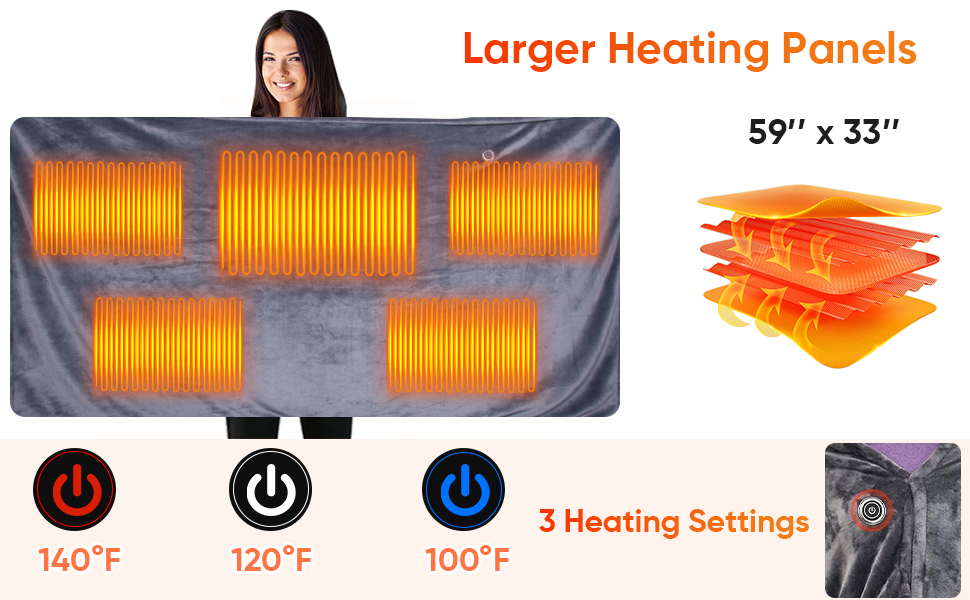
Image: A visual representation of the blanket's five heating panels, its dimensions (59" x 33"), and the three available heating settings (140°F, 120°F, 100°F).

Image: A close-up view highlighting the soft and warm coral fleece material of the blanket.

Image: A detailed view of the blanket's zipper design, indicating its functionality for wearability.
Setup
- Unpack: Carefully remove the heated blanket from its packaging.
- Inspect: Check the blanket and USB cable for any visible damage. Do not use if damaged.
- Connect Power: Locate the USB cable integrated into the blanket. Connect it to a compatible 5V/2A USB power source. This can be:
- A portable power bank (recommended for mobility).
- A USB wall adapter.
- A car charger with a USB port.
Note: Ensure your power source provides 5V/2A output for optimal heating performance. Low output sources (e.g., some laptop USB ports) may not provide sufficient power.
- Position Power Bank (if applicable): If using a power bank, place it in the designated pocket on the blanket.

Image: Visual guide demonstrating compatible USB power sources including portable chargers, wall adapters, and car chargers, and indicating that low-output sources are not suitable.
Operating Instructions
- Power On: Once connected to a power source, locate the control button on the blanket. Press and hold the power button for approximately 3 seconds to turn on the heating function. The indicator light will illuminate.
- Adjust Temperature: Short press the power button to cycle through the three heating levels:
- Red Light: High temperature (60°C ± 5°C / 140°F ± 9°F)
- White Light: Medium temperature (50°C ± 5°C / 120°F ± 9°F)
- Blue Light: Low temperature (40°C ± 5°C / 100°F ± 9°F)
Select the desired temperature setting for your comfort.
- Automatic Shut-Off: The blanket is designed with an automatic shut-off feature for safety. The exact duration is not specified, but it will power off after a period of continuous use.
- Power Off: To turn off the blanket manually, press and hold the power button again for approximately 3 seconds until the indicator light turns off.

Image: A detailed view of the three-speed temperature adjustment button, showing the red, white, and blue indicator lights corresponding to high, medium, and low heat settings respectively.
Maintenance
Proper care ensures the longevity and safe operation of your heated blanket.
- Disconnect Power: ALWAYS disconnect the USB cable from the power source and remove any power bank from its pocket before cleaning.
- Protect USB Connector: Ensure the USB protective cover is securely closed over the USB connector before washing to prevent water damage.
- Washing Instructions:
- Machine Wash: Use a gentle cycle with cold water. It is recommended to place the blanket in a mesh laundry bag to protect it during washing.
- Hand Wash: Gently hand wash with mild detergent in cold water.
- Do Not Bleach.
- Do Not Iron.
- Do Not Dry Clean.
- Drying: After washing, gently squeeze out excess water. Hang to air dry naturally. Ensure the blanket is completely dry before reconnecting to power or storing. Do not tumble dry.
- Storage: Store the blanket in a cool, dry place. Avoid folding it tightly or placing heavy objects on it, which could damage the internal heating elements.

Image: A user demonstrating how to prepare the blanket for washing by covering the USB port, then placing it into a washing machine.
Troubleshooting
| Problem | Possible Cause | Solution |
|---|---|---|
| Blanket does not heat. |
|
|
| Indicator light is off. |
|
|
| Blanket feels too hot/cold. |
|
|
Specifications
| Feature | Detail |
|---|---|
| Brand | SLuB |
| Model Name | 1211X |
| Material | Cotton (Flannel) |
| Color | Grey |
| Product Dimensions | 59"L x 33"W (approx. 150cm x 85cm) |
| Power Input | 5V/2A USB |
| Heating Levels | 3 (Low: 40°C, Medium: 50°C, High: 60°C, all ± 5°C) |
| Special Feature | Wearable, Auto Shut-Off, Machine Washable |
| Item Weight | 1.66 pounds |
| UPC | 742952896446 |
Warranty and Support
This product is covered by a return policy of 30 days for refund or replacement, as per Amazon's policy at the time of purchase. For specific warranty details beyond this period, please refer to the manufacturer's documentation included with your product or contact SLuB customer support.
For further assistance or inquiries, please visit the official SLuB store on Amazon: SLuB Store.