
1. Product Overview
The OREiN Solar Flood Lights (Model OL3300150) are designed to provide efficient and reliable outdoor illumination. These lights feature a built-in 2600mAh battery, a highly efficient monocrystalline silicon solar panel for faster charging, and a 120-degree motion sensor. With IP65 waterproofing and multiple lighting modes, they are suitable for various outdoor applications such as patios, garages, yards, and pathways.

Image 1.1: Two OREiN Solar Flood Lights. These lights are designed for outdoor use, featuring a solar panel on top and a main light unit with a motion sensor below.
2. Product Features
- High-Efficiency Solar Charging: Equipped with a monocrystalline silicon solar panel, offering up to 50% faster charging efficiency compared to standard solar panels.
- Long-Lasting Battery: Features a 2600mAh high-capacity built-in battery, providing 10-15 hours of illumination on a full charge.
- Bright and Anti-Glare Illumination: Delivers bright 5000K cool white light, equivalent to 3000 lumens. The inner panel incorporates focusing holes technology for concentrated light, and an anti-glare protective outer cover to prevent direct eye discomfort.
- Advanced Motion Sensing: Integrated 120-degree motion sensor detects movement within a 26-foot range, enhancing security and energy efficiency.
- Three Lighting Modes: Offers versatile lighting options:
- Off-On-Off Mode: Light activates at full brightness for 20 seconds upon motion detection, then turns off.
- Dim-Bright-Dim Mode: Light stays dim, then brightens to full intensity for 20 seconds upon motion detection, returning to dim.
- Dim Light Mode: Maintains a low brightness throughout the night and turns off automatically during the day. The motion sensor is inactive in this mode.
- Durable and Weatherproof: Constructed from PC+ABS material with a black rubber ring, ensuring IP65 waterproof rating for resistance against rain, snow, heat, and dust.
- Easy Installation & Portable Design: Designed for simple wall-mount installation and can also be used as a portable light for activities like camping.

Image 2.1: Key features of the OREiN Solar Flood Light, including its multiple modes, battery capacity, motion sensor, waterproofing, and solar power.

Image 2.2: Illustration of the upgraded solar panel's construction (tempered glass, EVA, cell, PVP) and the honeycomb anti-glare design of the LED array.

Image 2.3: Visual representation of the 120-degree sensing angle and 26-foot detecting distance of the motion sensor, covering an irradiation area of 800 sq ft.
3. Package Contents
Each OREiN Solar Flood Light package (Model OL3300150) typically includes the following items:
- OREiN Solar Flood Light Unit (x2 for 2-pack)
- Mounting Screws and Wall Anchors
- User Manual (this document)
- LED Lens (integrated)
4. Specifications
| Attribute | Specification |
|---|---|
| Model Name | OL3300150 |
| Brand | OREiN |
| Dimensions (L x W x H) | 7.87" x 4.33" x 5.12" |
| Item Weight | 2.08 Pounds (per light) |
| Power Source | Solar Powered |
| Battery Capacity | 2600mAh Lithium Ion (built-in) |
| Light Source Type | LED |
| Color Temperature | 5000K Cool White |
| Brightness | Equivalent to 3000lm |
| Wattage | 8 watts |
| Voltage | 3.7 Volts |
| Motion Sensor Angle | 120° |
| Motion Sensor Distance | Up to 26 feet |
| Water Resistance Level | IP65 Waterproof |
| Material | PC+ABS, Glass (solar panel) |
| Installation Type | Wall Mount |

Image 4.1: Product dimensions of the OREiN Solar Flood Light.
5. Installation
For optimal performance, install the solar flood light in a location that receives direct sunlight for at least 6-8 hours daily. Ensure the solar panel is not obstructed by trees, buildings, or other structures.
Wall Mount Installation Steps:
- Step 1: Mark and Drill Holes. Choose a suitable mounting location. Use the light's bracket as a template to mark the positions for two drill holes. Drill the holes and insert the provided drywall anchors if installing on a masonry or drywall surface.
- Step 2: Secure the Bracket. Align the light bracket with the drilled holes. Use the provided screws to firmly secure the bracket to the mounting surface.
- Step 3: Attach and Adjust Light. Attach the solar flood light unit to the secured bracket. Adjust the angle of the solar panel to maximize sun exposure and the direction of the light head to illuminate the desired area.
Note: If installing on a wooden wall, drywall anchors are typically not required. Simply drill pilot holes and secure the bracket directly with screws.
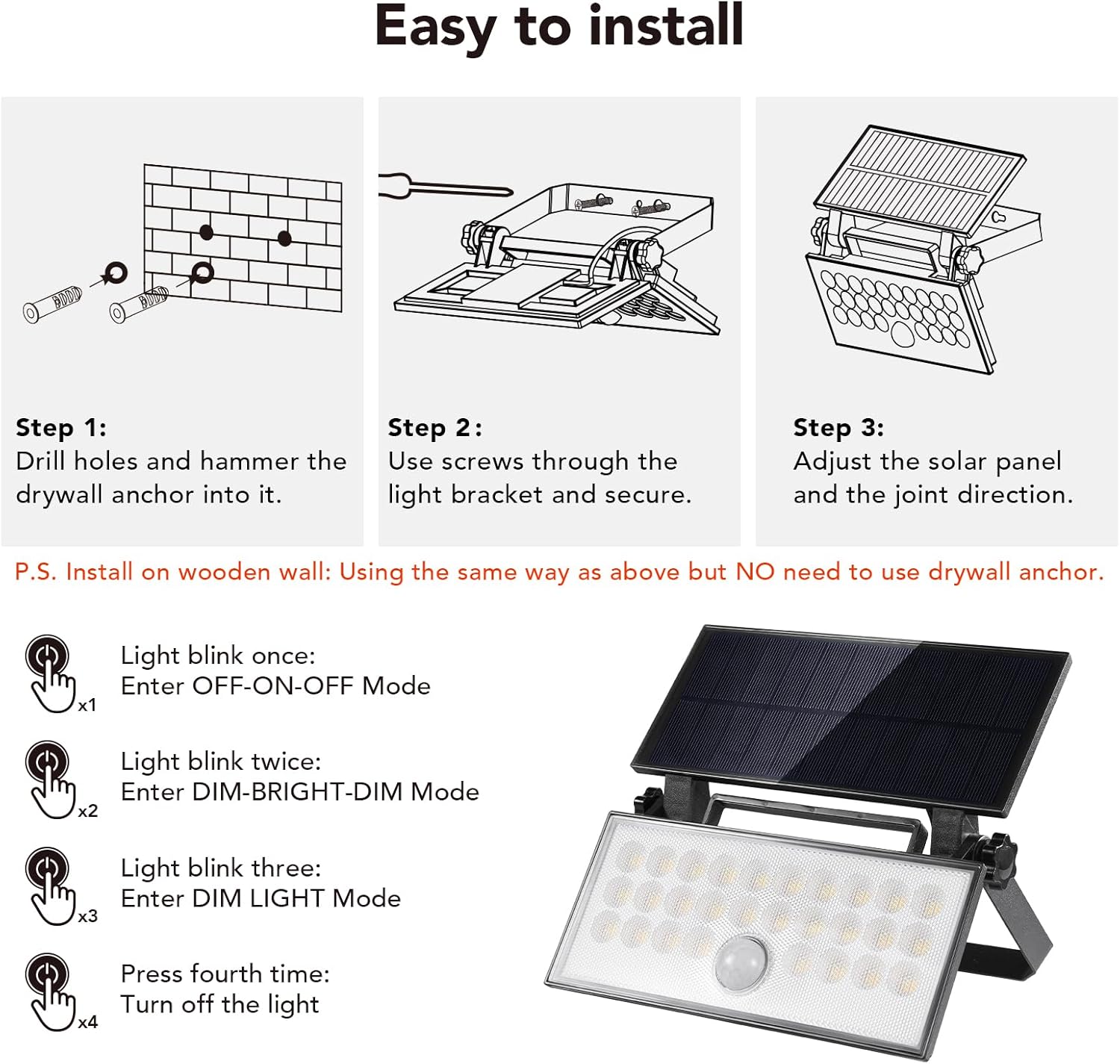
Image 5.1: Visual guide for installing the OREiN Solar Flood Light, showing the process from marking holes to final adjustments.
6. Operation
The OREiN Solar Flood Light features a single red push button for controlling its lighting modes. The light will automatically charge during the day and activate at night based on the selected mode.
Changing Lighting Modes:
- First Press (x1): Off-On-Off Mode
The light will blink once to indicate this mode. When motion is detected, the light will illuminate at 100% brightness for 20 seconds, then turn off completely.
- Second Press (x2): Dim-Bright-Dim Mode
The light will blink twice to indicate this mode. The light will maintain a dim illumination (approx. 30% brightness). Upon motion detection, it will brighten to 100% for 20 seconds, then return to dim.
- Third Press (x3): Dim Light Mode
The light will blink three times to indicate this mode. The light will stay on at a constant dim brightness (approx. 30% brightness) throughout the night. The motion sensor is inactive in this mode.
- Fourth Press (x4): Turn Off Light
Pressing the button a fourth time will turn the light off completely.
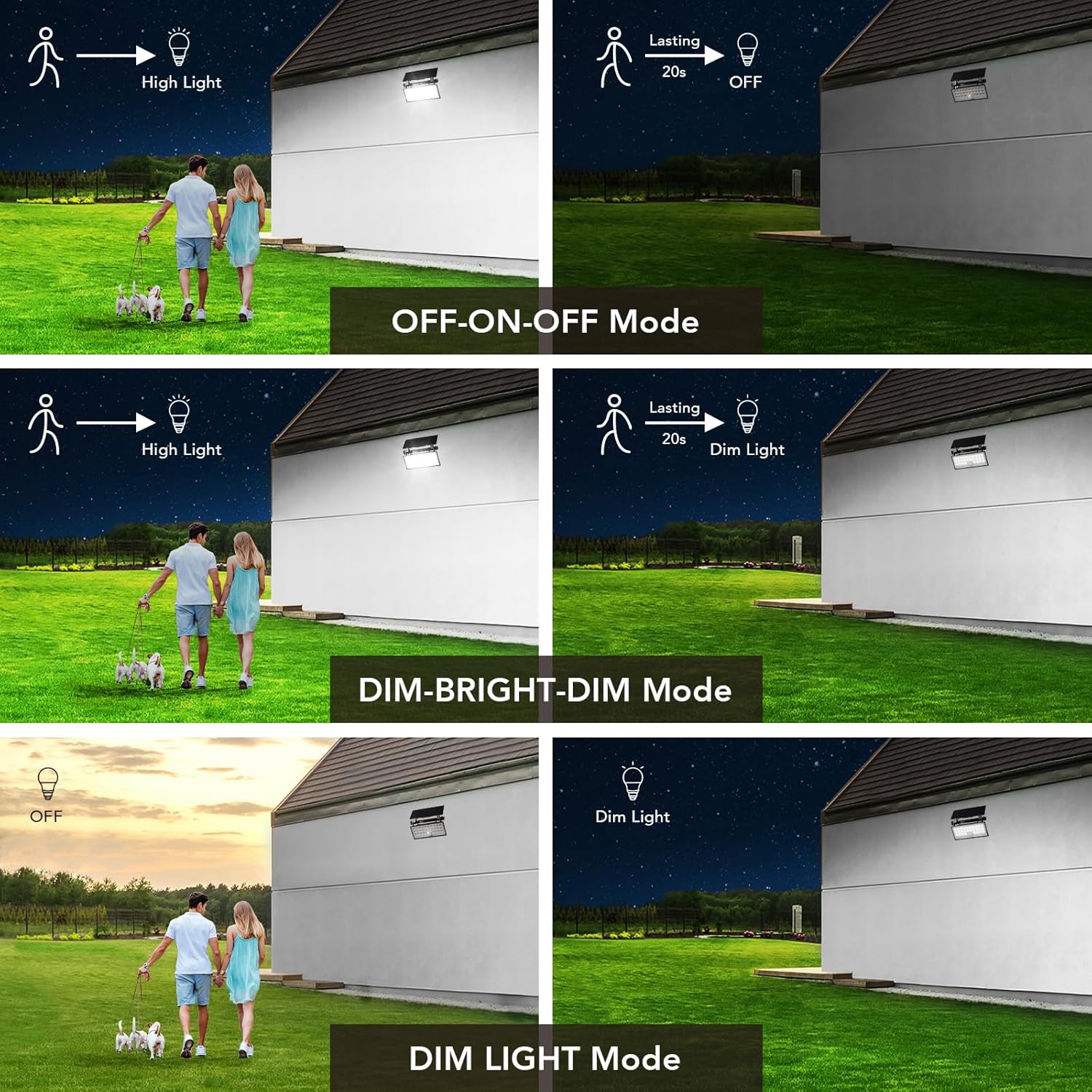
Image 6.1: Detailed explanation of the three operational modes and how the light responds to motion in each setting.

Image 6.2: Example of the solar light activating upon motion detection, providing illumination for a pathway.
7. Maintenance
Regular maintenance ensures the longevity and optimal performance of your OREiN Solar Flood Lights.
- Clean Solar Panel: Periodically wipe the solar panel with a soft, damp cloth to remove dust, dirt, leaves, or snow. A clean panel ensures maximum sunlight absorption and charging efficiency.
- Inspect Mounting: Check the mounting screws and bracket periodically to ensure they remain secure, especially after strong winds or storms.
- Clear Obstructions: Ensure no new obstructions (e.g., growing branches) are blocking direct sunlight from reaching the solar panel.
- Battery Care: The built-in lithium-ion battery is designed for long life. Avoid prolonged storage in extreme temperatures. If storing for an extended period, ensure the light is fully charged before storage and recharge every few months.
8. Troubleshooting
If you encounter issues with your OREiN Solar Flood Light, refer to the following common troubleshooting steps:
| Problem | Possible Cause | Solution |
|---|---|---|
| Light does not turn on at night. | Insufficient solar charge. | Ensure the solar panel is receiving 6-8 hours of direct sunlight daily. Clean the solar panel surface. Relocate the light if necessary. |
| Light stays dim or turns off too quickly. | Low battery charge. | Allow the light to charge for a full day in direct sunlight. Check for obstructions on the solar panel. |
| Motion sensor not working or too sensitive. | Incorrect mode selected or sensor obstruction. | Ensure the light is not in "Dim Light Mode" (where the sensor is inactive). Check if anything is blocking the sensor. Adjust the light's position if it's detecting unwanted motion (e.g., passing cars). |
| Light flickers. | Low battery or faulty connection. | Allow for a full day's charge. If the problem persists, contact customer support. |
| Light is not as bright as expected. | Insufficient charge or dirty lens. | Ensure adequate charging time. Clean the light's lens. |
9. Warranty and Support
OREiN Solar Flood Lights come with a 12-month warranty from the date of purchase. This warranty covers manufacturing defects and issues arising from normal use.
For warranty claims, technical assistance, or any questions regarding your product, please contact OREiN customer support. Provide your model number (OL3300150) and proof of purchase when contacting support.
Contact Information:
- Online: Visit the OREiN Store on Amazon: OREiN Amazon Store
- Email: Refer to your purchase confirmation for direct email support.
- Phone: 1(844)506-1530 (24-Hour Service)
We are committed to providing excellent service and will respond to inquiries within 24 hours.

Image 9.1: OREiN customer support is available to assist with product inquiries and issues.

