
1. Introduction
Thank you for choosing the Havit PB89 Powerbank. This portable power solution is designed to provide reliable and efficient charging for your mobile devices on the go. With its high capacity and compact design, it ensures your devices stay powered throughout the day. Please read this manual carefully before using the product to ensure proper operation and to maximize its lifespan.
2. Safety Information
To ensure safe operation and prevent damage, please observe the following precautions:
- Do not expose the power bank to extreme temperatures (above 60°C / 140°F or below 0°C / 32°F), direct sunlight, or fire.
- Do not immerse the power bank in water or other liquids.
- Avoid dropping, hitting, or disassembling the device. Unauthorized disassembly will void the warranty.
- Keep out of reach of children.
- Use only certified charging cables and adapters.
- If the power bank swells, emits an odor, or becomes excessively hot, discontinue use immediately.
- Dispose of the power bank responsibly according to local regulations. Do not dispose of it with household waste.
3. Package Contents
Please check the package for the following items:
- Havit PB89 Powerbank (1 unit)
- USB Charging Cable (1 unit)
- User Manual (this document)
4. Product Overview
The Havit PB89 Powerbank features a sleek, ergonomic design with multiple ports for versatile charging. Below is an overview of its components:

Figure 4.1: Front view of the Havit PB89 Powerbank, showing the Havit logo and LED indicator lights.
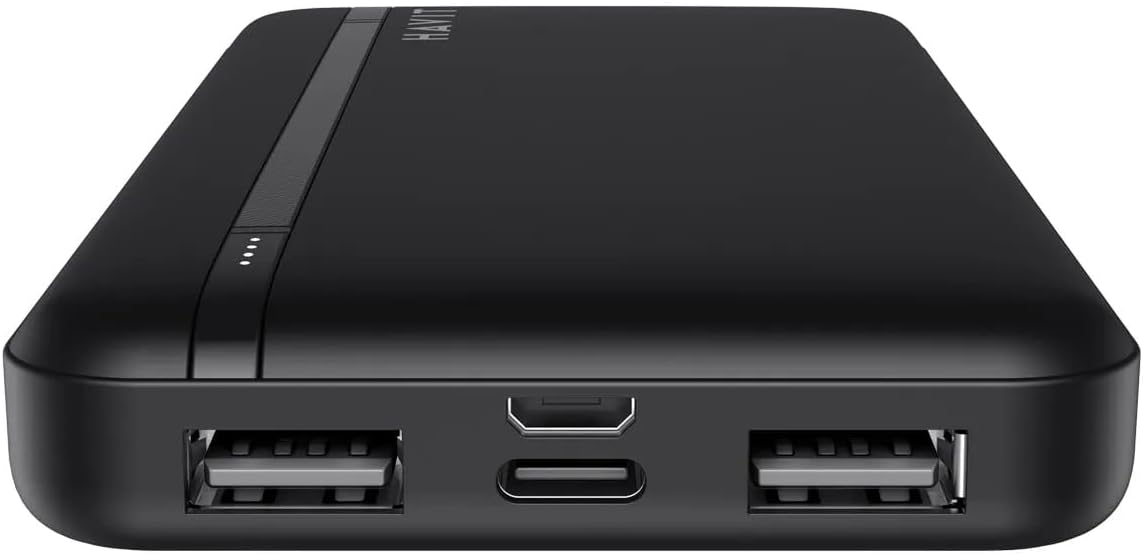
Figure 4.2: Close-up view of the Havit PB89 Powerbank's input and output ports, including two USB-A output ports, one Micro-USB input port, and one USB-C input port.
- LED Indicators: Four LED lights indicate the remaining battery capacity. Each light represents approximately 25% of the charge.
- USB-A Output Ports (x2): Used to charge external devices.
- Micro-USB Input Port: Used to charge the power bank.
- USB-C Input Port: Used to charge the power bank.
- Power Button: Press once to check battery level or initiate charging.
5. Setup
Before first use, it is recommended to fully charge your Havit PB89 Powerbank.
- Initial Charge: Connect the power bank to a power source (such as a wall adapter or computer USB port) using either the Micro-USB or USB-C input port and the provided USB cable.
- The LED indicators will light up to show the charging progress. All four LEDs will be solid when fully charged.
6. Operating Instructions
6.1. Charging the Powerbank
To charge the Havit PB89 Powerbank:
- Connect the provided USB cable to either the Micro-USB input port or the USB-C input port on the power bank.
- Connect the other end of the USB cable to a USB wall charger (DC5V/2.0A recommended) or a computer's USB port.
- The LED indicators will flash to show the charging status. When all four LEDs are solid, the power bank is fully charged.
6.2. Charging Your Devices
To charge your mobile phone, tablet, or other USB-powered devices:
- Connect your device's charging cable to one of the USB-A output ports on the Havit PB89 Powerbank.
- Connect the other end of the cable to your device.
- The power bank will automatically begin charging your device. If not, press the power button once to initiate charging.
- The LED indicators on the power bank will show the remaining battery level.
- Disconnect your device once it is fully charged.
Note: The power bank supports dual device charging simultaneously via its two USB-A output ports.
7. Maintenance
Proper maintenance ensures the longevity of your power bank:
- Cleaning: Use a soft, dry cloth to clean the surface of the power bank. Do not use harsh chemicals or abrasive materials.
- Storage: Store the power bank in a cool, dry place away from direct sunlight and extreme temperatures. If storing for extended periods, charge the power bank to about 50-75% every 3 months to maintain battery health.
- Avoid Over-Discharge: Do not allow the power bank to completely drain its battery frequently, as this can reduce its overall lifespan.
8. Troubleshooting
| Problem | Possible Cause | Solution |
|---|---|---|
| Power bank not charging | Cable is faulty; charger is not working; power bank is fully charged. | Try a different USB cable and charger. Ensure the power source is active. Check LED indicators. |
| Device not charging from power bank | Power bank battery is low; cable is faulty; device is not compatible; power bank needs activation. | Recharge the power bank. Try a different charging cable. Ensure your device is compatible. Press the power button on the power bank. |
| Slow charging | Using a low-power charger/cable; device requires higher input. | Use a 5V/2A wall charger for the power bank. Ensure your device's cable is suitable for fast charging. |
| LED indicators not working | Power bank is completely drained or faulty. | Attempt to charge the power bank for an extended period. If issues persist, contact customer support. |
9. Specifications
| Feature | Detail |
|---|---|
| Model | PB89 |
| Battery Capacity | 10,000mAh / 3.7V / 18.5Wh |
| Input (Micro-USB) | DC 5V / 2.0A |
| Input (USB-C) | DC 5V / 2.0A |
| Output (USB-A) | DC 5V / 2.4A (Max) |
| Material | ABS |
| Dimensions | 137 x 70 x 16 mm |
| Weight | 195g ± 5g |
| Power Source | Battery Powered |
| Recommended Use | Charging mobile devices |
10. Warranty and Support
The Havit PB89 Powerbank comes with a 2-year distributor warranty from the date of purchase. This warranty covers manufacturing defects and material faults under normal use.
The warranty does not cover:
- Damage caused by misuse, abuse, accident, or negligence.
- Damage caused by unauthorized repair or modification.
- Normal wear and tear.
For warranty claims or technical support, please contact your local distributor or the Havit customer service team. Please have your purchase receipt and product model number ready.
For more information, visit the official Havit website or contact your point of purchase.