1. Introduction
This manual provides instructions for the GENGQIANSI replacement remote control, designed for use with various Lasko Space Heater and Tower Fan models. Please read this manual thoroughly before using the remote control to ensure proper operation and longevity.
Note: This remote control displays temperature in Fahrenheit only.

Image 1.1: Front view of the GENGQIANSI replacement remote control.
2. Setup
2.1 Battery Installation
- Locate the battery compartment on the back of the remote control.
- Slide the battery compartment cover downwards to open it.
- Insert two AAA 1.5V batteries, ensuring the correct polarity (+ and -) as indicated inside the compartment.
- Slide the battery compartment cover back into place until it clicks securely.
Important: Batteries are not included with the remote control. Always use new AAA 1.5V batteries for optimal performance.

Image 2.1: Back view of the remote control with the battery compartment.
2.2 Compatibility
This remote control is a replacement for Lasko Space Heater and Tower Fan models, including but not limited to:
- 2033624A
- 2033624
- FH515
- FH610
- FH620
- FH500
No programming is typically required; the remote should function directly with compatible models after battery installation.
3. Operating Instructions
Familiarize yourself with the buttons and their functions:
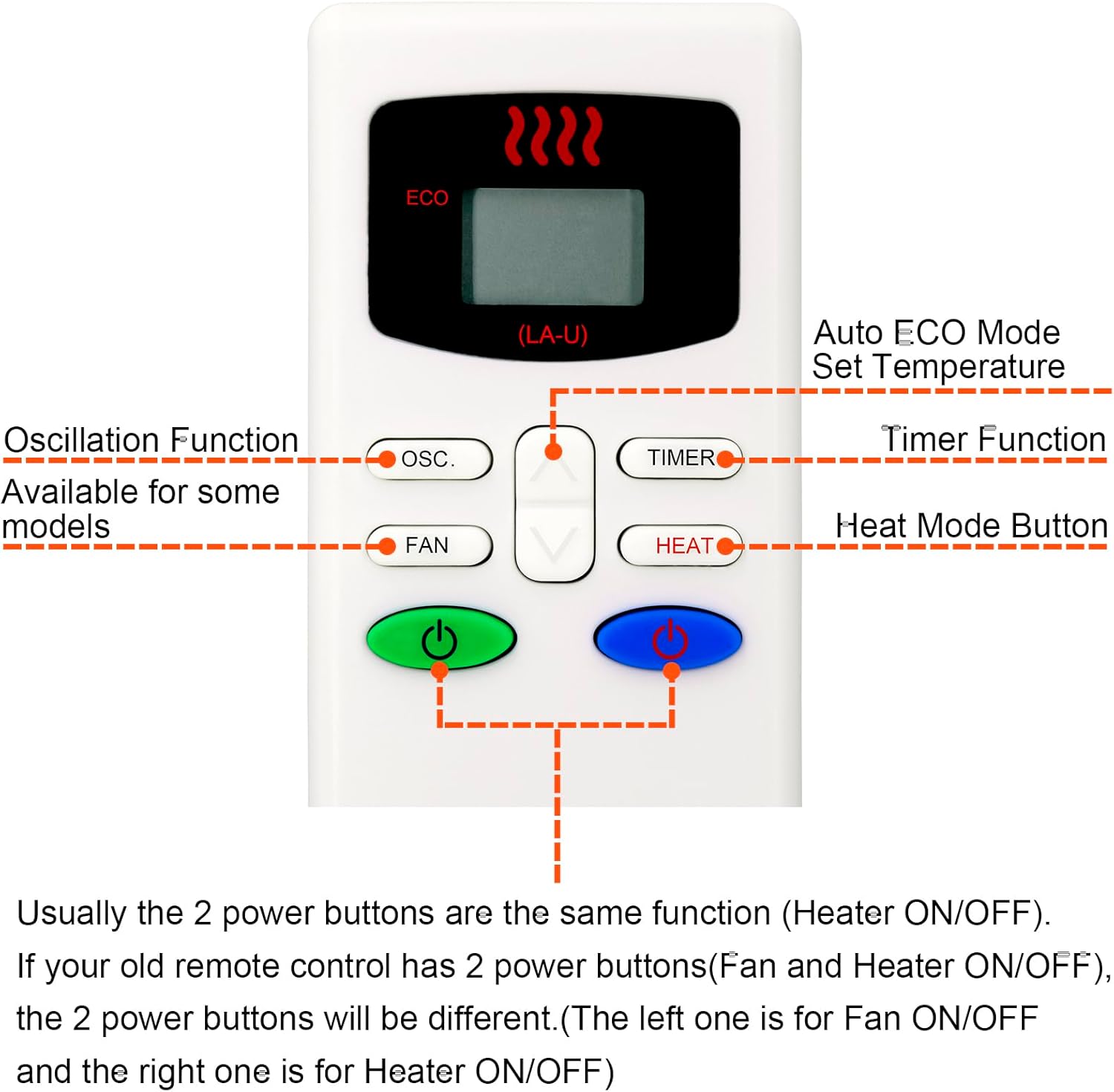
Image 3.1: Remote control button functions.
| Button | Function |
|---|---|
| ECO | Activates Auto ECO Mode for setting desired temperature. |
| OSC. | Controls the oscillation function (available on some models). |
| FAN | Turns the fan ON/OFF. |
| Up/Down Arrows | Adjusts temperature or timer settings. |
| TIMER | Activates and adjusts the timer function. |
| HEAT | Turns the heater ON/OFF or selects heat mode. |
| Green Power Button | General power ON/OFF for the fan. |
| Blue Power Button | General power ON/OFF for the heater. |
Note on Power Buttons: Depending on your specific Lasko model, the two power buttons may function identically for overall ON/OFF, or one may control the fan (green) and the other the heater (blue) independently.
4. Maintenance
4.1 Cleaning
To clean the remote control, wipe it with a soft, dry cloth. Do not use abrasive cleaners, solvents, or wet cloths, as these can damage the surface or internal components.
4.2 Battery Replacement
Replace batteries when the remote control's range decreases or it stops responding. Always replace both batteries simultaneously with new AAA 1.5V batteries. Dispose of old batteries responsibly according to local regulations.
4.3 Storage
If the remote control will not be used for an extended period, remove the batteries to prevent leakage and potential damage. Store the remote in a cool, dry place away from direct sunlight and extreme temperatures.
5. Troubleshooting
| Problem | Possible Cause | Solution |
|---|---|---|
| Remote not working | Dead or incorrectly installed batteries. | Check battery polarity; replace with new AAA 1.5V batteries. |
| Limited range or intermittent response | Weak batteries; obstruction between remote and unit; interference. | Replace batteries; ensure clear line of sight to the unit's sensor; minimize electronic interference. |
| Specific functions not working | Unit incompatibility; remote malfunction. | Verify your Lasko model is listed as compatible. If issues persist, contact customer support. |
6. Specifications
- Model Number: 2033624A
- Brand: GENGQIANSI
- Compatible Devices: Lasko Space Heaters (FH515, FH610, FH620, FH500, 2033624A, 2033624)
- Power Source: 2 x AAA 1.5V Batteries (not included)
- Display: Fahrenheit Only
- Color: Black/Silver
- Special Feature: Ergonomic design
- Item Weight: 2.11 ounces (approximately 60 grams)
- Package Dimensions: 7.68 x 3.27 x 1.02 inches (approximately 19.5 x 8.3 x 2.6 cm)
7. Warranty and Support
For warranty information and customer support, please refer to the purchase documentation or contact the seller directly. Keep your purchase receipt as proof of purchase.
If you encounter any issues not covered in this manual, please reach out to the GENGQIANSI customer service for assistance.