
Devoko 0077-1200
Devoko Height Adjustable Electric Desk User Manual
Model: 0077-1200
Introduction
Thank you for choosing the Devoko Height Adjustable Electric Desk. This manual provides essential information for the safe assembly, operation, and maintenance of your new electric standing desk. Designed for a healthier working environment, this desk allows seamless transitions between sitting and standing positions, promoting better posture and reducing the risks associated with prolonged sitting.
The Devoko electric desk features a robust motor, convenient USB-C and USB-A charging ports, efficient cable management, and optional 360° wheels for mobility. Please read this manual thoroughly before assembly and use to ensure optimal performance and longevity of your product.
Safety Information
- Ensure all components are present and undamaged before assembly. Do not use if any parts are missing or broken.
- Keep children and pets away from the desk during operation, especially when adjusting height.
- Do not place hands or other objects near the moving parts of the desk frame during height adjustment.
- Ensure the power cord is not pinched or damaged. Use only the provided power adapter.
- Do not overload the desk. The maximum weight recommendation is 70 Kilograms (154 lbs).
- Avoid spilling liquids on the control panel or motor components.
- If the desk malfunctions or makes unusual noises, disconnect power immediately and contact customer support.
- The desk is equipped with an anti-collision system. However, always be aware of surroundings when adjusting height.
Package Contents
Please verify that all the following components are included in your package:
- Desktop (120 x 60 cm)
- Desk Legs/Frame (2 pieces)
- Control Panel with USB-C and USB-A ports
- Power Adapter and Cable
- Cable Management Tray
- Headphone Hook
- Keyboard Tray
- Optional 360° Wheels (4 pieces)
- Adjustable Feet (4 pieces, pre-installed or separate)
- Assembly Hardware (screws, Allen wrench, etc.)
- Instruction Manual
Setup and Assembly
Assembly is designed to be straightforward. It is recommended to have a clear, spacious area for assembly. All necessary tools are included.

Figure 1: Simplified illustration of desk frame assembly. Attach the crossbar to the legs and secure the desktop.
- Unpack Components: Carefully remove all parts from the packaging and lay them out on a soft, clean surface to prevent scratches.
- Assemble Desk Frame: Attach the crossbar to the two desk legs using the provided screws. Ensure all connections are secure.
- Attach Desktop: Carefully place the desktop upside down on a soft surface. Align the assembled frame with the pre-drilled holes on the desktop and secure it using the provided screws.
- Install Control Panel: Mount the control panel to the underside of the desktop in the designated area. Connect the motor cables and power cable to the control panel.
- Install Cable Management Tray: Attach the cable management tray to the underside of the desk as shown in the diagram. This helps organize power strips and cables.
- Install Headphone Hook: Attach the headphone hook to the desired location on the side or front of the desk.
- Choose Feet or Wheels:
- Adjustable Feet: If using the adjustable feet, ensure they are securely screwed into the bottom of the desk legs. Adjust them to level the desk on uneven surfaces.
- 360° Wheels: If you prefer mobility, screw the four 360° wheels into the bottom of the desk legs. Ensure they are tightened securely.
- Cable Routing: Route all cables neatly through the cable management tray and grommet holes on the desktop.
- Power Connection: Connect the power adapter to the control panel and then plug it into a wall outlet.

Figure 2: The desk offers two modes: fixed with adjustable feet or mobile with 360° wheels. Choose the option that best suits your needs during assembly.

Figure 3: The integrated cable management tray helps keep your workspace tidy by organizing power strips and cables beneath the desk.
Operating Instructions
Your Devoko electric desk is designed for intuitive operation, allowing you to easily switch between sitting and standing positions.
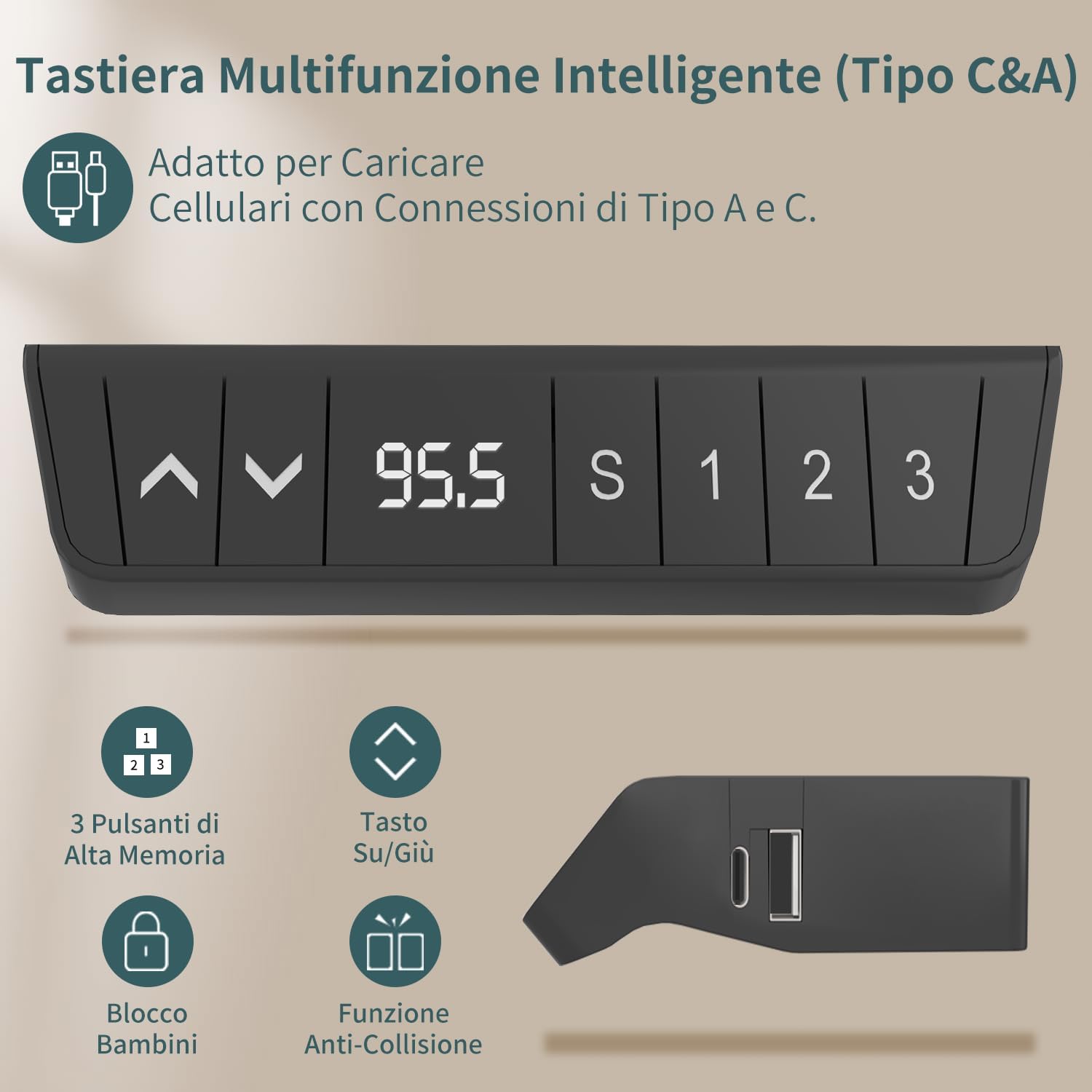
Figure 4: The control panel features up/down buttons, a digital display, memory presets (1, 2, 3), a lock function, and anti-collision sensitivity adjustment. USB-C and USB-A charging ports are also integrated.
Height Adjustment
- Raise Desk: Press and hold the Up (▲) button to raise the desk. Release the button when the desired height is reached.
- Lower Desk: Press and hold the Down (▼) button to lower the desk. Release the button when the desired height is reached.
- The desk can be adjusted from 72 cm (28.35 inches) to 118 cm (46.46 inches).

Figure 5: The desk seamlessly transitions between sitting mode (approx. 72cm) and standing mode (approx. 118cm), allowing for dynamic work postures.
Memory Presets
The desk allows you to save up to three preferred height settings for quick adjustments.
- Set a Memory Position: Adjust the desk to your desired height using the Up/Down buttons.
- Press the "S" button (Set). The display will show "S-".
- Within 3 seconds, press one of the memory buttons ("1", "2", or "3"). The current height will be saved to that button.
- Recall a Memory Position: Simply press the desired memory button ("1", "2", or "3"). The desk will automatically move to the saved height.
Anti-Collision System
The desk is equipped with a sensitive anti-collision system. If the desk encounters an obstacle during height adjustment, it will stop and reverse slightly to prevent damage.
- The sensitivity of the anti-collision system can typically be adjusted or toggled via specific button combinations on the control panel. Refer to the control panel diagram (Figure 4) for potential indicators or consult the manufacturer's website for detailed instructions if needed.
Charging Ports (USB-C & USB-A)
The integrated USB-C and USB-A ports on the control panel allow for convenient charging of your mobile devices directly from the desk.
- Simply connect your device's charging cable to the appropriate USB port on the control panel.
- Ensure the desk is powered on for the charging ports to function.
Maintenance
- Cleaning: Wipe the desk surface and frame with a soft, damp cloth. Avoid harsh chemicals or abrasive cleaners.
- Cable Management: Periodically check and reorganize cables to prevent tangles and ensure smooth operation.
- Motor Care: The motor is designed for durability and requires no special maintenance. Avoid obstructing the motor or frame during operation.
- Regular Checks: Periodically check all screws and connections to ensure they remain tight.
Troubleshooting
| Problem | Possible Cause | Solution |
|---|---|---|
| Desk does not move. | Power cord disconnected; motor cable loose; overload. | Check power connection; ensure all cables are securely plugged in; remove excess weight from desk. |
| Desk moves unevenly or makes unusual noise. | Loose screws; obstruction; uneven weight distribution. | Check and tighten all assembly screws; ensure no objects are obstructing the legs; redistribute weight evenly. |
| Anti-collision system triggers too often. | High sensitivity setting; actual obstruction. | Check for actual obstructions; consult control panel instructions for sensitivity adjustment (if available). |
| Memory presets not working. | Presets not saved correctly. | Follow the "Set a Memory Position" steps carefully to re-save your desired heights. |
| USB charging ports not working. | Desk not powered on; device cable issue. | Ensure desk is plugged in and powered; try a different USB cable or device. |
Specifications
- Brand: Devoko
- Model Number: 0077-1200
- Product Dimensions (D x W x H): 60 cm x 120 cm x (72-118 cm) / 23.62"D x 47.24"W x (28.35"-46.46")H
- Color: Black
- Style: Modern
- Base Material: Metal
- Top Material Type: Metal (implied by product description, though often particle board with laminate)
- Special Features: Adjustable Height, USB-C/USB Charging Control, Cable Management Tray, Anti-collision System
- Lifting Mechanism: Electric
- Maximum Weight Recommendation: 70 Kilograms (154 lbs)
- Tabletop Thickness: 15 Millimeters
- Included Components: Desk, Keyboard Tray, Headphone Hook, Cable Management Tray
- Required Assembly: Yes
Warranty and Support
Devoko offers a comprehensive warranty and dedicated customer support for your product.
- Warranty: 5-year warranty on the motor and table frame.
- Return Policy: 30 days unconditional return.
- Customer Support: If you encounter any installation problems, operational issues, or require assistance, please contact Devoko customer support through Amazon. We aim to reply within 24 hours.
- For the most up-to-date support information, please visit the official Devoko store on Amazon or their website.
Related documents0077-1200


Ask a question about this manual
Ask about setup, troubleshooting, compatibility, parts, safety, or missing instructions. Manuals+ will review the question and use this page’s manual context to help answer it.