
Introduction
Thank you for choosing the Joyroom JR-T03S Pro TWS Bluetooth Headset. This manual provides detailed instructions to help you get the most out of your new wireless earbuds. Please read this guide carefully before use and retain it for future reference.
The Joyroom JR-T03S Pro offers true wireless stereo sound, reliable Bluetooth connectivity, and convenient wireless charging support. Its ergonomic design ensures a comfortable fit for extended listening.
1. Setup
1.1 Unboxing and Included Components
Before first use, please ensure all components are present in the package.
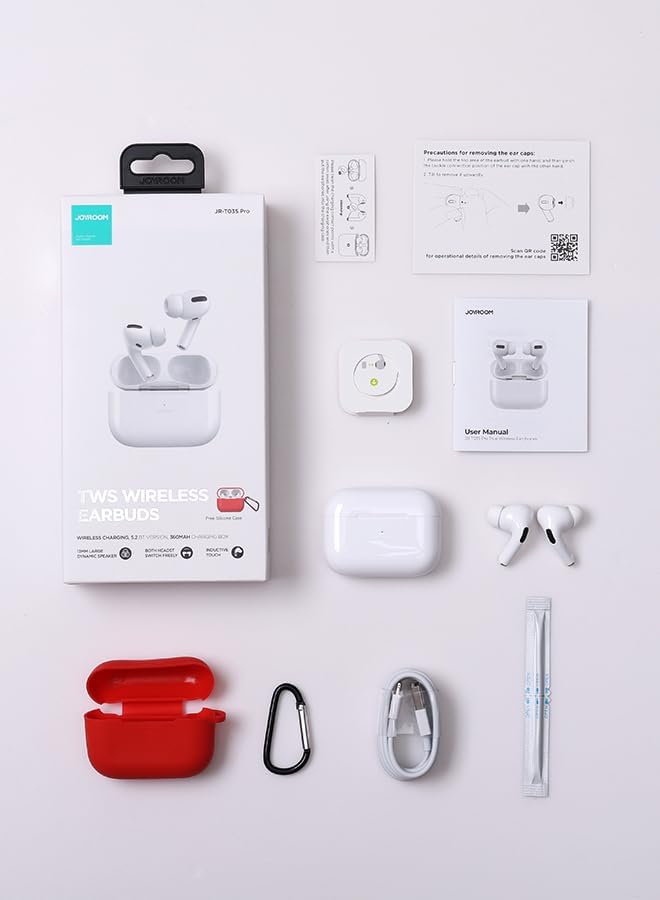
Image: The Joyroom JR-T03S Pro TWS Bluetooth Headset, charging case, various sizes of ear cushions, and a charging cable are displayed on a flat surface.
- Joyroom JR-T03S Pro Earbuds (Left and Right)
- Charging Case
- Ear Cushions (various sizes)
- Charging Cable
1.2 Charging the Headset
The charging case has a 360 mAh battery. For optimal performance, fully charge the earbuds and case before initial use.

Image: The Joyroom JR-T03S Pro charging case is shown being charged both wirelessly on a charging pad and via a USB cable, illustrating its dual charging capabilities.
- Wired Charging: Connect the charging cable to the charging port on the case and a power source.
- Wireless Charging: Place the charging case on a compatible wireless charging pad.
The indicator light on the case will show charging status. A full charge provides approximately 7 hours of music time for the earbuds, with an additional 28 hours from the charging case.
1.3 Pairing with Your Device
The JR-T03S Pro features quick pairing for convenience.
- Open the charging case. The earbuds will automatically enter pairing mode.
- On your device (phone, tablet, etc.), go to Bluetooth settings.
- Select "JR-T03S Pro" from the list of available devices.
- Once connected, you will hear an audio prompt, and the indicator light on the case will confirm successful pairing.
The earbuds will automatically reconnect to the last paired device when removed from the case, if Bluetooth is enabled on the device.
2. Operating Instructions
2.1 Basic Controls
The earbuds feature touch controls for various functions:
- Play/Pause: Single tap on either earbud.
- Next Track: Double tap on the right earbud.
- Previous Track: Double tap on the left earbud.
- Answer/End Call: Single tap on either earbud.
- Reject Call: Press and hold on either earbud.
- Activate Voice Assistant: Triple tap on either earbud.
2.2 In-ear Detection
The earbuds are equipped with in-ear detection technology.

Image: A woman is shown wearing the Joyroom JR-T03S Pro earbuds, illustrating the in-ear detection feature where audio automatically plays when earbuds are worn and pauses when removed.
- Audio playback will automatically pause when you remove an earbud from your ear.
- Playback will resume when you place the earbud back in your ear.
This feature can be enabled or disabled through your device's Bluetooth settings or a dedicated app, if available.
2.3 Enhanced Calling Experience
The JR-T03S Pro features DNS (Digital Noise Suppression) enhanced calling for clearer conversations.

Image: A woman is smiling and talking on the phone while wearing the Joyroom JR-T03S Pro earbuds, demonstrating the clear calling experience provided by DNS noise reduction.
While the Jerry version chipset may experience slight interference in environments with multiple devices or strong signals (e.g., subway), the DNS technology aims to reduce background noise for improved call clarity.
2.4 Ergonomic Design and Fit
The earbuds are designed for a secure and comfortable fit.

Image: A man is shown wearing the Joyroom JR-T03S Pro earbuds, with close-ups highlighting the ergonomic design and comfortable, secure fit within the ear.
Choose the appropriate ear cushion size from the included options to ensure a snug fit, which is crucial for both comfort and sound quality.
3. Maintenance
Proper maintenance ensures the longevity and performance of your headset.
- Cleaning: Regularly clean the earbuds and charging case with a soft, dry, lint-free cloth. Do not use harsh chemicals or abrasive materials.
- Ear Cushions: Remove and clean ear cushions periodically. Ensure they are completely dry before reattaching.
- Storage: When not in use, store the earbuds in their charging case to protect them and keep them charged.
- Water Resistance: The earbuds are waterproof. However, avoid prolonged exposure to water or submersion. Dry them thoroughly if they get wet.
4. Troubleshooting
If you encounter issues with your Joyroom JR-T03S Pro, refer to the following common solutions:
- No Sound/Connection Issues:
- Ensure earbuds are charged and powered on.
- Check if Bluetooth is enabled on your device.
- Try unpairing and re-pairing the earbuds with your device.
- Ensure earbuds are within the 12-meter Bluetooth range.
- Interference/Lag (Jerry Version):
- The Jerry version chipset may experience slight anti-interference issues in areas with high electromagnetic interference (e.g., subway, crowded outdoor areas with many devices). Try moving to a less congested area.
- Ensure your device is close to the earbuds.
- Earbuds Not Charging:
- Ensure the charging cable is securely connected or the case is properly placed on the wireless charger.
- Check if the charging case itself has power.
- Clean the charging contacts on both the earbuds and the case.
- In-ear Detection Not Working:
- Ensure the sensors are clean and unobstructed.
- Check your device's Bluetooth settings or any associated app to ensure the feature is enabled.
5. Specifications
| Feature | Detail |
|---|---|
| Model Name | JR-T03S Pro (Jerry Version) |
| Wireless Communication Technology | Bluetooth |
| Charging Case Battery | 360 mAh |
| Battery Life (Earbuds) | Up to 7 hours (music time) |
| Total Battery Life (with Case) | Up to 35 hours (7H + 28H) |
| Control Type | Touch Control |
| Water Resistance Level | Waterproof |
| Item Weight | 220 Grams |
| Product Dimensions | 4.4 x 2.2 x 5.38 cm |
| Headphones Ear Placement | In Ear |
| Impedance | 32 Ohms |
| Sensitivity | 103 dB |
6. Warranty and Support
Joyroom products are designed for quality and reliability. For warranty information and customer support, please refer to the documentation included with your purchase or visit the official Joyroom website.
Extended warranty options may be available from third-party providers. Please check with your retailer for details.
7. Product Videos
7.1 Product Overview and In-Ear Detection
Video: This short video demonstrates the Joyroom JR-T03S Pro earbuds being taken out of their case, placed into the ear, and highlights the automatic in-ear detection feature where music pauses and plays.
7.2 Usage and Charging Demonstration
Video: This video showcases the Joyroom JR-T03S Pro earbuds in use, demonstrating the one-touch listening feature and the wired/wireless dual charging mode for the charging case.