
Introduction
This manual provides instructions for the ZdalaMit RC-1187 replacement remote control. This remote is designed to be compatible with specific Denon Sound Bar models, offering a direct replacement without the need for complex programming. Simply insert batteries, and the remote is ready for use.
Compatible Denon Sound Bar Models:
- DHT-T100
- DHT-T110
- DHT-S514
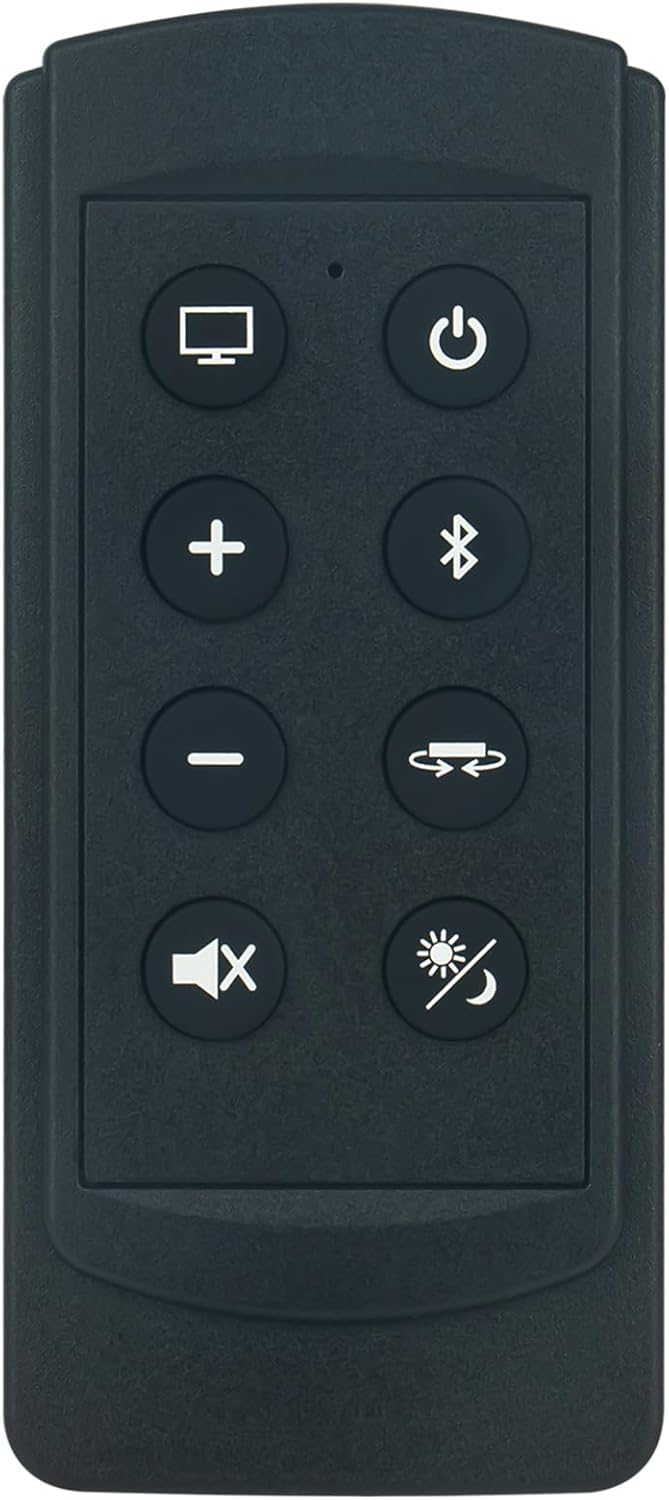
Image: A visual comparison showing the ZdalaMit RC-1187 replacement remote control alongside the original remote it replaces.
Package Contents
- 1 x RC-1187 Replacement Remote Control
- Note: AAA batteries are not included and must be purchased separately.
Setup
1. Battery Installation
- Locate the battery compartment on the back of the remote control.
- Slide open the battery compartment cover.
- Insert two (2) AAA size alkaline batteries, ensuring the correct polarity (+ and -) as indicated inside the compartment.
- Close the battery compartment cover securely.
Important: This remote control requires no programming. Once batteries are correctly installed, it is ready for immediate use with compatible Denon Sound Bar models.

Image: Angled view of the RC-1187 remote control, illustrating its design and the approximate location of the battery compartment on the underside.
Operating Instructions
The RC-1187 remote control provides direct access to essential functions of your compatible Denon Sound Bar. Point the remote directly at the sound bar's sensor for optimal performance.

Image: Top-down view of the RC-1187 remote control, showing the layout and symbols of its buttons.
Button Functions:
- Power (⏻): Turns the sound bar on or off.
- TV Input (⌚): Switches the input source to TV.
- Volume Up (+): Increases the sound volume.
- Volume Down (-): Decreases the sound volume.
- Mute (🔇): Mutes or unmutes the sound.
- Bluetooth (➿): Selects Bluetooth as the audio input source.
- Input Cycle (⇆): Cycles through available input sources (e.g., HDMI, Optical, Analog).
- Display/Mode (☀️/🌙): Changes display information or sound modes.
Maintenance
Battery Replacement:
Replace batteries when the remote's response becomes inconsistent or stops working. Always replace both AAA batteries at the same time with new ones. Do not mix old and new batteries, or different types of batteries.
Cleaning:
Wipe the remote control with a soft, dry cloth. Do not use liquid cleaners, abrasive pads, or chemical solvents, as these can damage the remote's surface or internal components.
Troubleshooting
- Remote not responding:
- Ensure batteries are inserted correctly with the proper polarity.
- Replace old batteries with new AAA alkaline batteries.
- Check for any obstructions between the remote control and the sound bar's sensor.
- Ensure you are within the effective operating range and pointing the remote directly at the sound bar.
- Specific buttons not working:
- Verify that the sound bar model is listed as compatible.
- Clean the remote's surface and buttons to ensure no debris is interfering with button presses.
Specifications
| Model Number | RC-1187 |
| Brand | ZdalaMit |
| Compatible Devices | Denon Sound Bar DHT-T100, DHT-T110, DHT-S514 |
| Power Source | 2 x AAA Alkaline Batteries (not included) |
| Dimensions | 6 x 2 x 0.5 inches (approximately) |
| Item Weight | 0.317 ounces (approximately) |
| Special Feature | Ergonomic design |
| Color | Black |
Warranty and Support
For any questions, concerns, or support regarding your ZdalaMit RC-1187 replacement remote control, please contact the seller or manufacturer directly through your purchase platform. Please refer to your purchase documentation for specific warranty details.