1. Introduction
This manual provides detailed instructions for the safe and effective operation of your YDBAO 10A 12V 24V Car Battery Charger. Please read this manual thoroughly before using the device to ensure proper function and to prevent damage or injury. This charger is designed for lead-acid batteries, including AGM, GEL, EFB, and traditional wet batteries, for 12V (2Ah-150Ah) and 24V (2Ah-100Ah) systems. It is suitable for cars, motorcycles, boats, and other vehicles.
Important: This charger is not suitable for lithium batteries.
2. Safety Information
Always observe the following safety precautions when operating the battery charger:
- Read all instructions before use.
- Do not charge lithium batteries.
- Ensure proper ventilation during charging to prevent gas accumulation.
- Wear eye protection and gloves when handling batteries.
- Keep the charger away from flammable materials.
- Do not expose the charger to rain or moisture.
- Disconnect the power supply before making or breaking connections to the battery.
- Avoid short-circuiting the output clamps.
- Keep out of reach of children.
- If the power cord is damaged, it must be replaced by the manufacturer or a qualified service agent to avoid hazards.
3. Product Overview
The YDBAO Car Battery Charger features an intelligent design with multiple functions for efficient and safe battery charging and maintenance.
3.1 Key Features
- Automatic Voltage Detection: Automatically detects 12V or 24V battery systems.
- Multi-Mode Selection: Includes Standard, AGM/GEL, Water, Motorcycle, and Repair modes.
- LCD Touch Screen Display: Provides real-time information on temperature, current, voltage, charging status, and error indicators.
- Automatic Temperature Compensation: Adjusts charging parameters based on ambient temperature for optimal performance and battery longevity.
- Pulse Repair Mode: Designed to recondition and extend the life of deeply discharged or sulfated batteries.
- Comprehensive Safety Protections: Overvoltage, reverse connection, short circuit, overheat, and anti-false trigger protection.
- Durable Construction: Flame-retardant ABS shell and soft core copper wire for safety and conductivity.
3.2 Charger Components

Image Description: A top-down view of the YDBAO 10A 12V 24V Car Battery Charger. The charger is red and black with an LCD screen displaying "12V24V INTELLIGENT PULSE REPAIR CHARGER" and various icons. Attached are red and black battery clamps and a power cord with a three-pin plug. This image illustrates the main unit and its primary connections.
- Main Unit: The charger body with LCD display and control buttons.
- Battery Clamps: Red (+) and Black (-) clamps for connecting to the battery terminals.
- AC Power Cord: For connecting the charger to a standard wall outlet.
- Cooling Fan: Integrated fan for temperature regulation during operation.
4. Setup Instructions
Follow these steps to prepare the charger for use:
- Inspect the Charger: Before each use, check the charger, cables, and clamps for any damage. Do not use if damaged.
- Prepare the Battery:
- Ensure the battery terminals are clean and free of corrosion.
- If charging a battery in a vehicle, ensure the vehicle's ignition is off and all accessories are disconnected.
- For batteries with removable caps, check the electrolyte level and add distilled water if necessary (for wet batteries only).
- Connect to Battery:
- Connect the red (+) clamp to the positive (+) battery terminal.
- Connect the black (-) clamp to the negative (-) battery terminal.
- Ensure connections are secure.

Image Description: The YDBAO battery charger is shown connected to a car battery. The red clamp is attached to the positive terminal, and the black clamp to the negative terminal. The charger unit is placed on the ground next to the battery, illustrating a typical setup for charging.
- Connect to Power: Plug the AC power cord into a standard electrical outlet. The charger will power on and display current battery information.
5. Operating Instructions
The charger automatically detects 12V or 24V systems. Use the "Mode Selection" button to choose the appropriate charging mode.
5.1 Mode Selection

Image Description: A close-up of the YDBAO charger's LCD screen and control panel. A finger icon points to the "Mode Selection" button, indicating how to interact with the charger's settings.
Press the MODE SELECTION button to cycle through the available charging modes:
- Standard (STD): For ordinary lead-acid batteries.
- AGM/GEL: For AGM, GEL, and EFB batteries.
- Water (WET): For traditional wet lead-acid batteries and small lead-acid batteries.
- Motorcycle: For all types of motorcycle batteries and small lead-acid batteries.
- Repair: For reconditioning deeply discharged, sulfated, or old batteries that cannot be charged normally.

Image Description: The YDBAO charger is displayed with five icons representing the different charging modes: Standard (car icon), AGM/GEL, Water Battery, Motorcycle, and Repair. This visually explains the mode selection options.
5.2 Charging Process
- After selecting the mode, the charger will begin the 7-stage charging process automatically.
- The LCD screen will display real-time information:
- Voltage (V): Current battery voltage.
- Current (A): Charging current.
- Temperature (°C): Ambient temperature detected by the charger.
- Battery Level Indicator: Shows the approximate charge level (20%, 40%, 60%, 80%, FULL).
- Status Icons: Indicators for Winter/Summer mode, Repair mode (PUL), Completion (OFF), and error messages (ERO).

Image Description: A detailed view of the charger's intelligent digital display. It shows examples of voltage, current, temperature, battery charge level, repair status (PUL), completion (OFF), and error (ERO) displays, illustrating the comprehensive feedback provided to the user.
- Automatic Temperature Compensation: The charger's microcomputer automatically detects the ambient temperature within 3-5 seconds and adjusts the charging voltage to optimize charging efficiency and battery life, especially in extreme temperatures (Winter Mode below 10°C, Summer Mode above 28°C).
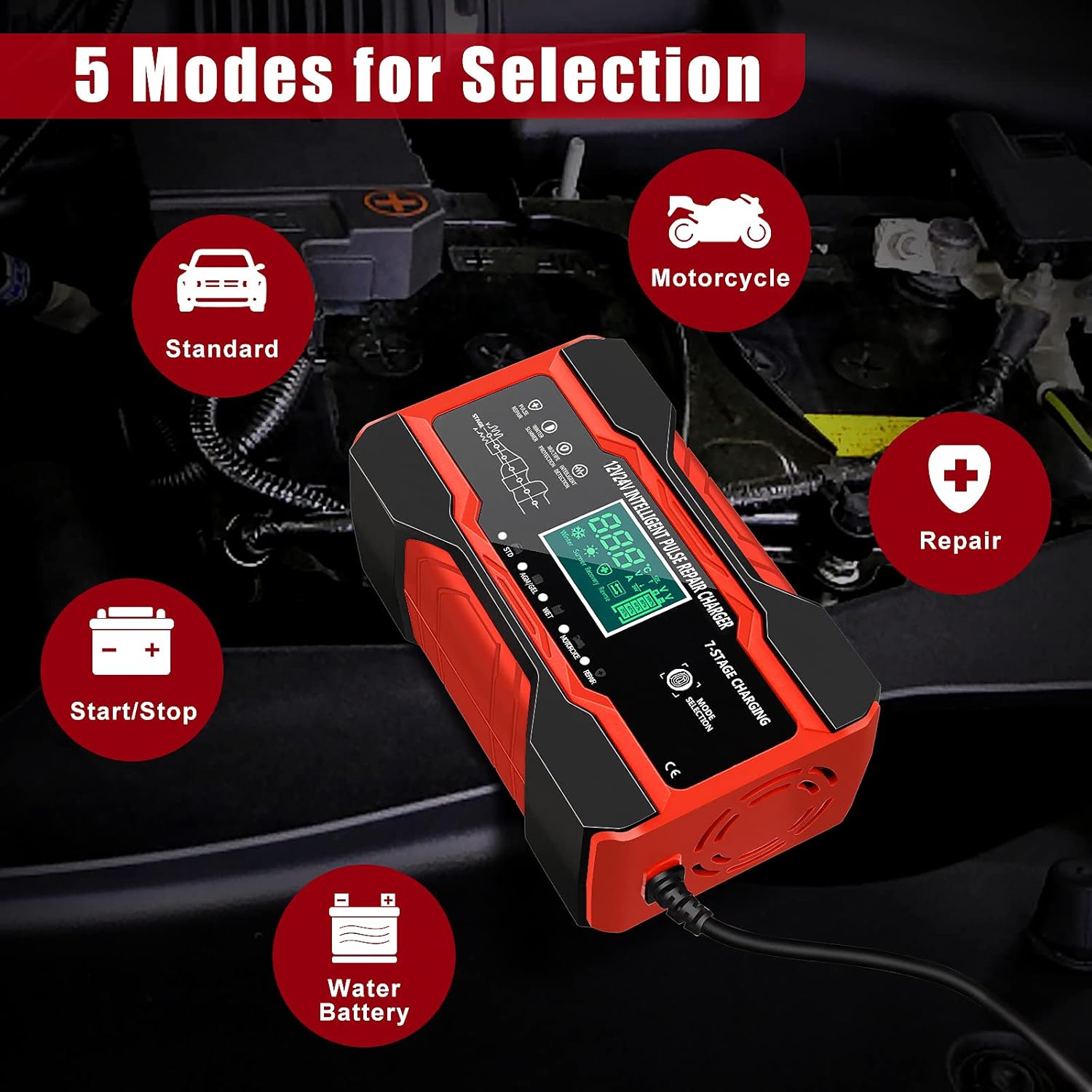
Image Description: This image illustrates the automatic temperature compensation feature, showing a split screen with a summer scene (above 28°C) and a winter scene (0-10°C). The charger is depicted in the middle, indicating its ability to adapt charging based on environmental temperature.
- Completion: Once the battery is fully charged, the charger will automatically stop charging and display "FULL" or "OFF" on the LCD screen.
5.3 Repair Mode (PUL)
The Repair mode is designed for batteries that have been idle for a long time, are deeply discharged, or cannot be charged by standard methods due to sulfation. This mode uses pulse technology to attempt to recondition the battery.

Image Description: The charger's display shows "Repair Mode" with icons representing batteries that have been idle for a long time, old batteries, and batteries that cannot be charged. This highlights the specific use case for the repair function.
- Select "Repair" mode using the Mode Selection button.
- The charger will initiate a pulse repair cycle. This process can take several hours.
- Monitor the battery during this process. Not all batteries can be fully recovered.
6. Maintenance
Proper maintenance ensures the longevity and safe operation of your charger:
- Cleaning: Disconnect the charger from power and battery before cleaning. Wipe the exterior with a soft, dry cloth. Do not use solvents or abrasive cleaners.
- Storage: Store the charger in a cool, dry place when not in use. Keep cables neatly coiled.
- Cable Inspection: Regularly inspect the power cord and battery cables for cuts, fraying, or damage. Replace if necessary.
- Battery Terminals: Keep battery terminals clean to ensure good electrical contact.
7. Troubleshooting
If you encounter issues with your YDBAO battery charger, refer to the following table:
| Problem | Possible Cause | Solution |
|---|---|---|
| Charger does not turn on. | No power from outlet; faulty power cord. | Check the power outlet with another device. Inspect the power cord for damage. |
| "ERO" or "Reverse/Abnormal" displayed. | Reverse polarity connection; faulty battery. | Disconnect and reconnect clamps ensuring red (+) to positive and black (-) to negative. Test battery condition. |
| Charger not charging or slow charging. | Incorrect mode selected; poor connection; deeply discharged battery. | Ensure correct mode is selected. Check clamp connections. Try Repair mode for deeply discharged batteries. |
| Charger gets hot. | Normal operation; poor ventilation; internal fault. | Some heat is normal. Ensure adequate ventilation around the charger. If excessively hot, disconnect and contact support. |
8. Specifications
| Feature | Detail |
|---|---|
| Brand | YDBAO |
| Model | B0CH8CJ4PC |
| Input Voltage | 100-240V AC, 50-60 Hz |
| Output Voltage | 12V / 24V (Automatic Detection) |
| Output Current | 12V 10A / 24V 5A |
| Battery Capacity Range | 12V: 2Ah-150Ah; 24V: 2Ah-100Ah |
| Compatible Battery Types | Lead-acid (AGM, GEL, EFB, Wet). Not for Lithium batteries. |
| Product Dimensions (LxWxH) | 15 x 9 x 6 cm (approximately 5.9 x 3.5 x 2.4 inches) |
| Item Weight | 560 g (approximately 1.23 lbs) |
| Safety Features | Overvoltage, Reverse Connection, Short Circuit, Overheat, Anti-False Trigger, Pulse Repair |
| Display | LCD Touch Screen |
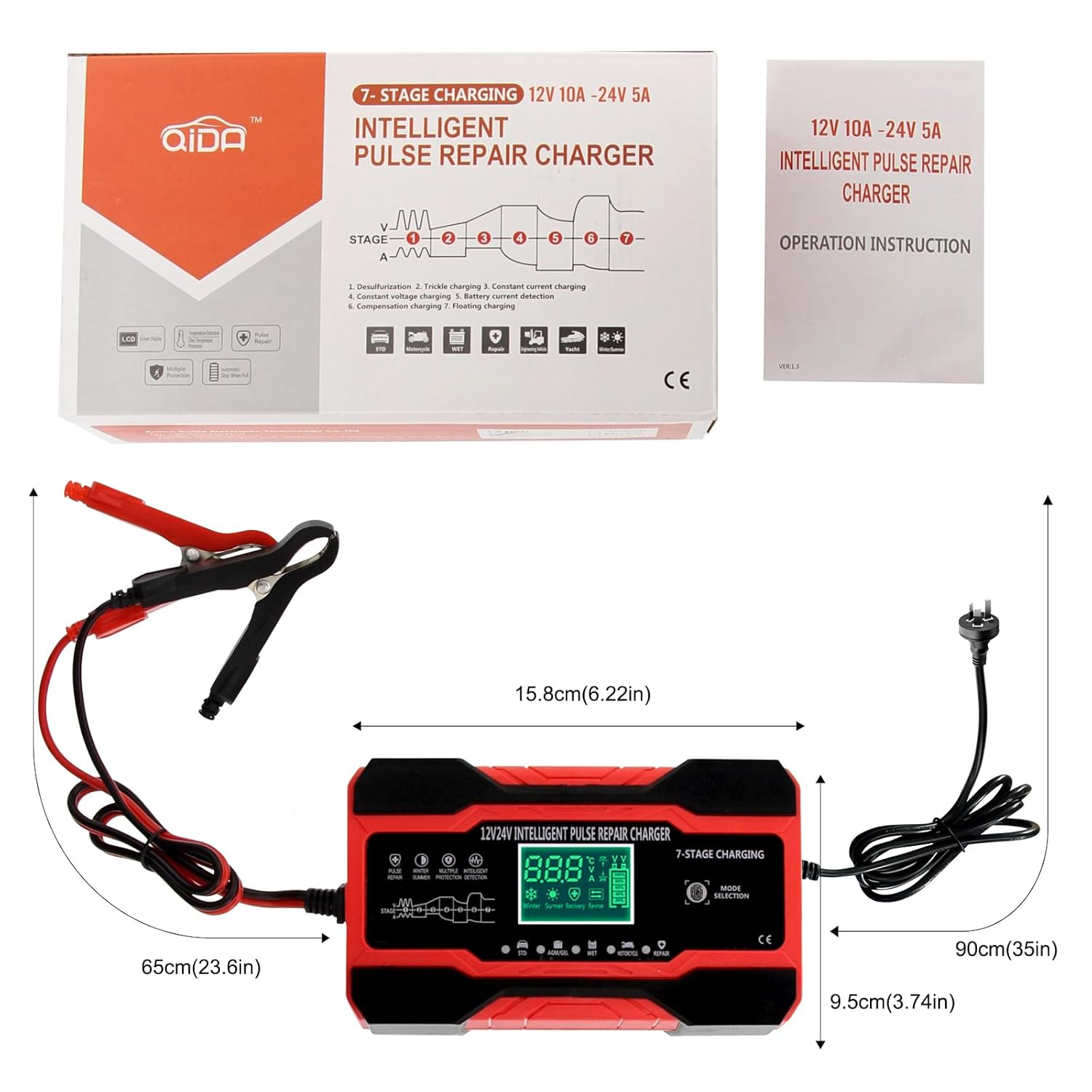
Image Description: This image shows the YDBAO charger alongside its packaging and an instruction manual. Dimensions for the charger (15.8cm length, 9.5cm width) and cable lengths (65cm for battery clamps, 90cm for power cord) are overlaid, providing a clear visual of the product's physical characteristics.
9. Warranty and Support
For warranty information or technical support, please refer to the contact details provided with your purchase documentation or visit the official YDBAO website. Keep your purchase receipt as proof of purchase.