
Introduction
This manual provides essential information for the safe and efficient operation of your QOMOLANGMA DTF Curing Oven. This oven is designed for baking freshly powdered DTF transfer sheets, ensuring proper curing of the powder. It features preset settings for ease of use and a compact design.
Safety Information
WARNING: High Temperature. Do not touch heated surfaces during or immediately after operation.
It is strongly recommended to use this DTF curing oven in conjunction with a fume extractor or in a well-ventilated area with outside venting. Fumes produced during the curing process may be harmful if inhaled. Ensure adequate air circulation to prevent the buildup of potentially hazardous fumes.
Always disconnect the power supply before cleaning or performing any maintenance.
Product Overview
The QOMOLANGMA DTF Curing Oven is a compact unit designed for efficient powder curing of DTF transfer films. It features a heating panel, a digital control panel for temperature and time, and a lid for containing heat.

Figure 1: Front view of the DTF Curing Oven with the lid in the open position, revealing the internal curing chamber.

Figure 2: Detailed view of the digital control panel, displaying temperature and time settings. The panel includes buttons for adjustment and power.
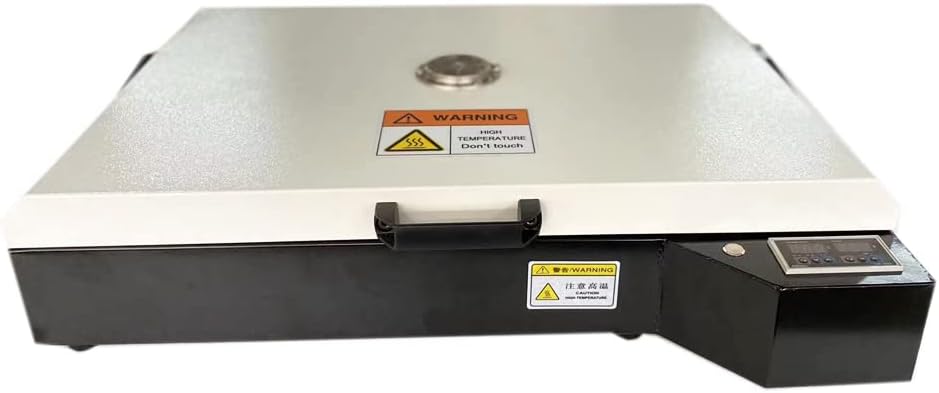
Figure 3: Top view of the DTF Curing Oven with the lid closed. A prominent warning label indicates high temperatures and advises against touching the surface.
Setup
- Unpacking: Carefully remove the DTF Curing Oven from its packaging. Inspect the unit for any signs of damage during transit. Report any damage to the seller immediately.
- Placement: Place the oven on a stable, heat-resistant surface. Ensure there is sufficient clearance around the unit for proper ventilation. As noted in the Safety Information, operate the oven in a well-ventilated area, ideally with a fume extractor or direct outside venting.
- Power Connection: Connect the power cord to the oven and then plug it into a standard 110V electrical outlet. Ensure the outlet meets the power requirements of 1900W and 17A.
- Initial Power On: Before first use, power on the unit briefly to ensure the digital display illuminates and appears functional. Power off and proceed to operation.
Operating Instructions
The DTF Curing Oven is designed for straightforward operation with preset settings. The suggested temperature for curing is 150°C (302°F), and the suggested curing time is 20 seconds. These parameters may vary slightly depending on the specific DTF powder used and its melting point.
- Prepare Transfer Sheet: Ensure your DTF transfer sheet has been freshly powdered and is ready for curing.
- Power On: Turn on the DTF Curing Oven using the main power switch. The digital display will illuminate, showing the current temperature and time settings.
- Preheat (if necessary): Allow the oven to reach the suggested curing temperature of 150°C (302°F). The oven's internal thermostat will regulate the temperature.
- Place Transfer Sheet: Carefully open the oven lid. Place the powdered DTF transfer sheet flat inside the curing chamber. The oven can accommodate sheets up to 16.5in x 23.4in (A2 size).
- Start Curing: Close the oven lid. The curing process will begin automatically or can be initiated via the control panel if a start button is present (refer to Figure 2 for control panel details). The digital timer will count down the suggested 20 seconds.
- Curing Completion: An audible alarm will sound once the curing time is completed.
- Remove Transfer Sheet: Carefully open the oven lid. Using heat-resistant gloves, remove the cured DTF transfer sheet. Allow the sheet to cool before handling further.
- Power Off: When finished with all curing tasks, turn off the main power switch and unplug the oven from the electrical outlet.
Maintenance
- Cleaning: Ensure the oven is completely cool and unplugged before cleaning. Use a soft, dry cloth to wipe down the exterior surfaces. For the interior, gently wipe away any powder residue with a dry or slightly damp cloth. Do not use abrasive cleaners or solvents.
- Inspection: Periodically inspect the power cord for any signs of damage. Check the heating element and internal chamber for any debris or obstructions.
- Storage: Store the oven in a clean, dry environment when not in use.
Troubleshooting
| Problem | Possible Cause | Solution |
|---|---|---|
| Oven does not power on. | No power supply; power cord loose; faulty outlet. | Check if the power cord is securely plugged into both the oven and the wall outlet. Test the outlet with another device. Ensure the main power switch is in the "ON" position. |
| Oven not heating to desired temperature. | Incorrect settings; faulty heating element. | Verify the temperature setting on the digital display. Allow sufficient time for preheating. If the issue persists, contact customer support. |
| Curing results are inconsistent or incomplete. | Incorrect temperature/time; uneven powder application; sheet not flat. | Ensure the suggested temperature (150°C / 302°F) and time (20s) are used. Verify even powder distribution on the sheet. Ensure the sheet lies perfectly flat within the oven. |
| Alarm does not sound after curing. | Alarm malfunction. | Note the time manually. If the alarm consistently fails, contact customer support. |
Specifications
- Model: DTF Curing Oven (16.5in x 23.4in)
- Maximum Film Size: A2 / 16.5in x 23.4in (420mm x 594mm)
- Heating Panel Quantity: 1 pcs
- Power Supply: 110V
- Power Consumption: 1900W
- Current: 17A
- Suggested Curing Temperature: 150°C (302°F)
- Suggested Curing Time: 20 seconds
- Item Weight: Approximately 36 pounds
- Manufacturer: Sign-in-China
Warranty and Support
For warranty information, technical support, or service inquiries regarding your QOMOLANGMA DTF Curing Oven, please contact the seller or manufacturer directly. Keep your purchase receipt and product serial number (if applicable) readily available when contacting support.
Manufacturer: Sign-in-China
Brand: QOMOLANGMA
Refer to your purchase documentation for specific warranty terms and contact details.


