
UGREEN PB311
Contents
UGREEN PB311 20W Two-Way Fast Charging Power Bank User Manual
Model: PB311 | Brand: UGREEN
1. Introduction
Thank you for choosing the UGREEN PB311 20W Two-Way Fast Charging Power Bank. This device is designed to provide portable and efficient power for your electronic devices. Please read this manual carefully before use to ensure proper operation and to maximize the lifespan of your power bank.
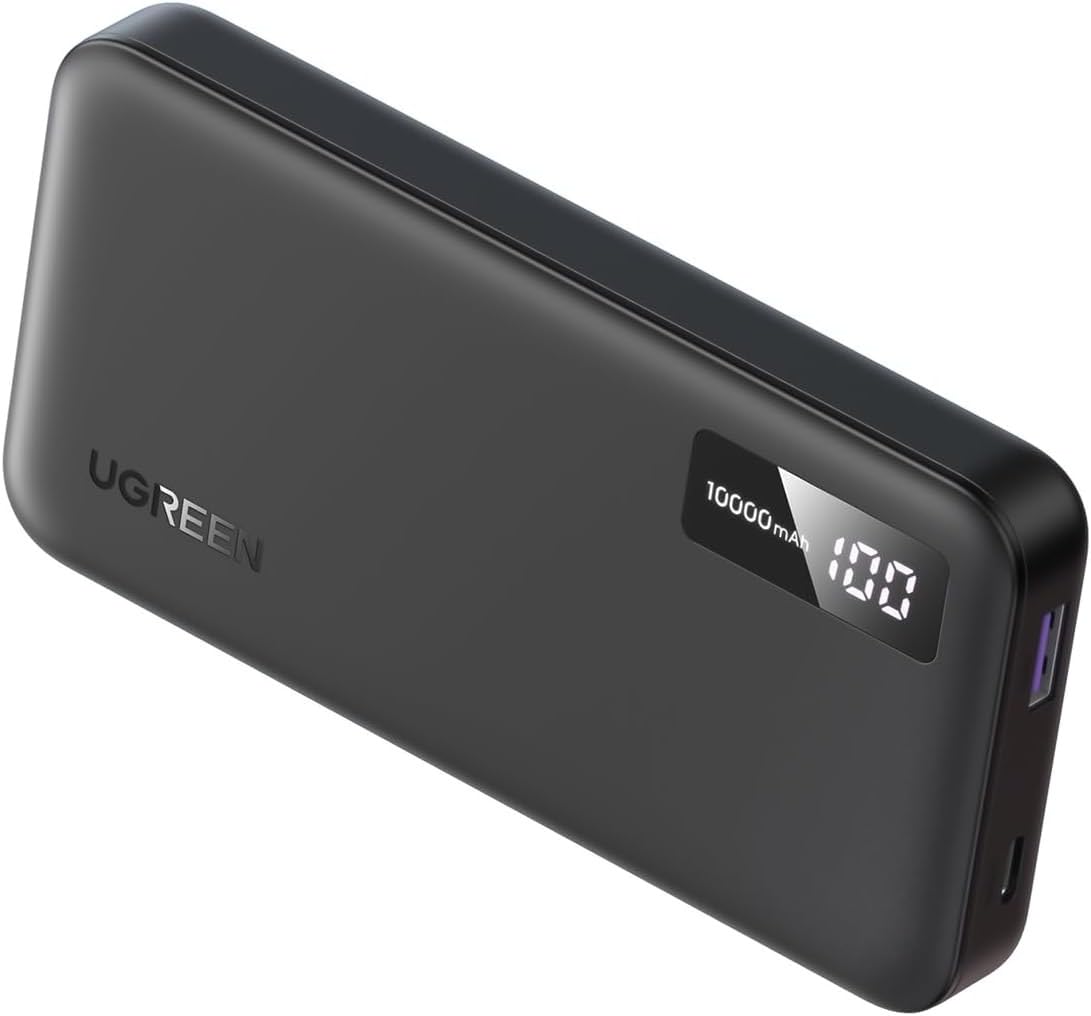
Image: The UGREEN PB311 power bank, a sleek black device with a digital display showing '10000mAh' and '100%' charge.
2. Product Features
- High Capacity: Built-in 10000mAh lithium polymer battery for extended usage.
- Compact Design: Slim design with 17mm thickness for easy portability.
- Durable Construction: Metallic case ensures durability and protection of internal components.
- Digital Indicator: Spacious digital indicator for tracking battery charge percentage.
- Fast Charging Ports:
- USB-C port supports 20W Power Delivery (PD) with quick charge capability.
- USB-A port provides 22.5W output for fast charging.
- Comprehensive Safety Protections: Includes Over Voltage Protection (OVP), Over Charging Protection, Over Current Protection (OCP), Over Temperature Protection (OTP), and Short Circuit Protection (SCP).
- Certifications: Certified with CE, ROHS, FCC, and POPS for quality and safety standards.
- Two-Way Quick Charge: Supports PD QC 3.0 fast charging for both charging devices and recharging the power bank itself.
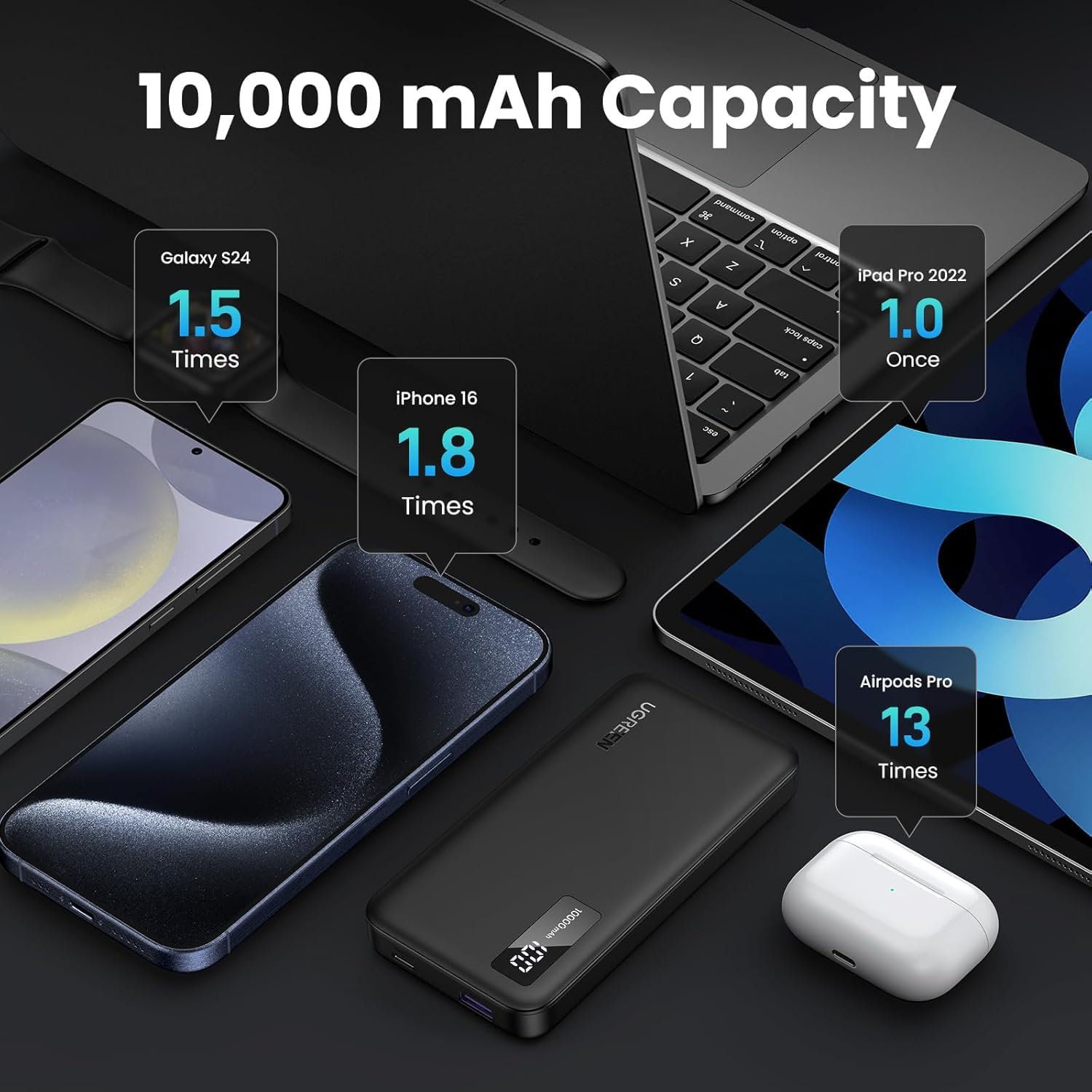
Image: An illustration demonstrating the 10,000 mAh capacity, showing how many times it can charge various devices like a Galaxy S24 (1.5 times), iPhone 16 (1.8 times), iPad Pro 2022 (1.0 times), and AirPods Pro (13 times).

Image: A visual showing the 22.5W Max Output, highlighting that it charges an iPhone 16 Pro 3 times faster than an original 5W charger, reaching 0-60% in 30 minutes.

Image: A person placing the UGREEN PB311 power bank into a bag, illustrating its compact dimensions (131.8*66*16.5mm) and portability.

Image: The UGREEN PB311 power bank held up to an airplane window, indicating its airline-approved status for travel.
3. Setup
Initial Charging
- Before first use, fully charge the power bank.
- Connect the power bank's USB-C port to a compatible USB wall charger (not included) using a USB-C to USB-C cable or a USB-A port to a USB wall charger using a USB-A to USB-C cable.
- The digital display will show the charging progress, indicating the battery percentage.
- Once the display shows '100%', the power bank is fully charged and ready for use.
4. Operating Instructions
Charging Your Devices
- Connect your device (e.g., smartphone, tablet) to the power bank using a compatible charging cable.
- Use the USB-C port for Power Delivery (PD) fast charging or the USB-A port for standard fast charging, depending on your device's compatibility.
- The power bank will automatically begin charging your device. The digital display will show the remaining battery percentage of the power bank.
- Disconnect your device once it is fully charged or when you no longer need to charge it.
Recharging the Power Bank
- When the power bank's battery level is low (indicated by the digital display), it's time to recharge it.
- Connect the power bank's USB-C input port to a USB wall charger or a computer's USB port. For optimal charging speed, use a 20W PD compatible charger.
- The digital display will show the charging percentage increasing.
- Once the display reaches '100%', the power bank is fully charged. Disconnect it from the power source.
5. Safety Information
The UGREEN PB311 Power Bank is equipped with multiple safety features to ensure safe and reliable operation:
- Over Voltage Protection (OVP): Prevents damage from excessive voltage input.
- Over Charging Protection: Stops charging once the battery is full to prevent overcharge.
- Over Current Protection (OCP): Protects against excessive current flow.
- Over Temperature Protection (OTP): Monitors and regulates internal temperature to prevent overheating.
- Short Circuit Protection (SCP): Automatically shuts down in case of a short circuit.
Additionally, the product is certified with CE, ROHS, FCC, and POPS, ensuring compliance with international safety and environmental standards.

Image: An illustration detailing the multiple safety protections, including Over-Voltage, Over-Current, Over-Charge, Over-Discharge, Over-Temperature, and Short-Circuit Protection, with a flame-resistant material note.
Important Safety Precautions:
- Do not expose the power bank to extreme temperatures (above 45°C or below 0°C).
- Do not disassemble, modify, or repair the device yourself.
- Avoid dropping, hitting, or subjecting the power bank to strong impacts.
- Keep away from water, moisture, and flammable materials.
- Dispose of the power bank responsibly according to local regulations.
6. Maintenance
- Cleaning: Use a soft, dry cloth to clean the surface of the power bank. Do not use liquid cleaners or aerosols.
- Storage: Store the power bank in a cool, dry place away from direct sunlight and extreme temperatures. If storing for extended periods, charge it to about 50-70% every 3 months to preserve battery health.
- Handling: Handle the power bank with care. Avoid dropping it or placing heavy objects on it.
7. Troubleshooting
Common Issues and Solutions:
- Power bank not charging:
- Ensure the charging cable is securely connected to both the power bank and the wall charger.
- Try a different charging cable or wall charger.
- Verify the wall charger is functioning correctly.
- Device not charging from power bank:
- Check if the power bank has sufficient charge (digital display).
- Ensure the charging cable connecting your device to the power bank is not damaged and is securely connected.
- Try a different port on the power bank or a different charging cable for your device.
- Slow charging:
- Ensure you are using a fast-charging compatible cable and adapter for both charging the power bank and charging your devices.
- Some devices may limit charging speed based on their battery status or temperature.
- Digital display not working:
- Try connecting the power bank to a charger to see if it reactivates.
- If the issue persists, contact customer support.
If you encounter issues not listed here or if problems persist, please contact UGREEN customer support for assistance.
8. Specifications
| Attribute | Value |
|---|---|
| Model Name | power bank 311 |
| Power Source | Corded Electric |
| Battery Cell Composition | Lithium Polymer |
| Voltage | 5 Volts |
| Brand | UGREEN |
| Generic Name | power bank |
| Net Quantity | 1 count |
| Item Dimensions LxWxH | 13.2 x 6.6 x 1.6 Centimeters |
| Item Weight | 300 g |
| Manufacturer | Ugreen |
| Item model number | PB311 |
| Batteries | 2 Lithium Polymer batteries required. (included) |
| Product Dimensions | 13.18 x 6.6 x 1.65 cm |
9. Warranty and Support
Warranty Information:
The UGREEN PB311 Power Bank comes with a 1 Year Warranty from the date of purchase. This warranty covers manufacturing defects and issues arising from normal use. It does not cover damage caused by misuse, accidents, unauthorized modifications, or natural disasters.
Customer Support:
For technical support, warranty claims, or any questions regarding your UGREEN PB311 Power Bank, please contact UGREEN customer service through their official website or the retailer from whom you purchased the product. Please have your purchase receipt and product model number (PB311) ready when contacting support.
Ask a question about this manual
Ask about setup, troubleshooting, compatibility, parts, safety, or missing instructions. Manuals+ will review the question and use this page’s manual context to help answer it.