
1. Product Overview
The DetectTrek Z100 is a professional metal detector designed for efficient and precise treasure hunting. It features an upgraded DSP chip for enhanced interference resistance and accurate detection of buried items up to 25.4 cm deep. The device offers multiple detection modes and adjustable settings to suit various environments and user preferences.
Key Features
- Adaptability: Features 5 sensitivity levels, 3 volume levels, and an adjustable length ranging from 68 cm to 142.2 cm to accommodate different users and detection scenarios.
- Deep Exploration: Equipped with an IP68 waterproof 25.4 cm search coil, allowing for confident exploration in both land and shallow water conditions. Note: The control box is not waterproof.
- Advanced Performance: Utilizes an upgraded DSP chip for improved interference resistance and a 0-99 digital target indicator for precise metal identification.
- Multiple Detection Modes: Includes 6 distinct modes: All-Metal (A-M), Discrimination (DISC), Notch, Memory, Jewelry, and Pinpoint.
- Innovative Memory Mode: Allows users to target specific metal types and retains settings upon power cycle, saving setup time.
Package Contents
Ensure all items are present in your package:
- 1 x DetectTrek Z100 Metal Detector Unit with large LCD screen and backlight
- 1 x Over-ear Headphones
- 1 x Military-grade Shovel
- 1 x Backpack
- 1 x Belt Pouch (for pinpointer, pinpointer not included)
- 2 x 9V Alkaline Batteries
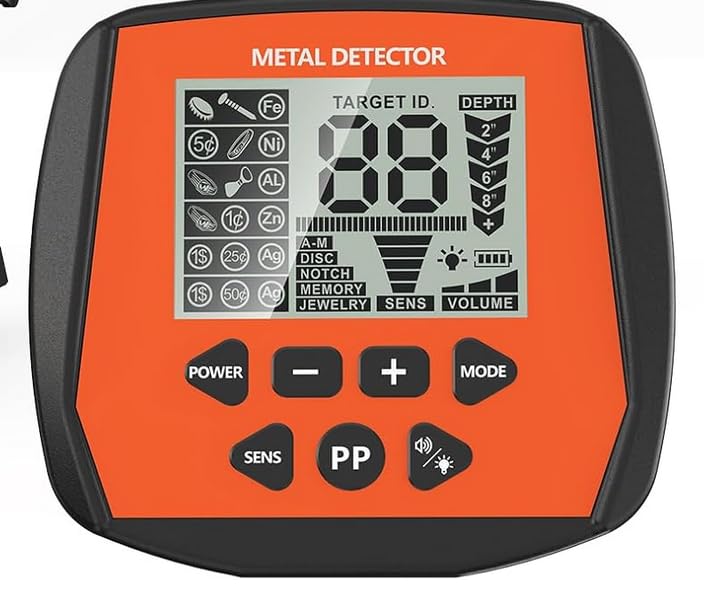
Image of the DetectTrek Z100 Professional Metal Detector, showing its adjustable shaft, control unit, and search coil.
2. Safety Information
Please read and understand all safety instructions before operating the DetectTrek Z100 Metal Detector.
- Handle with Care: Avoid dropping the detector. Impacts can damage internal circuits and the casing, leading to malfunction.
- Water Resistance: The search coil is IP68 waterproof. However, the control box is NOT waterproof. Do not submerge the control box in water.
- Battery Safety: Keep batteries out of reach of children. Do not mix old and new batteries, or different types of batteries. Dispose of used batteries according to local regulations.
- Electromagnetic Interference: Be aware of potential electromagnetic interference from power lines, other electronic devices, or strong magnetic fields, which can affect detector performance.
- Environmental Awareness: Always be aware of your surroundings when detecting. Avoid hazardous areas.
3. Assembly Instructions
The DetectTrek Z100 features a unique foldable cam lock design for quick and easy assembly, typically within 30 seconds.
- Attach the Search Coil: Securely fasten the search coil to the lower stem using the provided bolt and knob. Ensure it is tight but do not overtighten.
- Connect the Stems: Insert the lower stem into the middle stem, and then the middle stem into the upper stem. Use the cam locks to secure the sections at your desired length.
- Mount the Control Unit: Slide the control unit onto the upper stem. Ensure it clicks into place or is securely fastened.
- Wrap the Cable: Carefully wrap the search coil cable around the stem, leaving enough slack for coil movement, and plug the connector into the control unit. Ensure the connection is firm.
- Install Batteries: Open the battery compartment on the control unit and insert the two 9V alkaline batteries, observing the correct polarity. Close the compartment securely.
4. Operating Your Metal Detector
4.1 Powering On/Off
- To power on, press and hold the power button until the LCD screen illuminates.
- To power off, press and hold the power button again until the screen turns off.
4.2 Display Interface
The large LCD screen provides digital, visual, and audio cues. The 0-99 Digital Target Indicator helps identify potential targets. Lower numbers typically indicate ferrous metals (iron), while higher numbers indicate non-ferrous metals (silver, copper, gold).
4.3 Sensitivity Adjustment
The Z100 offers 5 sensitivity levels. Adjust sensitivity using the dedicated buttons on the control unit. Higher sensitivity increases detection depth but can also increase susceptibility to electromagnetic interference and false signals. Start with a lower sensitivity in areas with high interference.
4.4 Volume Control
There are 3 volume levels. Adjust the volume to a comfortable level using the volume buttons. Headphones can be used for clearer audio feedback and to avoid disturbing others.
4.5 Detection Modes
The Z100 features 6 detection modes, selectable via the mode button:
- All-Metal (A-M): Detects all types of metal. Ideal for general searching when you want to find everything.
- Discrimination (DISC): Allows you to eliminate unwanted metals (e.g., iron) from detection.
- Notch: Similar to Discrimination, but allows for specific ranges of target IDs to be accepted or rejected.
- Memory: An innovative mode that allows you to save and recall settings for specific metal types, optimizing your search for particular targets.
- Jewelry: Optimized for finding jewelry, typically by discriminating against iron and other common trash metals.
- Pinpoint (PP): Used to precisely locate the exact position of a detected target before digging.
5. Using Memory Mode
The Memory mode is designed for efficient targeting of specific metal types. This mode allows you to focus your search and ignore unwanted signals.
- Activating Memory Mode: Select 'MEMORY' from the detection modes.
- Saving Settings: While in Memory mode, you can adjust discrimination or notch settings to accept or reject specific target IDs. The detector will remember these settings even after being turned off and on, saving over 90% of setup time for subsequent searches.
- Targeting Specific Metals: Use this mode when you are consistently finding a particular type of metal and wish to filter out others.
6. Using Pinpoint Mode
The Pinpoint (PP) mode helps you accurately locate the center of a detected target, minimizing the size of your excavation.
- Detect a Target: First, sweep the search coil over an area in a regular detection mode until a target is indicated.
- Activate Pinpoint Mode: Press the 'PINPOINT' button. The detector will emit a continuous tone.
- Locate the Center: Slowly move the search coil in a cross-pattern over the area where the target was detected. The audio tone will become loudest and the target ID will stabilize when the center of the coil is directly over the target.
- Mark the Spot: Once the loudest signal is found, mark the spot for precise digging.
7. Waterproof Search Coil
The DetectTrek Z100 features a 25.4 cm search coil with an IP68 waterproof rating. This allows for reliable detection in wet conditions, including shallow water, beaches, and damp soil.
- Submersion: The search coil can be fully submerged in shallow water.
- Control Box: It is crucial to remember that the control box is NOT waterproof. Do not submerge or expose the control box to heavy rain or splashes.
- Cleaning: After use in wet or muddy conditions, clean the search coil with fresh water and wipe it dry.
8. Care and Maintenance
Proper care and maintenance will extend the life and performance of your DetectTrek Z100 Metal Detector.
- Cleaning: Wipe down the detector with a damp cloth after each use. For the search coil, rinse with fresh water if used in saltwater or muddy conditions. Ensure all parts are dry before storage.
- Storage: Store the detector in a cool, dry place away from direct sunlight and extreme temperatures.
- Batteries: Remove batteries if the detector will not be used for an extended period to prevent leakage and damage.
- Avoid Chemicals: Do not use abrasive cleaners or solvents on any part of the detector.
- Cable Care: Inspect the search coil cable regularly for any signs of damage. Avoid sharp bends or kinks.
9. Troubleshooting
If you encounter issues with your DetectTrek Z100, refer to the following common problems and solutions:
| Problem | Possible Cause | Solution |
|---|---|---|
| Detector does not power on | Dead or incorrectly installed batteries | Check battery polarity. Replace with fresh 9V alkaline batteries. |
| Erratic signals or false positives | High sensitivity setting, electromagnetic interference, mineralized ground | Reduce sensitivity. Move away from power lines or other electronics. Perform ground balance if available (refer to specific model features). |
| Poor detection depth | Low battery power, incorrect sensitivity, highly mineralized ground | Replace batteries. Increase sensitivity (if not causing false signals). |
| No audio from headphones | Headphones not plugged in correctly, faulty headphones, low volume | Ensure headphones are fully plugged in. Test with another pair of headphones. Increase volume. |
| Control box not responding | Low battery, internal fault | Replace batteries. If problem persists, contact customer support. |
10. Technical Specifications
| Model Number | Z100 |
| Brand | DetectTrek |
| Dimensions (L x W x H) | 142.24 x 68.58 x 142.24 cm (Extended Length: 56 inches) |
| Weight | 3.25 kg |
| Color | Orange |
| Material | Metal, Premium ABS Plastic |
| Power Source | Battery Powered (2 x 9V Alkaline Batteries) |
| Display Type | LCD |
| Search Coil Size | 25.4 cm (10 inches) |
| International Protection Rating | IP68 (Search Coil Only) |
| Detection Depth | Up to 25.4 cm (10 inches) for coins |
| Sensitivity Levels | 5 |
| Volume Levels | 3 |
| Detection Modes | 6 (All-Metal, Discrimination, Notch, Memory, Jewelry, Pinpoint) |
11. Warranty Information
Specific warranty details for the DetectTrek Z100 Metal Detector are not provided in this manual. Please refer to the product packaging, your purchase receipt, or the retailer's website for information regarding warranty coverage and terms. Typically, products come with a limited manufacturer's warranty covering defects in materials and workmanship.
12. Customer Support
For technical assistance, troubleshooting beyond this manual, or inquiries regarding your DetectTrek Z100 Metal Detector, please contact the retailer or manufacturer's customer support. Have your model number (Z100) and purchase information ready when contacting support.
You may find contact information on the product packaging, the official DetectTrek website, or through the platform where you purchased the product.


