
Introduction
This manual provides essential instructions for the safe and proper use of your LEXIBOOK Barbie S160BB Light Up Speaker Stand. Please read this manual thoroughly before operating the device and retain it for future reference.
Safety Information
Always follow basic safety precautions when using this product to reduce the risk of injury. This product is designed for children and should be used under adult supervision. Keep small parts away from young children to prevent choking hazards. Do not expose the device to water or excessive moisture. Use only the recommended power source (batteries).
The adjustable height feature allows the stand to grow with your child, ensuring a comfortable and safe experience. Ensure the stand is stable on a flat surface before use.
Package Contents
Please check that all items are present in the package:
- 1 x Speaker on Stand
- 2 x Microphones
- 1 x User Manual
- 1 x Aux-in Cable
- 1 x Phone Holder
Setup
1. Assembly
Assemble the stand components by securely connecting the base to the main pole, and then attaching the speaker unit to the top of the pole. Ensure all connections are firm and stable.

Image: Fully assembled LEXIBOOK Barbie S160BB Light Up Speaker Stand, showing the pink stand, speaker unit with Barbie graphics, and two microphones.
2. Battery Installation
Locate the battery compartment, typically on the underside or back of the speaker unit. Insert 3 AA batteries, ensuring correct polarity (+/-). Close the compartment securely.
Note: Batteries are not included and must be purchased separately.
3. Adjusting Stand Height
The stand's height is adjustable from 60 cm to 95 cm. Loosen the locking mechanism on the stand pole, adjust to the desired height, and then securely tighten the mechanism to fix the stand in place.
4. Attaching Microphones
Connect the two microphones to the designated ports on the speaker unit. Ensure they are securely plugged in.

Image: A close-up view of the pink speaker unit, showing the control panel, Barbie graphics, and the two microphones connected to their respective ports.
5. Phone Holder Installation
Attach the phone holder to the designated slot on the speaker unit. This holder allows you to place a smartphone or tablet for displaying lyrics or recording performances.
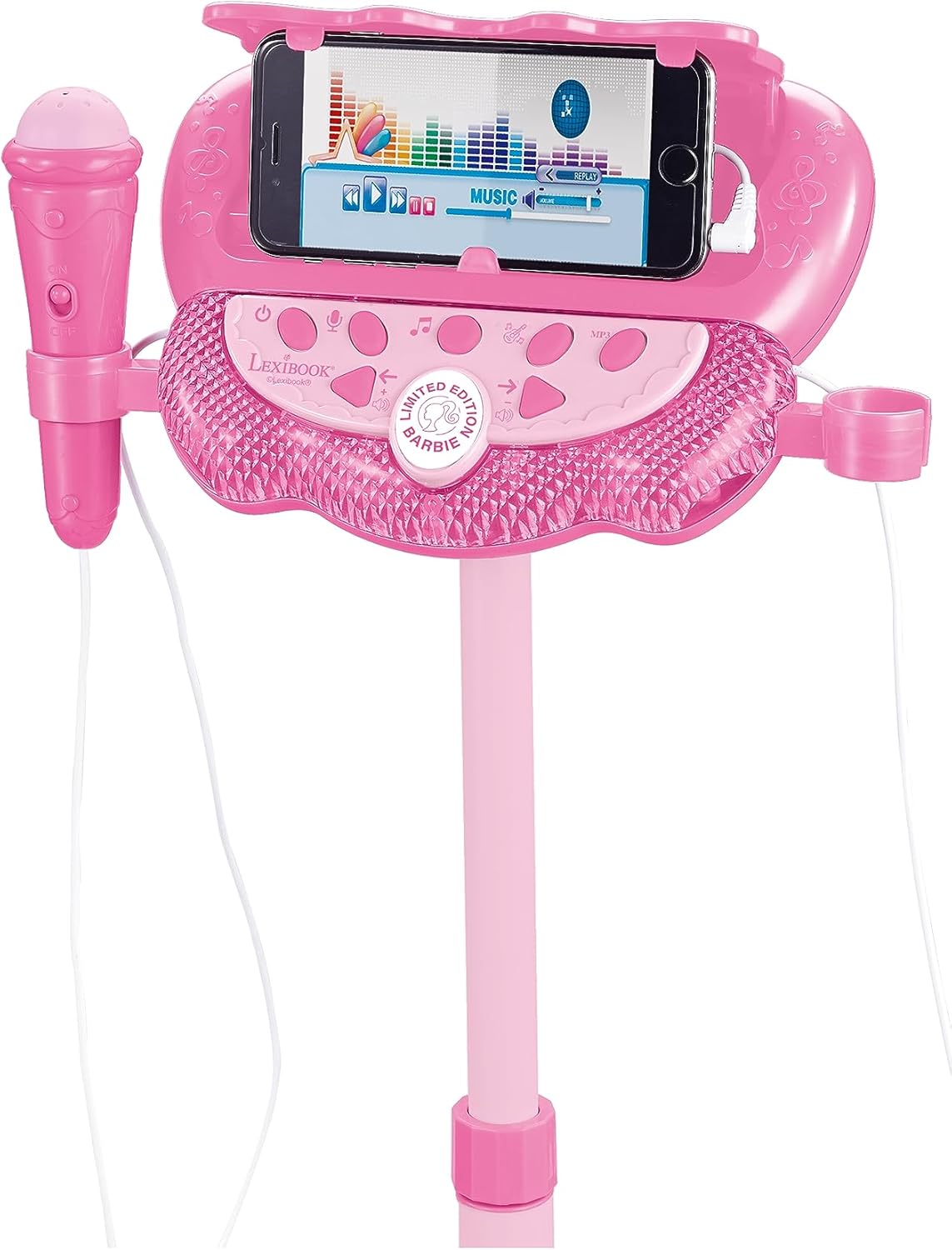
Image: The LEXIBOOK Barbie S160BB speaker unit with a smartphone securely placed in its holder, demonstrating its use for displaying content.
Operating Instructions
1. Power On/Off
Press the power button, usually located on the speaker unit's control panel, to turn the device on or off. The light effects will activate upon powering on.
2. Connecting External Audio (Aux-in)
Use the provided Aux-in cable to connect your smartphone, MP3 player, or other audio device to the Aux-in port on the speaker unit. This allows you to play your favorite music through the speaker.
Tip: Adjust the volume on your connected audio device for optimal sound balance with the microphones.
3. Microphone Usage
Speak or sing into the microphones. The speaker unit will amplify your voice. Some models may include a recording function; refer to the control panel for specific buttons (e.g., a record button) to activate this feature.

Image: A detailed view of one of the pink microphones, showing its design and on/off switch.
4. Light Effects
The speaker unit features dynamic light effects that activate when the device is powered on, enhancing the performance experience.
Maintenance
- Cleaning: Wipe the device with a soft, dry cloth. Do not use abrasive cleaners or immerse in water.
- Storage: Store the speaker stand in a cool, dry place away from direct sunlight when not in use.
- Battery Care: Remove batteries if the device will not be used for an extended period to prevent leakage.
Troubleshooting
| Problem | Possible Cause | Solution |
|---|---|---|
| Device does not power on. | Batteries are dead or incorrectly inserted. | Replace batteries with new AA batteries, ensuring correct polarity. |
| No sound from speaker. | Volume too low on connected device or speaker. Aux-in cable not fully connected. | Increase volume on both the speaker and the connected audio device. Ensure Aux-in cable is securely plugged into both devices. |
| Microphone volume is low. | Microphone switch is off. Volume settings. | Ensure microphone switch is in the 'ON' position. Adjust volume controls on the speaker unit if available. Reduce external music volume to hear microphone more clearly. |
| Stand is unstable. | Locking mechanism not tightened. Uneven surface. | Ensure the height adjustment locking mechanism is fully tightened. Place the stand on a flat, stable surface. |
Specifications
| Feature | Detail |
|---|---|
| Model Number | S160BB |
| Brand | LEXiBOOK |
| Item Weight | 1.25 pounds |
| Product Dimensions | 22.44 x 11.42 x 4.92 inches |
| Batteries Required | 3 AA batteries |
| Material Type | Plastic |
| Connector Type | 3.5 mm Jack (Aux-in) |
| Compatible Devices | Smartphone, Personal Computer, Tablet |
| Speaker Count | 1 |
| Media Format | MP3 Audio |
| Power Source | Battery Powered |
| Voltage | 5 Volts |
| Special Features | Adjustable Height, Dynamic Light Effects, Aux-in Cable for Audio Player Connection, Built-in Recording Function, Phone Holder |
Warranty and Support
Information regarding product warranty and customer support contact details is not provided within this manual. Please refer to the product packaging or the manufacturer's official website for warranty terms and support options.