Introduction
Thank you for choosing the Cuisinart 2-Slice Custom Select Metal Toaster. This sleek, stainless steel toaster is designed for optimal performance and style, accommodating various bread selections and shade preferences. Please read this manual thoroughly before use to ensure safe and efficient operation.

Image: The Cuisinart 2-Slice Custom Select Metal Toaster, showcasing its design alongside toasted bread and fresh sandwiches.
Safety Instructions
- Always unplug the toaster from the outlet when not in use and before cleaning.
- Do not operate the toaster with a damaged cord or plug, or after the appliance malfunctions or has been dropped or damaged in any manner.
- Do not immerse the toaster in water or other liquids.
- Do not place the toaster on or near a hot gas or electric burner, or in a heated oven.
- Do not use the toaster for other than intended use.
- Avoid touching hot surfaces. Use handles or knobs.
- Ensure bread is properly centered in the slots to prevent burning.
Setup
- Unpack the toaster and remove all packaging materials.
- Place the toaster on a clean, dry, and stable surface.
- Ensure the crumb tray is properly inserted at the bottom of the toaster.
- Plug the power cord into a standard electrical outlet.

Image: Side view of the Cuisinart 2-Slice Custom Select Metal Toaster, highlighting its sleek stainless steel finish.
Operating Instructions
1. Loading Items
Place one or two slices of bread, bagels, waffles, pastries, or English muffins into the toasting slots. The self-adjusting toast slots accommodate various thicknesses.
2. Selecting Toast Type
Press the button corresponding to the item you are toasting: BREAD, BAGEL, WAFFLE, PASTRY, or ENGLISH MUFFIN. A blue indicator light will illuminate next to your selection.
3. Adjusting Shade Setting
Use the shade selector dial (numbered 1-7) to choose your desired level of toasting. '1' is the lightest, and '7' is the darkest.
4. Initiating Toasting
Push the carriage lever down until it locks into place. The toasting cycle will begin.
5. Special Functions
- SINGLE: Press this button if you are toasting only one slice. This adjusts the heat to ensure even toasting on both sides of a single slice.
- DEFROST: Press this button if you are toasting frozen items. This function works in combination with the bread type presets for accurate defrosting time.
- CANCEL: Press this button at any time to stop the toasting cycle and eject the items.
6. Removing Toasted Items
Once the toasting cycle is complete, the items will automatically pop up. The high-lift carriage allows for easy removal of smaller items.
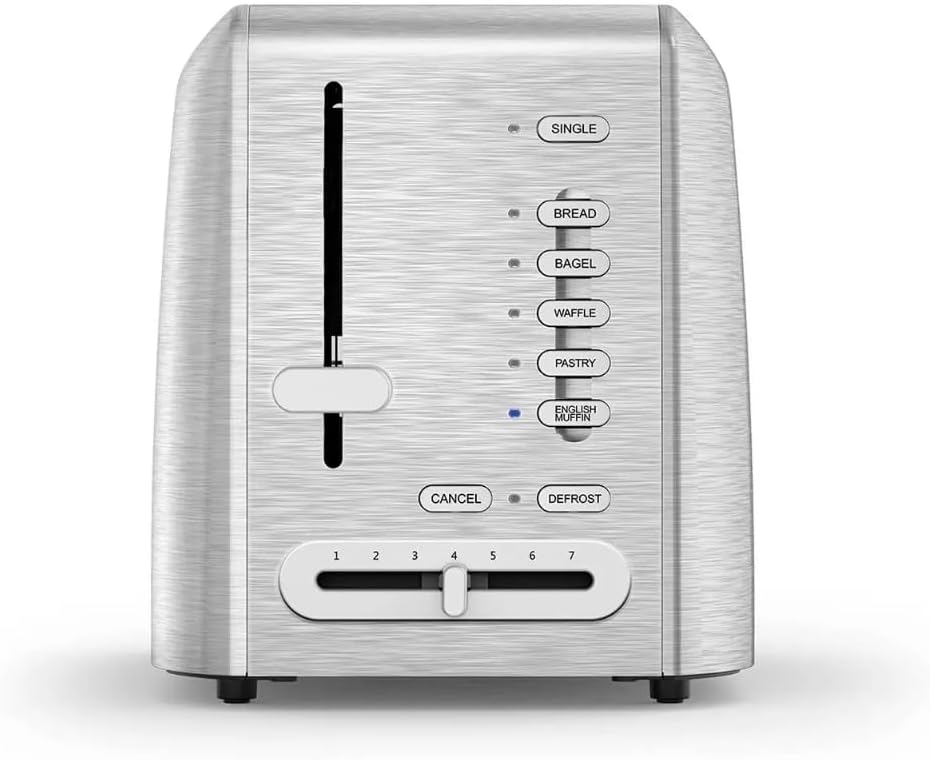
Image: Detailed view of the toaster's control panel, showing the 'SINGLE', 'BREAD', 'BAGEL', 'WAFFLE', 'PASTRY', 'ENGLISH MUFFIN', 'CANCEL', 'DEFROST' buttons, and the shade selector dial.
Features
- Dual control panel with programmed settings for various items.
- Dedicated SINGLE slice button for even toasting.
- Self-adjusting toast slots to accommodate different item thicknesses.
- DEFROST function for frozen items.
- 7 toast shade settings for customized browning.
- High-lift carriage for safe and easy removal of toasted items.
- Removable crumb tray for quick and easy cleanup.
- Sleek stainless steel design.
Maintenance
Cleaning the Crumb Tray
- Unplug the toaster and allow it to cool completely.
- Pull out the crumb tray located at the bottom of the toaster.
- Discard crumbs and wipe the tray with a damp cloth.
- Ensure the tray is completely dry before reinserting it into the toaster.
Exterior Cleaning
Wipe the exterior of the toaster with a soft, damp cloth. Do not use abrasive cleaners or scouring pads, as they may scratch the stainless steel finish.
Troubleshooting
| Problem | Possible Cause | Solution |
|---|---|---|
| Toaster does not turn on. | Not plugged in; power outage; faulty outlet. | Ensure toaster is securely plugged in. Check circuit breaker. Try a different outlet. |
| Bread does not toast. | Carriage lever not fully depressed; incorrect setting. | Push the carriage lever down until it locks. Verify correct toast type and shade setting. |
| Uneven toasting. | Items not centered; crumb tray full; internal element issue. | Ensure items are centered. Clean crumb tray. If problem persists, contact customer support. |
| Smoke coming from toaster. | Food lodged in slots; crumb tray full; high shade setting. | Immediately press CANCEL and unplug. Remove any lodged food (when cool). Clean crumb tray. Reduce shade setting. |
Specifications
- Brand: Cuisinart
- Model: RBT-1350PC
- Number of Slices: 2
- Material: Stainless Steel (exterior), Plastic (some components)
- Color: Black
- Wattage: 1800 watts
- Voltage: 220 Volts
- Dimensions: 11" H x 12" W x 8" D
- Item Weight: 4.09 pounds
- UPC: 086279220479

Image: The Cuisinart 2-Slice Custom Select Metal Toaster with its approximate dimensions (11" height, 12" width, 8" depth) indicated.
Warranty and Support
This Cuisinart toaster comes with a Limited 3-Year Warranty. For warranty claims, technical support, or service inquiries, please refer to the contact information provided in your product packaging or visit the official Cuisinart website.
For additional information, you may visit the Cuisinart Store on Amazon.


