
Introduction
This manual provides essential information for the safe and efficient installation, operation, and maintenance of the CBBEXP MR-J2S-20B-T004 Servo Driver. Please read this manual thoroughly before using the product to ensure correct handling and to prevent potential hazards or damage.
The MR-J2S-20B-T004 is a high-performance servo driver designed for precise motor control in various industrial automation applications. It is a Programmable Logic Control (PLC) product.
Setup
1. Unpacking and Inspection
Carefully remove the servo driver from its packaging. Inspect the unit for any signs of physical damage that may have occurred during transit. If any damage is found, do not proceed with installation and contact your supplier immediately.
Ensure all components listed in the packing list are present. The package should contain the MR-J2S-20B-T004 Servo Driver unit.
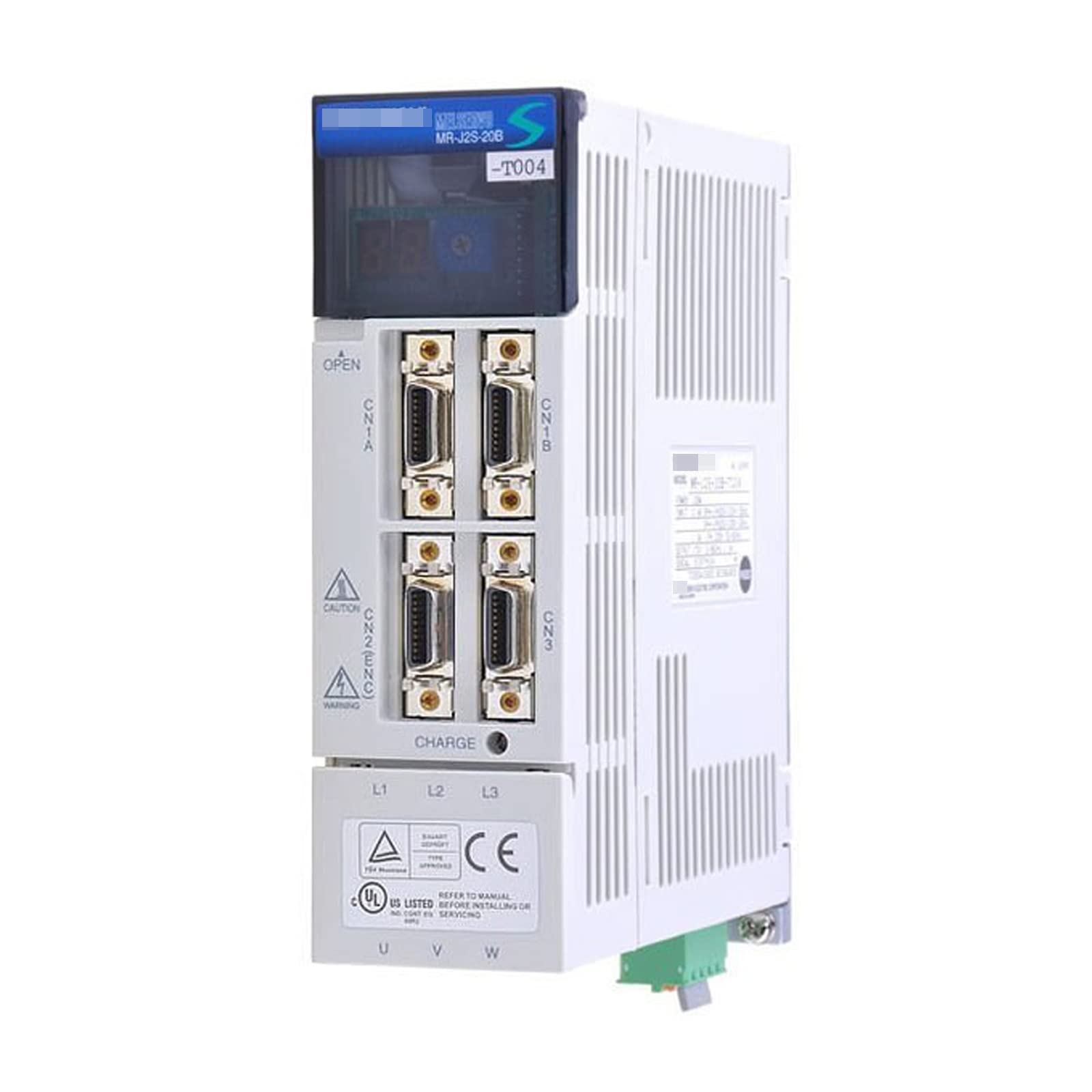
Image showing the front view of the CBBEXP MR-J2S-20B-T004 Servo Driver, highlighting its compact design and connection ports.
2. Mounting
Mount the servo driver in a vertical position within an electrical enclosure to ensure proper heat dissipation. Allow sufficient space around the unit for ventilation and cable routing. Use appropriate mounting screws to secure the unit firmly to a stable surface.
- Ensure the mounting surface is flat and free from vibrations.
- Maintain adequate clearance from other heat-generating components.
3. Wiring
All wiring should be performed by qualified personnel in accordance with local and national electrical codes. Ensure power is disconnected before making any connections.
- Power Supply Wiring: Connect the main power supply to the designated terminals. Verify voltage and current ratings match the driver's specifications.
- Motor Wiring: Connect the servo motor power and encoder feedback cables to the corresponding terminals on the driver. Ensure correct phase sequence and secure connections.
- Control Signal Wiring: Connect control signals (e.g., pulse, direction, enable, alarm outputs) from the PLC or host controller to the driver's I/O terminals. Use shielded cables for signal integrity.
- Grounding: Properly ground the servo driver and motor to prevent electrical noise and ensure safety.
4. Initial Power-Up
Before applying power, double-check all wiring connections. Apply power to the servo driver. Observe the status indicators for normal operation. Refer to the operating section for indicator meanings.
Operating
1. Basic Operation Modes
The MR-J2S-20B-T004 supports various operation modes, typically configured via a connected PLC or programming software. Common modes include position control, speed control, and torque control.
- Position Control: Used for precise positioning applications.
- Speed Control: Used for maintaining a constant motor speed.
- Torque Control: Used for applications requiring constant torque output.
2. Parameter Settings
The servo driver's performance can be optimized by adjusting various parameters. These parameters are typically set using dedicated software provided by the manufacturer or through a human-machine interface (HMI) connected to the PLC. Refer to the detailed programming manual for specific parameter descriptions and adjustment procedures.
3. Status Indicators
The servo driver features LED indicators that provide visual feedback on its operational status and any detected errors. Consult the detailed manual for a complete list of indicator states and their meanings.
- RUN/ALARM LED: Indicates operational status or an alarm condition.
- POWER LED: Indicates power supply status.
Maintenance
1. Routine Checks
Regular inspection helps ensure reliable operation and extends the lifespan of the servo driver. Perform the following checks periodically:
- Check for loose wiring connections.
- Inspect for any signs of overheating or discoloration on components.
- Verify that cooling fans (if present) are operating correctly and are free from obstructions.
2. Cleaning
Keep the servo driver and its surroundings clean and free from dust, dirt, and debris. Use a soft, dry cloth for cleaning. Do not use solvents or abrasive cleaners.
3. Environmental Considerations
Ensure the operating environment adheres to the specified temperature, humidity, and vibration limits. Excessive heat, moisture, or vibration can negatively impact the driver's performance and longevity.
Troubleshooting
This section outlines common issues and potential solutions. For detailed troubleshooting, refer to the comprehensive technical manual.
| Problem | Possible Cause | Solution |
|---|---|---|
| No Power / Power LED Off | No input power; Blown fuse; Faulty wiring. | Check power supply; Replace fuse; Verify wiring connections. |
| Alarm LED On | Overcurrent; Overvoltage; Encoder error; Motor overload. | Identify specific alarm code (if displayed); Check motor load; Inspect motor and encoder wiring; Consult detailed alarm list in manual. |
| Motor Not Moving | No enable signal; Incorrect command signal; Motor or driver fault. | Verify enable signal is active; Check command signal integrity; Inspect motor and driver for faults. |
Specifications
- Model: MR-J2S-20B-T004
- Type: Programmable Logic Control Product
- Manufacturer: CBBEXP
- ASIN: B0CH6YS83H
- First Available: September 3, 2023
Warranty and Support
The CBBEXP MR-J2S-20B-T004 Servo Driver comes with a One-Year Warranty from the date of purchase. This warranty covers defects in materials and workmanship under normal use.
For technical support, warranty claims, or further assistance, please contact your supplier or the manufacturer directly. Provide your product model number and purchase details when seeking support.
Zhengbang Automation specializes in PLC hardware and maintains a large stock. For any model or quantity inquiries, please consult them online for competitive pricing and support.