
CBBEXP FX5U-80MT/ES
User Manual: CBBEXP FX5U-80MT/ES Programmable Module
Model: FX5U-80MT/ES
1. Introduction
This manual provides essential information for the safe and efficient use of the CBBEXP FX5U-80MT/ES Programmable Module. It covers product overview, installation, operation, maintenance, troubleshooting, and technical specifications. Please read this manual thoroughly before operating the device and keep it for future reference.
2. Safety Information
Always observe the following safety precautions to prevent injury, damage to the product, or damage to connected equipment.
- Electrical Safety: Ensure all power connections are made by qualified personnel. Disconnect power before performing any installation, wiring, or maintenance.
- Environment: Operate the module within specified environmental conditions (temperature, humidity) to ensure optimal performance and longevity.
- Handling: Handle the module with care to avoid physical damage.
- Grounding: Properly ground the module as per local electrical codes and manufacturer recommendations.
- Authorized Use: Use the module only for its intended purpose as a programmable logic control device.
Warning: This product may contain chemicals known to the State of California to cause cancer and birth defects or other reproductive harm.
3. Product Overview
The CBBEXP FX5U-80MT/ES is a robust programmable logic control (PLC) module designed for industrial automation applications. It serves as a central control unit for various machinery and processes, offering reliable performance and versatile programming capabilities.
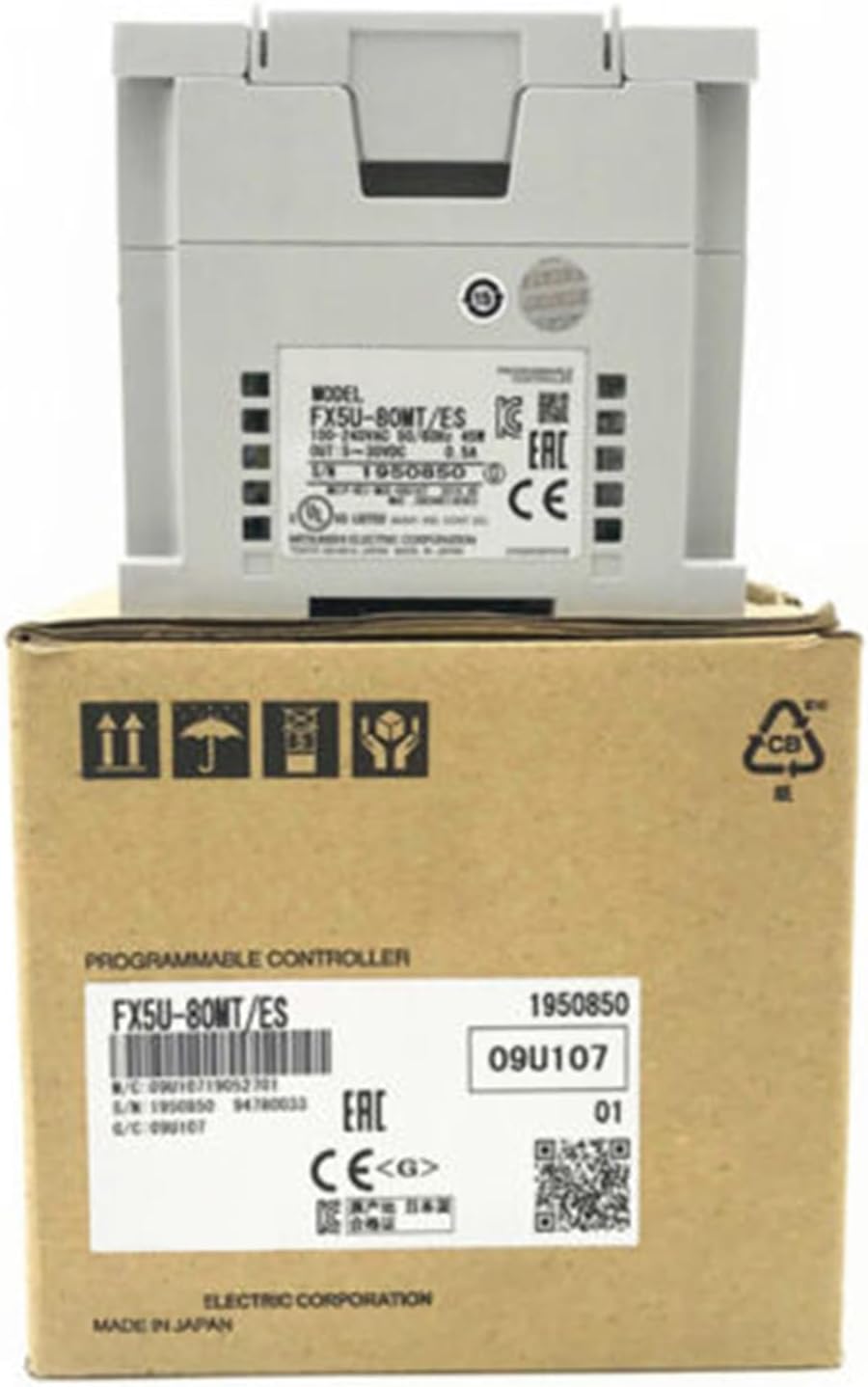
Figure 3.1: The CBBEXP FX5U-80MT/ES Programmable Module. This image displays the CBBEXP FX5U-80MT/ES Programmable Module, a grey industrial control unit, resting on its brown cardboard retail packaging. The module itself has labels indicating 'MODEL FX5U-80MT/ES' and various electrical specifications. The box also features product identification and regulatory marks.
4. Setup and Installation
Proper installation is crucial for the module's performance and safety. Follow these general guidelines:
- Mounting: Securely mount the FX5U-80MT/ES module in a suitable industrial enclosure, ensuring adequate ventilation and protection from environmental factors.
- Power Connection: Connect the module to a stable power source. The module requires 100-240VAC, 50/60Hz input. Ensure proper grounding.
- Input/Output Wiring: Connect input devices (sensors, switches) and output devices (actuators, relays) to the appropriate terminals as per your system design. The module provides 5-30VDC, 0.5A output.
- Communication Setup: Connect any necessary communication cables (e.g., Ethernet, USB) for programming and monitoring.
- Pre-Power Check: Before applying power, double-check all wiring connections for correctness and security.
5. Operating Instructions
Once installed, the FX5U-80MT/ES module is ready for programming and operation.
- Programming Software: Use compatible PLC programming software to develop and upload your control logic to the module. Refer to the software's documentation for detailed instructions.
- Mode Selection: Understand the different operating modes (e.g., RUN, STOP, PROGRAM) and how to switch between them.
- Monitoring: Utilize the programming software to monitor the status of inputs, outputs, and internal registers during operation.
- Safety Interlocks: Always implement appropriate safety interlocks in your programming to prevent hazardous conditions.
6. Maintenance
Regular maintenance helps ensure the longevity and reliable operation of your FX5U-80MT/ES module.
- Cleaning: Periodically clean the exterior of the module with a soft, dry cloth. Avoid using solvents or abrasive cleaners. Ensure power is off before cleaning.
- Inspection: Regularly inspect wiring connections for looseness or corrosion. Check for any signs of overheating or physical damage.
- Firmware Updates: Check the manufacturer's website for any available firmware updates that may improve performance or address issues.
7. Troubleshooting
This section provides basic troubleshooting steps for common issues. For more complex problems, contact technical support.
| Problem | Possible Cause | Solution |
|---|---|---|
| Module does not power on. | No power supply; incorrect wiring; faulty power supply. | Check power connections; verify power source voltage; ensure proper grounding. |
| Inputs not responding. | Sensor malfunction; incorrect wiring; programming error. | Verify sensor operation; check input wiring; review PLC program logic. |
| Outputs not activating. | Actuator malfunction; incorrect wiring; programming error; overload. | Check actuator; verify output wiring; review PLC program; check for overcurrent. |
| Communication error. | Incorrect cable; wrong communication settings; software issue. | Ensure correct cable type; verify communication parameters (baud rate, IP address); restart software. |
8. Specifications
| Attribute | Detail |
|---|---|
| Model | FX5U-80MT/ES |
| Type | Programmable Logic Control Product |
| Input Power | 100-240VAC, 50/60Hz |
| Output | 5-30VDC, 0.5A |
| Manufacturer | CBBEXP |
| ASIN | B0CH6W13CJ |
| Item Model Number | FX5U-80MT/ES-NEW |
| Date First Available | September 3, 2023 |
9. Warranty and Support
The CBBEXP FX5U-80MT/ES Programmable Module comes with a One-Year Warranty from the date of purchase, covering manufacturing defects. Please retain your proof of purchase for warranty claims.
For technical support, troubleshooting assistance beyond this manual, or warranty inquiries, please contact Zhengbang Automation, the specialized supplier of PLC hardware. They are devoted to providing excellent customer service and have extensive experience with leading brands.
You can consult them online for any model and quantity for good prices. Refer to your purchase documentation for specific contact details.
Related documentsFX5U-80MT/ES

Ask a question about this manual
Ask about setup, troubleshooting, compatibility, parts, safety, or missing instructions. Manuals+ will review the question and use this page’s manual context to help answer it.