
1. Introduction
This manual provides essential information for the proper installation, operation, and maintenance of the CBBEXP 6ED1055-4MH00-0BA0 Logic Module. Please read this manual thoroughly before using the device to ensure safe and efficient operation.
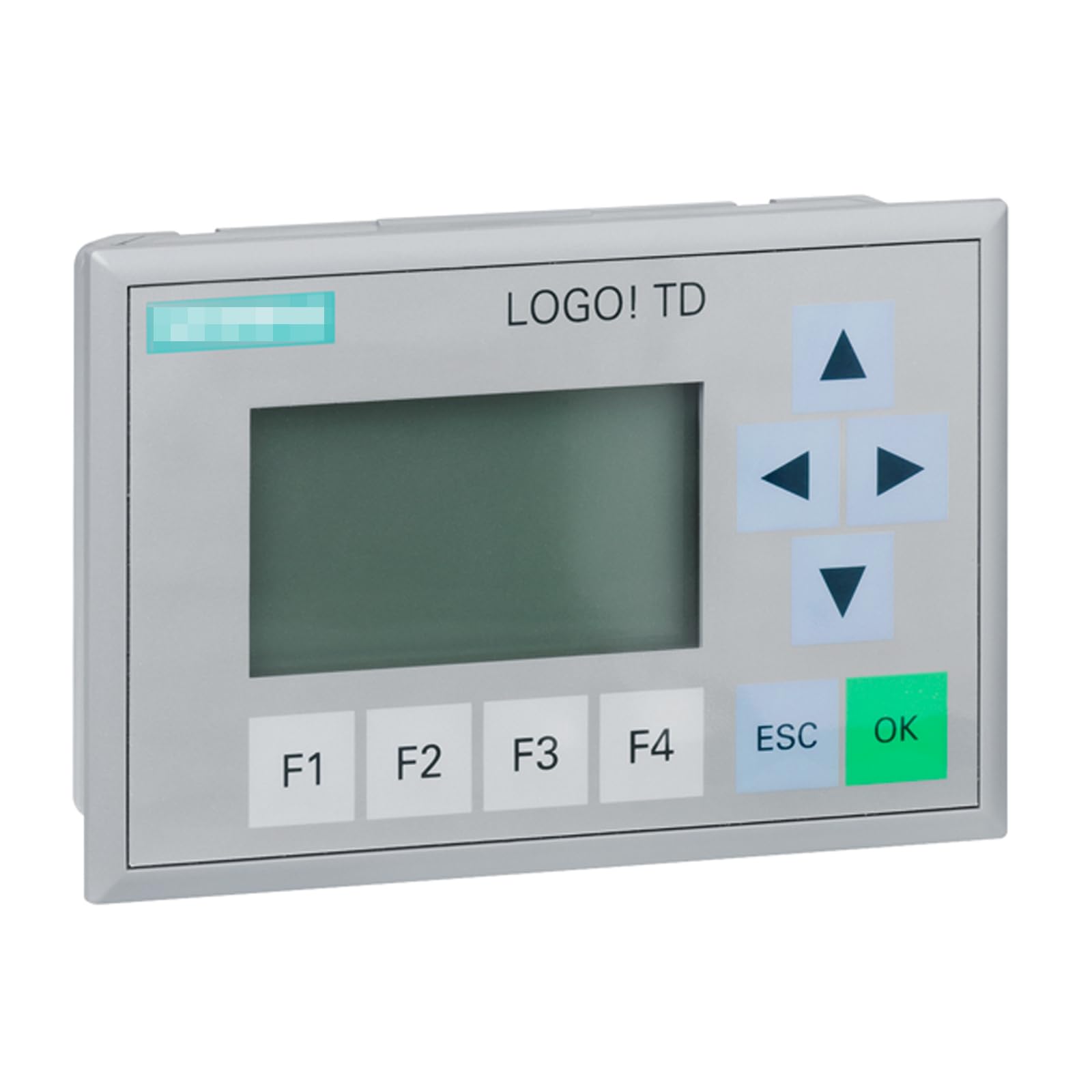
Figure 1: CBBEXP 6ED1055-4MH00-0BA0 Logic Module. This image displays the CBBEXP 6ED1055-4MH00-0BA0 Logic Module. It features a central LCD screen, four directional arrow buttons on the right, four function keys (F1, F2, F3, F4) below the screen, and 'ESC' and 'OK' buttons on the bottom right. The top right corner shows 'LOGO! TD'.
2. Product Overview
2.1 Key Features
- Model: 6ED1055-4MH00-0BA0
- Type: Programmable Logic Control Product
- Condition: New, sealed in box
2.2 Components
The CBBEXP 6ED1055-4MH00-0BA0 Logic Module typically includes the following user-interface components:
- LCD Display: For viewing status, parameters, and program information.
- Directional Arrow Buttons: Used for navigation within menus and adjusting values.
- Function Keys (F1-F4): Programmable keys for quick access to specific functions.
- ESC Button: Used to exit menus or cancel operations.
- OK Button: Used to confirm selections or enter menus.
3. Setup
3.1 Installation
Ensure the logic module is installed in a suitable environment, free from excessive dust, moisture, and extreme temperatures. Mount the module securely according to standard industrial control panel practices. Connect power and input/output wiring as per your system design and local electrical codes. Refer to the detailed wiring diagrams provided with your system documentation for specific connections.
3.2 Initial Power-Up
After installation and wiring are complete, apply power to the module. The LCD display should illuminate, and the device will typically perform a self-test. Observe the display for any error messages or indicators. If the device powers on successfully, it will usually show a default screen or prompt for initial configuration.
4. Operating Instructions
4.1 Basic Navigation
Use the directional arrow buttons to navigate through menus and options displayed on the LCD screen. The 'OK' button confirms selections or enters sub-menus, while the 'ESC' button allows you to go back to the previous screen or cancel an operation.
4.2 Programming
The 6ED1055-4MH00-0BA0 Logic Module is a programmable device. Programming is typically performed using dedicated software on a computer, which is then downloaded to the module. Refer to the specific programming software manual for detailed instructions on creating, editing, and downloading programs. The function keys (F1-F4) can be assigned specific actions within your program.
5. Maintenance
5.1 Cleaning
To maintain optimal performance, keep the module clean. Use a soft, dry cloth to wipe the exterior. Avoid using abrasive cleaners, solvents, or excessive moisture, which can damage the display or internal components.
5.2 Firmware Updates
Periodically check the manufacturer's official website for any available firmware updates. Firmware updates can provide performance enhancements, new features, or bug fixes. Follow the instructions provided with the update package carefully.
6. Troubleshooting
6.1 Common Issues
- Device Not Powering On: Check power supply connections and ensure the correct voltage is applied. Verify circuit breakers or fuses.
- Display Not Working: Ensure power is supplied. If the device powers on but the display is blank, contact support.
- Unexpected Behavior: Review your program for logical errors. Ensure all input/output wiring is correct and secure. Consider performing a factory reset if configuration issues are suspected (refer to programming software manual for procedure).
- Communication Errors: Verify communication cable connections and settings (e.g., baud rate, parity) in both the module and the programming software.
For issues not covered here, or if troubleshooting steps do not resolve the problem, please contact customer support.
7. Specifications
7.1 Technical Data
- Manufacturer: CBBEXP
- Model Number: 6ED1055-4MH00-0BA0
- Type: Programmable Logic Control Product
- ASIN: B0CH5KBLPY
- Date First Available: September 2, 2023
8. Warranty and Support
8.1 Warranty Information
The CBBEXP 6ED1055-4MH00-0BA0 Logic Module comes with a One-Year Warranty from the date of purchase. This warranty covers defects in materials and workmanship under normal use. Please retain your proof of purchase for warranty claims. The warranty does not cover damage caused by improper installation, misuse, unauthorized modifications, or external factors.
8.2 Customer Support
For technical assistance, warranty claims, or any questions regarding the CBBEXP 6ED1055-4MH00-0BA0 Logic Module, please contact your vendor or the manufacturer's customer service. Provide your model number and a detailed description of the issue for efficient support.