
1. Introduction
Thank you for choosing the GOLINPEILO 12-Compartment Metal Locker Cabinet. This manual provides essential information for the safe assembly, operation, and maintenance of your new storage cabinet. Please read these instructions carefully before use and retain them for future reference.
2. Safety Information
Important Safety Warning: To prevent overturning, this product must be used with the wall attachment device provided. Failure to secure the cabinet to a wall can result in serious injury, especially to children.

Image: Anti-tipping warning symbol. This symbol indicates the necessity of securing the cabinet to a wall to prevent it from falling over, which could cause injury.
- Always assemble the product on a soft, clean surface to prevent scratches.
- Ensure all parts are correctly installed and tightened before use.
- Do not allow children to climb on or play with the cabinet.
- Distribute weight evenly within the compartments to maintain stability.
3. Product Overview
The GOLINPEILO 12-Compartment Metal Locker Cabinet is designed for secure storage in various environments such as homes, offices, gyms, or schools. It features a durable steel construction and individual lockable compartments.
Dimensions:
- Overall Dimensions (W x D x H): 35.4" x 17.7" x 70.9" (90 cm x 45 cm x 180 cm)
- Loading capacity per shelf: 55.1 lb (25 kg)
- Total loading capacity: 308.6 lb (140 kg)

Image: Dimensional diagram of the locker cabinet, illustrating its width, depth, and height, along with internal compartment measurements.
Key Features:
- 12 individual lockable compartments (2 keys included for each door).
- Constructed from high-quality steel for durability.
- Each door includes air vents and a name tag holder.
- Plastic feet to prevent floor scratches.
- Modern design in light gray and dark gray finish.

Image: Front view of the GOLINPEILO 12-compartment metal locker cabinet, showcasing its light gray and dark gray finish and individual doors.
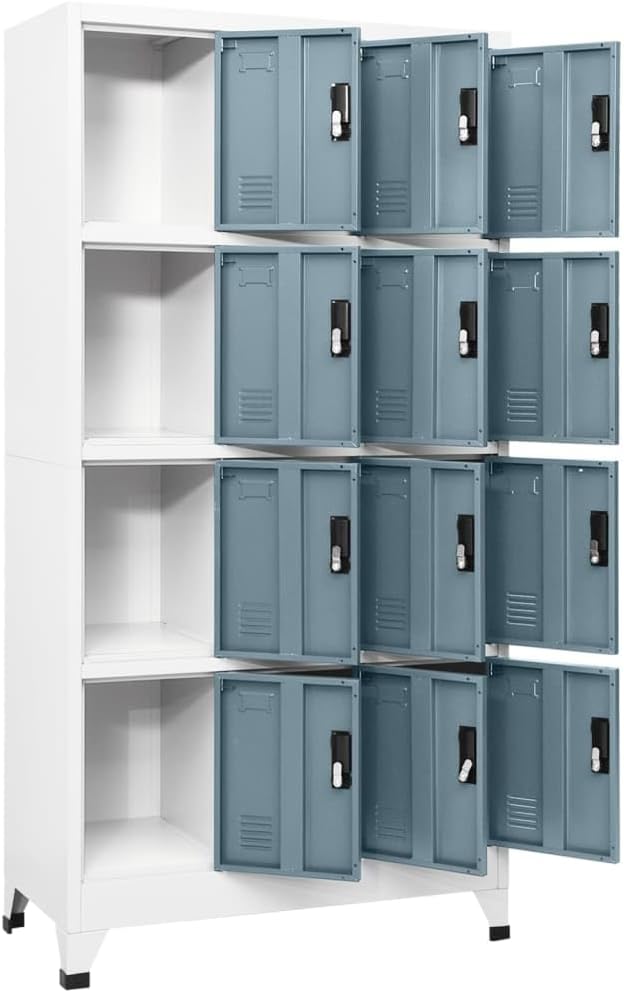
Image: Interior view of the locker cabinet with several doors open, revealing the individual storage compartments.
4. Components List
Please check that all components are present before beginning assembly. If any parts are missing or damaged, contact customer support.
| Part | Description | Quantity |
|---|---|---|
| Top Panel | Steel top panel | 1 |
| Bottom Panel | Steel bottom panel | 1 |
| Side Panels | Left and Right steel side panels | 2 |
| Back Panels | Steel back panels | Multiple (as per design) |
| Compartment Doors | Steel doors with locks, air vents, and name tag holders | 12 |
| Keys | Keys for each compartment lock | 24 (2 per door) |
| Plastic Feet | Protective feet for the base | 4 |
| Assembly Hardware | Screws, bolts, nuts, wall attachment device | 1 set |
5. Setup Instructions
Assembly is required for this product. It is recommended to have two people for assembly. Please follow the steps below carefully.
- Unpack Components: Carefully remove all parts from the packaging and lay them out on a soft, clean surface to prevent damage. Verify all components listed in Section 4 are present.
- Assemble the Frame: Attach the side panels to the top and bottom panels using the provided hardware. Ensure all connections are secure but do not fully tighten screws until the entire frame is assembled.
- Install Back Panels: Slide or attach the back panels into their designated grooves or positions on the frame.
- Attach Doors: Mount each compartment door to the frame using the hinges and hardware. Ensure doors open and close smoothly.
- Install Locks: The locks are pre-installed on the doors. Ensure each lock functions correctly with its corresponding keys.
- Attach Plastic Feet: Secure the plastic feet to the bottom corners of the cabinet.
- Secure to Wall: This is a critical step. Using the provided wall attachment device, secure the cabinet to a sturdy wall. Follow the specific instructions included with the wall attachment hardware for proper installation.
- Final Tightening: Once the cabinet is in its final position and secured to the wall, fully tighten all screws and bolts.

Image: Close-up view of the plastic feet, designed to protect flooring from scratches and provide stability.
6. Operating Instructions
Using the Locks:
- Each compartment door is equipped with a lock and comes with two keys.
- To lock a compartment, close the door and insert the key into the lock. Turn the key clockwise until the lock mechanism engages. Remove the key.
- To unlock, insert the correct key and turn counter-clockwise until the lock disengages.
- Keep spare keys in a safe and accessible location.
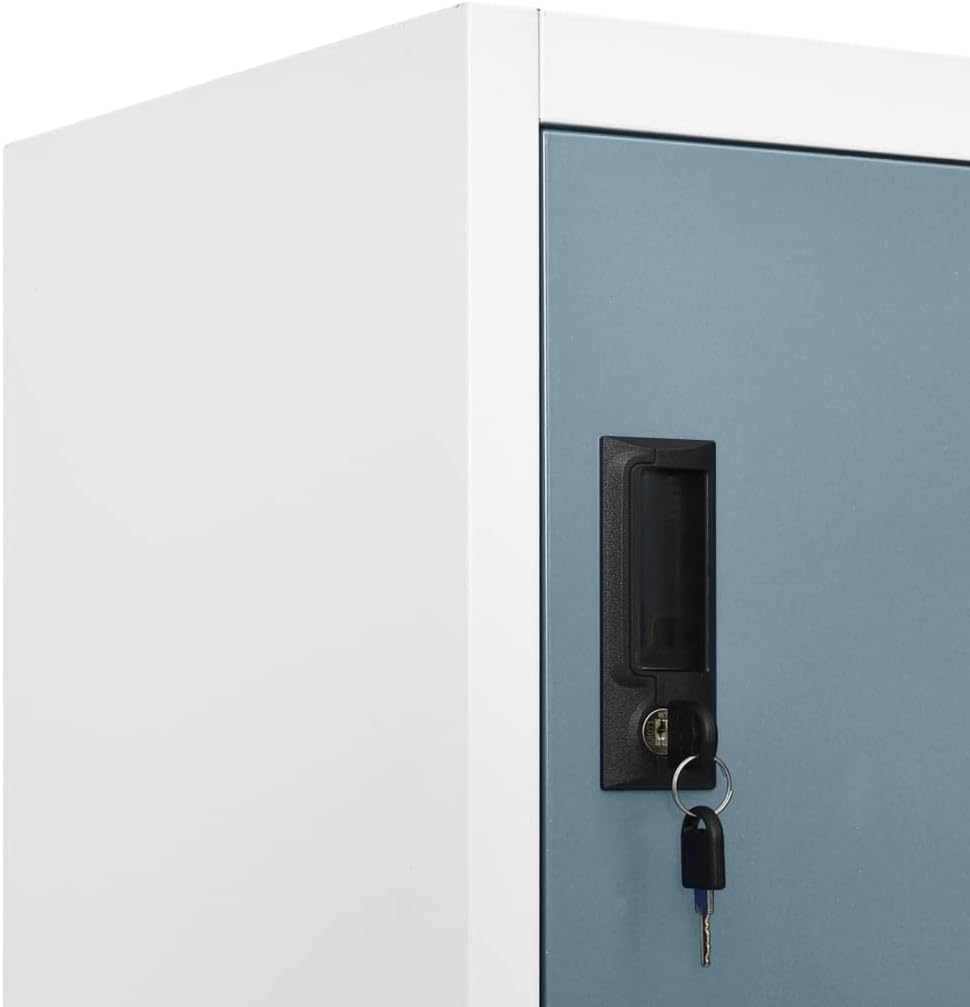
Image: Close-up of a locker door, showing the integrated lock and a key inserted, illustrating the locking mechanism.
Using Name Tag Holders:
- Each door has a designated slot for a name tag or label.
- Insert a paper label with the desired name or content description into the holder for easy identification of compartment contents.
7. Maintenance
Proper maintenance will ensure the longevity and appearance of your locker cabinet.
- Cleaning: Wipe the cabinet with a damp cloth. For stubborn marks, use a mild soap solution and then wipe dry immediately. Avoid abrasive cleaners or harsh chemicals that could damage the finish.
- Inspection: Periodically check all screws and connections to ensure they remain tight. Re-tighten if necessary.
- Lock Care: If locks become stiff, apply a small amount of graphite lubricant to the keyhole.
8. Troubleshooting
- Cabinet is wobbly: Ensure all assembly screws are fully tightened. Verify the cabinet is placed on a level surface. If necessary, adjust the plastic feet or use shims. Confirm the wall attachment device is securely installed.
- Door does not close properly: Check hinges for proper alignment. Ensure no items are obstructing the door's path.
- Key is stuck or lock is stiff: Apply a small amount of graphite lubricant to the keyhole. Do not force the key.
9. Specifications
| Attribute | Value |
|---|---|
| Brand | GOLINPEILO |
| Model | 12-Compartment Metal Locker Cabinet |
| Color | Light Gray and Dark Gray |
| Material | Steel, Plastic |
| Dimensions (W x D x H) | 35.4" x 17.7" x 70.9" (90 cm x 45 cm x 180 cm) |
| Number of Compartments | 12 |
| Loading Capacity per Shelf | 55.1 lb (25 kg) |
| Total Loading Capacity | 308.6 lb (140 kg) |
| Assembly Required | Yes |
| Product Care Instructions | Wipe with Damp Cloth |
10. Warranty and Support
For warranty information or customer support, please refer to the purchase documentation or contact GOLINPEILO customer service directly. Our service team aims to address concerns within 24 hours.
You can visit the GOLINPEILO Store for more information: GOLINPEILO Store