
CBBEXP 1734-IB8
CBBEXP 1734-IB8 Digital Input Module User Manual
Model: 1734-IB8
Introduction
This manual provides essential information for the installation, operation, and maintenance of the CBBEXP 1734-IB8 Digital Input Module. The 1734-IB8 is an 8-point sinking 24VDC digital input module designed for use in Programmable Logic Control (PLC) systems. It is part of the POINT I/O family, offering flexible and modular input capabilities for industrial automation applications.
Setup and Installation
Proper installation is crucial for the reliable operation of the 1734-IB8 module. Follow these guidelines for physical setup and wiring.
Physical Mounting
The 1734-IB8 module is designed for DIN rail mounting. Ensure the DIN rail is securely fastened within the control cabinet. The module snaps onto the DIN rail and connects to adjacent POINT I/O modules or a communication adapter.
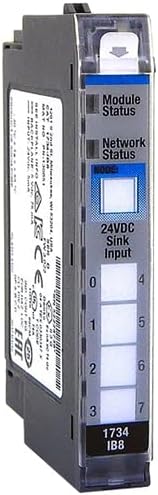
Figure 1: Front view of the CBBEXP 1734-IB8 Digital Input Module. This image displays the module's status indicators, input terminals (0-7), and model number. The module features a clear cover over the wiring terminals and labels for Module Status, Network Status, and 24VDC Sink Input.
Wiring Connections
The 1734-IB8 module provides 8 sinking digital input points. Connect 24VDC input signals to the appropriate terminals. A sinking input means the module provides the common return path for the input device's current. Ensure all wiring adheres to local electrical codes and safety standards.
- Power Supply: Connect a stable 24VDC power supply to the POINT I/O system.
- Input Devices: Connect your 24VDC sinking input devices (e.g., pushbuttons, limit switches) to the designated input terminals (0-7).
- Common: Ensure the common return for the input devices is properly connected to the module's common terminal.
Refer to the specific wiring diagrams provided with your complete POINT I/O system documentation for detailed connection instructions.
Operating Instructions
Once installed and wired, the 1734-IB8 module functions as an interface for digital input signals within your PLC system.
Module Functionality
The module detects the presence or absence of a 24VDC signal at each of its 8 input points. These states are then communicated to the connected PLC controller for processing according to the programmed logic.
Status Indicators
The front of the module features LED indicators to provide visual feedback on its status:
- Module Status LED: Indicates the operational status of the module. Typically, a solid green light signifies normal operation. Refer to the system documentation for specific error codes indicated by flashing patterns.
- Network Status LED: Indicates the communication status with the network adapter. A solid green light usually means a healthy network connection.
- Input Point LEDs (0-7): Each input point has a dedicated LED. This LED illuminates when a 24VDC signal is present at the corresponding input terminal, indicating an active input.
Maintenance
The CBBEXP 1734-IB8 module is designed for robust industrial environments and requires minimal maintenance. However, periodic checks can help ensure long-term reliability.
- Environmental Conditions: Ensure the module operates within its specified temperature and humidity ranges. Avoid exposure to excessive dust, moisture, or corrosive gases.
- Cleaning: If necessary, gently clean the exterior of the module with a soft, dry cloth. Do not use harsh chemicals or abrasive materials. Ensure power is disconnected before cleaning.
- Wiring Integrity: Periodically inspect wiring connections for tightness and signs of wear or damage. Loose connections can lead to intermittent operation or signal loss.
Troubleshooting
If the 1734-IB8 module is not functioning as expected, consider the following troubleshooting steps:
- Check Power: Verify that the 24VDC power supply to the POINT I/O system is active and stable.
- Module Status LED: Observe the Module Status LED. If it is not solid green, consult your system's documentation for the meaning of the specific flashing pattern.
- Network Status LED: If the Network Status LED is not solid green, check the communication adapter and network connections.
- Input Point LEDs: If an input is not registering, check the corresponding input point LED. If the LED is off when the input device is active, verify the wiring from the input device to the module and the functionality of the input device itself.
- PLC Program: Ensure the PLC program is correctly configured to read the input data from the 1734-IB8 module.
For complex issues, consult the comprehensive documentation for your specific PLC system or contact technical support.
Specifications
Key technical specifications for the CBBEXP 1734-IB8 Digital Input Module:
| Attribute | Value |
|---|---|
| Model Number | 1734-IB8 |
| Module Type | Digital Input Module |
| Number of Inputs | 8 Points |
| Input Type | Sinking |
| Input Voltage | 24VDC |
| Manufacturer | CBBEXP |
| First Available Date | September 2, 2023 |
Warranty and Support
The CBBEXP 1734-IB8 Digital Input Module comes with a One-Year Warranty from the date of purchase, covering manufacturing defects. For warranty claims or technical assistance, please contact your vendor or the manufacturer directly.
For further inquiries or support, you may consult the seller, PLG Solutions / PLG Automation, or Zhengbang Automation, which specializes in PLC hardware and offers customer-oriented service.
For general information regarding the product or to consult about other models, you can visit the CBBEXP brand page on Amazon.
Ask a question about this manual
Ask about setup, troubleshooting, compatibility, parts, safety, or missing instructions. Manuals+ will review the question and use this page’s manual context to help answer it.