Introduction
Thank you for choosing the Krysenix PG1 Gaming Headset. This manual provides detailed instructions for setting up, operating, maintaining, and troubleshooting your headset to ensure an optimal gaming experience. Please read this manual thoroughly before use.

Image: The Krysenix PG1 Gaming Headset, featuring a black design with RGB lighting on the earcups and an attached microphone.
Package Contents
- Krysenix PG1 Gaming Headset
- 2.2m Extension Cable
- 3.5mm 1-to-2 Audio Splitter Cable
- User Manual
Setup
Connecting to Devices
The Krysenix PG1 headset offers multi-platform compatibility through its 3.5mm jack and a USB connection for RGB lighting.
- For PC/Laptop/Mac (with separate audio/mic ports): Connect the headset's 3.5mm jack to the included 3.5mm 1-to-2 audio splitter cable. Plug the green connector of the splitter into your device's audio output (headphone) port and the pink connector into the microphone input port. For RGB lighting, connect the USB cable to an available USB port.
- For PS4/PS5/Nintendo Switch/Mobile/Tablet (with combined 3.5mm audio/mic port): Plug the headset's 3.5mm jack directly into the device's 3.5mm audio port. For RGB lighting, connect the USB cable to an available USB port on your console or a power source.
- For Xbox One/Xbox Series X/S: An additional adapter (not included) may be required for older Xbox One controllers that do not have a 3.5mm jack. For controllers with a 3.5mm jack, plug the headset's 3.5mm jack directly into the controller. For RGB lighting, connect the USB cable to an available USB port on the console or a power source.
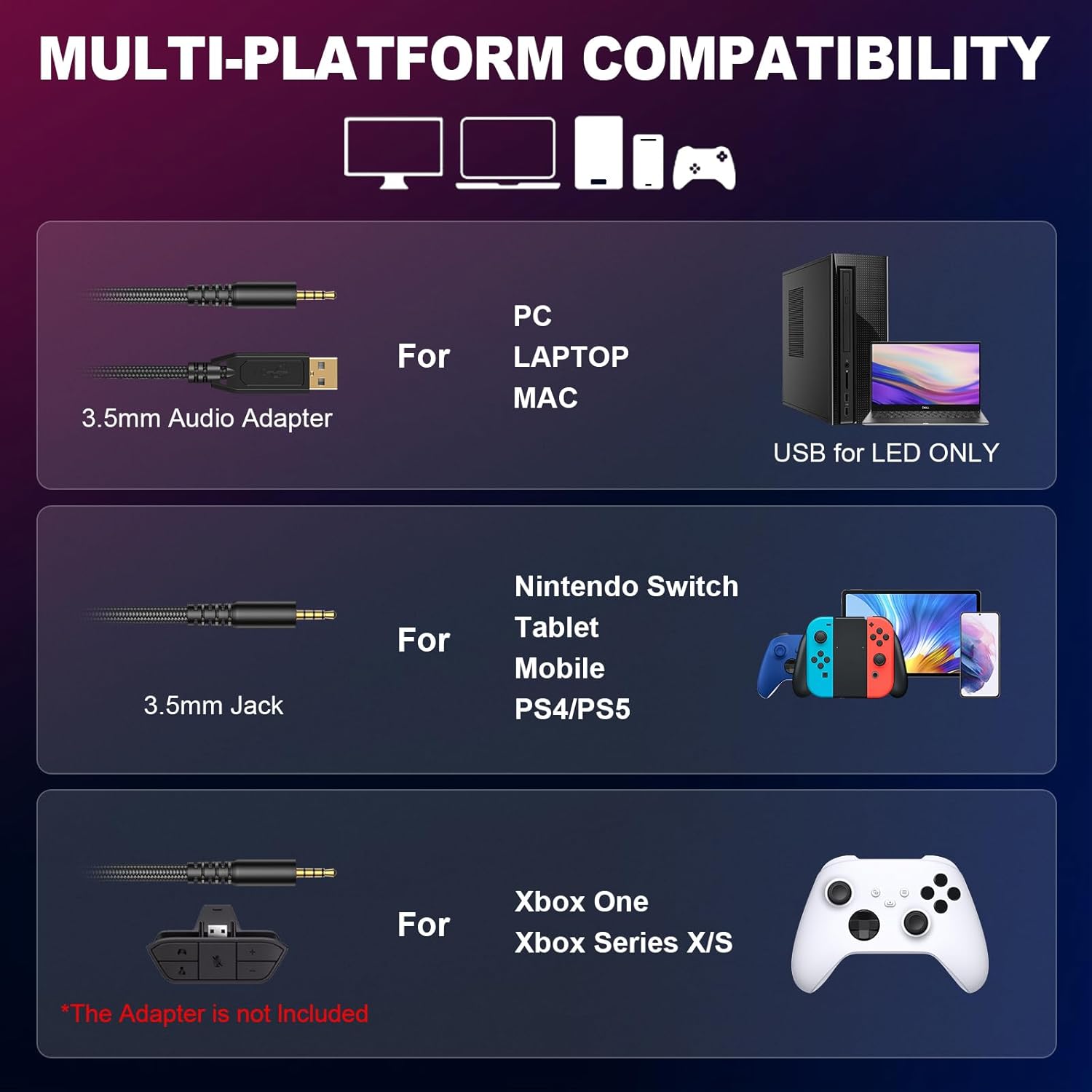
Image: Diagram illustrating various connection methods for PC, Laptop, Mac, Nintendo Switch, Tablet, Mobile, PS4/PS5, Xbox One, and Xbox Series X/S, highlighting the 3.5mm audio adapter and USB for LED.

Image: A visual representation of the Krysenix PG1 headset connected to various gaming platforms including Xbox, Nintendo Switch, PS4/PS5, Laptop, and PC.
Operating Instructions
Audio and Microphone Control
The headset features an in-line control unit for easy access to volume and microphone functions.
- Volume Wheel: Rotate the scroll wheel on the in-line control to adjust the audio volume up or down.
- Microphone Mute Switch: Use the dedicated switch on the in-line control to quickly mute or unmute the microphone.
- Microphone Adjustment: The flexible, omnidirectional microphone can be adjusted up to 120 degrees to position it optimally for clear voice pickup.

Image: A detailed view of the headset's braided cable, showing the USB connector for LED lights, the gold-plated 3.5mm plug, the volume wheel, and the one-key mute switch on the in-line control.

Image: Close-up of the in-line control unit, highlighting the one-touch volume switch and microphone mute button.
RGB Lighting
The headset features dynamic RGB lighting on the earcups. To activate the RGB lights, ensure the USB connector is plugged into a powered USB port on your device or a USB power adapter.
Comfort and Fit
The Krysenix PG1 headset is designed for comfort during extended use. It features a lightweight headband and soft, breathable ear cushions. Adjust the headband to fit your head comfortably. The earcups provide passive noise isolation.

Image: A close-up of the headset's stretchable headband mechanism, showing approximately 2cm of adjustment range.

Image: A detailed view of the upgraded 3D earmuff structure, emphasizing the soft padding for comfort.

Image: A close-up of the unique hybrid ear cushions, highlighting their design for comfort and sound isolation.
Maintenance
Proper care will extend the life of your Krysenix PG1 Gaming Headset.
- Cleaning: Use a soft, dry cloth to wipe down the headset. For ear cushions, a slightly damp cloth can be used, but ensure they are completely dry before use. Do not use harsh chemicals or abrasive cleaners.
- Storage: Store the headset in a cool, dry place away from direct sunlight and extreme temperatures. Avoid placing heavy objects on the headset.
- Cable Care: Avoid sharp bends or excessive pulling on the cable to prevent damage.
Troubleshooting
If you encounter issues with your Krysenix PG1 headset, refer to the following common solutions:
| Problem | Possible Cause | Solution |
|---|---|---|
| No sound from headset |
|
|
| Microphone not working |
|
|
| RGB lights not working |
|
|
| Sound imbalance (one ear louder) |
|
|
| Headset uncomfortable |
|
|
Specifications
| Feature | Detail |
|---|---|
| Model Name | PG1 |
| Connectivity Technology | Wired |
| Headphone Jack | 3.5 mm Jack |
| Driver Size | 50mm Neodymium Drivers |
| Frequency Response | 20 Hz - 20 kHz |
| Impedance | 32 ohms |
| Sensitivity | 111 dB |
| Microphone Type | Omnidirectional, Noise-Cancelling |
| Cable Length | Approximately 2.2 meters (86 inches) |
| Weight | 280 Grams |
| Material | Polyurethane (PU) Plastic |
| Special Features | Adjustable Headband, Noise Isolation, Lightweight, RGB Lighting |
| Compatible Devices | Gaming Consoles (PS4, PS5, Xbox One, Switch), PC, Laptop, Mobile Phones |
Warranty and Support
Krysenix products are designed for reliability and performance. For specific warranty information, please refer to the documentation included with your purchase or visit the official Krysenix website. If you require technical support or have questions not covered in this manual, please contact Krysenix customer service through their official channels.