1. Introduction
This manual provides detailed instructions for the assembly, operation, and maintenance of your Rfiver TV Stand. This stand is designed to securely hold televisions and monitors ranging from 13 to 43 inches, with a maximum weight capacity of 20 kg (44.1 lbs). It features height adjustment, tilt functionality, and 90-degree rotation for optimal viewing flexibility. Please read this manual thoroughly before assembly and use to ensure safe and correct operation.
2. Safety Information
- Weight Limit: Do not exceed the maximum weight capacity of 20 kg (44.1 lbs). Overloading can cause instability and potential injury.
- TV Size: Ensure your television or monitor is within the recommended size range of 13-43 inches.
- VESA Compatibility: Verify that your TV's VESA mounting pattern (distance between screw holes on the back) is between 75x75 mm and 200x200 mm.
- Assembly: Follow all assembly instructions carefully. Incorrect assembly can lead to product failure.
- Stability: Always ensure the stand is placed on a stable, level surface. Lock the casters when the stand is in its desired position to prevent accidental movement.
- Children and Pets: Keep children and pets away from the stand during assembly and ensure the TV is securely mounted to prevent tipping.
- Damage: Do not use the stand if any parts are damaged or missing. Contact customer support for replacement parts.
3. Package Contents
Before beginning assembly, please check that all parts listed below are present and undamaged. If any parts are missing or damaged, please contact Rfiver customer support.
- Main Support Column
- Base Frame with Casters (or adjustable feet)
- TV Mounting Bracket
- Hardware Kit (screws, washers, spacers for TV mounting)
- Assembly Tools (if included)
- Instruction Manual
Note: A screwdriver may be required for attaching the TV to the bracket.
4. Setup and Assembly
Follow these steps carefully to assemble your Rfiver TV Stand. It is recommended to have a second person assist with mounting the TV.
4.1. Assemble the Base
- Attach the casters to the base frame. Ensure they are securely tightened. Alternatively, attach the adjustable feet if you prefer a stationary setup.
- Connect the main support column to the assembled base. Use the provided screws and tools to ensure a firm connection.

Figure 4.1: Base assembly with options for casters or adjustable feet. The casters allow 360-degree rotation for easy movement, while adjustable feet provide stability for a fixed position.
4.2. Attach TV Mounting Bracket to TV
- Carefully place your TV face down on a soft, clean surface to prevent scratches.
- Identify the VESA mounting holes on the back of your TV.
- Select the appropriate screws, washers, and spacers from the hardware kit that fit your TV's VESA pattern.
- Attach the TV mounting bracket arms to the back of your TV. Ensure the bracket is oriented correctly for the desired screen rotation (horizontal or vertical). Important: Incorrect orientation during this step will prevent 90-degree horizontal rotation later.

Figure 4.2: The assembled TV stand with a television mounted, illustrating its use in a home environment. This image highlights the stand's compact footprint and suitability for various room types.
4.3. Mount TV to Stand
- With assistance, carefully lift the TV with the attached bracket and hook it onto the main support column's mounting plate.
- Secure the TV to the stand using the safety locking mechanism (usually screws or clips) to prevent accidental dislodgement.

Figure 4.3: Close-up view of the stand's features, including a safety lock mechanism for secure TV attachment, integrated cable management clips to keep wires tidy, and robust piping for structural integrity.
5. Operating Instructions
5.1. Height Adjustment
The TV stand offers 6 levels of height adjustment, ranging from 113.3 cm (44.5 inches) to 133.3 cm (52.3 inches), with each step being 4 cm. To adjust the height:
- Loosen the height adjustment screws or levers on the main support column.
- Carefully raise or lower the TV to the desired height.
- Securely tighten the height adjustment screws or levers to lock the TV in place.

Figure 5.1: A diagram showing the minimum and maximum height settings (113.3 cm to 133.3 cm) and the 6-level adjustment mechanism. Also displays base dimensions (43 cm x 48 cm).
5.2. Tilt Adjustment
The TV mounting bracket allows for a tilt range from -2° (downward) to +20° (upward). This feature helps optimize viewing angles from various positions, such as sitting on a sofa or standing.
- Locate the tilt adjustment knobs or screws on the TV mounting bracket.
- Loosen them slightly.
- Adjust the TV to the desired tilt angle.
- Tighten the knobs or screws to secure the tilt position.
5.3. 90° Rotation
The stand supports 90-degree rotation of the display, allowing you to switch between horizontal (landscape) and vertical (portrait) orientations. This is useful for specific applications like gaming or professional presentations.
- Ensure the TV is not obstructed by any furniture or walls.
- Gently rotate the TV to the desired 90-degree orientation. The rotation mechanism is designed for smooth movement.
- Note: If the bracket was not installed correctly during setup, 90-degree rotation may not be possible. Refer back to Section 4.2.

Figure 5.2: Visual representation of the TV stand's rotational flexibility, allowing a full 90-degree pivot, and its vertical tilt range from -2 degrees to +20 degrees for optimal viewing.
5.4. Mobility and Stability
If using casters, the stand can be easily moved. To ensure stability once positioned, engage the locks on the casters. If using adjustable feet, the stand remains stationary.
6. Maintenance
- Cleaning: Wipe the stand with a soft, dry cloth. Avoid abrasive cleaners or solvents that could damage the finish.
- Hardware Check: Periodically check all screws and connections to ensure they remain tight and secure. Retighten if necessary.
- Caster Maintenance: If using casters, keep them free of dust and debris to ensure smooth movement.
7. Troubleshooting
- Problem: TV cannot rotate 90 degrees horizontally.
- Solution: This usually indicates that the TV mounting bracket was installed in the wrong direction during initial setup. Please refer to Section 4.2 and re-install the bracket with the correct orientation.
- Problem: Stand feels unstable or wobbly.
- Solution:
- Ensure all assembly screws are securely tightened.
- Verify the stand is placed on a flat, level surface.
- If using casters, ensure they are locked when the stand is stationary.
- Check that the TV weight and size are within the specified limits.
- Problem: Difficulty adjusting height or tilt.
- Solution:
- Ensure adjustment knobs or levers are sufficiently loosened before attempting to move the TV.
- Do not force adjustments. If resistance is met, recheck the mechanism for obstructions.
8. Specifications
| Brand | Rfiver |
| Model Name | TV Stand Caster |
| Compatible TV Sizes | 13 - 43 inches |
| Maximum Load Capacity | 20 kg (44.1 lbs) |
| VESA Compatibility | 75x75 mm to 200x200 mm |
| Height Adjustment | 6 levels, 113.3 cm to 133.3 cm |
| Tilt Angle | -2° to +20° |
| Rotation | 90° Horizontal/Vertical |
| Material | Metal |
| Product Dimensions (LxWxH) | 48 x 43 x 133.3 cm |
| Item Weight | 4.4 kg |
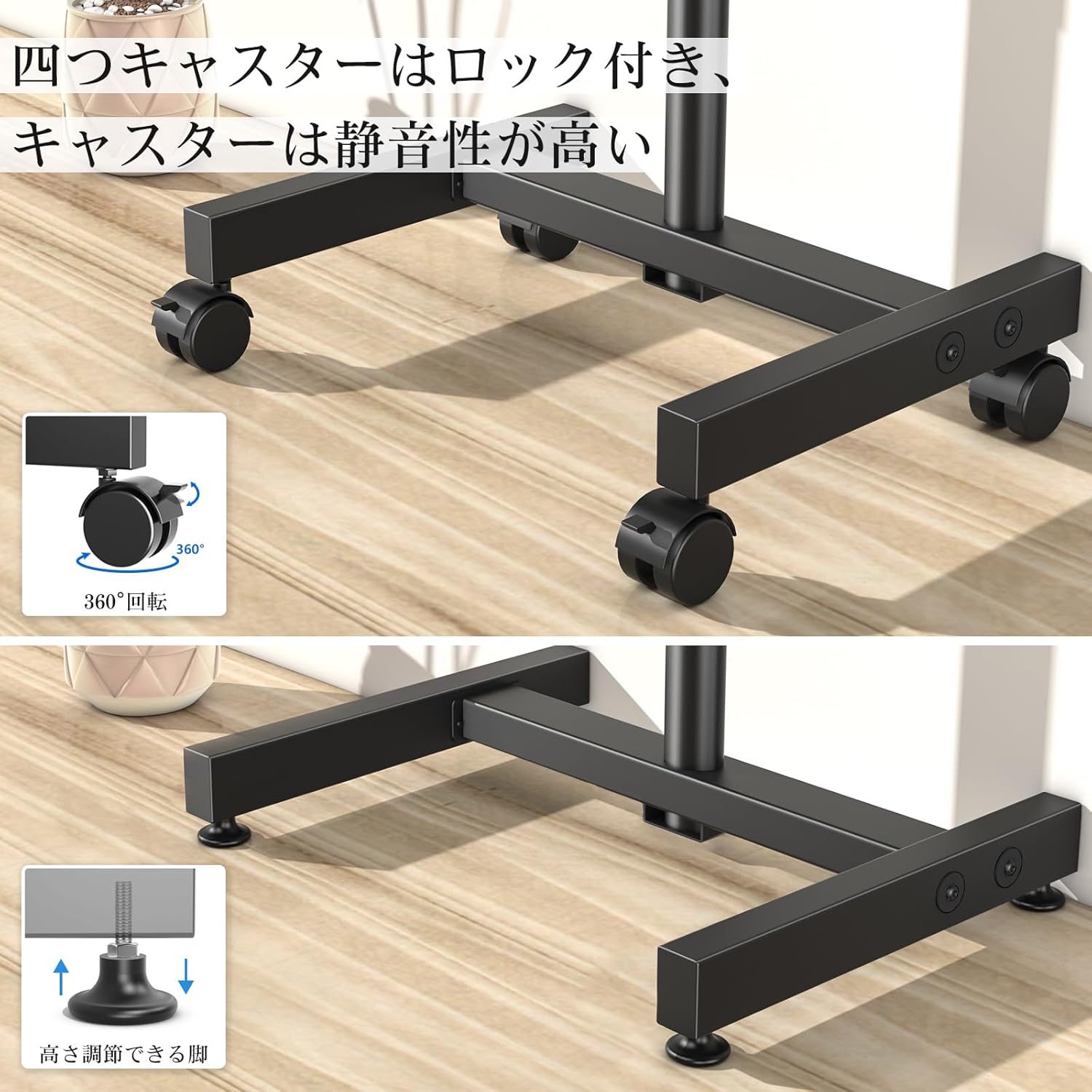
Figure 8.1: Detailed compatibility conditions, including supported TV sizes (13-43 inches), VESA mounting patterns (75x75mm to 200x200mm), and maximum weight capacity (20 kg).
9. Warranty and Support
Rfiver provides a 5-year quality assurance from the date of purchase for this product. This warranty covers manufacturing defects and material flaws under normal use.
If you have any questions, require assistance with assembly, or encounter any issues with your TV stand, please do not hesitate to contact our customer support team. We aim to respond to all inquiries within 12 hours.
When contacting support, please provide your TV model number and order number to help us assist you more efficiently.
Contact Information: Refer to the "Sold by: Rfiver Collections-Ask questions" link on the product purchase page or your purchase documentation for direct contact methods.