1. Safety Instructions
Please read all safety instructions carefully before using the OUGETHER Handheld Vacuum Cleaner. Retain this manual for future reference.
- Do not immerse the vacuum cleaner or its charging cable in water or other liquids.
- Keep the appliance away from children and pets. This is not a toy.
- Use only the provided USB charging cable. Do not use damaged cables or chargers.
- Do not vacuum flammable or combustible materials, hot ashes, or sharp objects.
- Ensure the filter is properly installed before operation to prevent damage to the motor.
- Do not attempt to disassemble or repair the vacuum cleaner yourself. Contact customer support for assistance.
- Unplug the vacuum cleaner before cleaning or performing any maintenance.
2. Product Overview
The OUGETHER Handheld Vacuum Cleaner is a compact, cordless device designed for efficient cleaning in various environments, including cars, homes, and offices. It features a powerful 9000PA suction and a foldable design for easy storage.
Package Contents:
- 1 x Handheld Vacuum Cleaner
- 1 x Flat Nozzle
- 2 x Duster Nozzle
- 2 x Brush Nozzle
- 1 x USB Charging Cable
- 1 x Storage Bag

Image: OUGETHER Handheld Vacuum Cleaner and its accessories.
Key Features:
- High-Power Suction: Equipped with a powerful motor and spiral-dual-duct structure, generating 9000PA suction.
- Cordless Design: Built-in rechargeable battery allows for freedom of movement without a power cable.
- Foldable Handle: Enables compact storage in cabinets and drawers.
- Washable Filtration System: Features a reusable filter screen for easy maintenance.
- Versatile Attachments: Includes multiple nozzles for various cleaning tasks.
3. Setup
Initial Charging:
- Before first use, fully charge the vacuum cleaner.
- Connect the USB charging cable to the charging port on the vacuum cleaner.
- Plug the other end of the USB cable into a compatible USB power adapter (not included) or a USB port.
- The indicator light will show charging status (refer to the device for specific light indications). A full charge typically takes approximately 3-4 hours.

Image: Vacuum cleaner connected for USB charging.
Attaching Nozzles:
Select the appropriate nozzle for your cleaning task. Align the nozzle with the vacuum's suction inlet and push firmly until it clicks into place.
- Flat Nozzle: Ideal for narrow gaps and corners.
- Duster Nozzle: Suitable for delicate surfaces and general dusting.
- Brush Nozzle: Effective for loosening stubborn dirt and cleaning upholstery.
4. Operating Instructions
Powering On/Off:
Press the power button located on the handle to turn the vacuum cleaner on. Press it again to turn it off.
General Use:
- Ensure the dust cup is empty and the filter is clean and correctly installed.
- Attach the desired nozzle.
- Press the power button to start cleaning.
- Move the vacuum cleaner slowly over the surface to be cleaned, allowing the suction to pick up dirt and debris.
- For hard-to-reach areas, utilize the foldable handle feature by adjusting its angle.
- After use, press the power button to turn off the vacuum cleaner.

Image: Vacuum cleaner in use for household and car cleaning.
5. Maintenance
Regular maintenance ensures optimal performance and extends the lifespan of your vacuum cleaner.
Emptying the Dust Cup:
- Turn off the vacuum cleaner.
- Locate the dust cup release button or twist mechanism.
- Detach the dust cup from the main body.
- Empty the collected debris into a waste bin.
Cleaning the Filter:
The vacuum cleaner features a washable filtration system. It is recommended to clean the filter after every few uses, or when suction power decreases.
- Remove the filter from the dust cup.
- Rinse the filter under running water until it is clean.
- Allow the filter to air dry completely before reinserting it into the dust cup. Do not use the vacuum cleaner with a wet filter.
- Reassemble the dust cup and filter onto the vacuum cleaner.
Storage:
Store the vacuum cleaner in a cool, dry place. Utilize its foldable handle for compact storage.

Image: Vacuum cleaner with folded handle for compact storage.
6. Troubleshooting
If you encounter issues with your vacuum cleaner, refer to the following common problems and solutions:
| Problem | Possible Cause | Solution |
|---|---|---|
| Low suction power | Dust cup is full; Filter is clogged; Nozzle is blocked. | Empty dust cup; Clean or replace filter; Check and clear nozzle blockage. |
| Vacuum not turning on | Battery is depleted; Power button malfunction. | Charge the battery fully; If issue persists, contact customer support. |
| Vacuum not charging | Charging cable is damaged; USB adapter is faulty; Charging port is dirty. | Try a different USB cable/adapter; Clean charging port; Contact customer support. |
| Unusual noise during operation | Debris stuck in the fan/motor; Filter not properly installed. | Turn off and inspect for debris (do not force); Ensure filter is correctly seated. |
If the problem persists after trying these solutions, please contact OUGETHER customer support.
7. Specifications
| Specification | Detail |
|---|---|
| Power | 120W |
| Voltage | 7.4V |
| Suction Power | 9000PA |
| Power Supply | USB Charging (Battery Powered) |
| Material | ABS |
| Dimensions (LxW) | 13.4 x 2.95 inches (34 x 7.5 cm) |
| Weight | Approximately 610g (1.34 lbs) |
| Filter Type | Cartridge (Washable) |
| Noise Level | 70 Decibels |
| Control Method | Push Button / Touch |
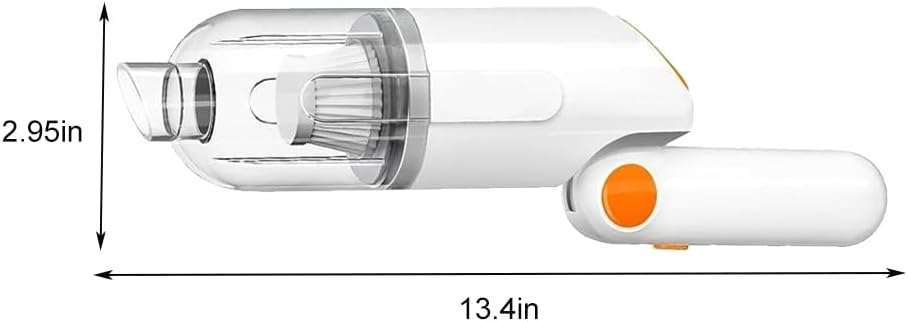
Image: Product dimensions.
8. Warranty and Support
OUGETHER products are manufactured to high-quality standards. This product comes with a standard manufacturer's warranty against defects in materials and workmanship under normal use.
For warranty claims, technical support, or any questions regarding your OUGETHER Handheld Vacuum Cleaner, please contact our customer service team through the retailer where the product was purchased or visit the official OUGETHER website for contact information.
Please have your purchase receipt and product model information ready when contacting support.


