
1. Introduction and Overview
The GTRS M800 Smart Electric Guitar is an innovative instrument designed to integrate traditional guitar playing with advanced digital technology. It features a built-in intelligent system that provides a wide array of effects, practice tools, and connectivity options, aiming to offer a comprehensive musical experience without the need for extensive external equipment.
This manual provides essential information for setting up, operating, and maintaining your GTRS M800 guitar, ensuring you can fully utilize its intelligent features and enjoy its high-quality sound.
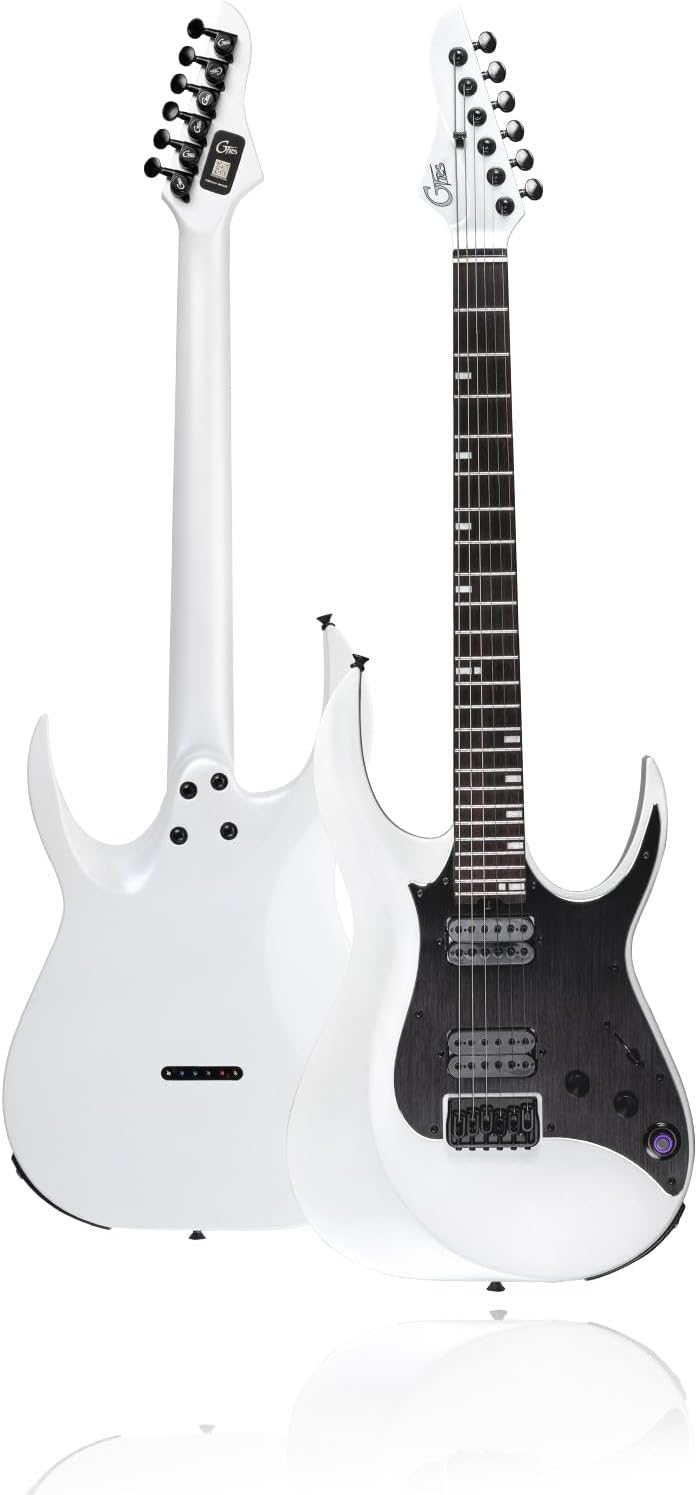
Figure 1: Front and back view of the GTRS M800 Smart Electric Guitar in white.
2. Setup
2.1 Unboxing and Initial Inspection
Carefully remove all components from the packaging. Verify that all items listed below are present and undamaged:
- GTRS M800 Smart Electric Guitar
- GTRS Gig Bag
- User Manual
- USB3.0 AM to Type C cable
- Wrenches (x2)

Figure 2: Included accessories with the GTRS M800 Smart Electric Guitar.
2.2 Charging the Battery
The GTRS M800 is equipped with a 4000 mAH Lithium Ion battery. Before first use, it is recommended to fully charge the guitar. Connect the provided USB-C cable to the guitar's charging port and a compatible USB power adapter (not included). A full charge provides approximately 10 hours of continuous use.

Figure 3: The GTRS M800 features a USB-C port for fast charging, offering up to 10 hours of battery life.
2.3 App Installation and Connection
To unlock the full potential of your GTRS M800, download the official GTRS App from your device's app store (Android/iOS). The app allows for comprehensive control over the guitar's intelligent system, effects, and practice tools.
- Search for "GTRS App" in your device's app store.
- Install the application.
- Ensure Bluetooth is enabled on your mobile device.
- Turn on your GTRS M800 guitar.
- Open the GTRS App and follow the on-screen prompts to connect to your guitar via Bluetooth. You may need to scan the QR code located on the back of the guitar's neck plate for initial pairing.

Figure 4: The GTRS Smart App provides access to 128 effect types and various settings.
3. Operating Instructions
3.1 Intelligent System (G100) Overview
The GTRS M800 integrates the G100 Intelligent System, which includes built-in effects and tools. This system is controlled via the "Super Konb" (knob) on the guitar and the GTRS App.

Figure 5: Key features of the GTRS M800, including the Super Konb for smart system control.
3.2 Effects and Tone Management
The GTRS M800 offers 126 types of effects. You can switch between 4 preset banks by pressing the "Super Konb". All tones can be edited and modified within the GTRS App. The app also allows you to share your custom presets to the Mooer Cloud and download tones shared by other users.

Figure 6: The GTRS App provides extensive effect module settings for tone customization.
The guitar also supports tone capture using MNRS technology, allowing you to reproduce the sound of 16 classic guitars, including acoustic and rock electric guitars, with high fidelity.

Figure 7: GTRS guitars can simulate 16 classic guitar tones.
3.3 Practice Tools and Connectivity
The GTRS M800 includes several useful tools for practice:
- 80s Loop: Create and play along with loops.
- 40 Drummer: Access various drum patterns for rhythm practice.
- Tuner: Built-in tuner for accurate tuning.
- Bluetooth: Connect your device via Bluetooth to play along with backing tracks or music.
- Headphone Output: Connect headphones directly to the guitar for silent practice.
- Wireless Footswitch Support: The system supports the GWF4 Wireless Footswitch (sold separately) for hands-free control of effects and functions.

Figure 8: The GTRS App provides integrated practice tools.

Figure 9: The GTRS M800 can be connected to headphones or a guitar amp.
3.4 Pickup Configuration
The M800 features an H-H (Humbucker-Humbucker) pickup configuration, providing a wide range of tonal flexibility. These pickups perform optimally even when the G100 system is off, ensuring a consistent and powerful sound.

Figure 10: The M800 is equipped with H-H pickups for versatile tone.
4. Maintenance
4.1 General Care
- Keep the guitar clean by wiping it with a soft, dry cloth after each use.
- Store the guitar in its gig bag or a hard case when not in use to protect it from dust, humidity, and physical damage.
- Avoid exposing the guitar to extreme temperatures or sudden changes in humidity.
- Regularly check and tighten any loose screws on hardware components.
4.2 String Replacement
Replace strings regularly to maintain optimal tone and playability. The M800 uses 6 brass strings. Refer to standard electric guitar string replacement procedures. Ensure proper string gauge for best performance.
4.3 Software Updates
Periodically check the GTRS App for firmware updates for your guitar. Updates can improve performance, add new features, or fix bugs. Follow the in-app instructions for safe and successful updates.
5. Troubleshooting
| Problem | Possible Cause | Solution |
|---|---|---|
| Guitar not connecting to App via Bluetooth. | Bluetooth is off on device; guitar is off; app not updated; incorrect pairing. | Ensure Bluetooth is on. Turn guitar off/on. Update GTRS App. Re-attempt pairing via QR code. |
| No sound or low volume. | Volume knob low; headphones/amp not connected properly; effect settings muted. | Increase guitar volume. Check cable connections. Verify effect chain settings in GTRS App. |
| Battery not charging. | Faulty USB-C cable; power adapter issue; charging port damage. | Try a different USB-C cable and power adapter. Contact support if issue persists. |
| Effects not changing or responding. | App not synced; "Super Konb" not functioning; firmware issue. | Ensure app is synced. Restart guitar and app. Check for firmware updates. |
6. Specifications
| Feature | Detail |
|---|---|
| Model | M800 |
| Item Weight | 14.22 pounds |
| Product Dimensions | 45.31 x 17 x 6.3 inches |
| Batteries | 1 Lithium Ion battery required (included) |
| Battery Life | Approx. 10 hours |
| Back Material | Alder Wood |
| Body Material | Alder |
| Color Name | white |
| Fretboard Material | Rosewood |
| Guitar Pickup Configuration | H-H |
| String Material | Brass |
| Top Material | Maple Wood |
| Neck Material Type | Maple |
| Number of Strings | 6 |
| Guitar Bridge System | Fixed |
| Hand Orientation | Right |
7. Official Product Video
Watch the official GTRS M800 Intelligent Electric Guitar video for a comprehensive overview of its features and capabilities.
Video: GTRS M800 Intelligent Electric Guitar. This video showcases the design, intelligent system, effects, and overall performance of the GTRS M800 guitar.
8. Warranty and Support
For warranty information, technical support, or service inquiries, please refer to the warranty card included with your product or visit the official GTRS Store online. Keep your proof of purchase for warranty claims.
GTRS Store: https://www.amazon.com/stores/GTRS/page/45F90FE5-251F-4A5F-A899-0E5E60DF7D78


