
Marantz CINEMA50SG
Contents
Marantz Cinema 50 9.4 Channel 8K Home Theater AV Receiver User Manual
Model: CINEMA50SG
Introduction
This manual provides essential information for the safe and efficient operation of your Marantz Cinema 50 9.4 Channel 8K Home Theater AV Receiver. Please read this manual thoroughly before using the unit to ensure proper setup and performance. Keep this manual for future reference.

Figure 1: Front view of the Marantz Cinema 50 AV Receiver.
Key Features
- Peerless Performance: Immersive spaciousness, warm and rich tone, extraordinary detail and lifelike dynamics are legendary hallmarks of the Marantz sound.
- Technology Leader: Excellence is heard and seen. CINEMA 50 features architectural design that can be featured or remain discreet in any luxurious environment.
- Exquisite Design: A modern expression of timeless design principles, CINEMA 50 features the iconic Marantz porthole, symmetrical design, and front panel controls elegantly hidden from view.
- Effortless: Included remote, accessible front-panel controls, and an intuitive on-screen setup process make you feel like an expert user right away.
- Premium Audio: 9.4 channel 110-watt-per-channel amplification, Dolby Atmos, DTS:X, IMAX Enhanced and Auro 3D, 8K Ultra HD, and HEOS Built-in streaming.
Setup Guide
1. Unpacking and Placement
Carefully remove the receiver from its packaging. Place the unit on a stable, level surface with adequate ventilation around it. Avoid placing it near heat sources or in direct sunlight.
2. Connecting Speakers
Connect your speakers to the appropriate terminals on the rear panel of the receiver. Ensure correct polarity (+ to + and - to -) for each speaker. The Marantz Cinema 50 supports a 9.4 channel configuration.
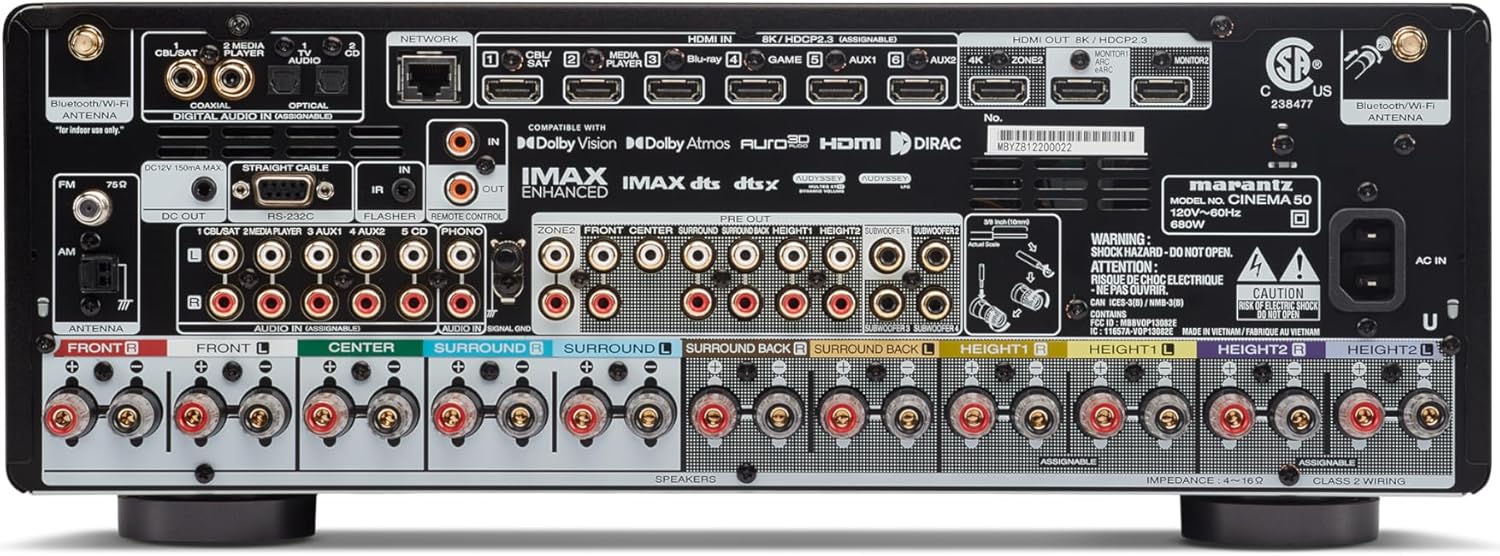
Figure 2: Rear panel showing speaker terminals and input/output connections.
3. Connecting Audio/Video Devices
Use HDMI cables to connect your source devices (e.g., Blu-ray player, game console, streaming device) to the HDMI IN ports on the receiver. Connect the HDMI OUT (ARC/eARC) port to your TV's HDMI ARC/eARC input for audio return channel functionality. The receiver features 8K Ultra HD support.
4. Network Connection
For network features like HEOS Built-in, Wi-Fi, and Bluetooth, connect the receiver to your home network. You can use an Ethernet cable for a wired connection or connect wirelessly via Wi-Fi settings in the setup menu.
5. Initial Setup and Calibration
Follow the on-screen setup assistant that appears when you first power on the receiver. This guide will walk you through speaker calibration using Audyssey MultEQ XT32 (or Dirac Live, if purchased separately) to optimize sound for your room's acoustics.
Operating Instructions
Power On/Off
Press the power button on the front panel or the remote control to turn the unit on or off.
Input Selection
Use the INPUT selector knob on the front panel or the dedicated input buttons on the remote control to switch between connected audio/video sources (e.g., Blu-ray, Game, CD).
Volume Control
Adjust the volume using the VOLUME knob on the front panel or the Volume +/- buttons on the remote control.
Streaming Music (HEOS Built-in)
Utilize the HEOS app on your smartphone or tablet to stream music from various online services, network-attached storage, or Bluetooth-connected devices. The receiver also supports AirPlay 2 for Apple devices.
Voice Control
The Marantz Cinema 50 can be controlled hands-free with compatible voice assistants like Alexa and Siri when properly configured through the HEOS app and your smart home ecosystem.
Maintenance
To ensure optimal performance and longevity of your receiver, follow these maintenance guidelines:
- Cleaning: Wipe the exterior surfaces with a soft, dry cloth. Do not use abrasive cleaners or solvents.
- Ventilation: Ensure that the ventilation openings on the top and sides of the unit are not blocked. Proper airflow prevents overheating.
- Dust Removal: Periodically use a soft brush or a vacuum cleaner with a brush attachment to remove dust from the vents.
- Cable Connections: Occasionally check all cable connections to ensure they are secure and free from corrosion.
Troubleshooting
If you encounter issues with your Marantz Cinema 50 receiver, refer to the following common problems and solutions:
| Problem | Possible Cause | Solution |
|---|---|---|
| No power | Power cord disconnected; Power outage | Check power cord connection; Verify power outlet functionality |
| No sound output | Incorrect input selected; Speaker cables loose; Mute activated | Select correct input; Check speaker connections; Deactivate mute |
| No video output | HDMI cable issues; Incorrect TV input | Check HDMI cable connections; Select correct HDMI input on TV |
| Network connection issues | Wi-Fi signal weak; Router issues | Relocate receiver closer to router; Restart router; Reconfigure network settings |
For more complex issues, consult the full online manual or contact Marantz customer support.
Specifications
- Product Dimensions: 15.5 x 17.4 x 6.5 inches
- Item Weight: 36.6 pounds
- Model Number: CINEMA50SG
- Surround Sound Channel Configuration: 9.4
- Total HDMI Ports: 9
- Connectivity Technology: HDMI, Wi-Fi, Bluetooth
- Audio Encoding: Dolby Atmos, DTS:X, IMAX Enhanced, Auro 3D
- Special Features: HEOS Built-in, Spotify, Tidal, AirPlay 2
Warranty and Support
Your Marantz Cinema 50 receiver is covered by a manufacturer's warranty. For detailed warranty information, please refer to the warranty card included with your product or visit the official Marantz website.
For technical support, product registration, or service inquiries, please contact Marantz customer support or visit their official website:
Marantz Official Website: www.marantz.com
Optional protection plans are available for extended coverage:
- 2-Year Protection Plan
- 3-Year Protection Plan
- Complete Protect (monthly billing)
Ask a question about this manual
Ask about setup, troubleshooting, compatibility, parts, safety, or missing instructions. Manuals+ will review the question and use this page’s manual context to help answer it.