
Roilpet Roilpet-cat feeder-button
Roilpet Automatic Pet Feeder User Manual
Model: Roilpet-cat feeder-button
1. Introduction
The Roilpet Automatic Pet Feeder is designed to provide a convenient and reliable solution for your pet's feeding needs. This device ensures your pet receives consistent and healthy nutrition through timed and measured feeding settings. It features advanced sealing technology to keep food fresh and offers dual power options for uninterrupted operation. This manual provides detailed instructions for setup, operation, and maintenance of your automatic pet feeder.

Image 1.1: The Roilpet Automatic Pet Feeder, showcasing its design with a transparent food hopper and a stainless steel bowl.
2. Safety Information
- Read all instructions carefully before using the feeder.
- Keep the feeder away from children and pets when not in use or during setup to prevent accidental activation or damage.
- Use only dry pet food with a kibble size appropriate for the feeder's dispensing mechanism.
- Do not immerse the main unit in water or any other liquid. Only detachable parts are washable.
- Ensure the power adapter cable is not damaged and is placed where it cannot be tripped over or chewed by pets.
- If using batteries, ensure they are inserted with correct polarity and replace them when low to prevent power interruption.
- Do not attempt to disassemble or repair the main unit yourself. Contact customer support for assistance.
3. Package Contents
Please check the package contents to ensure all items are present:
- Roilpet Automatic Pet Feeder Main Unit
- Food Storage Hopper
- Stainless Steel Food Bowl
- USB Power Adapter Cable (5V)
- Desiccant Bag
- User Manual
4. Product Features
- Updated Anti-Clog Design: Features a unique push-out feeding system, which is more reliable than traditional rotary designs, ensuring consistent food dispensing without blockages.
- Customized Feeding Plan: Program up to 4 meals daily, with each meal containing 1 to 9 portions. Each portion is approximately 5-10g, allowing precise control over your pet's diet.
- Food Freshness: The lid features a silicone rubber ring and ABS plastic combination, creating a strong airtight seal. A desiccant bag keeps the pet food fresh and crispy.
- Pet-Proof Design: Equipped with a secure locking system and a silicone-reinforced lid to prevent spills. The control buttons are designed to be pet-proof, preventing accidental changes to settings.
- Reliable Dual Power Supply: Operates via a 5V USB power adapter or 3 AA batteries (not included). A memory function ensures settings are retained even during power outages.
- Easy to Clean: All parts, except the main base unit, are detachable and washable for easy cleaning and hygiene maintenance.

Image 4.1: Illustration of the feeder's push-out mechanism, designed to prevent food clogs, compared to a rotary system prone to jamming.
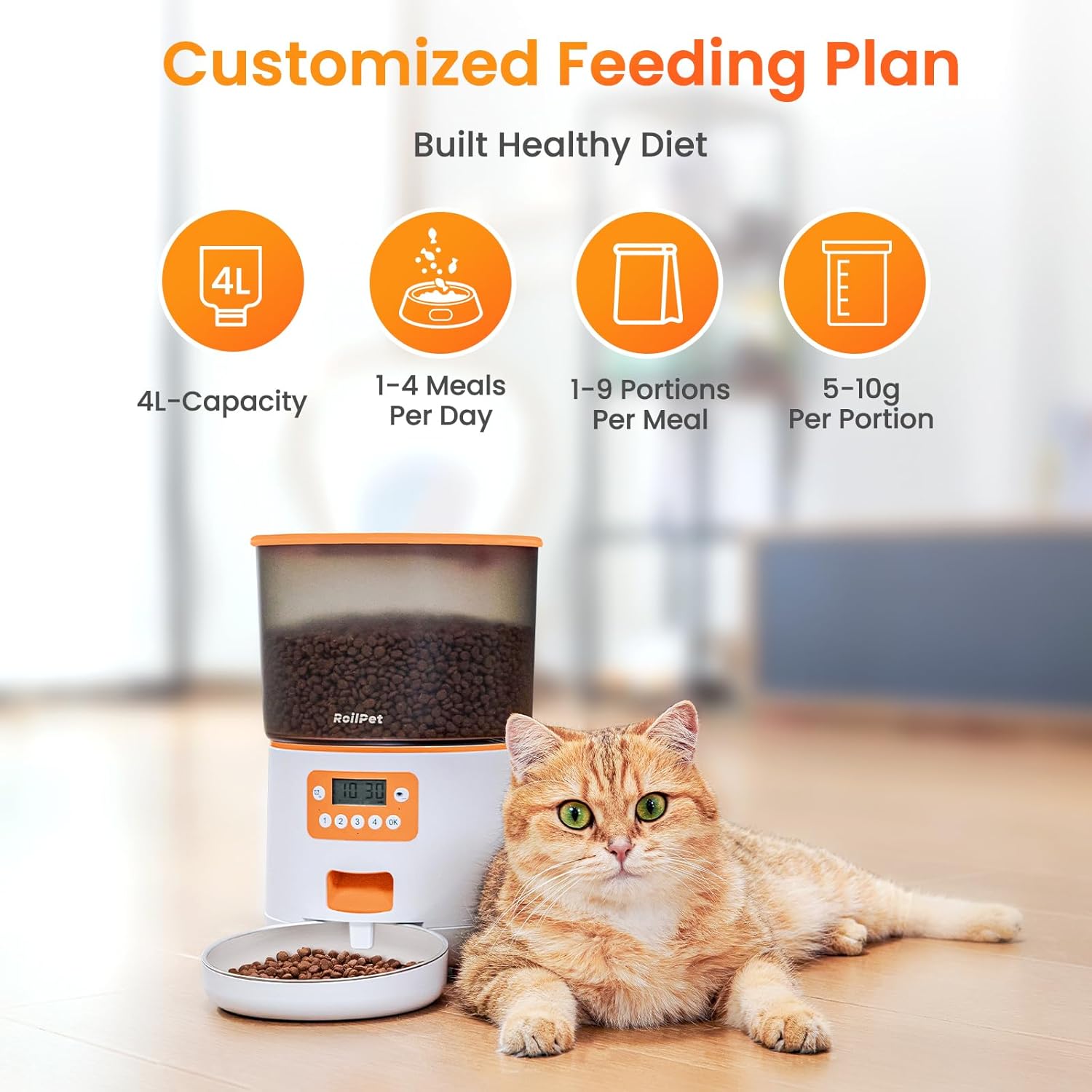
Image 4.2: Visual representation of the feeder's customizable feeding options, including capacity and portion control.

Image 4.3: Illustration of the dual power supply options, allowing the feeder to operate via wired connection or batteries.
5. Setup
5.1 Unpacking and Assembly
- Carefully remove all components from the packaging.
- Place the main feeder unit on a flat, stable surface.
- Attach the stainless steel food bowl to the designated slot at the base of the feeder.
5.2 Power Supply
The feeder supports dual power options:
- Wired Power: Connect the 5V USB power adapter cable to the feeder's power port and plug it into a wall outlet.
- Battery Power: Open the battery compartment at the bottom of the feeder and insert 3 AA batteries (not included), ensuring correct polarity. This provides backup power in case of an outage.
5.3 Filling the Food Hopper
- Remove the lid from the food storage hopper.
- Insert the desiccant bag into its designated slot under the lid to help keep food fresh.
- Pour dry pet food into the hopper. The feeder has a 4L capacity.
- Securely close the lid, ensuring it forms an airtight seal.
6. Operation
6.1 Setting the Current Time
- Press the 'Set' button to enter time setting mode.
- Use the 'Up' and 'Down' arrows to adjust the hour.
- Press 'Set' again to move to minute adjustment, then use 'Up' and 'Down' arrows.
- Press 'OK' to confirm and save the current time.
6.2 Programming Feeding Schedule
The feeder allows you to program up to 4 meals per day.
- Press the 'Meal' button (usually labeled 1, 2, 3, or 4) to select the meal you wish to program.
- Use the 'Up' and 'Down' arrows to set the desired feeding time for that meal.
- Press 'OK' to confirm the time.
- Next, use the 'Up' and 'Down' arrows to set the number of portions (1-9) for this meal.
- Press 'OK' to confirm the portions and save the meal setting.
- Repeat for other meals (2, 3, 4) as needed.
6.3 Manual Feeding
To dispense food manually, press and hold the 'Manual Feed' button (often labeled with a food icon or 'Feed'). The feeder will dispense one portion each time the button is pressed and held briefly.
6.4 Locking Mechanism
The feeder is equipped with a secure locking mechanism to prevent pets from tampering with settings or accessing extra food. Ensure the lid is properly locked after filling the hopper. The control panel buttons are also designed to be pet-proof.
7. Maintenance
7.1 Cleaning Instructions
Regular cleaning is essential for your pet's health and the feeder's longevity.
- Disassembly: To clean, first unlock the button on the side of the feeder and pull away the food hopper from the main base unit. Detach the stainless steel bowl.
- Washing: The food hopper, stainless steel bowl, and other detachable parts can be hand-washed with mild soap and water.
- Drying: Ensure all washed parts are completely dry before reassembling them to prevent moisture from affecting the food or internal components.
- Main Unit: The main unit (base with control panel) should not be immersed in water. Wipe it clean with a damp cloth and then dry it thoroughly.

Image 7.1: Step-by-step guide on how to safely disassemble the feeder for cleaning.

Image 7.2: Detachable components of the feeder being cleaned in a sink, emphasizing the importance of drying them thoroughly.
7.2 Refilling Food
Monitor the food level in the transparent hopper and refill as needed to ensure continuous feeding.
7.3 Replacing Desiccant Bag
The desiccant bag helps maintain food freshness. Replace it periodically (e.g., every 1-2 months) or when you notice it has absorbed significant moisture.
8. Troubleshooting
| Problem | Possible Cause | Solution |
|---|---|---|
| Feeder not dispensing food. | Food hopper empty; food clogged; power issue; incorrect settings. | Refill food; check for clogs and clear them; ensure power adapter is connected or batteries are fresh; verify feeding schedule settings. |
| Display not turning on. | No power; loose connection; dead batteries. | Check power adapter connection; replace batteries; try a different power outlet. |
| Food tastes stale or is not fresh. | Lid not sealed properly; desiccant bag needs replacement. | Ensure lid is securely closed and sealed; replace the desiccant bag. |
| Pet accessing extra food. | Lid not locked; pet tampering with buttons. | Ensure the lid is securely locked; the feeder's buttons are designed to be pet-proof, but ensure proper placement to minimize access. |
9. Specifications
- Product Dimensions: 19.05 x 33.02 x 33.02 cm
- Weight: 1.49 kilograms
- Model Reference: Roilpet-cat feeder-button
- Recommended Breed: Medium (suitable for cats and small to medium dogs)
- Color: White
- Care Instructions: Hand wash detachable parts only
- Special Features: Easy to use, Anti-clog design, Dual power supply, Pet-proof buttons
- Battery Operated: Yes (3 AA batteries, not included)
- Material Type: Plastic (main unit), 304 Stainless Steel (bowl)
- Target Species: Dog, Cat
- Food Capacity: 4 Liters (approx. 16.9 cups)
- Portion Size: 5-10g per portion
- Meals per Day: 1-4
- Portions per Meal: 1-9
10. Warranty and Support
For warranty information or technical support, please refer to the product packaging or contact Roilpet customer service directly. Keep your purchase receipt as proof of purchase for any warranty claims.
Related Documents - Roilpet-cat feeder-button
 |
RoilPet Automatic Pet Feeder WiFi 2.4GHz User Manual Comprehensive user manual for the RoilPet Automatic Pet Feeder with WiFi 2.4GHz. Learn about product features, installation, setup, app connection, feeding schedules, recommended portions, and troubleshooting. |
 |
RoilPet 6L Pet Water Fountain - User Manual User manual for the RoilPet 6L Pet Water Fountain, providing detailed instructions on setup, operation, cleaning, maintenance, and troubleshooting. Features triple filtration and LED shortage reminder for pets. |
 |
IMIPAW Automatic Pet Feeder DU3L-WY User Manual User manual for the IMIPAW Automatic Pet Feeder, model DU3L-WY. This guide provides safety instructions, product overview, setup, operation, cleaning, maintenance, and troubleshooting for the WiFi-enabled pet feeder with app control. |
 |
PETLIBRO Automatic Cat Feeder User Manual (PLAF005/PLAF006) - Setup, Operation, and Care User manual for the PETLIBRO Automatic Cat Feeder (Model PLAF005/PLAF006), a 5L dry food dispenser designed for two cats or dogs. It features a splitter, two stainless steel bowls, a 10-second meal call, timer settings, and capacity for 50 portions across 6 meals per day. The manual covers safety guidelines, product overview, operation instructions, cleaning, and troubleshooting. |
 |
CAT BOAT Smart Pet Feeder DCA013: Quick Start Guide A comprehensive quick start guide for the CAT BOAT Smart Pet Feeder (Model DCA013), covering product overview, installation, setup, networking, troubleshooting, and basic parameters. Designed for cats and small dogs. |
Ask a question about this manual
Ask about setup, troubleshooting, compatibility, parts, safety, or missing instructions. Manuals+ will review the question and use this page’s manual context to help answer it.