Introduction
Thank you for choosing the Hoofun Smart Globe String Lights. This manual provides essential information for the safe and efficient operation of your new lighting product. Please read it thoroughly before installation and use, and retain it for future reference.
These 33ft USB-powered string lights feature 50 LED globe bulbs with color-changing capabilities, controllable via Bluetooth app and an included remote. They are designed for both indoor and outdoor decorative use.
Package Contents
- 1 x Hoofun Smart Globe String Lights (33ft, 50 LED)
- 1 x USB Controller
- 1 x 24-Key Remote Control
- 1 x User Manual (this document)

Image: Overview of the Hoofun Smart Globe String Lights, showing the string of 50 LED bulbs, the USB controller, the 24-key remote control, and a smartphone displaying the "iDeal Led" app interface.
Specifications
| Brand | Hoofun |
| Model Number | 33Ft Smart fairy lights |
| Length | 33 Feet (approximately 10 meters) |
| Number of LEDs | 50 Globe Bulbs |
| Light Source Type | LED (WS2812B individual addressable) |
| Power Source | USB Powered (5V/2A) |
| Control Methods | Bluetooth APP ("iDeal Led"), 24-Key Remote Control, USB Controller Button |
| Color Options | 16 Million Colors (via App) |
| Waterproof Rating | IP65 (Lights only; USB controller is NOT waterproof) |
| Material | Polyvinyl Chloride (PVC) coating |
| Item Weight | 9.6 ounces |
Safety Information
- Ensure the power source is 5V/2A USB. Using an incorrect power adapter may damage the product.
- The USB controller is not waterproof. Protect it from moisture and rain.
- Do not cut or modify the string lights. This will void the warranty and may cause damage.
- Keep out of reach of children.
- Avoid direct exposure to extreme temperatures or open flames.
Setup
- Unpack the Lights: Carefully remove the string lights, USB controller, and remote control from the packaging.
- Connect Power: Plug the USB end of the string lights into a compatible 5V/2A USB power source (e.g., USB wall adapter, power bank, computer USB port).

Image: Close-up of the USB controller, highlighting the button for manual control and the USB plug.
- Positioning: Arrange the string lights in your desired location. The PVC coating provides IP65 weather resistance for the lights themselves, making them suitable for outdoor use, but ensure the USB controller is protected from water.

Image: Hoofun Smart Globe String Lights strung across an outdoor patio, providing ambient lighting for a gathering.
- Remote Control Preparation: Ensure the remote control has a working battery. Remove any plastic tab if present. For optimal remote functionality, ensure the remote is pointed towards the USB controller.
- App Download (Optional): For advanced features, download the "iDeal Led" app from your smartphone's app store (App Store for iOS, Google Play for Android).
Operating Instructions
A. Using the USB Controller Button
- Press the button on the USB controller to cycle through various preset lighting modes and colors.
- This provides basic control without the remote or app.
B. Using the 24-Key Remote Control
Point the remote directly at the USB controller for effective operation.
Image: The 24-key remote control, showing buttons for color selection, brightness adjustment, mode selection (fade, jump, flash, chase), and timer settings.
- Power On/Off: Use the ON and OFF buttons.
- Color Selection: Press the colored buttons (Red, Green, Blue, White, etc.) to select a solid color.
- Brightness Adjustment: Use the Brightness Up and Brightness Down buttons.
- Mode Selection:
- FADE: Lights fade between colors.
- JUMP: Lights jump between colors.
- FLASH: Lights flash rapidly.
- CHASE: Lights display a chasing effect.
- Timer Function: Select 4H, 6H, 8H, or 24H to set the lights to turn off automatically after the selected duration.
Video: Demonstration of the Hoofun Smart Globe String Lights in a bedroom setting, showcasing various color changes and effects controlled by the remote. The video illustrates how to switch between blue, warm white, green, and red solid colors, as well as different dynamic modes.
C. Using the "iDeal Led" Bluetooth App
- Download and Install: Search for "iDeal Led" in your app store and install it.
- Bluetooth Connection:
- Ensure Bluetooth is enabled on your smartphone.
- Open the "iDeal Led" app. The app should automatically detect and connect to your Hoofun Smart Globe String Lights within a range of 26.25ft-32.8ft.
- App Features:
- DIY Lighting: Control each LED individually. Choose from 16 million colors to customize unique lighting effects.
- Music Sync: Utilize the built-in high-sensitive microphone in the USB controller to synchronize light pulses with music played through your phone or nearby audio.
- Scene Modes: Select from various pre-programmed scene modes.
- Brightness & Speed Adjustment: Fine-tune the brightness and speed of dynamic effects.
- Timer & Schedule: Set custom schedules for the lights to turn on/off at specific times.
- Group Control: If you have multiple Hoofun Smart String Lights, you can group them for synchronized control.
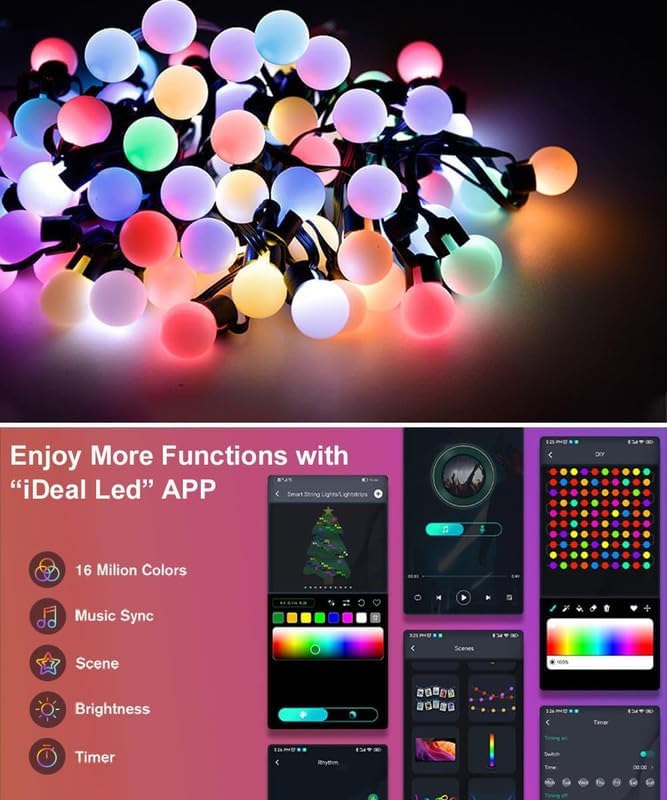
Image: Screenshots of the "iDeal Led" app interface, illustrating options for 16 million colors, music sync, scene selection, brightness control, and timer settings.
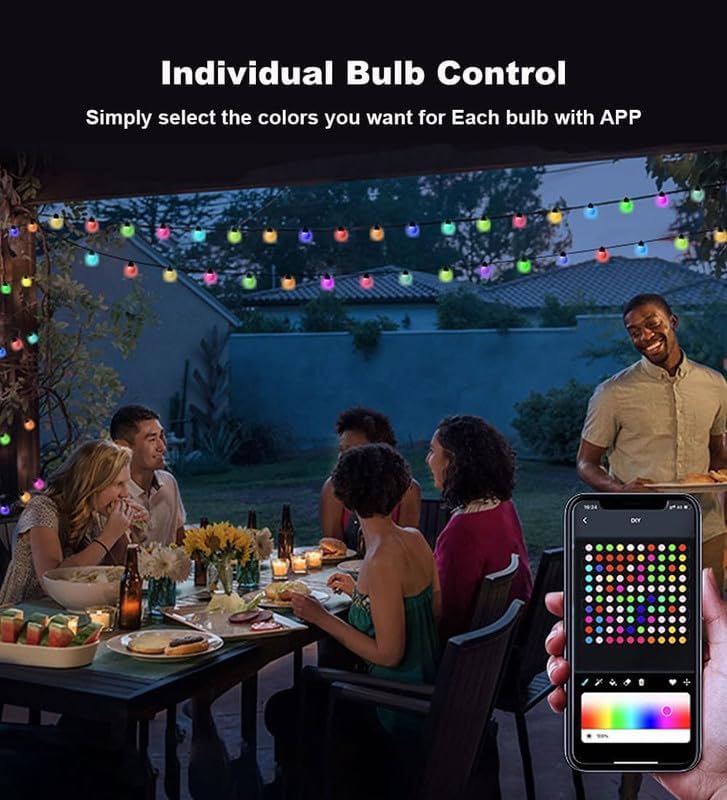
Image: A smartphone displaying the "iDeal Led" app, demonstrating the individual bulb control feature where users can select specific colors for each LED on the string.

Image: A smartphone displaying the "iDeal Led" app's music sync interface, with a music player and visualizer, indicating the lights can react to audio.
Maintenance
- Cleaning: Gently wipe the globe bulbs with a soft, dry cloth. Do not use harsh chemicals or abrasive cleaners.
- Storage: When not in use, carefully coil the string lights and store them in a cool, dry place away from direct sunlight.
- USB Controller Protection: Always ensure the USB controller is kept dry, especially during outdoor use.
Troubleshooting
| Problem | Possible Cause | Solution |
|---|---|---|
| Lights do not turn on. | No power, loose connection, faulty USB adapter. |
|
| Remote control not working. | Remote battery dead, remote not pointed at controller, obstruction. |
|
| App cannot connect to lights. | Bluetooth off, lights out of range, app issue. |
|
| Lights are dim or flickering. | Insufficient power, faulty connection. |
|
Warranty and Support
For warranty information or technical support, please contact Hoofun customer service through the retailer where the product was purchased or visit the official Hoofun website. Please have your model number (33Ft Smart fairy lights) and purchase details available when contacting support.
Manufacturer: Hoofun


