
1. Introduction
This manual provides essential information for the safe and effective use of your Klein Tools Multi-Bit Screwdriver Set, which includes an 11-in-1 Multi-Bit Screwdriver, a Stubby Screwdriver, and a 14-in-1 Electronic Screwdriver. Please read these instructions thoroughly before operation and retain for future reference.
2. Product Overview
This set provides a versatile range of screwdrivers designed for various applications, from general tasks to precision electronic work. Each tool features durable construction and ergonomic design for comfort and efficiency.
2.1. Klein Tools 11-in-1 Multi-Bit Screwdriver
This screwdriver includes 8 popular tips and converts to 3 nut driver sizes. It features a cushion-grip handle for enhanced comfort and torque.

Image: The Klein Tools 11-in-1 Multi-Bit Screwdriver, highlighting its cushion-grip handle, interchangeable blade, and included bit types (Flat, Phillips, Torx, Square, Nut Driver).

Image: A hand demonstrating the use of the Klein Tools 11-in-1 Multi-Bit Screwdriver to tighten a screw on an electrical outlet cover.
2.2. Klein Tools Stubby Screwdriver
The 6-in-1 stubby screwdriver features a compact interchangeable shaft holding 4 universal tips and converts to 2 nut driver sizes, ideal for tight spaces.

Image: The Klein Tools Stubby Screwdriver, showcasing its compact design, cushion-grip handle, interchangeable shaft, and included bit types (Flat, Phillips, Nut Driver).

Image: A hand using the Klein Tools Stubby Screwdriver to access a screw in a confined area between metal conduits.
2.3. Klein Tools 14-in-1 Electronic Screwdriver
This precision screwdriver combines 14 common precision sizes with a spin cap and cushion-grip handle for optimal control during delicate tasks.
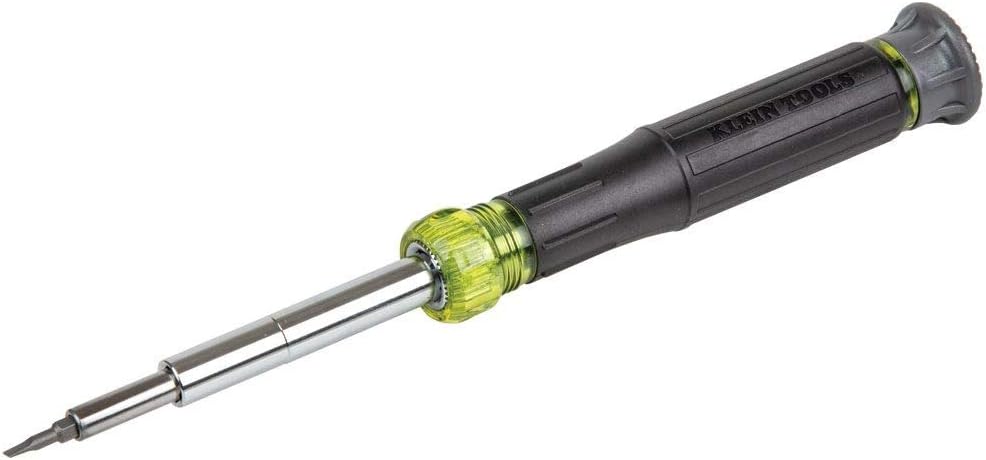
Image: The Klein Tools 14-in-1 Electronic Screwdriver, a slender tool designed for precision work.

Image: The Klein Tools 14-in-1 Electronic Screwdriver, detailing its spin cap for precise control, cushion-grip handle, industrial-strength heat-treated bits, and interchangeable steel shaft.

Image: A visual representation of the various bit types included with the Klein Tools 14-in-1 Electronic Screwdriver, including Phillips, Flat, Torx, and Hex sizes.
3. Setup
Your Klein Tools multi-bit screwdrivers are designed for quick and easy bit changes.
- Selecting a Bit: Identify the appropriate bit type and size for the fastener you intend to work with.
- Inserting the Bit: Pull the shaft out of the handle. Select the desired double-ended bit or nut driver. Insert the bit firmly into the hexagonal opening at the end of the shaft. Ensure the bit is fully seated.
- Re-inserting the Shaft: Place the shaft back into the handle, ensuring it clicks securely into place. For nut driver functionality, remove the bit and use the appropriate size opening on the shaft itself.

Image: The Klein Tools 11-in-1 Multi-Bit Screwdriver disassembled, showing the handle, the interchangeable shaft, and the various double-ended bits.
4. Operating Instructions
Always ensure you are using the correct bit type and size for the fastener to prevent damage to the fastener head or the bit itself.
- Secure Grip: Hold the screwdriver firmly by the cushion-grip handle.
- Apply Pressure: Apply steady, downward pressure to the screwdriver while turning to engage the fastener. This helps prevent cam-out (the bit slipping out of the fastener head).
- Direction of Turn: Turn clockwise to tighten fasteners and counter-clockwise to loosen them.
- Precision Control (14-in-1 Electronic Screwdriver): For delicate tasks, utilize the spin cap on the 14-in-1 electronic screwdriver. Place your index finger on the spin cap to maintain constant pressure while rotating the handle with your thumb and middle finger for fine control.
- Stubby Screwdriver Use: The compact design of the stubby screwdriver is ideal for working in confined spaces where a full-sized screwdriver cannot fit.
5. Maintenance
Proper maintenance ensures the longevity and performance of your Klein Tools screwdrivers.
- Cleaning: Wipe down the handles and shafts with a clean, dry cloth after each use. For stubborn grime, a damp cloth with mild soap can be used, followed by thorough drying.
- Bit Storage: Store bits securely within the screwdriver handles or in a designated bit holder to prevent loss and damage.
- Inspection: Periodically inspect bits for wear or damage. Worn bits can strip fastener heads. Replace damaged bits as necessary.
- Lubrication: No lubrication is typically required for these tools. Avoid applying oils or greases to the bit retention mechanisms unless specifically instructed by the manufacturer.
6. Troubleshooting
If you encounter issues with your screwdrivers, consider the following common solutions:
| Issue | Possible Cause | Solution |
|---|---|---|
| Bit slips out of fastener head (cam-out) | Incorrect bit size/type; insufficient downward pressure; worn bit. | Ensure correct bit is used. Apply more downward pressure. Replace worn bit. |
| Difficulty changing bits | Dirt or debris in shaft; bit stuck. | Clean the shaft and bit openings. Ensure bits are inserted straight. |
| Screwdriver feels loose | Shaft not fully seated in handle. | Push the shaft firmly into the handle until it clicks into place. |
7. Specifications
- Brand: KLEIN TOOLS
- Material: Alloy Steel
- Head Styles: Flat, Phillips, Torx, Square (for 11-in-1), Hex (for 14-in-1)
- Number of Items: 1 (set includes 3 screwdrivers)
- 11-in-1 Multi-Bit Screwdriver: 8 popular tips, 3 nut driver sizes
- 6-in-1 Stubby Screwdriver: 4 universal tips, 2 nut driver sizes
- 14-in-1 Electronic Screwdriver: 14 common precision sizes
- Features: Cushion-grip handles, heat-treated precision machined bits, integrated steel shafts, spin cap (14-in-1)
8. Warranty and Support
Klein Tools products are manufactured to high standards of quality and durability. For information regarding warranty coverage, product support, or to contact customer service, please visit the official Klein Tools website or refer to the packaging for specific details.
Official Website: www.kleintools.com


