
Introduction
The Minelab X-Terra Pro is an advanced metal detector designed for gold and treasure hunting. It features adjustable frequencies, high sensitivity, and a waterproof design, making it suitable for various terrains and conditions. This manual provides essential information for setting up, operating, and maintaining your X-Terra Pro metal detector.
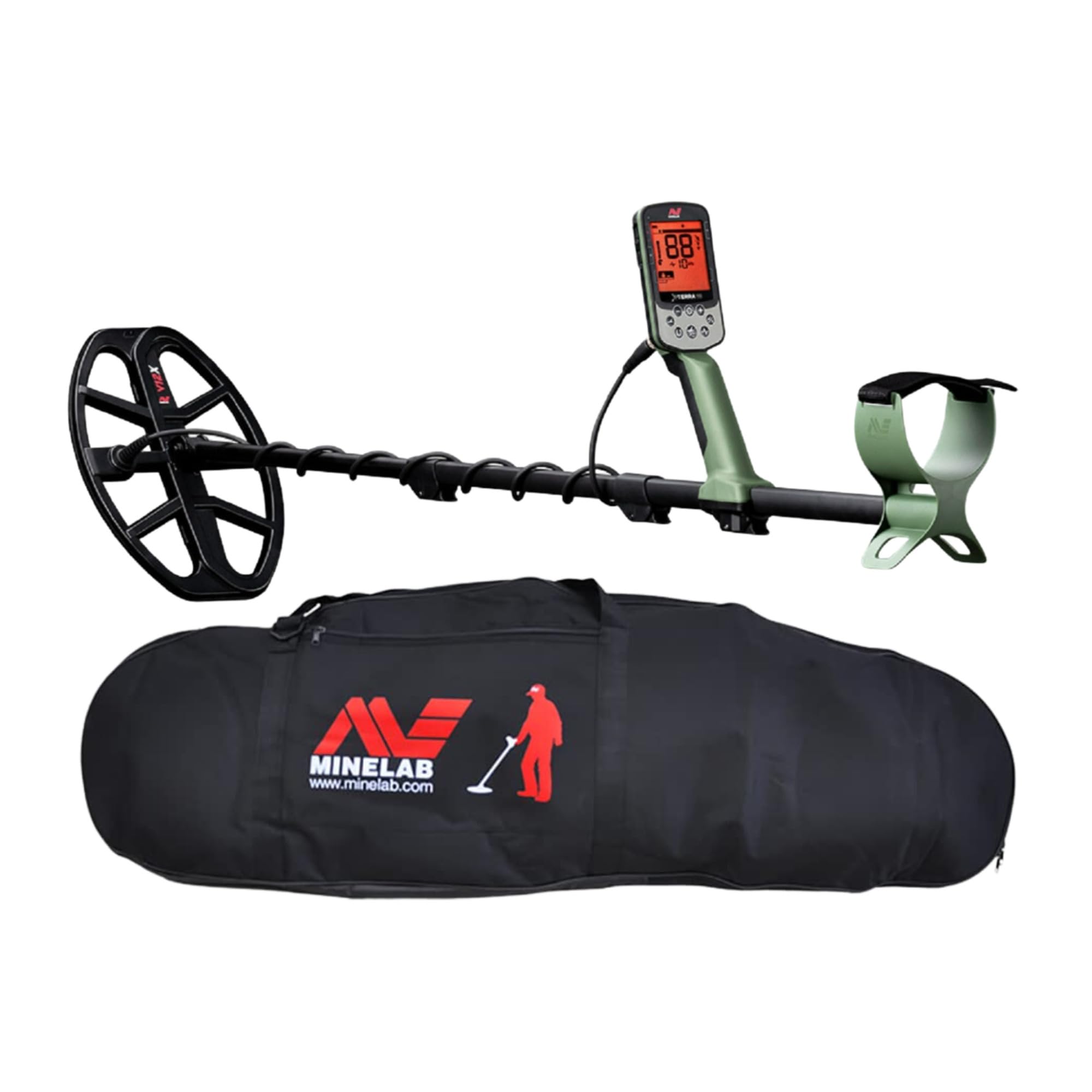
Figure 1: The Minelab X-Terra Pro Metal Detector, fully assembled.
Setup
1. Assembly
The X-Terra Pro features a lightweight 3-piece shaft design for easy assembly and portability. Connect the shaft sections securely. Attach the search coil to the lower shaft and connect the coil cable to the control pod. Ensure all connections are firm.

Figure 2: Side view of the X-Terra Pro, highlighting the shaft and coil.
2. Control Pod Overview
The control pod houses the display and operational buttons. Familiarize yourself with the button layout for efficient use.

Figure 3: Detailed view of the X-Terra Pro control panel and its functions.
- Power ON/OFF: Press and hold to turn the device on or off.
- Backlight & Flashlight Settings: Adjust display backlight and activate the control pod flashlight.
- Wireless Audio Control: Manage wireless audio connections.
- Sensitivity & Setting Control: Adjust detection sensitivity and navigate settings.
- Detect Mode Button: Switch between Park, Field, and Beach search modes.
- Accept/Reject Button: Discriminate unwanted targets.
- All-Metal Shortcut: Quickly switch to all-metal detection.
- Pinpoint/Detect Button: Use for precise target location.
- Frequency Select Button: Change operating frequencies (5, 8, 10, 15 kHz).
3. Charging
The X-Terra Pro features a magnetic USB charging connector. Connect the provided charging cable to the magnetic port on the control pod and to a suitable USB power source. Ensure the port is clean and dry before charging.
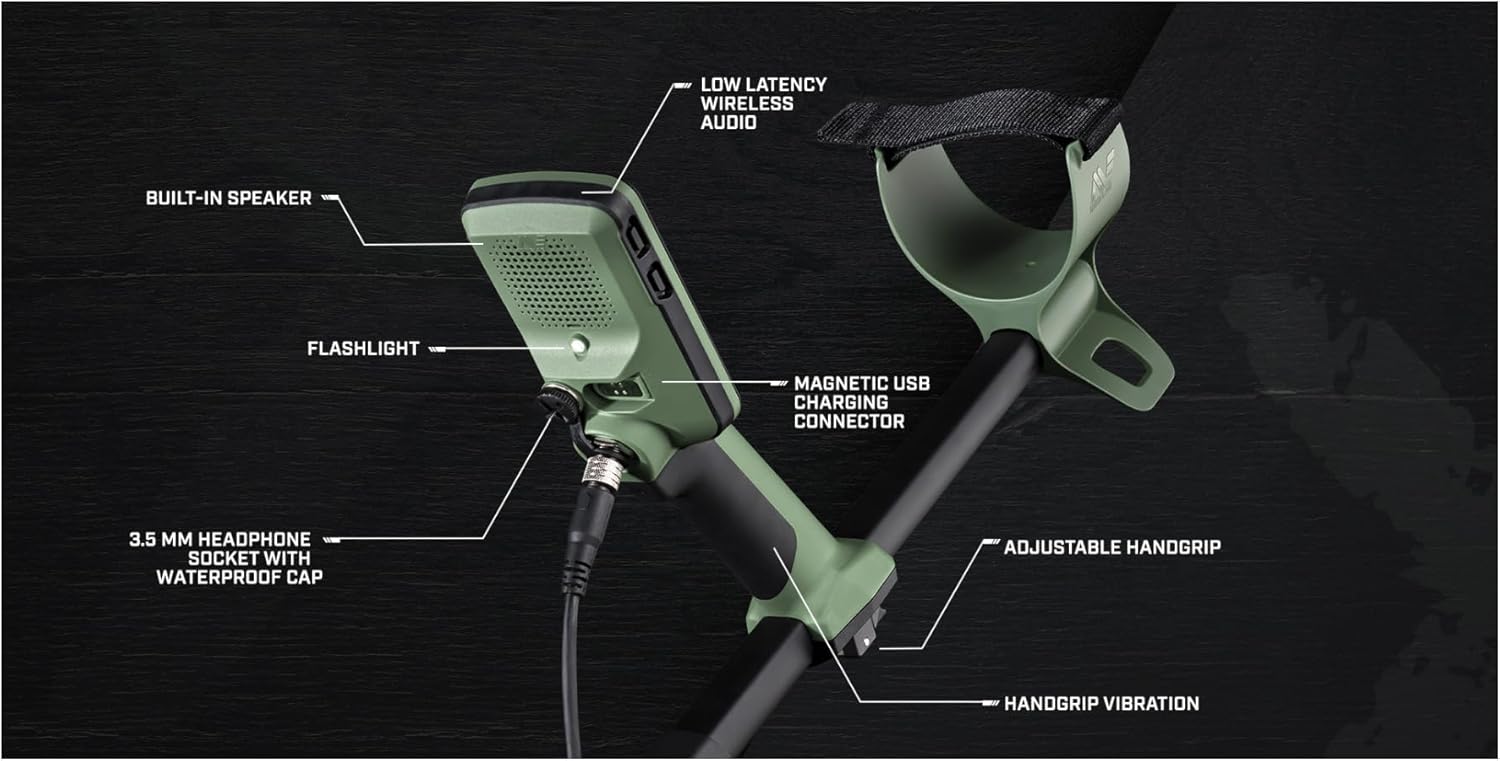
Figure 4: Close-up of the control pod, indicating the magnetic USB charging port.
Operating the Detector
1. Search Modes
The X-Terra Pro offers three primary search modes:
- Park Mode: Ideal for high-trash areas like parks and recreational sites.
- Field Mode: Best for open fields and general relic hunting.
- Beach Mode: Optimized for saltwater conditions, operating at 8 kHz for enhanced performance.
2. Pro-Switch Multi-Frequency Technology
Utilize the Pro-Switch feature to select optimal operating frequencies for different targets and ground conditions. Available frequencies include 5 kHz, 8 kHz, 10 kHz, and 15 kHz. The 8 kHz frequency is specifically used in Beach Mode.
3. Sensitivity Adjustment
Adjust the detector's sensitivity to maximize detection depth and minimize false signals. Higher sensitivity increases depth but may also pick up more ground noise. Start with a moderate setting and increase as ground conditions allow.
4. Discrimination
Use the discrimination feature to filter out unwanted trash targets. This allows the detector to ignore specific metal types, focusing on more desirable finds. Adjust discrimination levels based on your target preferences.
5. Ground Balancing
Perform ground balancing to eliminate false signals caused by mineralized ground. The X-Terra Pro offers automatic ground balancing for ease of use. Refer to the on-screen prompts for instructions.
6. Audio Modes and Tones
The detector features 5 audio modes, allowing customization of target tones. Adjust the volume to a comfortable level for clear audio feedback.
7. Recovery Speed
The recovery speed setting determines how quickly the detector can process signals from closely spaced targets. A faster recovery speed is beneficial in trashy areas, while a slower speed can offer greater depth in cleaner ground.
8. Additional Features
- Control Pod Flashlight: Provides illumination for low-light conditions.
- Handgrip Vibration: Offers tactile feedback for target detection, useful in noisy environments or for users with hearing impairments.
- 3.5mm Headphone Socket: Connect headphones for private listening, includes a waterproof cap for protection.
Maintenance
1. Cleaning
After each use, wipe down the detector with a damp cloth to remove dirt and debris. Ensure the search coil and control pod are clean, especially around the connectors.
2. Waterproofing
The X-Terra Pro is fully IP68 waterproof to 5 meters (16 feet). Ensure all caps and connectors are securely fastened before submerging the detector. Do not use underwater beyond 5 meters.
3. Storage
Store the detector in a cool, dry place. For long-term storage, it can be disassembled into its compact 25-inch form and placed in the included carry bag.

Figure 5: The included Minelab Universal Detector Carry Bag for convenient storage and transport.
Troubleshooting
If you encounter any issues with your Minelab X-Terra Pro, please refer to the following general troubleshooting steps:
- No Power: Ensure the battery is charged. Check the charging connection.
- False Signals: Perform ground balancing. Reduce sensitivity. Check for electromagnetic interference from nearby power lines or electronic devices.
- No Target Response: Ensure the search coil is properly connected. Increase sensitivity. Check the discrimination settings to ensure desired targets are not being rejected.
- Water Leakage: Immediately power off the device. Ensure all waterproof caps and connections are sealed correctly. If leakage persists, contact customer support.
For persistent issues, contact Minelab customer support.
Specifications
| Feature | Specification |
|---|---|
| Brand | MINELAB |
| Model Number | X-Terra Pro |
| Item Weight | 2.9 Pounds |
| Product Dimensions | 9.1 x 9.1 x 9.1 inches |
| Extended Length | 50 Inches |
| Adjustable Length | Yes |
| Operating Frequency | 5, 8, 10, 15 KHz (8 KHz in Beach Mode) |
| International Protection Rating | IP68 (Waterproof to 5 meters) |
| Power Source | Battery Powered |
| Material | Metal |
| Search Coil Size | 12" x 9" Elliptical Double-D (V12X™ Coil with skidplate) |
Warranty and Support
For warranty information and customer support, please refer to the official Minelab website or contact your authorized dealer. Keep your proof of purchase for any warranty claims.


